sketchucation logo sketchucation
    • 登入
    Oops, your profile's looking a bit empty! To help us tailor your experience, please fill in key details like your SketchUp version, skill level, operating system, and more. Update and save your info on your profile page today!
    🔌 Smart Spline | Fluid way to handle splines for furniture design and complex structures. Download

    Rayscaper, My trip down the road to adjumacation.
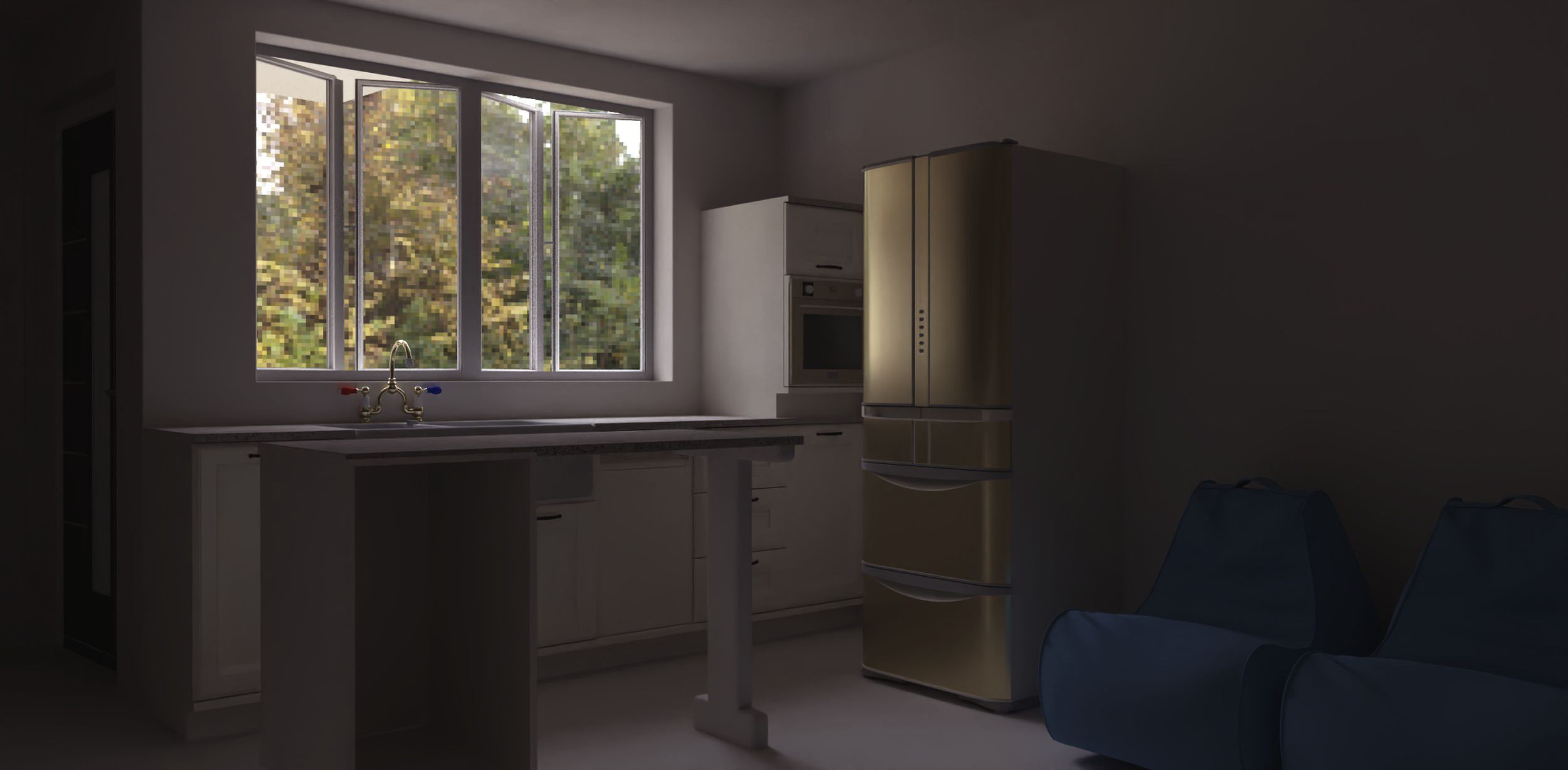
    已排程 已置頂 已鎖定 已移動 WIP
    176 貼文 8 Posters 12.8k 瀏覽 7 Watching
    正在載入更多貼文
    • 從舊到新
    • 從新到舊
    • 最多點贊
    回覆
    • 在新貼文中回覆
    登入後回覆
    此主題已被刪除。只有擁有主題管理權限的使用者可以查看。
    • Mike AmosM 離線
      Mike Amos @pixelcruncher
      最後由 編輯

      @pixelcruncher

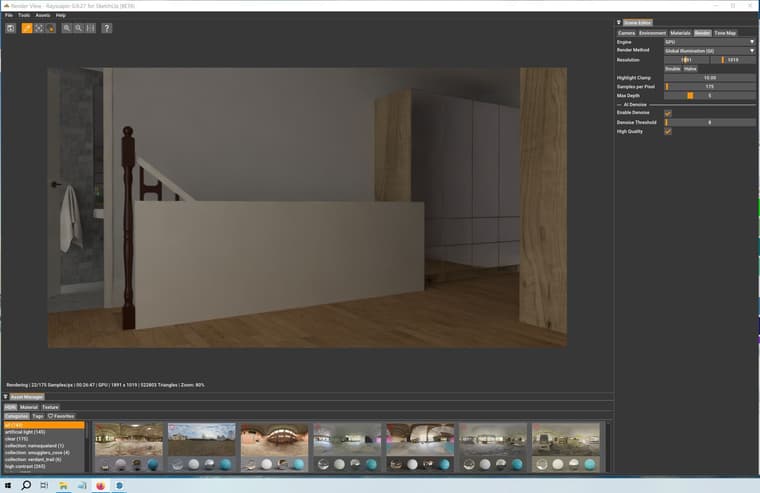
      Screen Test.jpg

      Absentia mortis praesentiam vitae probat, vita autem est argumentum constantiae.

      P 1 條回覆 最後回覆 回覆 引用 0
      • P 離線
        pixelcruncher Extension Creator @Mike Amos
        最後由 編輯

        @Mike-Amos Thanks for sharing that screenshot.

        That is indeed ridiculously slow...

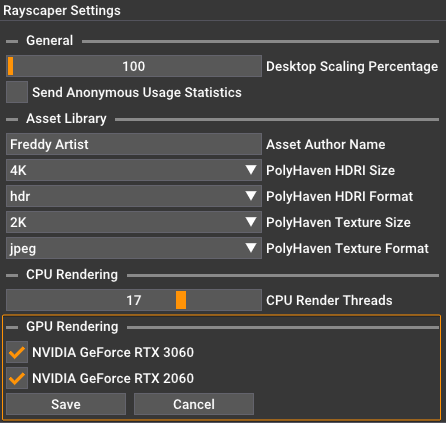
        What kind of GPU do you have?

        Rayscaper Menu > File > Settings:
        f43306d1-7ed5-4153-b7ed-e69bb3d522e1-image.png

        • Is CPU rendering faster for this case?
        • What happens if you disable the denoiser?

        I'm the developer of Rayscaper: https://rayscaper.com/ - Fast and easy rendering for SketchUp.

        Mike AmosM 2 條回覆 最後回覆 回覆 引用 0
        • Mike AmosM 離線
          Mike Amos @pixelcruncher
          最後由 編輯

          @pixelcruncher

          I have had a response from the NVIDIA tech support. Very helpful bunch and they exonerate the graphics card/drivers. Seems to be a BIOS issue. Looking for a fix.

          Absentia mortis praesentiam vitae probat, vita autem est argumentum constantiae.

          1 條回覆 最後回覆 回覆 引用 0
          • Mike AmosM 離線
            Mike Amos @pixelcruncher
            最後由 編輯

            @pixelcruncher

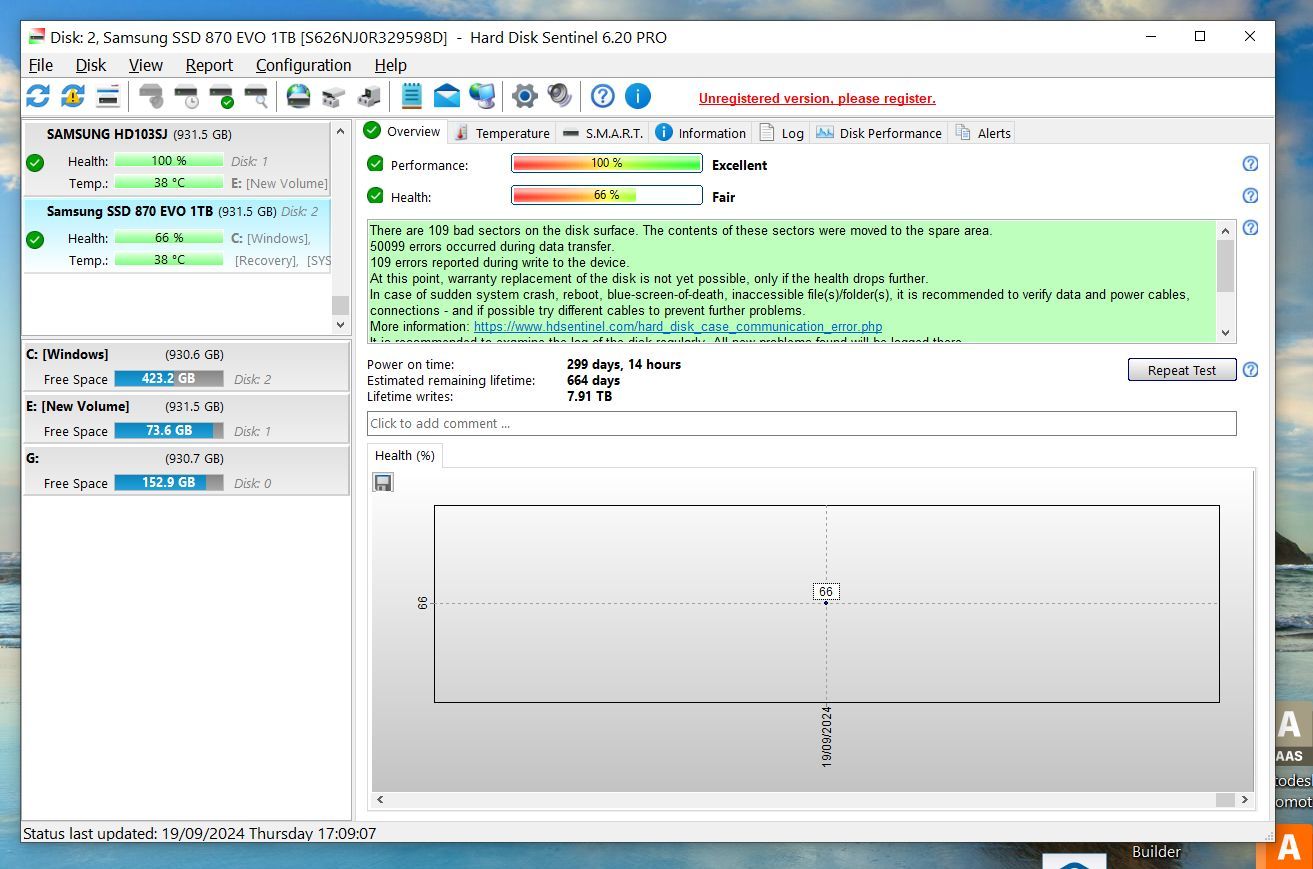
            SSD failing it seems.

            ssd Failing.jpg

            Absentia mortis praesentiam vitae probat, vita autem est argumentum constantiae.

            Mike AmosM 1 條回覆 最後回覆 回覆 引用 0
            • Mike AmosM 離線
              Mike Amos @Mike Amos
              最後由 編輯

              I feel like I am re-learning this dark art. new perspectives on things I suppose.

              Health wise stuff is loud. Certain sensations etc which are dementia alike bring a feeling of not really being in charge of the mental process, forgetting stuff for example.

              I believe this older pc is just outclassed by Rayscaper so while I try to lay out this flat, post window replacement I will be limiting myself to Twilight and Maxwell for rendering.

              For those of you who also have little niggling doubts about 'stuff', you CAN get through whatever the issue is. Noli Illegitemi Carbonundrum.

              I apologise for asking questions which probably should be simple to 'know', I'm going to do what I can. This place remains important to me for the joy we share on building and rendering whatever the hell it is we make.

              Keep on keeping on, never let crap get in the way of trying to be the best you can be 'today'.

              Tomorrow is merely smoke and mirrors.

              Absentia mortis praesentiam vitae probat, vita autem est argumentum constantiae.

              Rich O BrienR 1 條回覆 最後回覆 回覆 引用 0
              • Rich O BrienR 離線
                Rich O Brien Moderator @Mike Amos
                最後由 編輯

                @Mike-Amos said in Rayscaper, My trip down the road to adjumacation.:

                I apologise for asking questions which probably should be simple to 'know'

                There's no need to apologize for what you consider simple questions. Path tracing render engines are complex beasts.

                I encourage to stay on your journey. Learning new apps and techniques is good for the mind.

                You can still achieve a lot with the hardware you have.

                Download the free D'oh Book for SketchUp 📖

                Mike AmosM 1 條回覆 最後回覆 回覆 引用 0
                • Mike AmosM 離線
                  Mike Amos @Rich O Brien
                  最後由 編輯

                  @Rich-O-Brien

                  Another little 'lesson' todays crash provided some ino at least.

                  Crash #298860

                  It looks like there might be an issue with Microsoft Visual Studio. The Microsoft Visual Studio C++ Redistributables are required for SketchUp to run and may need to be reloaded. Please try the following:

                  Check to make sure your graphics drivers are up to date: https://help.sketchup.com/en/sketchup/how-can-i-update-my-computers-graphics-driver
                  
                  Quit SketchUp (and LayOut)
                  
                  Go to Add/Remove Programs and uninstall the Microsoft Visual Studio C++ 2015 and above Redistributables (there may be a 32-bit and 64-bit version)
                  
                  Uninstall SketchUp from Add/Remove Programs
                  
                  Re-run the SketchUp installer. You can download it here if you need it: https://www.sketchup.com/offline-download
                  
                  Restart your computer
                  

                  If you continue to experience issues please reach out to our support staff at: https://help.sketchup.com/en/contact-support/technical-question/form

                  Absentia mortis praesentiam vitae probat, vita autem est argumentum constantiae.

                  1 條回覆 最後回覆 回覆 引用 0
                  • P 離線
                    pixelcruncher Extension Creator
                    最後由 編輯

                    Hey Mike,

                    I hope you are doing alright!

                    I believe this older pc is just outclassed by Rayscaper so while I try to lay out this flat, post window replacement I will be limiting myself to Twilight and Maxwell for rendering.

                    Your specs should be good for rendering with Rayscaper. CPU rendering, in particular, should require nothing beefier than what's needed for Twilight Render.

                    I apologise for asking questions which probably should be simple to 'know', I'm going to do what I can. This place remains important to me for the joy we share on building and rendering whatever the hell it is we make.

                    Echoing Rich's statement, there is no need to apologize! It's indeed a complex matter, and you have already produced great results. Having you as a user definitely makes Rayscaper better. You have the patience to tolerate beta software and have helped me squash a lot of bugs so far.

                    Cheers,
                    Thomas

                    I'm the developer of Rayscaper: https://rayscaper.com/ - Fast and easy rendering for SketchUp.

                    Mike AmosM 1 條回覆 最後回覆 回覆 引用 0
                    • Mike AmosM 離線
                      Mike Amos @pixelcruncher
                      最後由 編輯

                      @pixelcruncher

                      I'm doing OK, Thomas.

                      Certainly finding there are system wide issues, no matter how small they are, reduces my "I am so stoopid" sensation a fair bit and I am looking in to ways to understand and work round this.

                      The disk issue and the visual studio ussues point out there being life in the old pc yet.

                      I am talking to various people around hardware and software issues and hope to get a solution within a few days.

                      All jokes aside and despite 'issues'. I am still a lucky barkeep.

                      Absentia mortis praesentiam vitae probat, vita autem est argumentum constantiae.

                      Mike AmosM 1 條回覆 最後回覆 回覆 引用 1
                      • Mike AmosM 離線
                        Mike Amos @Mike Amos
                        最後由 Rich O Brien 編輯

                        @Mike-Amos

                        2024/Tools/extensions.rb:197:in `eval'
                        C:/Program Files/SketchUp/SketchUp 2024/Tools/extensions.rb:197:in `require'
                        C:/Program Files/SketchUp/SketchUp 2024/Tools/extensions.rb:197:in `load'
                        C:/Users/User/AppData/Roaming/SketchUp/SketchUp 2024/SketchUp/Plugins/rayscaper.rb:18:in `register_extension'
                        C:/Users/User/AppData/Roaming/SketchUp/SketchUp 2024/SketchUp/Plugins/rayscaper.rb:18:in `<module:Rayscaper>'
                        C:/Users/User/AppData/Roaming/SketchUp/SketchUp 2024/SketchUp/Plugins/rayscaper.rb:6:in `<top (required)>'
                        

                        Absentia mortis praesentiam vitae probat, vita autem est argumentum constantiae.

                        1 條回覆 最後回覆 回覆 引用 0
                        • P 離線
                          pixelcruncher Extension Creator
                          最後由 pixelcruncher 編輯

                          @Mike-Amos Sorry to hear that you are running into this.

                          Which version did you try to reinstall? Can you provide me with the filename of the *.rbz file? Could it be that you tried to install one of the older versions that is not SU2024 compatible? Nevermind this, I think the ones downloaded from SketchUcation are all named Rayscaper.rbz.

                          Can you try to reinstall Rayscaper using this guide: https://rayscaper.com/getting-started/installation-guide/#download-and-install-via-the-sketchup-extension-manager?

                          It's not a licensing issue like you mentioned in your email; I think the installation is broken.

                          Cheers,
                          Thomas

                          I'm the developer of Rayscaper: https://rayscaper.com/ - Fast and easy rendering for SketchUp.

                          Mike AmosM 1 條回覆 最後回覆 回覆 引用 0
                          • Mike AmosM 離線
                            Mike Amos @pixelcruncher
                            最後由 編輯

                            @pixelcruncher

                            Extension Errors Report
                            SketchUp: 24.0.594
                            OS: Windows 10
                            Ruby: 3.2.2

                            Extension: Rayscaper (0.9.30 Beta)
                            Error: LoadError (126: The specified module could not be found. - c:/users/user/appdata/roaming/sketchup/sketchup 2024/sketchup/plugins/rayscaper/installed/Windows/3.2.2/0.9.30 Beta/resources/SUEX_Rayscaper.so)
                            <internal:C:/Program Files/SketchUp/SketchUp 2024/Tools/RubyStdLib/rubygems/core_ext/kernel_require.rb>:85:in require' <internal:C:/Program Files/SketchUp/SketchUp 2024/Tools/RubyStdLib/rubygems/core_ext/kernel_require.rb>:85:in require'
                            c:/users/user/appdata/roaming/sketchup/sketchup 2024/sketchup/plugins/rayscaper/main.rbe:97:in <module:Rayscaper>' c:/users/user/appdata/roaming/sketchup/sketchup 2024/sketchup/plugins/rayscaper/main.rbe:5:in <main>'
                            C:/Program Files/SketchUp/SketchUp 2024/Tools/extensions.rb:197:in eval' C:/Program Files/SketchUp/SketchUp 2024/Tools/extensions.rb:197:in require'
                            C:/Program Files/SketchUp/SketchUp 2024/Tools/extensions.rb:197:in load' C:/Users/User/AppData/Roaming/SketchUp/SketchUp 2024/SketchUp/Plugins/rayscaper.rb:18:in register_extension'
                            C:/Users/User/AppData/Roaming/SketchUp/SketchUp 2024/SketchUp/Plugins/rayscaper.rb:18:in <module:Rayscaper>' C:/Users/User/AppData/Roaming/SketchUp/SketchUp 2024/SketchUp/Plugins/rayscaper.rb:6:in <top (required)>'

                            James at Seeit3d believes the Sketchucation store is broken.

                            Numerous reinstals and various different plugins fail each time I go through the uninstall plugin folder and reinstall.

                            Absentia mortis praesentiam vitae probat, vita autem est argumentum constantiae.

                            P Rich O BrienR 2 條回覆 最後回覆 回覆 引用 0
                            • P 離線
                              pixelcruncher Extension Creator @Mike Amos
                              最後由 編輯

                              @Mike-Amos

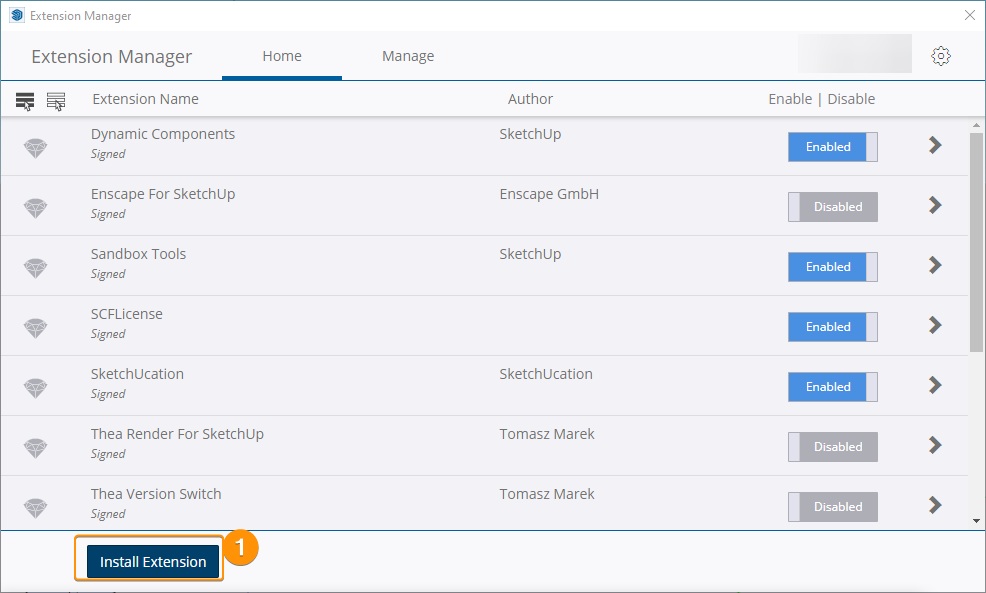
                              Do you mind trying a direct install? You can download the RBZ file from here: link. This should download the RBZ file directly from my Google drive.

                              And then install it in SketchUp directly via the extension manager: Menu > Extensions > Extension Manager:
                              3bfcf3a0-7166-4ddf-a298-58944ae1ed79-image.png

                              Restart SketchUp after a successful installation.

                              That should exclude SketchUcation.

                              Thanks,
                              Thomas

                              I'm the developer of Rayscaper: https://rayscaper.com/ - Fast and easy rendering for SketchUp.

                              1 條回覆 最後回覆 回覆 引用 0
                              • Rich O BrienR 離線
                                Rich O Brien Moderator @Mike Amos
                                最後由 編輯

                                @Mike-Amos said in Rayscaper, My trip down the road to adjumacation.:

                                James at Seeit3d believes the Sketchucation store is broken.

                                Fake news

                                Download the free D'oh Book for SketchUp 📖

                                Mike AmosM 1 條回覆 最後回覆 回覆 引用 1
                                • Mike AmosM 離線
                                  Mike Amos @Rich O Brien
                                  最後由 Rich O Brien 編輯

                                  @Rich-O-Brien

                                  C:/Program Files/SketchUp/SketchUp 2024/Tools/extensions.rb:197:in `load'
                                  C:/Users/User/AppData/Roaming/SketchUp/SketchUp 2024/SketchUp/Plugins/DM_artisan2.rb:21:in `register_extension'
                                  C:/Users/User/AppData/Roaming/SketchUp/SketchUp 2024/SketchUp/Plugins/DM_artisan2.rb:21:in `<module:Artisan2>'
                                  C:/Users/User/AppData/Roaming/SketchUp/SketchUp 2024/SketchUp/Plugins/DM_artisan2.rb:8:in `<module:DM>'
                                  C:/Users/User/AppData/Roaming/SketchUp/SketchUp 2024/SketchUp/Plugins/DM_artisan2.rb:7:in `<top (required)>'
                                  

                                  All sorts of errors with plugins, weird but the samsung disk scan suggested recovery for the drive which has failed due to an unknown error.
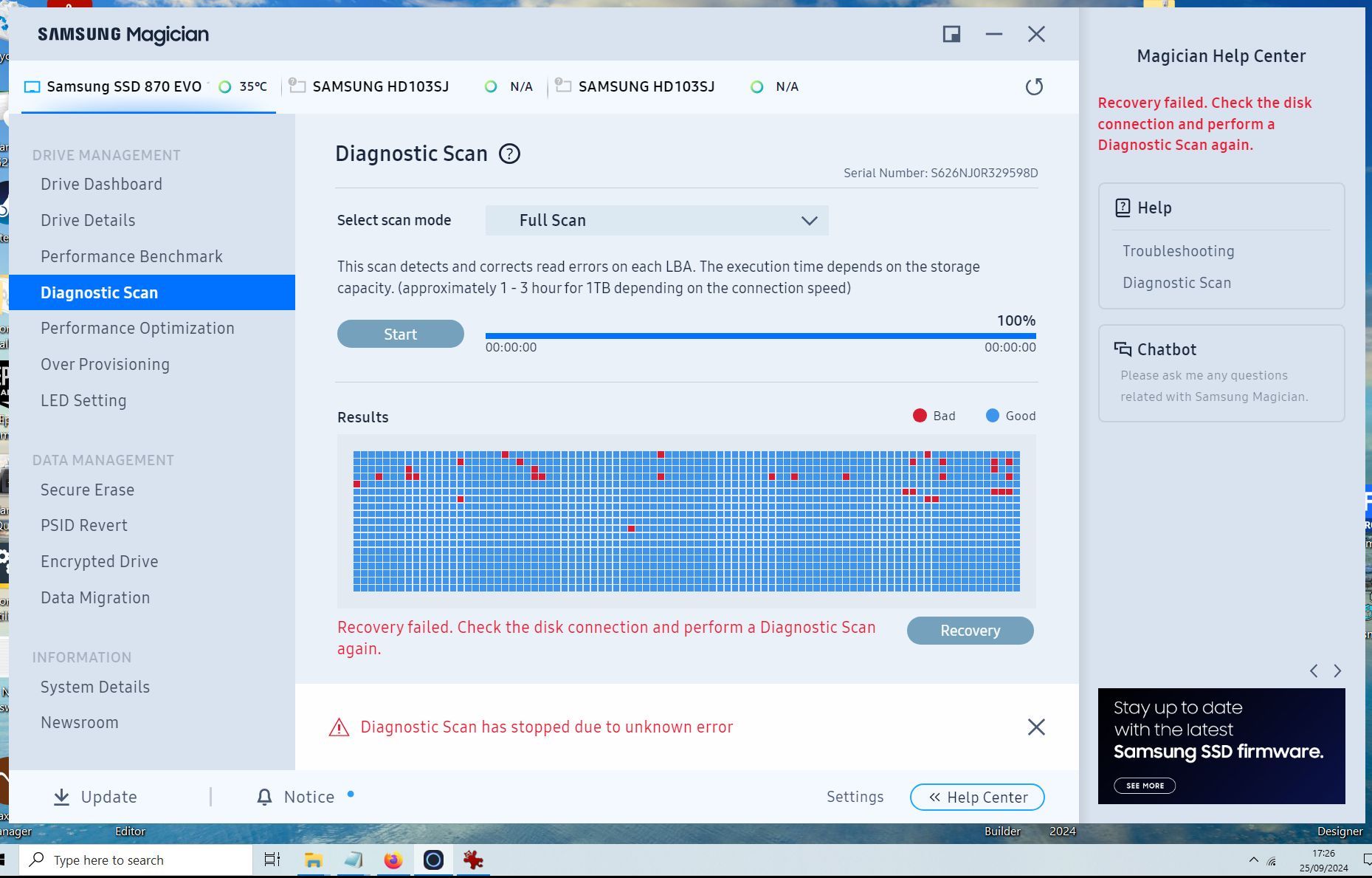
                                  Report Magician 2.jpg

                                  Absentia mortis praesentiam vitae probat, vita autem est argumentum constantiae.

                                  Mike AmosM 1 條回覆 最後回覆 回覆 引用 0
                                  • Mike AmosM 離線
                                    Mike Amos @Mike Amos
                                    最後由 編輯

                                    @Mike-Amos

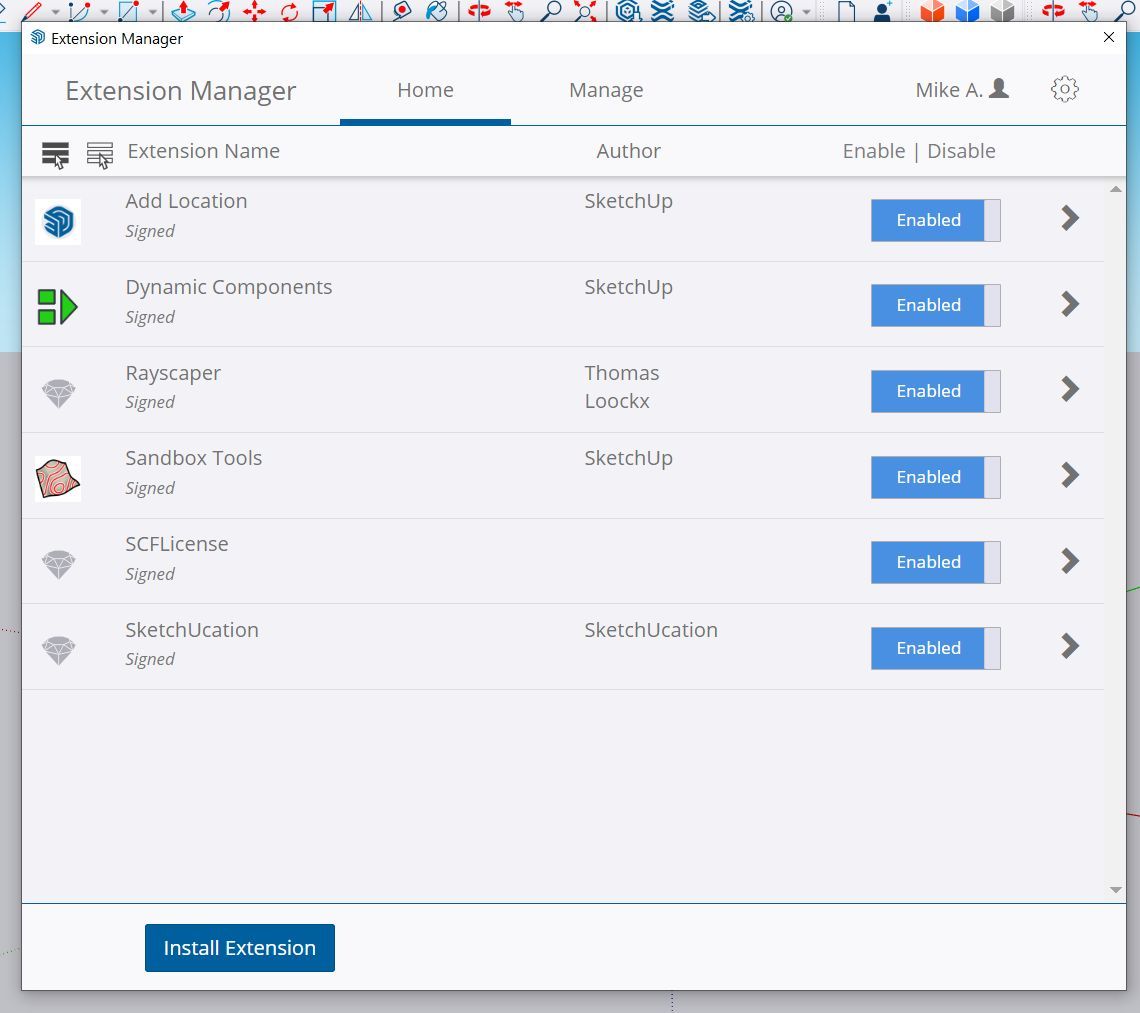
                                    Plugin Status.jpg

                                    Greyed out, nothing doing anywhere.

                                    Absentia mortis praesentiam vitae probat, vita autem est argumentum constantiae.

                                    Rich O BrienR 1 條回覆 最後回覆 回覆 引用 0
                                    • Rich O BrienR 離線
                                      Rich O Brien Moderator @Mike Amos
                                      最後由 編輯

                                      @Mike-Amos said in Rayscaper, My trip down the road to adjumacation.:

                                      Greyed out, nothing doing anywhere.

                                      As I explained in our chat room. Greyed out is not representative of 'not working'.

                                      Greyed out = Installed outside of SketchUp's ecosystem

                                      I think your issues are bigger than 3rd party extensions.

                                      If you run Windows own Disk Check what is the report?
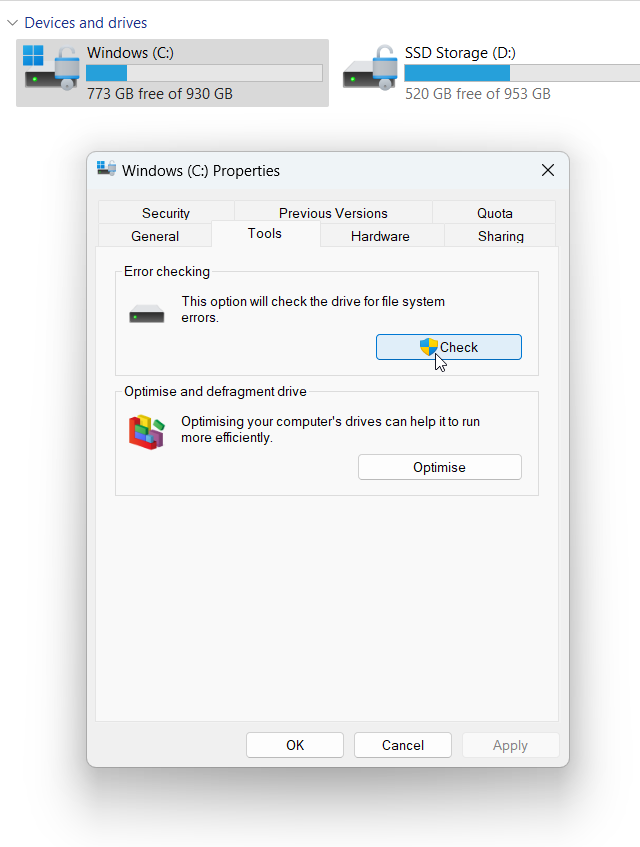
                                      8b3a5946-7553-489f-af7d-635ed03bd0e8-image.png

                                      So right click your drive, choose Properties, Tools tab and click Check

                                      Download the free D'oh Book for SketchUp 📖

                                      Mike AmosM 1 條回覆 最後回覆 回覆 引用 0
                                      • Mike AmosM 離線
                                        Mike Amos @Rich O Brien
                                        最後由 編輯

                                        @Rich-O-Brien

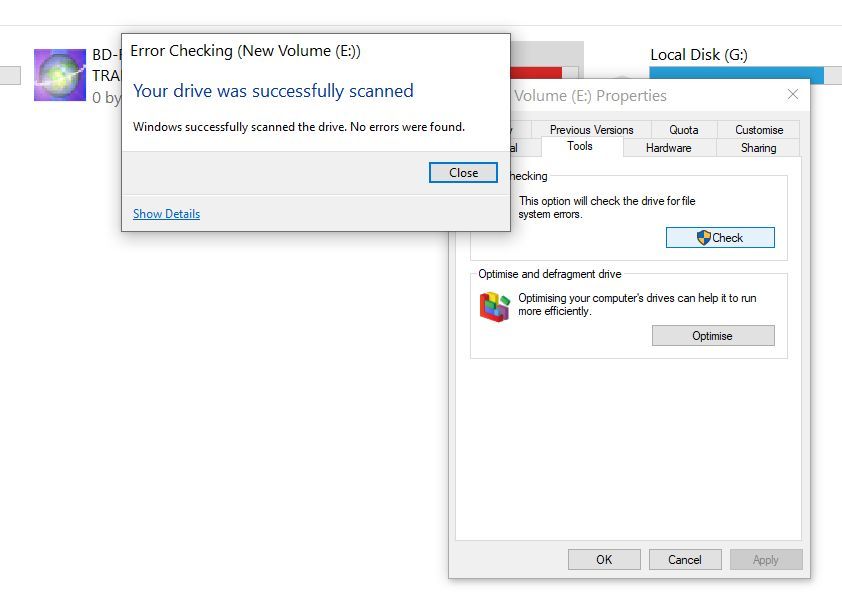
                                        Weird, this suggests an error on the E drive which the other scanning programs report as healthy.
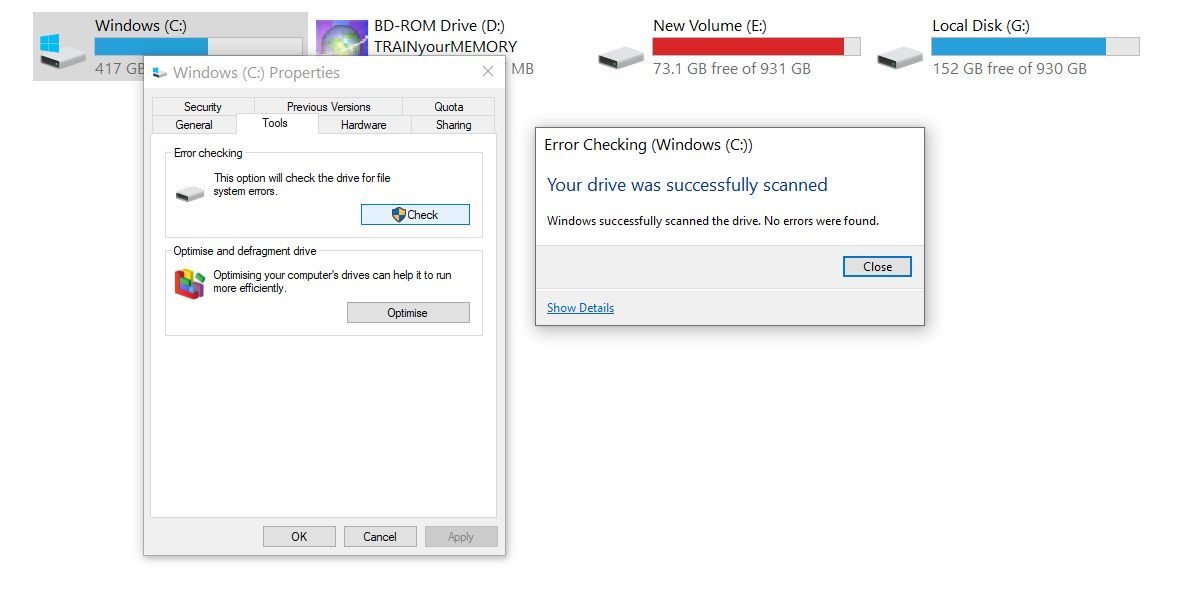
                                        Windows WTF.jpg

                                        Absentia mortis praesentiam vitae probat, vita autem est argumentum constantiae.

                                        Mike AmosM 1 條回覆 最後回覆 回覆 引用 0
                                        • Mike AmosM 離線
                                          Mike Amos @Mike Amos
                                          最後由 編輯

                                          Windows WTF 2.jpg

                                          Absentia mortis praesentiam vitae probat, vita autem est argumentum constantiae.

                                          Mike AmosM 1 條回覆 最後回覆 回覆 引用 0
                                          • Mike AmosM 離線
                                            Mike Amos @Mike Amos
                                            最後由 編輯

                                            A little stability at the moment. Not sorted yet but moving forwards.
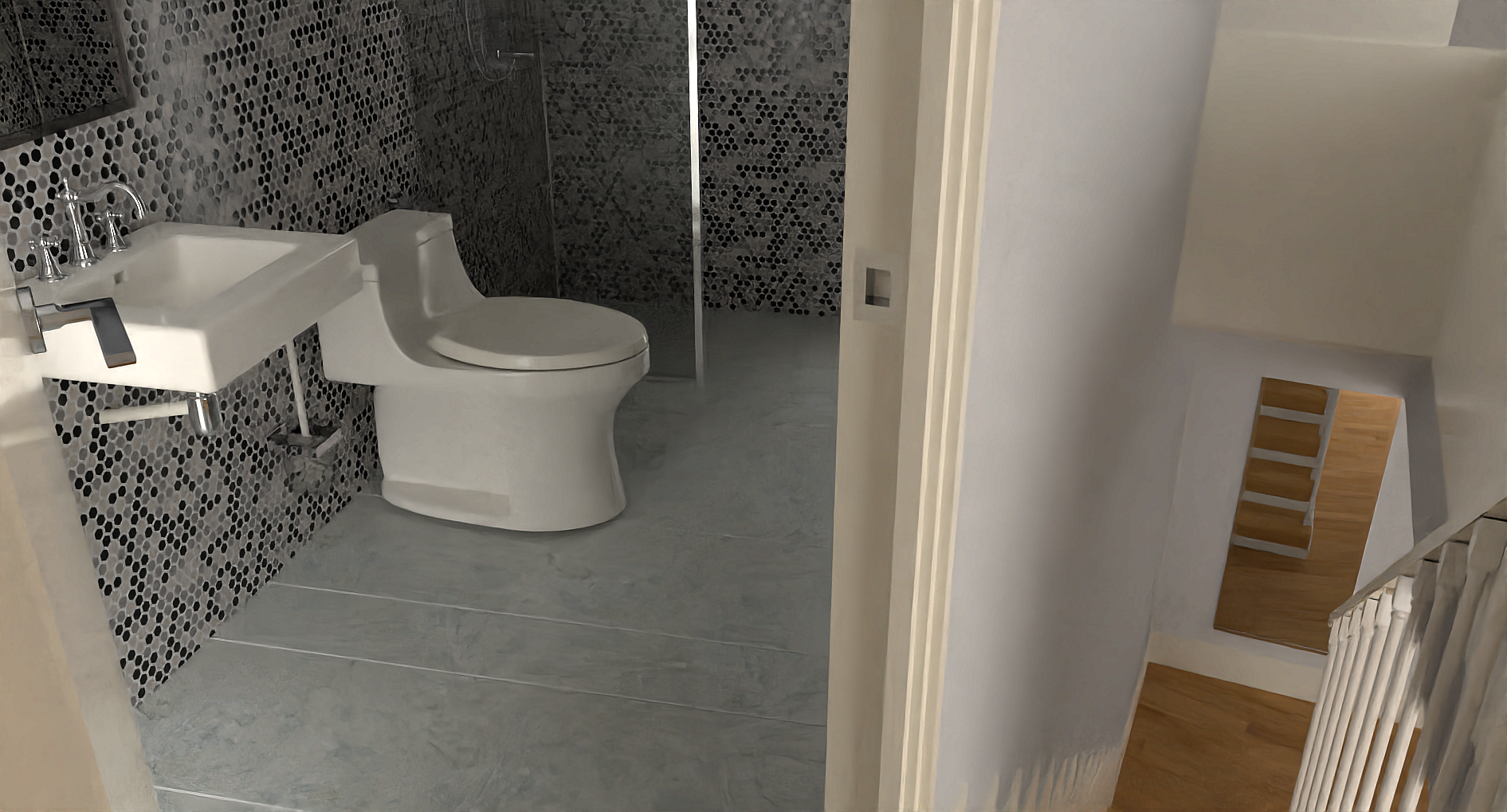
                                            5 1891 x 1019 200s 22m CPU Irfanview.png

                                            Absentia mortis praesentiam vitae probat, vita autem est argumentum constantiae.

                                            Mike AmosM 1 條回覆 最後回覆 回覆 引用 2
                                            • 1
                                            • 2
                                            • 5
                                            • 6
                                            • 7
                                            • 8
                                            • 9
                                            • 7 / 9
                                            • 第一個貼文
                                              最後的貼文
                                            Buy SketchPlus
                                            Buy SUbD
                                            Buy WrapR
                                            Buy eBook
                                            Buy Modelur
                                            Buy Vertex Tools
                                            Buy SketchCuisine
                                            Buy FormFonts

                                            Advertisement