sketchucation logo sketchucation
    • 登入
    Oops, your profile's looking a bit empty! To help us tailor your experience, please fill in key details like your SketchUp version, skill level, operating system, and more. Update and save your info on your profile page today!
    🔌 Easy Offset | Offset selected faces in SketchUp in positive and negative offsets. Download

    Rayscaper Alpha Version Available

    已排程 已置頂 已鎖定 已移動 Extensions & Applications Discussions
    114 貼文 14 Posters 4.4k 瀏覽 14 Watching
    正在載入更多貼文
    • 從舊到新
    • 從新到舊
    • 最多點贊
    回覆
    • 在新貼文中回覆
    登入後回覆
    此主題已被刪除。只有擁有主題管理權限的使用者可以查看。
    • majidM 離線
      majid
      最後由 編輯

      Thanks, Thomas and Dave.
      I wish I had some spare time to do a favor for RS.or lucky to work with you, but am busy making some money to support my family and stay in the Netherlands for the "search year" period. Somehow challenging 😄.

      My inspiring A, B, Sketches book: https://sketchucation.com/shop/books/intermediate/2612-alphabet-inspired-sketches--inspiring-drills-for-architects--3d-artists-and-designers-

      1 條回覆 最後回覆 回覆 引用 0
      • ntxdaveN 離線
        ntxdave
        最後由 編輯

        @majid said:

        Thanks, Thomas and Dave.
        I wish I had some spare time to help develop RS, as a beta tester ...or lucky to work with you, but am busy making some money to support my family and stay in the Netherlands for the "search year" period. Somehow challenging 😄.

        Glad you have an income. 😄 👍 Was just trying yo help if possible. 😄

        I hope one of these days I can back to “modeling” and rendering. Would love to be able to try Rayscaper as well. 😄

        Given the status of TR, I hope Thomas and Fletch & Chris ab work something out. 😄

        Press F1...thank me later

        1 條回覆 最後回覆 回覆 引用 0
        • jo-keJ 離線
          jo-ke
          最後由 編輯

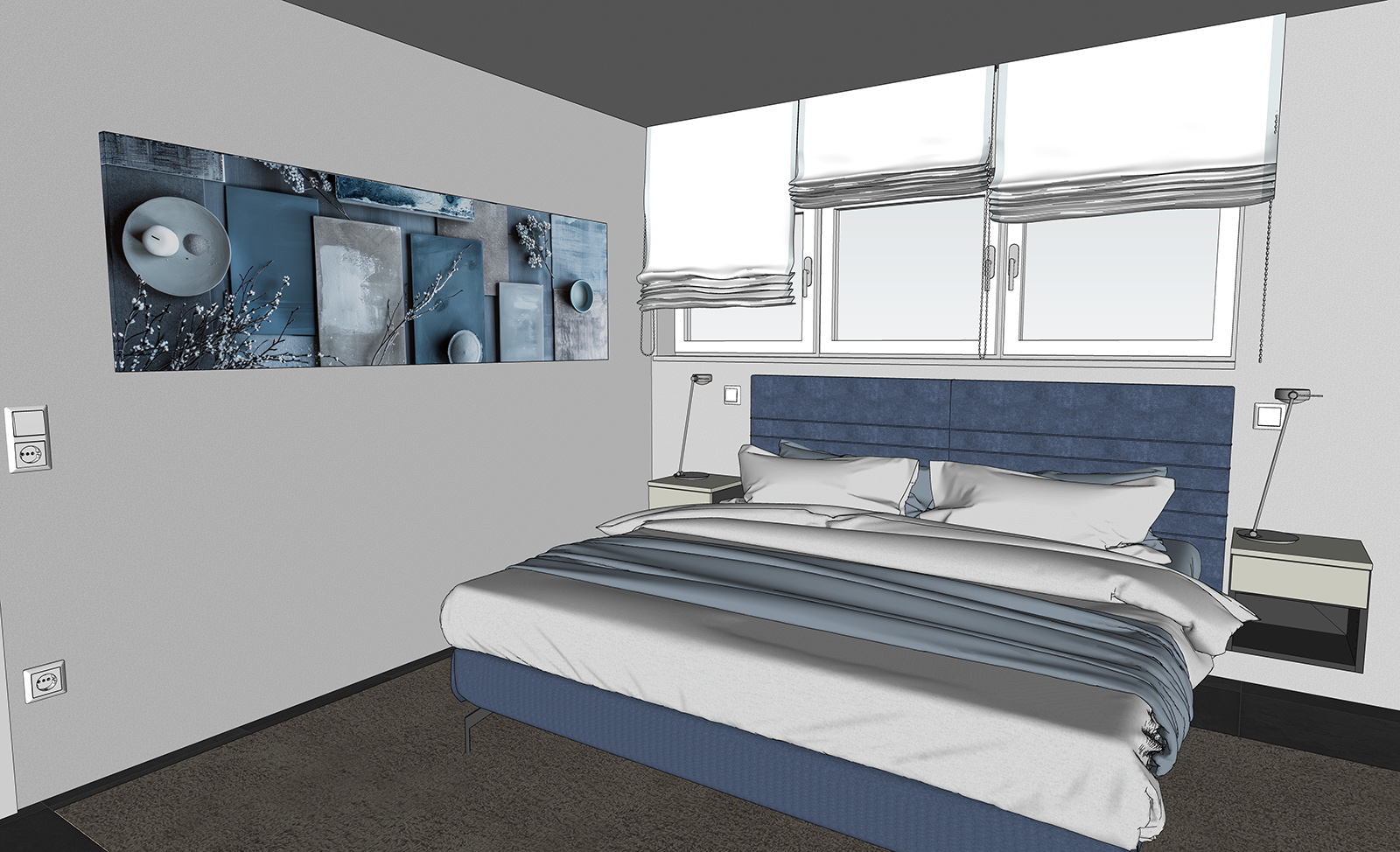
          today I started a new test with rayscaper.

          finished render is still grainy and the texture at the picture on the wall messes up.

          geib-su-rs.jpg


          test-rayscaper002.png

          http://www.zz7.de

          1 條回覆 最後回覆 回覆 引用 0
          • P 離線
            pixelcruncher Extension Creator
            最後由 編輯

            @jo-ke said:

            today I started a new test with rayscaper.

            finished render is still grainy and the texture at the picture on the wall messes up.
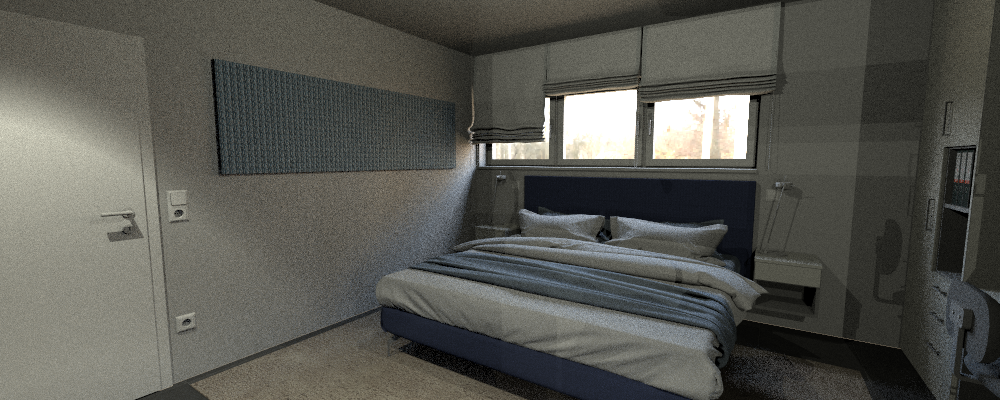
            That render looks very promising!

            There's a regression in the current release; textures are not automatically scaled when converted to Rayscaper. You can manually work around this by setting the scaling in Rayscaper.
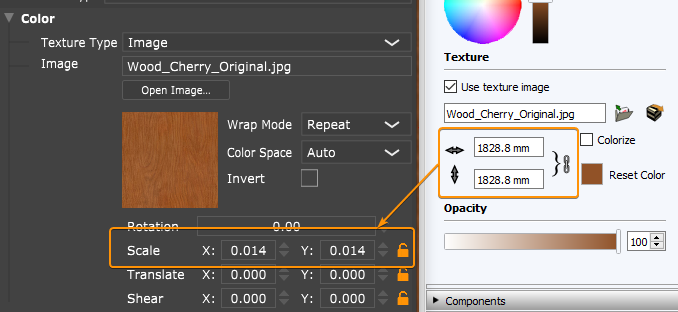
            Rayscaper texture scaling.

            Assuming your texture scale in SketchUp is in millimeters, the formulate is: 1 / ((texture_scale_mm / 10) / 2.54 inc/cm). So for this example: 1 / ((1828.8 / 10) / 2.54) = (1 / 72) = 0.013888 = 0.014. So basically the reciprocal of the size in inches.

            Again, I will fix the option to sync this.

            For the grainy noise:

            1. How many samples/px have you configured?
            2. Are you using AI denoise? That should resolve most of the noise.
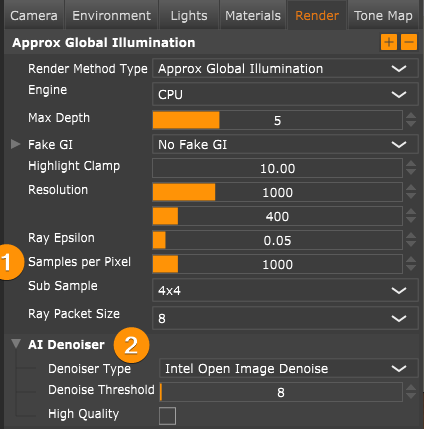
            Rayscaper render settings.

            Cheers,
            Thomas

            I'm the developer of Rayscaper: https://rayscaper.com/ - Fast and easy rendering for SketchUp.

            1 條回覆 最後回覆 回覆 引用 0
            • jo-keJ 離線
              jo-ke
              最後由 編輯

              I used the default settings

              http://www.zz7.de

              1 條回覆 最後回覆 回覆 引用 0
              • P 離線
                pixelcruncher Extension Creator
                最後由 編輯

                @jo-ke said:

                I used the default settings

                Do you mind mailing me the scene packed with the textures when you have time? You can pack the scene via the "Extensions > Rayscaper > Create Archive" menu. Can you also send me the log file? For some reason, it feels that the denoiser is not activated on your machine.

                I appreciate your help!

                Thanks,
                Thomas

                I'm the developer of Rayscaper: https://rayscaper.com/ - Fast and easy rendering for SketchUp.

                1 條回覆 最後回覆 回覆 引用 0
                • S 離線
                  sashapepperspray
                  最後由 編輯

                  Is it possible to make that if I insert a light in a component, all instances of the component get a light added?

                  1 條回覆 最後回覆 回覆 引用 0
                  • P 離線
                    pixelcruncher Extension Creator
                    最後由 編輯

                    @sashapepperspray said:

                    Is it possible to make that if I insert a light in a component, all instances of the component get a light added?

                    Yes, improving the light component instances is planned for 1.0. As you already observed, lights don't work if they are part of a group or component.

                    Cheers,
                    Thomas

                    I'm the developer of Rayscaper: https://rayscaper.com/ - Fast and easy rendering for SketchUp.

                    1 條回覆 最後回覆 回覆 引用 0
                    • majidM 離線
                      majid
                      最後由 編輯

                      This would be a nic option and I am wondering if it is possible to keep the intensity the same but use bucket tool to change the color of some?
                      I mean if it is applied "inside" the component, all instances change, if applied without opening the component it changes the color of that particular one...

                      My inspiring A, B, Sketches book: https://sketchucation.com/shop/books/intermediate/2612-alphabet-inspired-sketches--inspiring-drills-for-architects--3d-artists-and-designers-

                      1 條回覆 最後回覆 回覆 引用 0
                      • P 離線
                        pixelcruncher Extension Creator
                        最後由 編輯

                        @majid said:

                        This would be a nic option and I am wondering if it is possible to keep the intensity the same but use bucket tool to change the color of some?
                        I mean if it is applied "inside" the component, all instances change, if applied without opening the component it changes the color of that particular one...

                        That’s a good idea Majid, I will put it in Rayscaper’s backlog.

                        I'm the developer of Rayscaper: https://rayscaper.com/ - Fast and easy rendering for SketchUp.

                        1 條回覆 最後回覆 回覆 引用 0
                        • majidM 離線
                          majid
                          最後由 編輯

                          After a while installed the latest version and a, wondering how may I copy the same material texture to the normal map? any copy/apst or drag/drop option?

                          My inspiring A, B, Sketches book: https://sketchucation.com/shop/books/intermediate/2612-alphabet-inspired-sketches--inspiring-drills-for-architects--3d-artists-and-designers-

                          1 條回覆 最後回覆 回覆 引用 0
                          • P 離線
                            pixelcruncher Extension Creator
                            最後由 編輯

                            @majid said:

                            After a while installed the latest version and a, wondering how may I copy the same material texture to the normal map? any copy/apst or drag/drop option?

                            You can drag and drop the same image multiple times from a file browser. But you are pointing out a good worklow improvement here, you should be able to at least right-click and copy/paste. I will put it on the list, and expect it in one of the upcoming releases.

                            I'm the developer of Rayscaper: https://rayscaper.com/ - Fast and easy rendering for SketchUp.

                            1 條回覆 最後回覆 回覆 引用 0
                            • jo-keJ 離線
                              jo-ke
                              最後由 jo-ke 編輯

                              in the current render there is an ugly branding. So I can't use the result.drh001.png

                              http://www.zz7.de

                              P 1 條回覆 最後回覆 回覆 引用 0
                              • P 離線
                                pixelcruncher Extension Creator @jo-ke
                                最後由 編輯

                                Hey @jo-ke - now that Rayscaper is in beta, I started selling discounted beta licenses: https://sketchucation.com/purchase-smart.php?plugin=rayscaper - The watermarks are a limitation of the free version.

                                Cheers,
                                Thomas

                                I'm the developer of Rayscaper: https://rayscaper.com/ - Fast and easy rendering for SketchUp.

                                1 條回覆 最後回覆 回覆 引用 0
                                • 1
                                • 2
                                • 3
                                • 4
                                • 5
                                • 6
                                • 6 / 6
                                • 第一個貼文
                                  最後的貼文
                                Buy SketchPlus
                                Buy SUbD
                                Buy WrapR
                                Buy eBook
                                Buy Modelur
                                Buy Vertex Tools
                                Buy SketchCuisine
                                Buy FormFonts

                                Advertisement