sketchucation logo sketchucation
    • 登入
    Oops, your profile's looking a bit empty! To help us tailor your experience, please fill in key details like your SketchUp version, skill level, operating system, and more. Update and save your info on your profile page today!
    🔌 Easy Offset | Offset selected faces in SketchUp in positive and negative offsets. Download

    Rayscaper Alpha Version Available

    已排程 已置頂 已鎖定 已移動 Extensions & Applications Discussions
    114 貼文 14 Posters 4.4k 瀏覽 14 Watching
    正在載入更多貼文
    • 從舊到新
    • 從新到舊
    • 最多點贊
    回覆
    • 在新貼文中回覆
    登入後回覆
    此主題已被刪除。只有擁有主題管理權限的使用者可以查看。
    • jo-keJ 離線
      jo-ke
      最後由 編輯

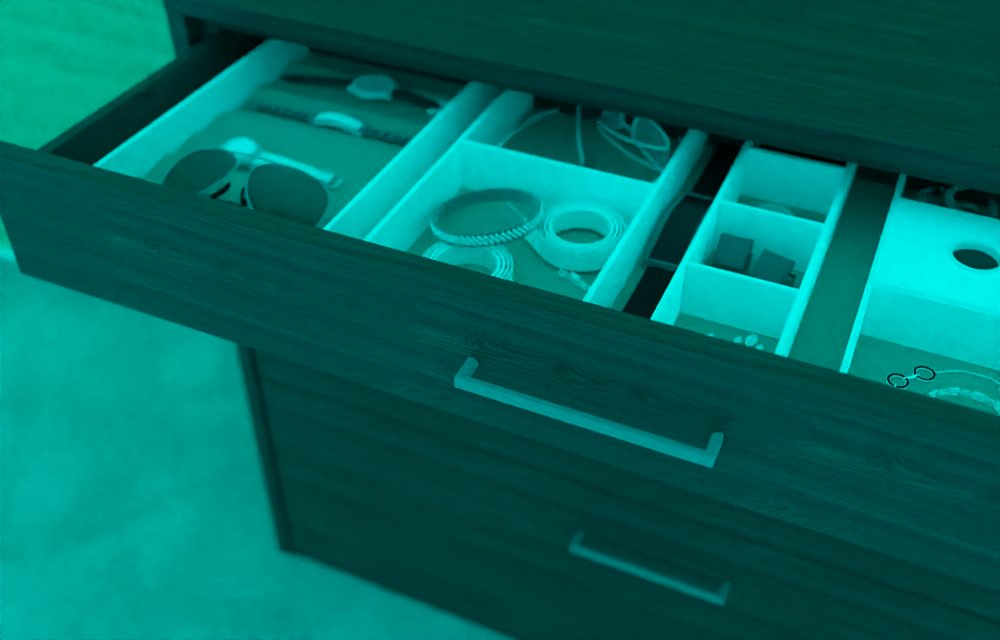
      I reinstalled rayscaper on my notebook.

      I reopend the test file, that I made yesterday, but most of material are lost.

      The file is saved in my dropbox.

      test.png

      http://www.zz7.de

      1 條回覆 最後回覆 回覆 引用 0
      • jo-keJ 離線
        jo-ke
        最後由 編輯

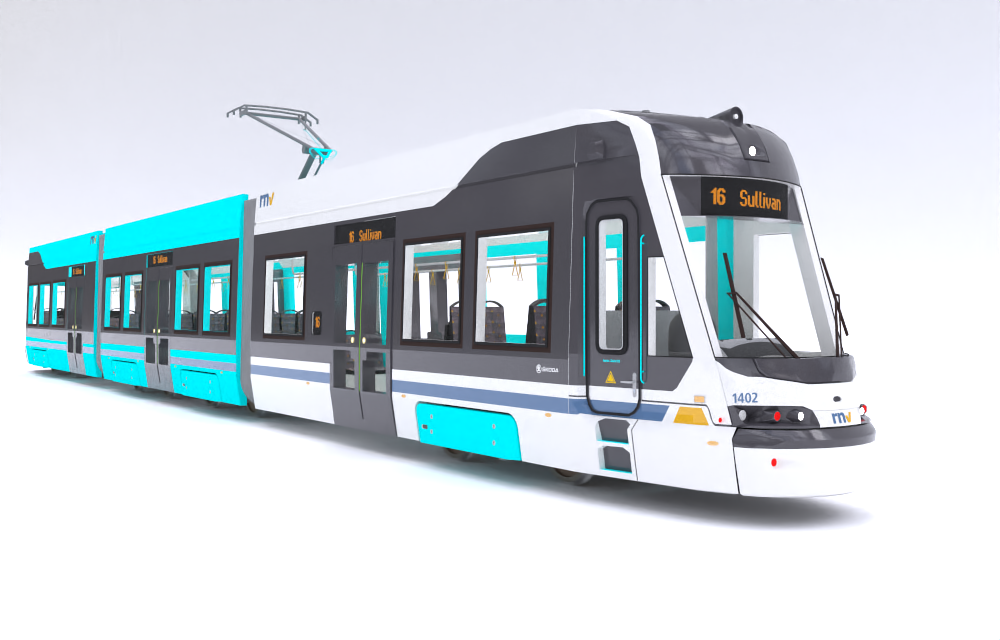
        OK, I've found out: HDR has to be refreshed.

        The tramwaymodel renders well exept the blue surfaces.

        test001.png

        http://www.zz7.de

        1 條回覆 最後回覆 回覆 引用 0
        • P 離線
          pixelcruncher Extension Creator
          最後由 編輯

          @jo-ke said:

          OK, I've found out: HDR has to be refreshed.

          The tramwaymodel renders well exept the blue surfaces.

          Thanks jo-ke for reporting. I can reproduce this bug locally and plan to have a release this week that fixes this bug, and the umlaut crash.

          Regards,
          Thomas

          I'm the developer of Rayscaper: https://rayscaper.com/ - Fast and easy rendering for SketchUp.

          1 條回覆 最後回覆 回覆 引用 0
          • S 離線
            SandraEli Newcomers
            最後由 編輯

            Please keep us posted when the Mac OS version is out
            I want to test it so bad

            1 條回覆 最後回覆 回覆 引用 0
            • P 離線
              pixelcruncher Extension Creator
              最後由 編輯

              @sandraeli said:

              Please keep us posted when the Mac OS version is out
              I want to test it so bad

              Hey SandraEli,

              Thanks for the interest! A Mac version is in the works, but the primary focus is to remove the alpha label and release a rock-solid Windows version.

              I will keep you posted when the Mac version is out.

              Cheers,
              Thomas

              I'm the developer of Rayscaper: https://rayscaper.com/ - Fast and easy rendering for SketchUp.

              1 條回覆 最後回覆 回覆 引用 0
              • majidM 離線
                majid
                最後由 編輯

                This is great that there are plenty of free materials available in Rayscraper, but wondering how may I change their scale or rotation. Am I missing a tutorial/description?

                My inspiring A, B, Sketches book: https://sketchucation.com/shop/books/intermediate/2612-alphabet-inspired-sketches--inspiring-drills-for-architects--3d-artists-and-designers-

                1 條回覆 最後回覆 回覆 引用 0
                • P 離線
                  pixelcruncher Extension Creator
                  最後由 編輯

                  @majid said:

                  This is great that there are plenty of free materials available in Rayscraper, but wondering how may I change their scale or rotation. Am I missing a tutorial/description?

                  Hey Majid,

                  You are right. Documentation and tutorials still need to be added for Rayscaper.

                  There are two ways to change the placement of a texture on a material.
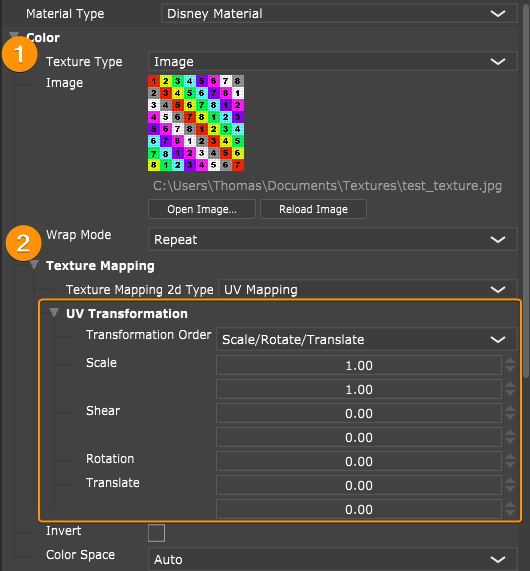
                  You can edit the UV transformation of the textures individually or use the global UV editor to edit all textures for a material in parallel.

                  Edit individual textures
                  You can do this by opening the texture settings assigned to the slot, for example, in the below image for the Color slot. And then, modify the transformation; it updates in real-time, so you should be able to eyeball it.
                  auCMiI9yLD.png

                  Edit all textures of a material

                  Or you can edit all textures for a single material simultaneously using the Global UV editor. This one can be opened via the edits menu at the top of the material.
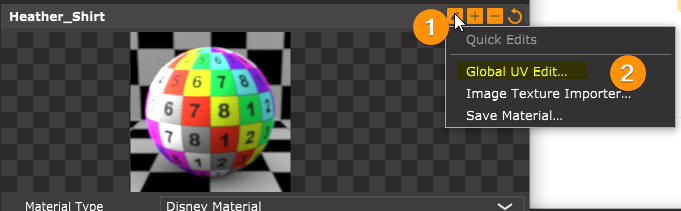
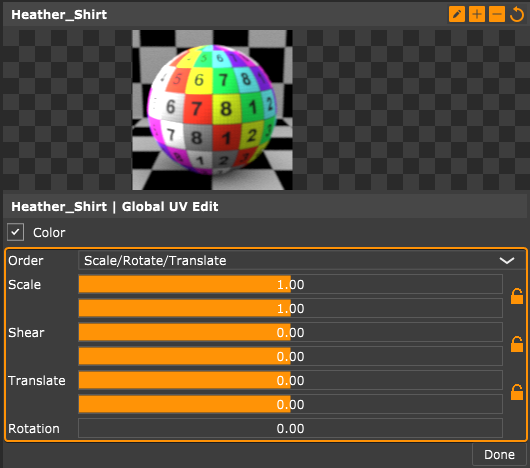
                  ShareX_tyeSaxDQtN.png

                  SketchUp_ZTOB3JlTpO.png

                  I hope this helps. Let me know if it's not clear, then I can make a quick video.

                  Better documentation and tutorials will arrive soon.

                  Cheers,
                  Thomas

                  I'm the developer of Rayscaper: https://rayscaper.com/ - Fast and easy rendering for SketchUp.

                  1 條回覆 最後回覆 回覆 引用 0
                  • S 離線
                    sashapepperspray
                    最後由 編輯

                    is there a way to pan or zoom on the rendered image in the render viewport?

                    1 條回覆 最後回覆 回覆 引用 0
                    • P 離線
                      pixelcruncher Extension Creator
                      最後由 編輯

                      @sashapepperspray said:

                      is there a way to pan or zoom on the rendered image in the render viewport?

                      Not there yet, but it’s on the roadmap for the 1.0 release.

                      Cheers,
                      Thomas

                      I'm the developer of Rayscaper: https://rayscaper.com/ - Fast and easy rendering for SketchUp.

                      1 條回覆 最後回覆 回覆 引用 0
                      • majidM 離線
                        majid
                        最後由 編輯

                        I was really busy recently doing my project. Just installed the latest version and tried it using the previous model. The toolbar does not show and when I start rendering many materials are missed and had to reload them manually. Also it seems slower to me...Maybe it is because my laptop is old and the GPU needs an update...
                        I will keep an eye on this post and pray for fast updates 😄

                        My inspiring A, B, Sketches book: https://sketchucation.com/shop/books/intermediate/2612-alphabet-inspired-sketches--inspiring-drills-for-architects--3d-artists-and-designers-

                        1 條回覆 最後回覆 回覆 引用 0
                        • P 離線
                          pixelcruncher Extension Creator
                          最後由 編輯

                          @majid said:

                          I was really busy recently doing my project. Just installed the latest version and tried it using the previous model. The toolbar does not show and when I start rendering many materials are missed and had to reload them manually. Also it seems slower to me...Maybe it is because my laptop is old and the GPU needs an update...
                          I will keep an eye on this post and pray for fast updates 😄

                          Hey Majid,

                          Which version are you using?

                          You can get the toolbar back with this: https://rayscaper.com/manual/user-interface/#i-lost-my-toolbar - I renamed the title of the toolbar in a previous release, hence the reason it disappeared.

                          Can you share the log and scene where the materials went missing? The log is named SUEX_Rayscaper.log, see item 5 here on how to get it: https://rayscaper.com/getting-help/report-a-bug/

                          What is slower? Do the render times or the user interface feel slower? If it's slow, I consider that a bug 💚

                          I will be releasing Rayscaper on a more frequent cadence now, have to get to 1.0.

                          Cheers,
                          Thomas

                          I'm the developer of Rayscaper: https://rayscaper.com/ - Fast and easy rendering for SketchUp.

                          1 條回覆 最後回覆 回覆 引用 0
                          • majidM 離線
                            majid
                            最後由 編輯

                            I did a clean installation, yet the toolbar is missing..
                            I think the denoiser refresh is less frequent maybe ...

                            My inspiring A, B, Sketches book: https://sketchucation.com/shop/books/intermediate/2612-alphabet-inspired-sketches--inspiring-drills-for-architects--3d-artists-and-designers-

                            1 條回覆 最後回覆 回覆 引用 0
                            • P 離線
                              pixelcruncher Extension Creator
                              最後由 編輯

                              @majid said:

                              I did a clean installation, yet the toolbar is missing..
                              I think the denoiser refresh is less frequent maybe ...

                              I replied to your message, I need some more info.

                              Cheers,
                              Thomas

                              I'm the developer of Rayscaper: https://rayscaper.com/ - Fast and easy rendering for SketchUp.

                              1 條回覆 最後回覆 回覆 引用 0
                              • majidM 離線
                                majid
                                最後由 編輯

                                Thanks THomas. Just replied to it.

                                My inspiring A, B, Sketches book: https://sketchucation.com/shop/books/intermediate/2612-alphabet-inspired-sketches--inspiring-drills-for-architects--3d-artists-and-designers-

                                1 條回覆 最後回覆 回覆 引用 0
                                • S 離線
                                  sashapepperspray
                                  最後由 編輯

                                  two questions
                                  are bump maps (height maps) planned to be added for materials?
                                  are cutting components going to be supported (once hidden objects are)?
                                  thank you for your work.

                                  1 條回覆 最後回覆 回覆 引用 0
                                  • P 離線
                                    pixelcruncher Extension Creator
                                    最後由 編輯

                                    @sashapepperspray said:

                                    two questions
                                    are bump maps (height maps) planned to be added for materials?
                                    are cutting components going to be supported (once hidden objects are)?
                                    thank you for your work.

                                    Yes, bump maps will be in the upcoming 1.0 release.

                                    Are you referring to section cuts? They are planned for the 1.x release.

                                    The Rayscaper roadmap is here: https://rayscaper.com/manual/roadmap/

                                    Cheers,
                                    Thomas

                                    I'm the developer of Rayscaper: https://rayscaper.com/ - Fast and easy rendering for SketchUp.

                                    1 條回覆 最後回覆 回覆 引用 0
                                    • ntxdaveN 離線
                                      ntxdave
                                      最後由 編輯

                                      @pixelcruncher said:

                                      The Rayscaper roadmap is here: https://rayscaper.com/manual/roadmap/

                                      Thanks for sharing. 😄

                                      Press F1...thank me later

                                      1 條回覆 最後回覆 回覆 引用 0
                                      • S 離線
                                        sashapepperspray
                                        最後由 編輯

                                        I am talking about components that glue to face and cut an opening

                                        1 條回覆 最後回覆 回覆 引用 0
                                        • P 離線
                                          pixelcruncher Extension Creator
                                          最後由 編輯

                                          @sashapepperspray said:

                                          I am talking about components that glue to face and cut an opening

                                          Do you mind posting an example to help me understand better?

                                          Thanks,
                                          Thomas

                                          I'm the developer of Rayscaper: https://rayscaper.com/ - Fast and easy rendering for SketchUp.

                                          1 條回覆 最後回覆 回覆 引用 0
                                          • jo-keJ 離線
                                            jo-ke
                                            最後由 編輯

                                            that looks much better

                                            saving in a folder containing "ü" is not possible yet it caused this error:
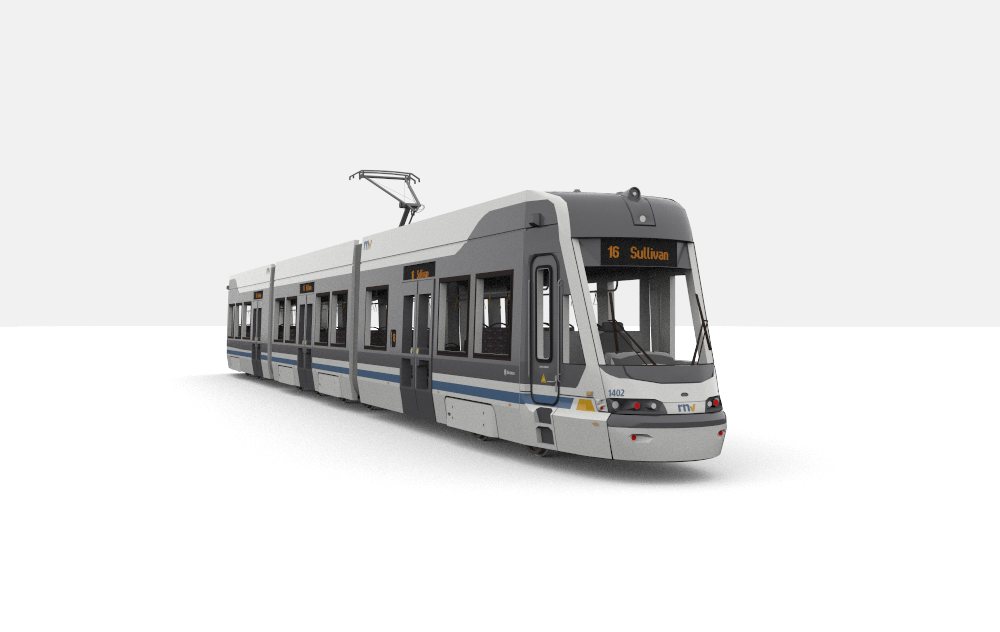

                                            test6.png


                                            rs2.jpg

                                            http://www.zz7.de

                                            1 條回覆 最後回覆 回覆 引用 0
                                            • 1
                                            • 2
                                            • 3
                                            • 4
                                            • 5
                                            • 6
                                            • 4 / 6
                                            • 第一個貼文
                                              最後的貼文
                                            Buy SketchPlus
                                            Buy SUbD
                                            Buy WrapR
                                            Buy eBook
                                            Buy Modelur
                                            Buy Vertex Tools
                                            Buy SketchCuisine
                                            Buy FormFonts

                                            Advertisement