sketchucation logo sketchucation
    • 登入
    Oops, your profile's looking a bit empty! To help us tailor your experience, please fill in key details like your SketchUp version, skill level, operating system, and more. Update and save your info on your profile page today!
    🔌 Smart Spline | Fluid way to handle splines for furniture design and complex structures. Download

    [Plugin] Universal Importer - v1.2.6 - 30 July 2024

    已排程 已置頂 已鎖定 已移動 Plugins
    446 貼文 109 Posters 456.8k 瀏覽 109 Watching
    正在載入更多貼文
    • 從舊到新
    • 從新到舊
    • 最多點贊
    回覆
    • 在新貼文中回覆
    登入後回覆
    此主題已被刪除。只有擁有主題管理權限的使用者可以查看。
    • samuel_tS 離線
      samuel_t @MikeG73
      最後由 samuel_t 編輯

      Hello @MikeG73

      Thanks 😉

      Indeed, BLEND format support in this extension is limited to older .blend files and one must claim then map the textures manually...

      I hope to improve that in the future 😇

      Cheers!

      1 條回覆 最後回覆 回覆 引用 0
      • R 離線
        RLGL
        最後由 編輯

        I have the latest DL. Thank you for the update. The scale is now correctly imported.
        Dave

        1 條回覆 最後回覆 回覆 引用 1
        • S 離線
          sashapepperspray
          最後由 編輯

          I have just updated the plugin and tried using it, and I get the following error:
          Universal Importer Error: Command failed: cd /d "C:/Users/tenen/AppData/Local/Temp/Universal Importer" && "C:/Users/tenen/AppData/Roaming/SketchUp/SketchUp 2024/SketchUp/Plugins/universal_importer/Applications/Assimp/Win/assimp.exe" export "export.dae" "export.obj" -tri
          I tried going to a previous version of sketchup, where I have an older version of the plugin, and I have the same error
          Do you know what this error is, and how I could fix it?

          S 1 條回覆 最後回覆 回覆 引用 0
          • S 離線
            sashapepperspray @sashapepperspray
            最後由 sashapepperspray 編輯

            This is the complete error:

            Universal Importer Error: Command failed: cd /d "C:/Users/tenen/AppData/Local/Temp/Universal Importer" && "C:/Users/tenen/AppData/Roaming/SketchUp/SketchUp 2024/SketchUp/Plugins/universal_importer/Applications/Assimp/Win/assimp.exe" export "export.dae" "export.obj" -tri

            C:/Users/tenen/AppData/Roaming/SketchUp/SketchUp 2024/SketchUp/Plugins/universal_importer/assimp.rb:106:in `convert_model'

            Universal Importer Version: 1.2.6

            I have tried uninstalling and reinstalling microsoft visual runtime, and I still have the problem.

            @samuel_t do you have any ideas about this? thank you

            samuel_tS 1 條回覆 最後回覆 回覆 引用 0
            • samuel_tS 離線
              samuel_t @sashapepperspray
              最後由 samuel_t 編輯

              @sashapepperspray This error message indicates that the bug occurs when a polygon reduction is requested, in the SU viewport, with the plugin toolbar... but I don't know why.

              Have you succeeded in this operation with other 3D models? Or this operation fails everytime, whatever the 3D model?

              S 1 條回覆 最後回覆 回覆 引用 0
              • S 離線
                sashapepperspray @samuel_t
                最後由 編輯

                @samuel_t It happens anytime I try any model, and also when I try importing models, I get this error
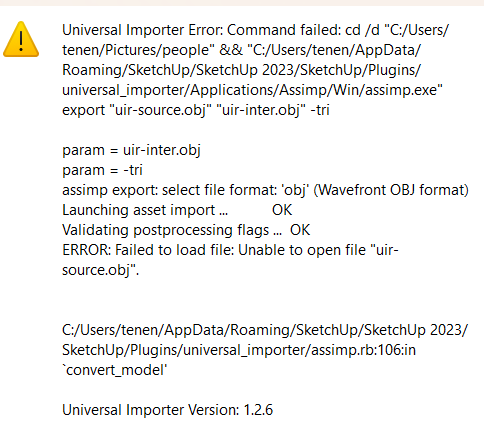
                Screenshot 2024-08-11 001507.png

                samuel_tS 1 條回覆 最後回覆 回覆 引用 0
                • samuel_tS 離線
                  samuel_t @sashapepperspray
                  最後由 編輯

                  @sashapepperspray Do you have Windows 10 or Windows 11? Are you Administrator of your OS?

                  S S 2 條回覆 最後回覆 回覆 引用 0
                  • S 離線
                    sashapepperspray @samuel_t
                    最後由 編輯

                    @samuel_t I am the administrator, and I have windows 11

                    samuel_tS 1 條回覆 最後回覆 回覆 引用 0
                    • samuel_tS 離線
                      samuel_t @sashapepperspray
                      最後由 samuel_t 編輯

                      @sashapepperspray
                      Can you please confirm that the latest Visual C++ Redistributable x64 is installed on your Windows? Here is a reference screenshot:

                      VC Redist X64.png

                      Hypothesis: You have a security software that blocks the Assimp executable (assimp.exe) when it tries to access the file system 🤔

                      S 1 條回覆 最後回覆 回覆 引用 0
                      • S 離線
                        sashapepperspray @samuel_t
                        最後由 編輯

                        @samuel_t I have the laset visual c++ installed. Do you know how I could fix this security problem?

                        samuel_tS 1 條回覆 最後回覆 回覆 引用 0
                        • samuel_tS 離線
                          samuel_t @sashapepperspray
                          最後由 samuel_t 編輯

                          @sashapepperspray
                          The security software is just a clue, I don't know if that's the issue.

                          Using the Windows File Explorer, can you please access this folder:

                          C:\Users\tenen\AppData\Roaming\SketchUp\SketchUp 2024\SketchUp\Plugins\universal_importer\Applications\Assimp\Win

                          Run assimp.exe and then report to this thread any errors you see.

                          S 1 條回覆 最後回覆 回覆 引用 0
                          • S 離線
                            sashapepperspray @samuel_t
                            最後由 編輯

                            @samuel_t nothing happens, a screen pops up for half a second, but disappears, and that is it.

                            S 1 條回覆 最後回覆 回覆 引用 0
                            • C 離線
                              cuagn
                              最後由 編輯

                              Hello,
                              I've installed Universal Importer 1.2.6 llast July in order to use it with SketchUp Make 2017 (I'm not a PRO, just for Hobby).

                              I try to use it today and I face this error, even after a reinstall of UI 1.2.6

                              alt text

                              I'm running
                              Windows 11 Professionnel

                              1 條回覆 最後回覆 回覆 引用 0
                              • S 離線
                                shagrat @samuel_t
                                最後由 編輯

                                Hi, I'm having a similar issue with this extension, I just get an error message (below) when I try to import a step file. This is the first time I've tried using this extension.
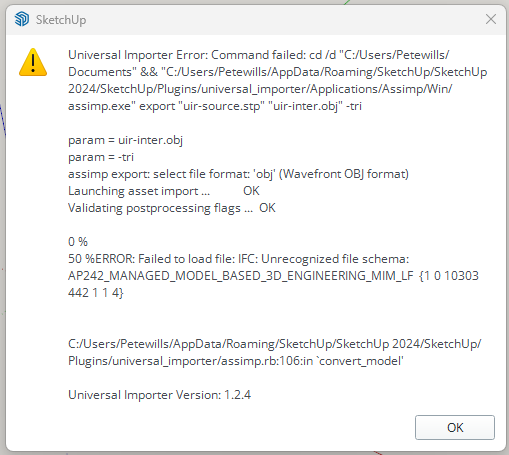
                                4e388390-e0bc-4c6b-9f6b-687e787f1b1e-image.png

                                Any help would be greatly appreciated. I have a whole bunch of components to import from a customer (I'm designing an assembly machine for him).

                                Really hope you can help as it takes forever to draw them from scratch.

                                Many thanks.

                                TIGT 1 條回覆 最後回覆 回覆 引用 0
                                • TIGT 離線
                                  TIG Moderator @shagrat
                                  最後由 TIG 編輯

                                  @shagrat
                                  I'm sure samuel will chip in...
                                  In the meanwhile...
                                  The error message refers to v1.2.4 - there is a newer version v1.2.6
                                  Also the error message relates to the import of an STP file as an OBJ file - you say in your text it was a STeP file [AP203/214 an 242 are supported]
                                  It will help samuel if you clarify exactly what file-type you are trying to import and how you are doing it...
                                  Meanwhile install the newest version of the extension...

                                  TIG

                                  S 1 條回覆 最後回覆 回覆 引用 0
                                  • S 離線
                                    shagrat @TIG
                                    最後由 編輯

                                    @TIG I've downloaded the latest version and get the following message:
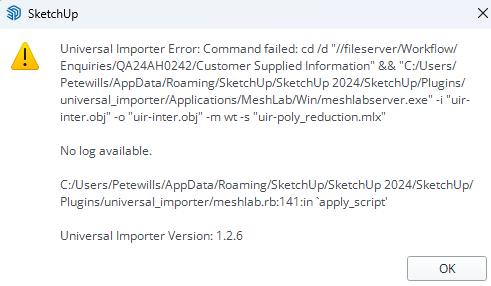
                                    18d96cc2-b120-43c7-a18d-362c57d2f2a7-image.png

                                    The file I'm trying to import is this:
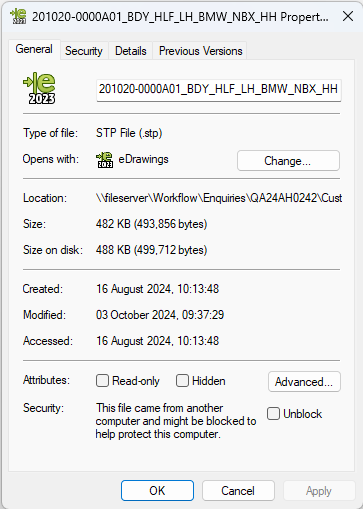
                                    e50db7ae-4567-43e7-a297-0382c9823dbb-image.png

                                    Hope someone can help as I have 40 of these components to import (or I have to draw them from scratch in SketchUp ☹

                                    Cheers

                                    TIGT samuel_tS 2 條回覆 最後回覆 回覆 引用 0
                                    • TIGT 離線
                                      TIG Moderator @shagrat
                                      最後由 編輯

                                      @shagrat
                                      At least you're getting new errors !!
                                      Hopefully @samuel_t can comment asap...

                                      TIG

                                      1 條回覆 最後回覆 回覆 引用 0
                                      • V 離線
                                        vadhome
                                        最後由 編輯

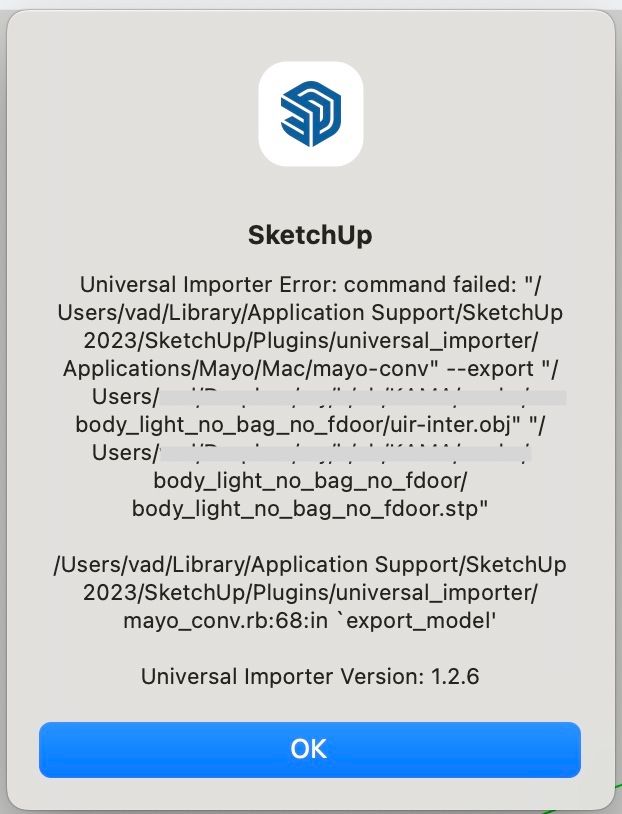
                                        Hi! The extension does not work on MacOS Ventura M2 . How to install it correctly?!error.jpg

                                        samuel_tS 2 條回覆 最後回覆 回覆 引用 0
                                        • S 離線
                                          sashapepperspray @sashapepperspray
                                          最後由 編輯

                                          @sashapepperspray
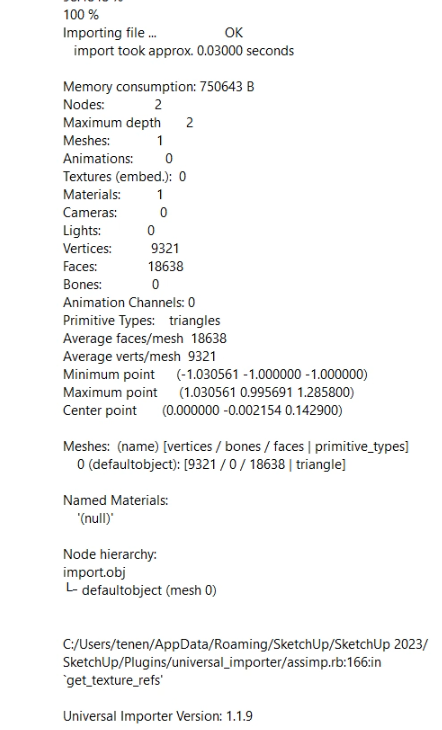
                                          I have installed an older version of the plugin (1.1.9) and I now can do poligon reduction, but I can't import, I get the following error messageScreenshot 2024-11-21 201114.png Screenshot 2024-11-21 201155.png
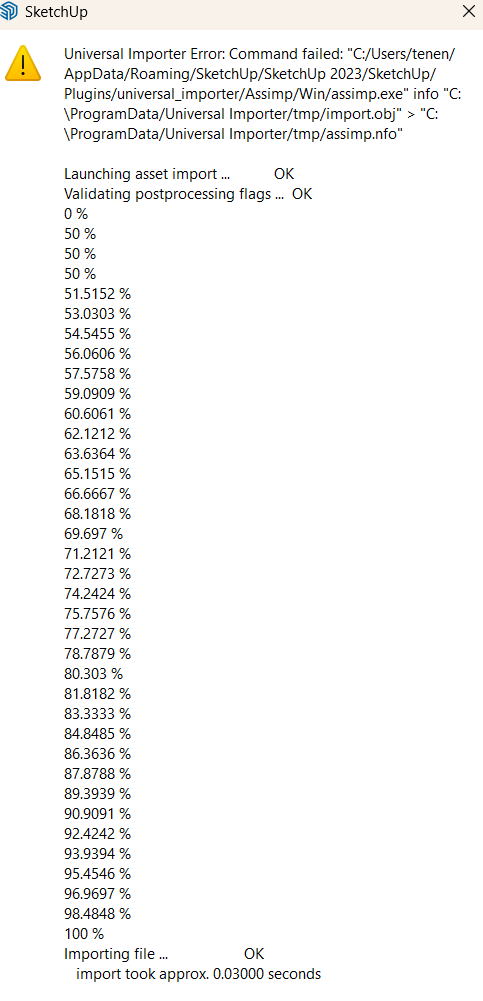
                                          do you have any ideas?

                                          samuel_tS 1 條回覆 最後回覆 回覆 引用 0
                                          • E 離線
                                            esthery Newcomers
                                            最後由 編輯

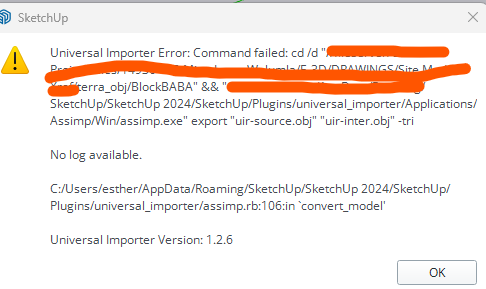
                                            image.png

                                            getting this error.. any solution?

                                            1 條回覆 最後回覆 回覆 引用 0
                                            • 1
                                            • 2
                                            • 12
                                            • 13
                                            • 14
                                            • 15
                                            • 16
                                            • 22
                                            • 23
                                            • 14 / 23
                                            • 第一個貼文
                                              最後的貼文
                                            Buy SketchPlus
                                            Buy SUbD
                                            Buy WrapR
                                            Buy eBook
                                            Buy Modelur
                                            Buy Vertex Tools
                                            Buy SketchCuisine
                                            Buy FormFonts

                                            Advertisement