[Plugin] ToolbarEditor (1.1.2) – updated 08.06.2014
-
I installed it from the scf plugin store and I thought it was the last version but it was not, now it works !
Thank you !
-
@ely862me said:
I installed it from the scf plugin store and I thought it was the last version but it was not, now it works !
Andreas updated this toolset twice on the same day, so the second version was not automatically picked up... v1.0.6 will be added to the 'SketchUcation Plugin Store' shortly... -
Andreas, here's a nice idea that I liked. That in addition to customize toolbar one could paste a snippet for a completely new command: http://sketchucation.com/forums/viewtopic.php?f=15&t=52454&p=475992#p475990
This would be a great tool. You think this tool can be tweaked for that?
-
-
Can someone write a sample ruby script to make an icon for a native command that has no icon so I can use it to add the icon to a toolbar made with ToolbarEditor?
-
How do you delete an icon in a toolbar made with ToolbarEditor?
-
How do you delete a toolbar made with ToolbarEditor?
-
-
1 - which one?
2 - click on the icon and drag it slowly on the right panel
3 - click on the minus sign - top right of your toolbar header -
@cadfather said:
1 - which one?
Generically so I could modify it for any command
@cadfather said:
2 - click on the icon and drag it slowly on the right panel
Thank you
@cadfather said:
3 - click on the minus sign - top right of your toolbar header
duh

-
As in the API documentation… http://www.sketchup.com/intl/en/developer/docs/ourdoc/command.php
cmd = UI;;Command.new("name of the command"){
  AuthorModule;;PluginName.name_of_the_main_method()
}
cmd.tooltip = "tooltip that describes the command"
cmd.status_bar_text = "text that tells how to use the command"
cmd.large_icon = "./path/to/a/icon24px.png"
cmd.small_icon = "./path/to/a/icon16px.png"
It still can only be used with understanding of what it does, and you would have to look up how a certain plugin is started.
It would probably be sufficient and much easier to edit the plugin's own ruby file, look for "UI::Command.new" and add the icons. The icon path can either be relative to the ruby file or absolute (to the system's root, ie. "C:/" on Windows).
Some plugins add themself only to the menu without creating a command. That looks like this:
UI.menu("plugins").add_item("name of the command"){ name_of_the_method }and can be replaced by a command object (as above) plus
UI.menu("plugins").add_item(cmd) -
Hello, could anyone help. I used this plugin with 2013 but it does not seem to work with 2014. I find it very useful, particularly as I use a mac and you can't stack the toolbars as you do on windows
many thanks
Dan
Macbook Pro
OSX 10.9
Sketchup Pro 2014 -
It throws a load error in SU2014
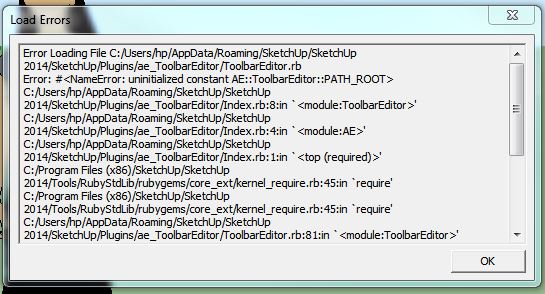
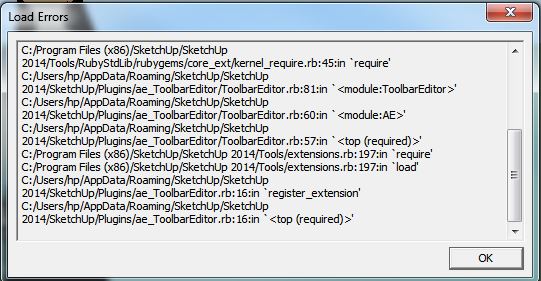
-
If you are curious, you can have a sneak-peak on the next version 1.1.0 with custom buttons. You will be able to create your own toolbar buttons for Ruby one-liners, code snippets or other things found on the forum.
-
Thanks, I fixed the load error.
-
@aerilius said:
Thanks, I fixed the load error.
BUT you haven't published it
-
It's on the previous page Tig, not the first post. It's a teaser/beta and the fix worked for me.
-
So the version in that mid-thread post has been updated - it was not clear...

-
I've noticed that this plugin takes a fairly long time to load all the icons at startup. Is there any other negative affects to performance?
-
It has an arbitrary timeout of five seconds. It's not doing much processing, it just needs to be sure that SketchUp has finished loading all other plugins. I wish SketchUp had (or will have) a proper API method for that. When I come back I'll see if it still works reliably wirh a shorter timeout.
-
its kind of strange for me. i have something like 4 tool bars, they load one icon at a time, and then on the 5th toolbar i made it loads all 6 instantly .. :
 :
: -
I updated the plugin. It now includes custom buttons.

-
Incredible.
-
I can haz all thomthoms in a toolbar?








Hello! It looks like you're interested in this conversation, but you don't have an account yet.
Getting fed up of having to scroll through the same posts each visit? When you register for an account, you'll always come back to exactly where you were before, and choose to be notified of new replies (either via email, or push notification). You'll also be able to save bookmarks and upvote posts to show your appreciation to other community members.
With your input, this post could be even better 💗
Register Login


Advertisement