[Plugin] ToolbarEditor (1.1.2) – updated 08.06.2014
-
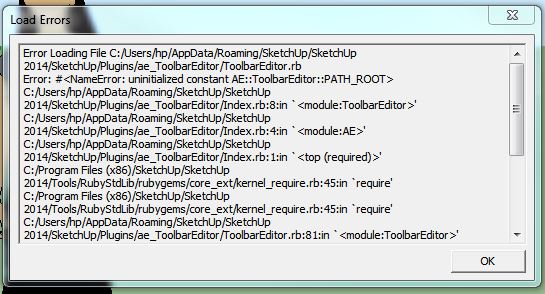
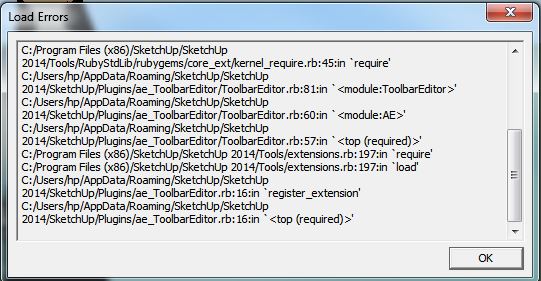
It throws a load error in SU2014
-
If you are curious, you can have a sneak-peak on the next version 1.1.0 with custom buttons. You will be able to create your own toolbar buttons for Ruby one-liners, code snippets or other things found on the forum.
-
Thanks, I fixed the load error.
-
@aerilius said:
Thanks, I fixed the load error.
BUT you haven't published it
-
It's on the previous page Tig, not the first post. It's a teaser/beta and the fix worked for me.
-
So the version in that mid-thread post has been updated - it was not clear...

-
I've noticed that this plugin takes a fairly long time to load all the icons at startup. Is there any other negative affects to performance?
-
It has an arbitrary timeout of five seconds. It's not doing much processing, it just needs to be sure that SketchUp has finished loading all other plugins. I wish SketchUp had (or will have) a proper API method for that. When I come back I'll see if it still works reliably wirh a shorter timeout.
-
its kind of strange for me. i have something like 4 tool bars, they load one icon at a time, and then on the 5th toolbar i made it loads all 6 instantly .. :
 :
: -
I updated the plugin. It now includes custom buttons.

-
Incredible.
-
I can haz all thomthoms in a toolbar?
-
Thank you for sharing this with us.
-
does this mean it's time for the Icon Making Challenge?
-
I can't enter code for custom (new) buttons using SketchUp Make 2014. Other wise this is a great extension. Thanks
-
how did miss this one, very nice...
just pondering some additional behaviour...
I regularly 'bury' plugins that I use infrequently, but add the tools main icon to a toolbar and use that to 'load' the plugin only when I need it, I tend to do it for plugins that add observers, skp's or materials to my model.
I try to do it on my own plugins as well so the 'command' is the loader...
examplecommand2 = UI;;Command.new("Add mac batch Icons"){ load( File.join(File.dirname(__FILE__), "Add_icon_logic_batch_skps.rb") ) }could the 'burying' be an option for this plugin?
so if I add a complex plugin to a toolbar it is moved into a 'Toolbar 1' folder and only a single icon is added to the 'Toolbar 1' toolbar, but if I click on that 'Icon' 'Toolbar 1' is replace by a second 'Toolbar1' that includes any additional toolset buttons at exactly the same position...
I'll see if I can find my simple 2 tool test file, that may clarify what I mean...
john
-
Thank you so much Aerilius!
It could be nice to export custom toolbars to a *.dat file to get the same toolbars in other computers. Is there any way to do anything like that?
Greetings!
-
The toolbars are stored in the registry
HKEY_CURRENT_USER\Software\SketchUp\SketchUp 2014\Plugins_ae\ToolbarEditor.
You can copy and paste it in the same key on another SketchUp installation or version. You can also use the File → Export functionality of the registry. I'm not sure whether I should add an export button to each of my plugins, I hope SketchUp will provide an efficient and central place to migrate settings.From a developer side, I want to emphasis again that most of us want plugin settings to be namespaced and bundled in one sub-key, and not mixed within SketchUp's internal keys.
-
@aerilius said:
The toolbars are stored in the registry
HKEY_CURRENT_USER\Software\SketchUp\SketchUp 2014\Plugins_ae\ToolbarEditor.
You can copy and paste it in the same key on another SketchUp installation or version. You can also use the File → Export functionality of the registry. I'm not sure whether I should add an export button to each of my plugins, I hope SketchUp will provide an efficient and central place to migrate settings.Thank you for your response! Greetings!

-
i would love this tool could create groups of nested buttons, like those in the bar "getting started"






Hello! It looks like you're interested in this conversation, but you don't have an account yet.
Getting fed up of having to scroll through the same posts each visit? When you register for an account, you'll always come back to exactly where you were before, and choose to be notified of new replies (either via email, or push notification). You'll also be able to save bookmarks and upvote posts to show your appreciation to other community members.
With your input, this post could be even better 💗
Register Login


Advertisement