sketchucation logo sketchucation
    • 登入
    Oops, your profile's looking a bit empty! To help us tailor your experience, please fill in key details like your SketchUp version, skill level, operating system, and more. Update and save your info on your profile page today!
    🔌 Smart Spline | Fluid way to handle splines for furniture design and complex structures. Download

    [Plugin] FredoTools::ThruPaint - v1.3a - 20 Oct 16

    已排程 已置頂 已鎖定 已移動 Plugins
    331 貼文 102 Posters 537.7k 瀏覽 102 Watching
    正在載入更多貼文
    • 從舊到新
    • 從新到舊
    • 最多點贊
    回覆
    • 在新貼文中回覆
    登入後回覆
    此主題已被刪除。只有擁有主題管理權限的使用者可以查看。
    • S 離線
      shri
      最後由 編輯

      many many thanks for your great tool.. 👍

      1 條回覆 最後回覆 回覆 引用 0
      • majidM 離線
        majid
        最後由 編輯

        unique genius Fredeo!!!!! many many thank you, this is greaaat

        My inspiring A, B, Sketches book: https://sketchucation.com/shop/books/intermediate/2612-alphabet-inspired-sketches--inspiring-drills-for-architects--3d-artists-and-designers-

        1 條回覆 最後回覆 回覆 引用 0
        • pietervP 離線
          pieterv
          最後由 編輯

          Hey Fredo,

          Thanks a lot for the great plugin! You are a hero.

          I have a slight problem tho. I used your plugin and in sketchup it looks like this
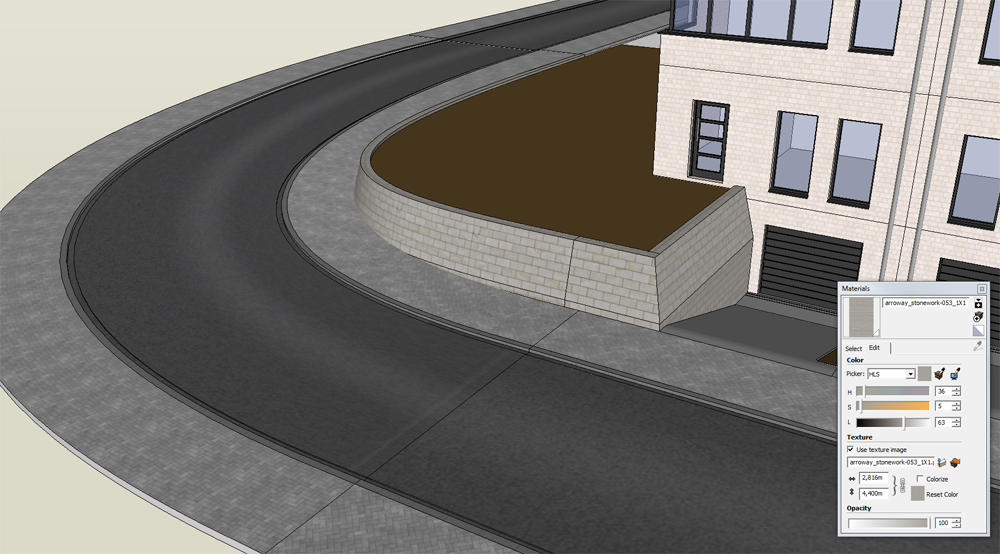
          http://www.citypixels.be/wp-content/uploads/2012/10/sketchup-thrupaint-01.png

          but when I render it in Maxwell Render it looks like this:
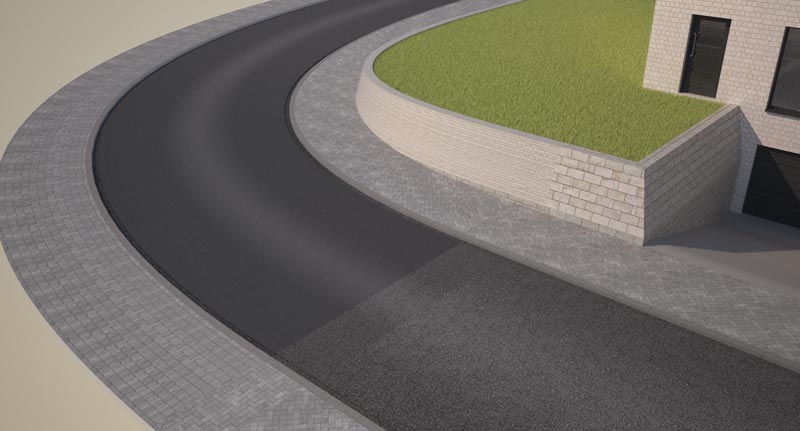
          http://www.citypixels.be/wp-content/uploads/2012/10/simpel-huis-render-017.jpg

          The yellow stones in the little wall have become much smaller and the middle part of the street has become darker. Do you have an idea what the problem could be?

          Thanks!

          Pieter

          This is my website:
          Citypixels - 3d Visualisatie Architectuur

          1 條回覆 最後回覆 回覆 引用 0
          • TIGT 離線
            TIG Moderator
            最後由 編輯

            Check if the two surfaces have the material applied in a different way.
            I suspect that one has the material applied to the face itself while the other has the material applied to the 'container' [group/component-instance] - check this by using 'Entity Info' and selecting the actual faces in each case - the 'mapping' cannot persist into exported formats when applied to a container rather than the face itself... Of course it might be a Maxwell issue with it mis-handing the UVmapping ?

            TIG

            1 條回覆 最後回覆 回覆 引用 0
            • thomthomT 離線
              thomthom
              最後由 編輯

              Contact Maxwell support - as this is their render engine that doesn't properly process the UV mapping.

              Thomas Thomassen — SketchUp Monkey & Coding addict
              List of my plugins and link to the CookieWare fund

              1 條回覆 最後回覆 回覆 引用 0
              • pietervP 離線
                pieterv
                最後由 編輯

                I have checked, and the two materials are axactly the same. I have the free version of Maxwell Render, so I'll repost this under "extensions & applications". Thanks for answering!

                This is my website:
                Citypixels - 3d Visualisatie Architectuur

                1 條回覆 最後回覆 回覆 引用 0
                • thomthomT 離線
                  thomthom
                  最後由 編輯

                  I'd still recommend you contact Maxwell - as this would then be something that presumably affects all users. Reporting issues to the developers is important - otherwise it'll never get fixed.

                  Thomas Thomassen — SketchUp Monkey & Coding addict
                  List of my plugins and link to the CookieWare fund

                  1 條回覆 最後回覆 回覆 引用 0
                  • C 離線
                    cadmunkey
                    最後由 編輯

                    Is this plugin for premium members only? If I click the download icon I get a banner.png.

                    1 條回覆 最後回覆 回覆 引用 0
                    • massimoM 離線
                      massimo Moderator
                      最後由 編輯

                      @unknownuser said:

                      ThruPaint is installed as part of FredoTools.. It requires LibFredo6 4.4 or above.

                      See the main post for this plugin for Installation of FredoTools

                      So you have to go to Fredo tools thread to download the plugin. Scroll down the page and you'll find it below the "download" icon.

                      1 條回覆 最後回覆 回覆 引用 0
                      • C 離線
                        cadmunkey
                        最後由 編輯

                        @massimo said:

                        @unknownuser said:

                        ThruPaint is installed as part of FredoTools.. It requires LibFredo6 4.4 or above.

                        See the main post for this plugin for Installation of FredoTools

                        So you have to go to Fredo tools thread to download the plugin. Scroll down the page and you'll find it below the "download" icon.

                        Cheers!

                        1 條回覆 最後回覆 回覆 引用 0
                        • masterpaulM 離線
                          masterpaul
                          最後由 編輯

                          I cant seem to texture this irregular surface, it just wont do it, textures wont align no matter what, and they also rotated differently everywhere.

                          Edit: Uploaded the file also.
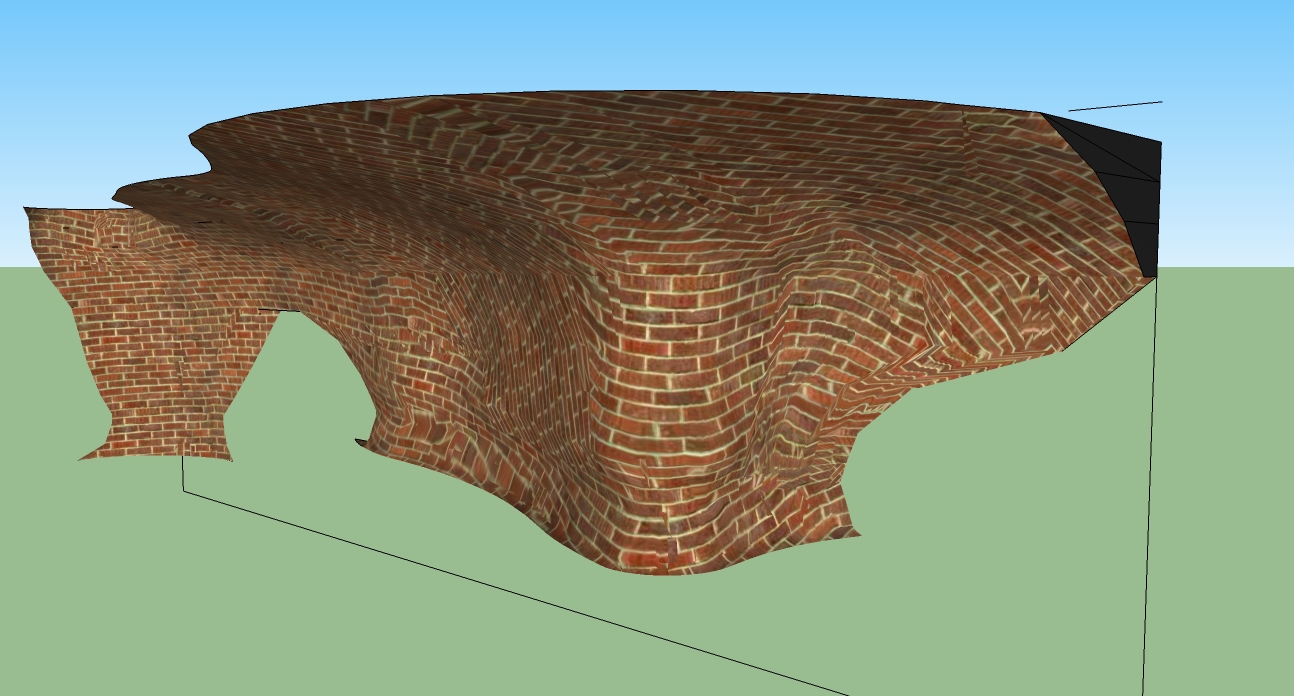

                          Help.jpg


                          Trickeywall.skp

                          1 條回覆 最後回覆 回覆 引用 0
                          • fredo6F 離線
                            fredo6
                            最後由 編輯

                            @masterpaul said:

                            I cant seem to texture this irregular surface, it just wont do it, textures wont align no matter what, and they also rotated differently everywhere.

                            Edit: Uploaded the file also.

                            The surafce is very 'irregular' actually. Unless it is made of Quads (with Thomthom's convention), I am afraid it cannot be properly mapped with ThruPaint.
                            I would recommend you try with SketchUV plugin, which is more specialized in UV-mapping any kind of surface.

                            Fredo

                            1 條回覆 最後回覆 回覆 引用 0
                            • masterpaulM 離線
                              masterpaul
                              最後由 編輯

                              @unknownuser said:

                              @masterpaul said:

                              I cant seem to texture this irregular surface, it just wont do it, textures wont align no matter what, and they also rotated differently everywhere.

                              Edit: Uploaded the file also.

                              The surafce is very 'irregular' actually. Unless it is made of Quads (with Thomthom's convention), I am afraid it cannot be properly mapped with ThruPaint.
                              I would recommend you try with SketchUV plugin, which is more specialized in UV-mapping any kind of surface.

                              Fredo

                              Thanks 😄

                              1 條回覆 最後回覆 回覆 引用 0
                              • OxerO 離線
                                Oxer
                                最後由 編輯

                                Hi Fredo,
                                I'm user of Thea4SU plugin and I have found a conflict with your plugin, before to install Thea4SU, ThruPaint worked fine but after, it appears this Error in Ruby Console:
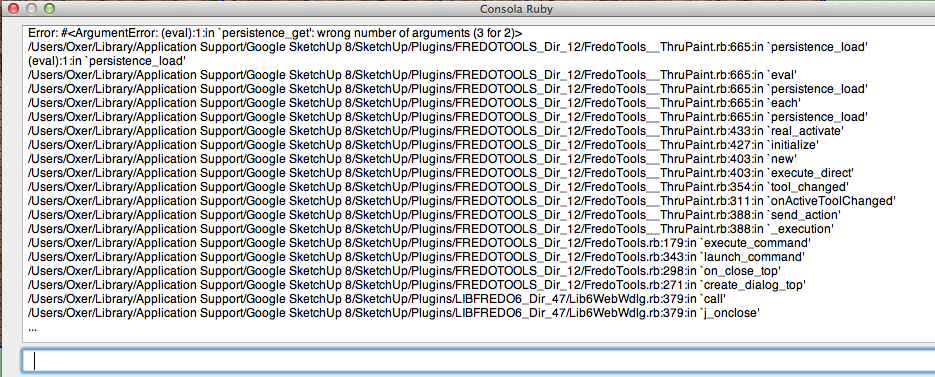
                                Thrupaint Error.png
                                I don't know if you can help me, I'll comment it to Tomasz (plugin developer) too.

                                "The result is the end what is important is the process" by Oxer
                                http://www.oxervision.blogspot.com/

                                1 條回覆 最後回覆 回覆 引用 0
                                • fredo6F 離線
                                  fredo6
                                  最後由 編輯

                                  Oxer,

                                  Thanks for signaling.

                                  Could you type the following in the Ruby console and send me the output
                                  Sketchup.read_default "FredoTools_ThruPaint", "Param"

                                  Thanks

                                  Fredo

                                  1 條回覆 最後回覆 回覆 引用 0
                                  • OxerO 離線
                                    Oxer
                                    最後由 編輯

                                    This is the output in Ruby Console:
                                    Output Ruby Console.png

                                    "The result is the end what is important is the process" by Oxer
                                    http://www.oxervision.blogspot.com/

                                    1 條回覆 最後回覆 回覆 引用 0
                                    • fredo6F 離線
                                      fredo6
                                      最後由 編輯

                                      Oxer,

                                      Thanks. Did you type the command with Thea installed or uninstalled (because the string is correct)?

                                      Fredo

                                      1 條回覆 最後回覆 回覆 引用 0
                                      • OxerO 離線
                                        Oxer
                                        最後由 編輯

                                        With Thea installed, I probed to type the command before and after to use Thea4SU and the result in the ruby console is the same.

                                        "The result is the end what is important is the process" by Oxer
                                        http://www.oxervision.blogspot.com/

                                        1 條回覆 最後回覆 回覆 引用 0
                                        • TIGT 離線
                                          TIG Moderator
                                          最後由 編輯

                                          Perhaps Thea uses a materials-observer and that then clashes with how this Fredo tool works ?
                                          Other renderers like Twilight probably have something similar too, without clashing; so it will be fixable, but then that's probably needed on the Thea side...

                                          TIG

                                          1 條回覆 最後回覆 回覆 引用 0
                                          • thomthomT 離線
                                            thomthom
                                            最後由 編輯

                                            Many render engines has a tendency to cause instability due to observers. Now, I do think ThruPaint also uses some observers. It's not easy to work out where the conflict lies when most render engines scramble their files (understandably).


                                            Thomas Thomassen — SketchUp Monkey & Coding addict
                                            List of my plugins and link to the CookieWare fund

                                            1 條回覆 最後回覆 回覆 引用 0
                                            • 1
                                            • 2
                                            • 13
                                            • 14
                                            • 15
                                            • 16
                                            • 17
                                            • 16 / 17
                                            • 第一個貼文
                                              最後的貼文
                                            Buy SketchPlus
                                            Buy SUbD
                                            Buy WrapR
                                            Buy eBook
                                            Buy Modelur
                                            Buy Vertex Tools
                                            Buy SketchCuisine
                                            Buy FormFonts

                                            Advertisement





