sketchucation logo sketchucation
    • 登入
    Oops, your profile's looking a bit empty! To help us tailor your experience, please fill in key details like your SketchUp version, skill level, operating system, and more. Update and save your info on your profile page today!
    🔌 Smart Spline | Fluid way to handle splines for furniture design and complex structures. Download

    [Plugin] FredoTools - v4.5c - 24 Jun 24


    已排程 已置頂 已鎖定 已移動 Plugins
    463 貼文 123 Posters 710.6k 瀏覽 121 Watching
    正在載入更多貼文
    • 從舊到新
    • 從新到舊
    • 最多點贊
    回覆
    • 在新貼文中回覆
    登入後回覆
    此主題已被刪除。只有擁有主題管理權限的使用者可以查看。
    • F 離線
      fantoosh420
      最後由 編輯

      I have also tried with SU2015 X64 on win7 X64 sp1. i used freedo tools 2.2a (with libfreedo 6.2a, i think). it was (and is) working just fine on my home PC. have to check with this new release of 2.4a.


      Sketchup 14.0.4900
      Core i5 760 @ 3.00 Ghz. 8 GB RAM windows 7 SP1 X64

      1 條回覆 最後回覆 回覆 引用 0
      • micioneM 離線
        micione
        最後由 編輯

        Problem solved.
        (today re-downloaded and installed).
        Works wonders.

        thanks

        1 條回覆 最後回覆 回覆 引用 0
        • OxerO 離線
          Oxer
          最後由 編輯

          New Spanish Language file v2.4a

          Spanish Language File

          "The result is the end what is important is the process" by Oxer
          http://www.oxervision.blogspot.com/

          1 條回覆 最後回覆 回覆 引用 0
          • fredo6F 離線
            fredo6
            最後由 編輯

            Oxer,

            Thanks very much. This will go in next update

            Fredo

            1 條回覆 最後回覆 回覆 引用 0
            • M 離線
              mcjoiner
              最後由 編輯

              Unsure if the following issue is me (likely), or related to FredoTools or LibFredo.

              When using actively using thrupaint the tool works great. As soon as I double-click out, the changes are not visible. If I re-activate the tool, the previous changes are visible again.
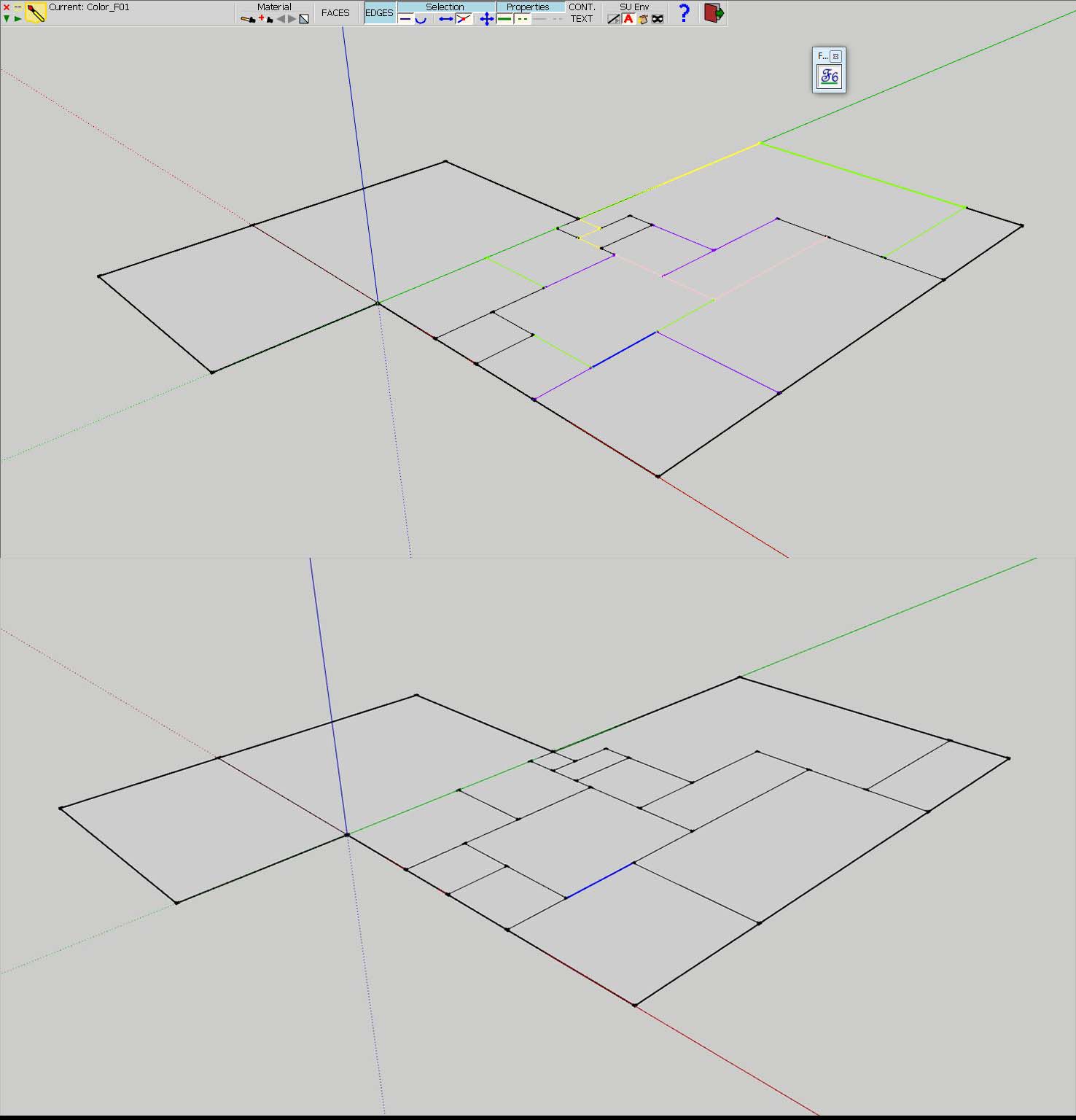
              thru paint.jpg

              I'm currently using sketchup pro 8.

              Suggestions?

              1 條回覆 最後回覆 回覆 引用 0
              • fredo6F 離線
                fredo6
                最後由 編輯

                It is probably related to the style for displaying Edges.

                To see the colors you need to set up the style by material in your model

                Fredo

                1 條回覆 最後回覆 回覆 引用 0
                • fredo6F 離線
                  fredo6
                  最後由 編輯

                  NEW RELEASE: FredoTools v2.5a - 10 Jan 15

                  FredoTools 2.5a is a release for ElementStats v1.0, which is a small tool to display statistiscs about entities in the model in an interactive way.

                  [flash=640,480:sirs851j]http://www.youtube.com/v/46IcCUqVf0c&hl[/flash:sirs851j]

                  Note: it requires to install LibFredo6 v6.6a

                  See main post of this thread for Download.

                  Fredo

                  1 條回覆 最後回覆 回覆 引用 0
                  • cottyC 離線
                    cotty
                    最後由 編輯

                    Thank you for another great addition to your toolbox!

                    my SketchUp gallery

                    1 條回覆 最後回覆 回覆 引用 0
                    • JClementsJ 離線
                      JClements
                      最後由 編輯

                      Another home run.
                      Great for serious modelers and newbies alike. Super great for SU training instructors and plugin demonstrations.

                      John | Illustrator | Beaverton, Oregon

                      1 條回覆 最後回覆 回覆 引用 0
                      • OxerO 離線
                        Oxer
                        最後由 編輯

                        Thanks for this new update!! 👍

                        Spanish Language Fredo Tools v2.5a

                        FredoTools_ES.lang.zip

                        "The result is the end what is important is the process" by Oxer
                        http://www.oxervision.blogspot.com/

                        1 條回覆 最後回覆 回覆 引用 0
                        • fredo6F 離線
                          fredo6
                          最後由 編輯

                          NEW RELEASE: FredoTools v2.5b - 18 Jan 15

                          FredoTools 2.5b is a small update fixing a few bugs in release v2.5a which was for ElementStats.

                          Note: version 2.5 (a and b) requires to install LibFredo6 v6.6

                          See main post of this thread for Download.

                          Fredo

                          1 條回覆 最後回覆 回覆 引用 0
                          • fredo6F 離線
                            fredo6
                            最後由 編輯

                            NEW RELEASE: FredoTools v2.5c - 19 Jan 15

                            FredoTools 2.5c fixes a major bug for SU8 (and SU6, SU7) preventing ElementStats from working properly.

                            Note: version 2.5 (a, b and c) requires to install LibFredo6 v6.6

                            See main post of this thread for Download.

                            Fredo

                            1 條回覆 最後回覆 回覆 引用 0
                            • S 離線
                              schnydix
                              最後由 編輯

                              Hello Fredo Thank you for the great work

                              All Other Translations following soon.
                              Roland F. Swiss

                              Translatet by Hand very carefully
                              Please Do not put my name into the plugins There is only space for the Author (Your name)
                              Save any Space for drawing.

                              FredoTools 2.5a


                              LibFredo6_DE.zip


                              SUClock_DE.zip


                              RoundCorner_DE.zip


                              HoverSelect_DE.zip


                              FredoTools_DE.zip


                              JointPushPull_DE.zip


                              ToolsOnSurface_DE.zip

                              1 條回覆 最後回覆 回覆 引用 0
                              • K 離線
                                KrisM
                                最後由 編輯

                                Feeling kind of dumb here but I can't see how to select both the front and back faces of an object while using ThruPaint. Most useful tool by the way.
                                KrisM

                                1 條回覆 最後回覆 回覆 引用 0
                                • massimoM 離線
                                  massimo Moderator
                                  最後由 編輯

                                  If you mean painting both front and back faces at once then
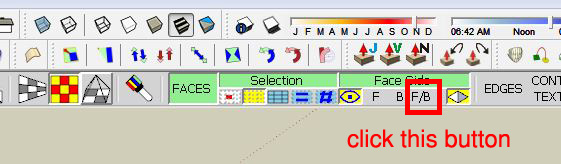
                                  Cattura.JPG

                                  1 條回覆 最後回覆 回覆 引用 0
                                  • K 離線
                                    KrisM
                                    最後由 編輯

                                    Okay, fixed. The options bar wasn't showing up because it was behind a floating toolbar.
                                    KrisM

                                    1 條回覆 最後回覆 回覆 引用 0
                                    • fredo6F 離線
                                      fredo6
                                      最後由 編輯

                                      NEW RELEASE: FredoTools v2.6a - 25 Feb 15

                                      FredoTools 2.6a is a release for

                                      • FredoTools::AutoReverseFaces, which automatically align the orientation of faces in pseudo-solids
                                      • FredoTools::Convexify, which performs the Convex decomposition of 3D shapes

                                      Note: it requires to install LibFredo6 v6.7a

                                      See main post of this thread for Download.

                                      Fredo

                                      1 條回覆 最後回覆 回覆 引用 0
                                      • H 離線
                                        hajasulthan
                                        最後由 編輯

                                        hi how to fix the problem with thrupaint. its says more than 4 edges.

                                        1 條回覆 最後回覆 回覆 引用 0
                                        • Dave RD 離線
                                          Dave R
                                          最後由 編輯

                                          @hajasulthan said:

                                          hi how to fix the problem with thrupaint. its says more than 4 edges.

                                          It would be helpful if you could give some useful information about your model. Perhaps you could post an example that shows the problem. Or at least some screen shots.

                                          Etaoin Shrdlu

                                          %

                                          (THERE'S NO PLACE LIKE)

                                          G28 X0.0 Y0.0 Z0.0

                                          M30

                                          %

                                          1 條回覆 最後回覆 回覆 引用 0
                                          • massimoM 離線
                                            massimo Moderator
                                            最後由 編輯

                                            @hajasulthan said:

                                            hi how to fix the problem with thrupaint. its says more than 4 edges.

                                            Most probably you've tried to apply a texture on surfaces which have more than 4 edges using the "Quadmesh UV" method. Try again by choosing a different method.


                                            1 條回覆 最後回覆 回覆 引用 0
                                            • 1
                                            • 2
                                            • 20
                                            • 21
                                            • 22
                                            • 23
                                            • 24
                                            • 22 / 24
                                            • 第一個貼文
                                              最後的貼文
                                            Buy SketchPlus
                                            Buy SUbD
                                            Buy WrapR
                                            Buy eBook
                                            Buy Modelur
                                            Buy Vertex Tools
                                            Buy SketchCuisine
                                            Buy FormFonts

                                            Advertisement