sketchucation logo sketchucation
    • 登入
    Oops, your profile's looking a bit empty! To help us tailor your experience, please fill in key details like your SketchUp version, skill level, operating system, and more. Update and save your info on your profile page today!
    ⚠️ Important | Libfredo 15.6b introduces important bugfixes for Fredo's Extensions Update

    Artisan 2 Wishlist

    已排程 已置頂 已鎖定 已移動 Plugins
    44 貼文 17 Posters 5.1k 瀏覽 17 Watching
    正在載入更多貼文
    • 從舊到新
    • 從新到舊
    • 最多點贊
    回覆
    • 在新貼文中回覆
    登入後回覆
    此主題已被刪除。只有擁有主題管理權限的使用者可以查看。
    • TIGT 離線
      TIG Moderator
      最後由 編輯

      @solo said:

      Repair holes, I dunno if it's even possible but imagine if there was a way to fix those tiny holes that sometimes appears after subdivision.
      There's been some discussion about this with thomthom under the 'SolidInspector' posts... it MUST be possible - although it is NOT easy! 😒

      TIG

      1 條回覆 最後回覆 回覆 引用 0
      • panixiaP 離線
        panixia
        最後由 編輯

        will ever artisan support quad faces?
        or at least preserve it in case the proxy was properly created with thomthom quadface/vertex tools or fredo curviloft or tig extrusion tools or any other tools wich eventually generates quads? ❓

        it would be very useful for cleaner topology, faster selections, better texture mapping etc. 👍

        1 條回覆 最後回覆 回覆 引用 0
        • P 離線
          Panga
          最後由 編輯

          My wish would be to be able to choose the shape of the brush. For the moment, or I missed something, the Brush is only a circle, I would love to see elispe, squarre or custom shapes used as brush pattern !!

          1 條回覆 最後回覆 回覆 引用 0
          • thomthomT 離線
            thomthom
            最後由 編輯

            @panga said:

            My wish would be to be able to choose the shape of the brush. For the moment, or I missed something, the Brush is only a circle, I would love to see elispe, squarre or custom shapes used as brush pattern !!

            hmm.... an idea form ... what about being able to define a shape by selected face?

            Thomas Thomassen — SketchUp Monkey & Coding addict
            List of my plugins and link to the CookieWare fund

            1 條回覆 最後回覆 回覆 引用 0
            • Bob JamesB 離線
              Bob James
              最後由 編輯

              @jclements said:

              Solo,

              If you saw two Americans somewhere in Europe eating a hamburger and fries in a McDonalds, what does that tell you?
              😎

              They're probably overweight 👿

              i7-4930K 3.4Ghz, 2x GTX780 6GB, 32GB DDR3-1600 ECC, OCZ Vertex 4 500GB, WD Black 3TB, 32TB NAS, 4x 27" Monitors, SpaceMouse Pro, X-keys XK-60

              1 條回覆 最後回覆 回覆 引用 0
              • JClementsJ 離線
                JClements
                最後由 編輯

                For the tool that flattens a selection to a plane, have the ability to input a Z-value or click on a surface once, and use the Z-value of that point to serve as the height of the plane.

                John | Illustrator | Beaverton, Oregon

                1 條回覆 最後回覆 回覆 引用 0
                • W 離線
                  Whaat
                  最後由 編輯

                  @panixia said:

                  will ever artisan support quad faces?
                  or at least preserve it in case the proxy was properly created with thomthom quadface/vertex tools or fredo curviloft or tig extrusion tools or any other tools wich eventually generates quads? ❓

                  it would be very useful for cleaner topology, faster selections, better texture mapping etc. 👍

                  I hope to add support for quad faces in a future version.

                  SketchUp Plugins for Professionals

                  1 條回覆 最後回覆 回覆 引用 0
                  • cottyC 離線
                    cotty
                    最後由 編輯

                    @whaat said:

                    @panixia said:

                    will ever artisan support quad faces?
                    or at least preserve it in case the proxy was properly created with thomthom quadface/vertex tools or fredo curviloft or tig extrusion tools or any other tools wich eventually generates quads? ❓

                    it would be very useful for cleaner topology, faster selections, better texture mapping etc. 👍

                    I hope to add support for quad faces in a future version.

                    👍

                    my SketchUp gallery

                    1 條回覆 最後回覆 回覆 引用 0
                    • panixiaP 離線
                      panixia
                      最後由 編輯

                      👍

                      1 條回覆 最後回覆 回覆 引用 0
                      • thomthomT 離線
                        thomthom
                        最後由 編輯

                        @whaat said:

                        I hope to add support for quad faces in a future version.

                        Let me know if you got questions on the quads.

                        Thomas Thomassen — SketchUp Monkey & Coding addict
                        List of my plugins and link to the CookieWare fund

                        1 條回覆 最後回覆 回覆 引用 0
                        • panixiaP 離線
                          panixia
                          最後由 編輯

                          1 條回覆 最後回覆 回覆 引用 0
                          • CarrozzaC 離線
                            Carrozza
                            最後由 編輯

                            Hi guys, I was wondering whether the next Artisan could get real-time feedback, like the good old subdivide-and-smooth plugin.
                            Actually, I never understood why this useful feature was removed in the first place.

                            1 條回覆 最後回覆 回覆 引用 0
                            • W 離線
                              Whaat
                              最後由 編輯

                              @carrozza said:

                              Hi guys, I was wondering whether the next Artisan could get real-time feedback, like the good old subdivide-and-smooth plugin.
                              Actually, I never understood why this useful feature was removed in the first place.

                              Hi Carrozza,
                              Actually the feature was never removed 😕

                              Make sure you have 'Create Proxy From Group' turned on in the 'Settings' dialog. Then, just create a group and apply the SDS tool to it.

                              SketchUp Plugins for Professionals

                              1 條回覆 最後回覆 回覆 引用 0
                              • CarrozzaC 離線
                                Carrozza
                                最後由 編輯

                                Oops, I'd teach myself to RTFM... sorry.

                                Edit: how do I "discard" the proxy and commit the subdivided mesh? Enter doesn't do it.
                                This time I searched before asking but had no luck.
                                Thanks!

                                1 條回覆 最後回覆 回覆 引用 0
                                • CarrozzaC 離線
                                  Carrozza
                                  最後由 編輯

                                  Ehm, I guess enough time passed after my question to make a bump.

                                  Is it possible to commit a subdivision discarding the proxy?

                                  Thanks!

                                  1 條回覆 最後回覆 回覆 引用 0
                                  • cottyC 離線
                                    cotty
                                    最後由 編輯

                                    @carrozza said:

                                    Ehm, I guess enough time passed after my question to make a bump.
                                    Is it possible to commit a subdivision discarding the proxy?
                                    Thanks!

                                    Do you want

                                    1. to make a subdivision with a group proxy and delete the proxy afterwards or
                                    2. to subdivide without the use of a group proxy?

                                    answer 1: you can edit the group and delete the proxy geometry (see picture)
                                    answer 2: you can subdivide in the context of the group (no proxy will be created)
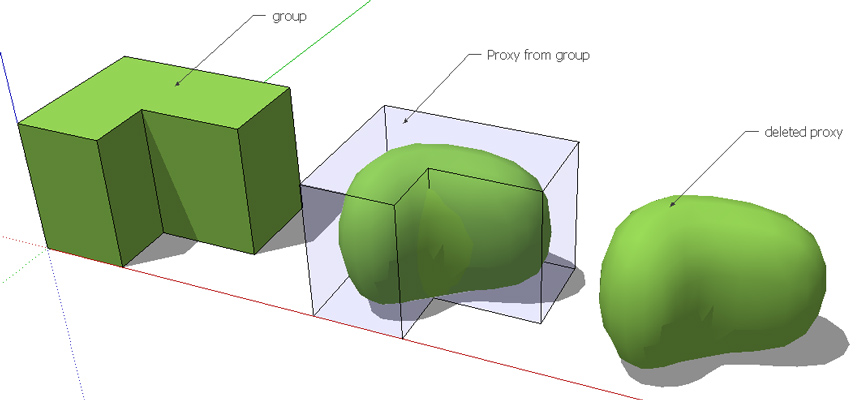

                                    deleted_proxy.jpg

                                    my SketchUp gallery

                                    1 條回覆 最後回覆 回覆 引用 0
                                    • Bob JamesB 離線
                                      Bob James
                                      最後由 編輯

                                      @jclements said:

                                      For the tool that flattens a selection to a plane, have the ability to input a Z-value or click on a surface once, and use the Z-value of that point to serve as the height of the plane.

                                      +1

                                      i7-4930K 3.4Ghz, 2x GTX780 6GB, 32GB DDR3-1600 ECC, OCZ Vertex 4 500GB, WD Black 3TB, 32TB NAS, 4x 27" Monitors, SpaceMouse Pro, X-keys XK-60

                                      1 條回覆 最後回覆 回覆 引用 0
                                      • CarrozzaC 離線
                                        Carrozza
                                        最後由 編輯

                                        Thank you Cotty, it was the first one.
                                        Somehow I supposed that there was a "commit" command that would do this automatically, but manually deleting the proxy group is fine.

                                        1 條回覆 最後回覆 回覆 引用 0
                                        • P 離線
                                          Panga
                                          最後由 編輯

                                          Don't know if it was asked before, but the ability to lock the contour edges of a selection could be really great !!

                                          1 條回覆 最後回覆 回覆 引用 0
                                          • M 離線
                                            mwm5053
                                            最後由 編輯

                                            I just saw where Artisan 1.2 has been released.

                                            2011 iMac
                                            SU 2015 Pro, 2017 Make
                                            V2 Twilight
                                            macOS Sierra 10.12.5

                                            1 條回覆 最後回覆 回覆 引用 0
                                            • 1
                                            • 2
                                            • 3
                                            • 2 / 3
                                            • 第一個貼文
                                              最後的貼文
                                            Buy SketchPlus
                                            Buy SUbD
                                            Buy WrapR
                                            Buy eBook
                                            Buy Modelur
                                            Buy Vertex Tools
                                            Buy SketchCuisine
                                            Buy FormFonts

                                            Advertisement