sketchucation logo sketchucation
    • 登入
    Oops, your profile's looking a bit empty! To help us tailor your experience, please fill in key details like your SketchUp version, skill level, operating system, and more. Update and save your info on your profile page today!
    🔌 Smart Spline | Fluid way to handle splines for furniture design and complex structures. Download

    [Plugin] QuadFaceTools

    已排程 已置頂 已鎖定 已移動 Plugins
    673 貼文 116 Posters 544.8k 瀏覽 116 Watching
    正在載入更多貼文
    • 從舊到新
    • 從新到舊
    • 最多點贊
    回覆
    • 在新貼文中回覆
    登入後回覆
    此主題已被刪除。只有擁有主題管理權限的使用者可以查看。
    • thomthomT 離線
      thomthom
      最後由 編輯

      Do you open the group? You cannot apply mapping to the outside of a group or component.

      Also - why do you want to use copy/paste? In this case it won't map the texture over the whole surface, just fill one of the quads.

      If you want to map the whole surface you should use the UV mapping tool.

      Thomas Thomassen — SketchUp Monkey & Coding addict
      List of my plugins and link to the CookieWare fund

      1 條回覆 最後回覆 回覆 引用 0
      • L 離線
        lapx
        最後由 編輯

        I guess i dont understand how your plugin works:(
        I thought it makes possible mapping texture on curved surfaces without distortions.
        How is this plugin differ from su texture projection method?
        Your right copy paste only worked on one quad. I want to simply map the logo on the entire
        Curved surface. I certain this works w su's projection, i just trying to umderstand the true avantage of your plugin and its optimum use.

        1 條回覆 最後回覆 回覆 引用 0
        • Rich O BrienR 離線
          Rich O Brien Moderator
          最後由 編輯

          Thomthom's plugin is a lot more useful than projection. Have you a file to map you can share?

          Download the free D'oh Book for SketchUp 📖

          1 條回覆 最後回覆 回覆 引用 0
          • thomthomT 離線
            thomthom
            最後由 編輯

            @lapx said:

            I want to simply map the logo on the entire Curved surface.

            Then you want to use the UV Mapping feature. There's a YouTube video that demonstrates it. Have you seen it?

            Thomas Thomassen — SketchUp Monkey & Coding addict
            List of my plugins and link to the CookieWare fund

            1 條回覆 最後回覆 回覆 引用 0
            • T 離線
              Tonyblack
              最後由 編輯

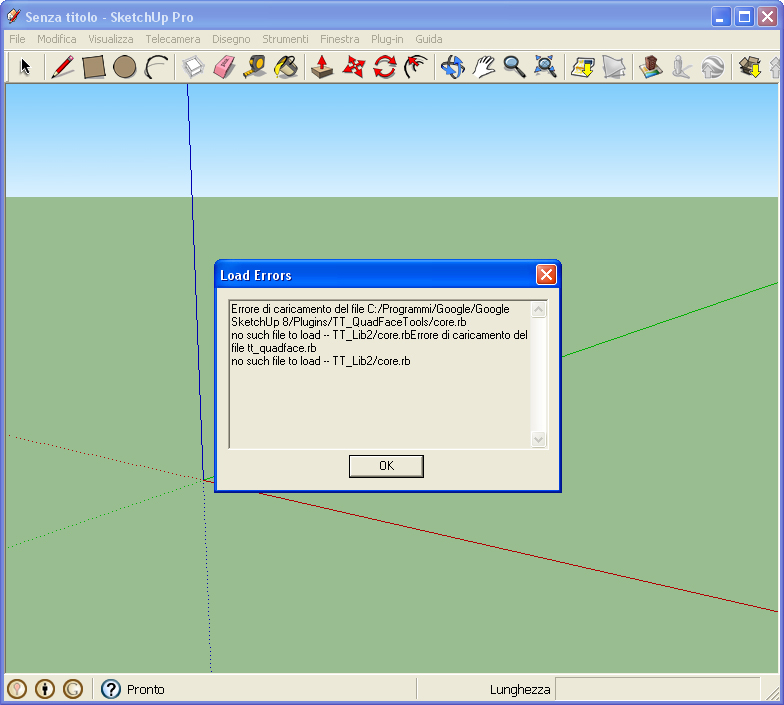
              Hi Thom,
              why after putting QuadFaceTools 0.6.0 in the plugin folder of SketchUp Pro 8 this message appears?
              Thanks and regards,

              Tony


              QuadFaceError.jpg

              1 條回覆 最後回覆 回覆 引用 0
              • Rich O BrienR 離線
                Rich O Brien Moderator
                最後由 編輯

                The error says you need another script to supplement this one.

                The script you need is Thomthoms Lib v2. If you read the download link in this thread you'll notice it mentions it under requirements

                404 — Bitbucket

                favicon

                (bitbucket.org)

                You can get Libv2 here...
                http://forums.sketchucation.com/viewtopic.php?f=323&t=30503

                Download the free D'oh Book for SketchUp 📖

                1 條回覆 最後回覆 回覆 引用 0
                • thomthomT 離線
                  thomthom
                  最後由 編輯

                  [floatr:3lvkx0s1]
                  https://bitbucket.org/thomthom/quadface-tools/wiki/Images/Toolbar_v0_7_0.png
                  [/floatr:3lvkx0s1]
                  Version 0.7.0

                  New Features

                  • Highlight Poles
                  • Build Corners
                  • Build Ends
                  • Convert Wireframe to Quads
                  • Loop to Region

                  Fixed

                  • Selection Tool now also selects entities that isn't quads.
                  • Selection Tool allow triple-click to select all connected.
                  • Cleaned up UI strings.
                  • Cleaned up icons.
                  • Connect Edges' HUD is now movable.

                  Thomas Thomassen — SketchUp Monkey & Coding addict
                  List of my plugins and link to the CookieWare fund

                  1 條回覆 最後回覆 回覆 引用 0
                  • Rich O BrienR 離線
                    Rich O Brien Moderator
                    最後由 編輯

                    Build Corners looks immense 👍

                    Download the free D'oh Book for SketchUp 📖

                    1 條回覆 最後回覆 回覆 引用 0
                    • TIGT 離線
                      TIG Moderator
                      最後由 編輯

                      👍 Thanks, yet again...

                      TIG

                      1 條回覆 最後回覆 回覆 引用 0
                      • N 離線
                        nfmdias
                        最後由 編輯

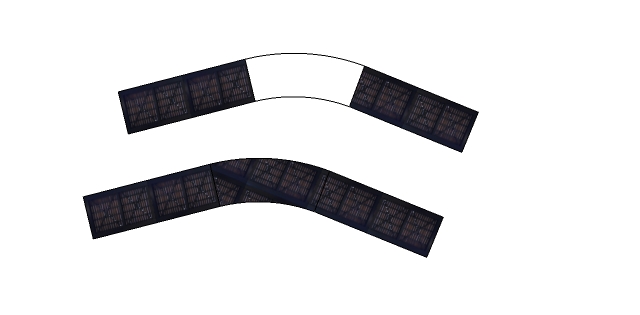
                        Hello!

                        I need your help. I'm doing a bridge and I have a problem in texture.
                        I wanted the texture is accompanied by the span of the bridge.

                        Thanks,
                        nfmdias


                        texture_bend.jpg

                        1 條回覆 最後回覆 回覆 引用 0
                        • thomthomT 離線
                          thomthom
                          最後由 編輯

                          You must create quads for the span of the bridge - then you can use the UV tool to map it.

                          Thomas Thomassen — SketchUp Monkey & Coding addict
                          List of my plugins and link to the CookieWare fund

                          1 條回覆 最後回覆 回覆 引用 0
                          • N 離線
                            nfmdias
                            最後由 編輯

                            @nfmdias said:

                            Hello!

                            I need your help. I'm doing a bridge and I have a problem in texture.
                            I wanted the texture is accompanied by the span of the bridge.

                            Thanks,
                            nfmdias

                            well here is the work done ... not bad. I had to do more triangulations.
                            Thanks for the tip.
                            nfmdias
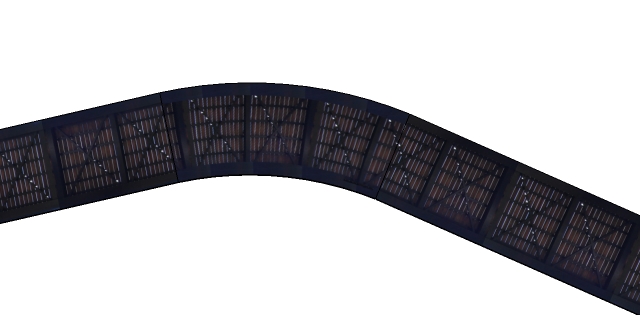

                            bottom view of the bridge

                            1 條回覆 最後回覆 回覆 引用 0
                            • N 離線
                              nfmdias
                              最後由 編輯

                              @thomthom said:

                              You must create quads for the span of the bridge - then you can use the UV tool to map it.

                              after some time and several attempts ... here is the work ... not bad. I had to do more "triangles".

                              thanks for the tip

                              nfmdias
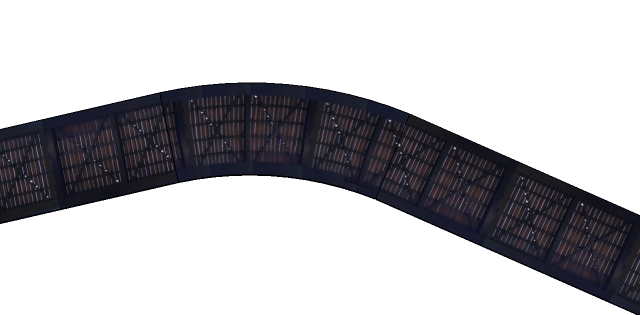

                              texture_bend2.jpg

                              1 條回覆 最後回覆 回覆 引用 0
                              • thomthomT 離線
                                thomthom
                                最後由 編輯

                                😄 👍 👍

                                Thomas Thomassen — SketchUp Monkey & Coding addict
                                List of my plugins and link to the CookieWare fund

                                1 條回覆 最後回覆 回覆 引用 0
                                • M 離線
                                  mingjae
                                  最後由 編輯

                                  hello,

                                  i want to ask something if u mind,
                                  does quadface works with curviloft-ed models?

                                  http://img37.imageshack.us/img37/7431/73239079.jpg

                                  coz i can't click any U or V axis to fix the map on a flag model 😞

                                  I have post it here,:
                                  http://forums.sketchucation.com/viewtopic.php?f=79&t=44024&p=393040#p393040

                                  can somebody maybe, make a tutorial from my model?
                                  sry, im a new start in SU..

                                  ty

                                  1 條回覆 最後回覆 回覆 引用 0
                                  • thomthomT 離線
                                    thomthom
                                    最後由 編輯

                                    @mingjae said:

                                    i want to ask something if u mind,
                                    does quadface works with curviloft-ed models?

                                    You must tell CurviLoft to generate Quads.

                                    CurviLoftQuadFace.png

                                    Thomas Thomassen — SketchUp Monkey & Coding addict
                                    List of my plugins and link to the CookieWare fund

                                    1 條回覆 最後回覆 回覆 引用 0
                                    • M 離線
                                      mingjae
                                      最後由 編輯

                                      Curviloft can do that thing to? great!

                                      but on my PC (SU7), there's no button like yours curviloft,
                                      this is what i have:

                                      http://img684.imageshack.us/img684/7990/64175044.jpg

                                      how to show the button? thx 🎉

                                      1 條回覆 最後回覆 回覆 引用 0
                                      • gillesG 離線
                                        gilles
                                        最後由 編輯

                                        Check if you have the last version.

                                        " c'est curieux chez les marins ce besoin de faire des phrases "

                                        1 條回覆 最後回覆 回覆 引用 0
                                        • R 離線
                                          redlerred7
                                          最後由 編輯

                                          may I give a suggestion?

                                          a way to convert version 5 (4?) pseudo quads into version 6 (newest).

                                          It's easier for me to use the eraser tool and hide the lines than selecting the lines I want and then changing the properties to make them a quad face

                                          1 條回覆 最後回覆 回覆 引用 0
                                          • thomthomT 離線
                                            thomthom
                                            最後由 編輯

                                            @redlerred7 said:

                                            a way to convert version 5 (4?) pseudo quads into version 6 (newest).

                                            404 — Bitbucket

                                            favicon

                                            (bitbucket.org)

                                            @unknownuser said:

                                            In version 0.4.0 the definition of a QuadFace changed. In order to use meshes from older QuadFace versions, as well as meshes generated by Sandbox Tools, you have to convert the mesh via this utility first.
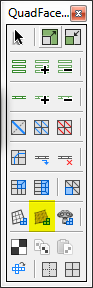
                                            QuadFace.png

                                            Not the most obvious - but I figured the early version where not adopted so widely that there would be that many needing it.


                                            Thomas Thomassen — SketchUp Monkey & Coding addict
                                            List of my plugins and link to the CookieWare fund

                                            1 條回覆 最後回覆 回覆 引用 0
                                            • 1
                                            • 2
                                            • 11
                                            • 12
                                            • 13
                                            • 14
                                            • 15
                                            • 33
                                            • 34
                                            • 13 / 34
                                            • 第一個貼文
                                              最後的貼文
                                            Buy SketchPlus
                                            Buy SUbD
                                            Buy WrapR
                                            Buy eBook
                                            Buy Modelur
                                            Buy Vertex Tools
                                            Buy SketchCuisine
                                            Buy FormFonts

                                            Advertisement