sketchucation logo sketchucation
    • 登入
    Oops, your profile's looking a bit empty! To help us tailor your experience, please fill in key details like your SketchUp version, skill level, operating system, and more. Update and save your info on your profile page today!
    ⚠️ Important | Libfredo 15.6b introduces important bugfixes for Fredo's Extensions Update

    [Plugin] [$] Artisan (1.2.3) - Feb 28, 2014

    已排程 已置頂 已鎖定 已移動 Plugins
    296 貼文 95 Posters 113.5k 瀏覽 95 Watching
    正在載入更多貼文
    • 從舊到新
    • 從新到舊
    • 最多點贊
    回覆
    • 在新貼文中回覆
    登入後回覆
    此主題已被刪除。只有擁有主題管理權限的使用者可以查看。
    • S 離線
      Speaker
      最後由 編輯

      Could someone convert those proxies, so I could open them in SU 7 please.

      http://www.youtube.com/user/latvietis1234

      1 條回覆 最後回覆 回覆 引用 0
      • boofredlayB 離線
        boofredlay
        最後由 編輯

        Here you go.


        Proxie Sample-1_SU6.skp


        comparatif_SU6.zip

        http://www.coroflot.com/boofredlay

        1 條回覆 最後回覆 回覆 引用 0
        • S 離線
          Speaker
          最後由 編輯

          Thanks!

          Just got into a problem- my laptop has a few broken arrow keys. That did not bother me before, becuse I don't use them almost never anyway, but how do I adjust the sculpt tools strenght now? 😕 It looks like only the radius is adjustable throught the VCB.

          http://www.youtube.com/user/latvietis1234

          1 條回覆 最後回覆 回覆 引用 0
          • W 離線
            Whaat
            最後由 編輯

            @speaker said:

            Thanks!

            Just got into a problem- my laptop has a few broken arrow keys. That did not bother me before, becuse I don't use them almost never anyway, but how do I adjust the sculpt tools strenght now? 😕 It looks like only the radius is adjustable throught the VCB.

            Actually you can type in 's' to adjust the strength. (eg. 10s) Did I not mention this in the Quick Reference guide? 😳

            SketchUp Plugins for Professionals

            1 條回覆 最後回覆 回覆 引用 0
            • N 離線
              nektares
              最後由 編輯

              yay! finally available! i bought it right away! thanks for the discount! now let´s try this amazing plugin!

              1 條回覆 最後回覆 回覆 引用 0
              • Dave RD 離線
                Dave R
                最後由 編輯

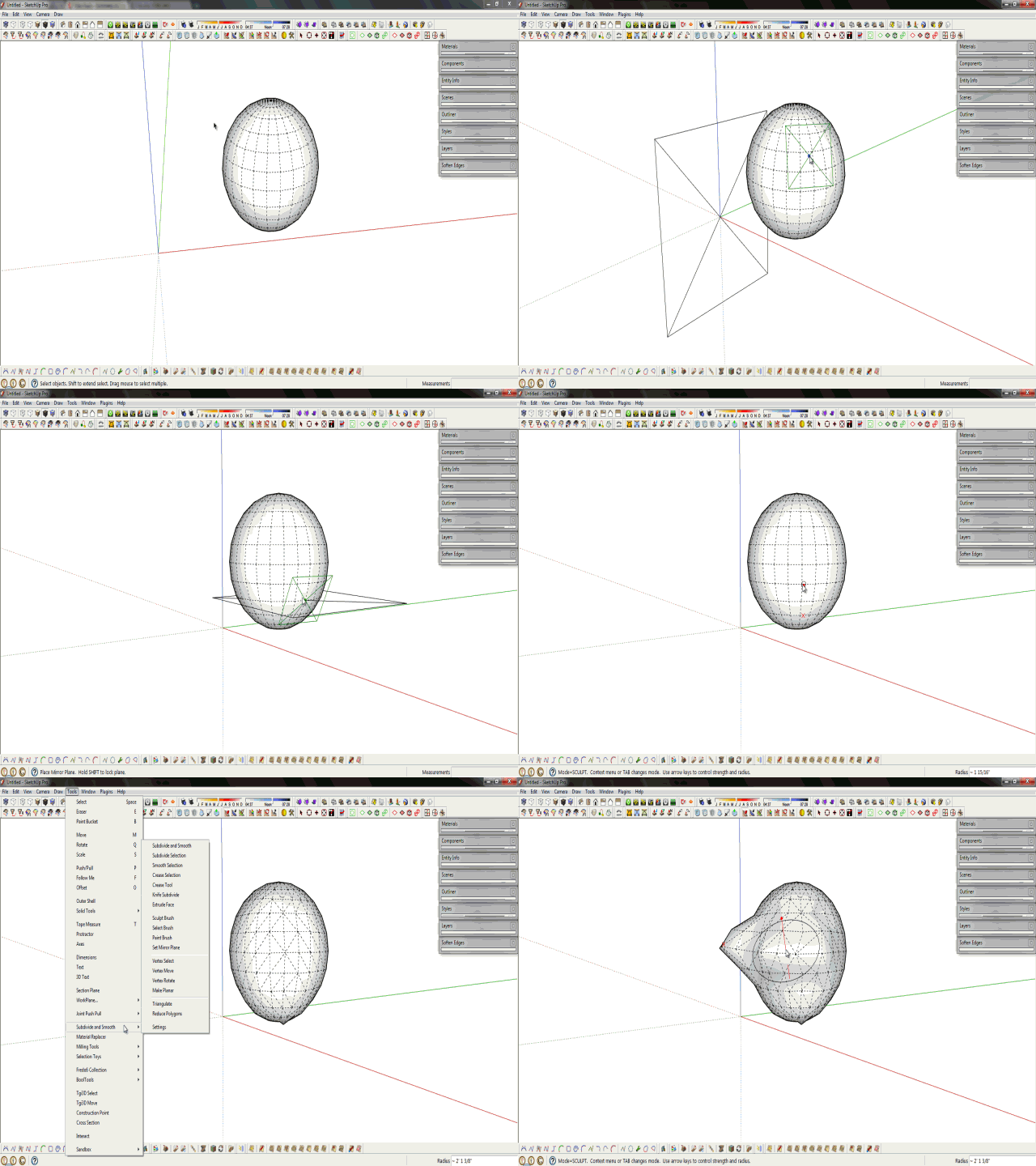
                From the web site: "Symmetrical sculpting mode using with user-defined work plane"

                Is this done by creating a component of half the model, copying and mirroring it? I can't seem to find any other way to do it.

                Etaoin Shrdlu

                %

                (THERE'S NO PLACE LIKE)

                G28 X0.0 Y0.0 Z0.0

                M30

                %

                1 條回覆 最後回覆 回覆 引用 0
                • soloS 離線
                  solo
                  最後由 編輯

                  No, it's more like a cutting plane.

                  http://www.solos-art.com

                  If you see a toilet in your dreams do not use it.

                  1 條回覆 最後回覆 回覆 引用 0
                  • Dave RD 離線
                    Dave R
                    最後由 編輯

                    I wish the tutorials were available.

                    Ah. I see. Split it with the Zorro-like tool.

                    Etaoin Shrdlu

                    %

                    (THERE'S NO PLACE LIKE)

                    G28 X0.0 Y0.0 Z0.0

                    M30

                    %

                    1 條回覆 最後回覆 回覆 引用 0
                    • soloS 離線
                      solo
                      最後由 編輯

                      See gif by Rich to explain.

                      Pete_SDS.gif

                      http://www.solos-art.com

                      If you see a toilet in your dreams do not use it.

                      1 條回覆 最後回覆 回覆 引用 0
                      • Dave RD 離線
                        Dave R
                        最後由 編輯

                        The GIF doesn't display for me. Sorry.

                        Etaoin Shrdlu

                        %

                        (THERE'S NO PLACE LIKE)

                        G28 X0.0 Y0.0 Z0.0

                        M30

                        %

                        1 條回覆 最後回覆 回覆 引用 0
                        • mitcorbM 離線
                          mitcorb
                          最後由 編輯

                          Just deployed this plugin last night.
                          Highly usable. Very intuitive.
                          Wish there was a way to automatically de-select unwanted, or non-compliant faces and keep the selection to proceed with selective smoothing, or subdividing. In my case using Shift/Brush Select does not deselect. Sketchup version 7.1, Dinosaur computer.

                          I take the slow, deliberate approach in my aimless wandering.

                          1 條回覆 最後回覆 回覆 引用 0
                          • P 離線
                            publied
                            最後由 編輯

                            nice tools. orga(s)nic!

                            hire me@ http://www.publied.it !

                            1 條回覆 最後回覆 回覆 引用 0
                            • massimoM 離線
                              massimo Moderator
                              最後由 編輯

                              Just played few minutes...Amazingly fast and really a spectacular set of tools.😮 👍
                              Waiting for the registration key. 🎉 😄

                              1 條回覆 最後回覆 回覆 引用 0
                              • FrederikF 離線
                                Frederik
                                最後由 編輯

                                @solo said:

                                See gif by Rich to explain.

                                Can't see the gif... 😞
                                Checking the link I get the message "You are not authorised to download this attachment."
                                I assume it's from a secret part of the SCF... 💚

                                Cheers
                                Kim Frederik

                                1 條回覆 最後回覆 回覆 引用 0
                                • Rich O BrienR 離線
                                  Rich O Brien Moderator
                                  最後由 編輯

                                  You're damn right but give me ten minutes and I'll sort it out!

                                  Download the free D'oh Book for SketchUp 📖

                                  1 條回覆 最後回覆 回覆 引用 0
                                  • unclebimU 離線
                                    unclebim
                                    最後由 編輯

                                    I really like the plugin and intend to purchase it. I have tested the texturing which is great but I noticed that when loaded Artisan blocks SketchUp's Texture submenu options - Position, Reset Position, Projected, Edit Texture Image. If I want to use these options, I have to disable Artisan via Preferences dialog and restart SketchUp. Is that ok and am I missing something or is it a bug?

                                    Regards

                                    Serafim

                                    1 條回覆 最後回覆 回覆 引用 0
                                    • thomthomT 離線
                                      thomthom
                                      最後由 編輯

                                      @unclebim said:

                                      I really like the plugin and intend to purchase it. I have tested the texturing which is great but I noticed that when loaded Artisan blocks SketchUp's Texture submenu options - Position, Reset Position, Projected, Edit Texture Image. If I want to use these options, I have to disable Artisan via Preferences dialog and restart SketchUp. Is that ok and am I missing something or is it a bug?

                                      Regards

                                      Serafim

                                      Sounds like the old menu-grey-out problem.
                                      Do you have any Fredo plugins installed? If so, have you updated them all?
                                      Do you have a very large number of plugins installed?

                                      Thomas Thomassen — SketchUp Monkey & Coding addict
                                      List of my plugins and link to the CookieWare fund

                                      1 條回覆 最後回覆 回覆 引用 0
                                      • TIGT 離線
                                        TIG Moderator
                                        最後由 編輯

                                        Texture context-menu is OK with Artisan for me...
                                        Are there any other context-menu items missing/grayed-out ?
                                        If so this is a known issue from having too many 'commands' loading - there are fixes updates / available, and a script by AlexM to optimize if not eliminate the issue http://forums.sketchucation.com/viewtopic.php?p=252413#p252413

                                        TIG

                                        1 條回覆 最後回覆 回覆 引用 0
                                        • unclebimU 離線
                                          unclebim
                                          最後由 編輯

                                          Thank you thomthom and TIG, I have Fredo's plugins and all my plugins are updated. I have indeed too much of them loaded so I shall try to resolve that. I also have some component related items graying out like Explode, which happens with Tgi3D loaded. I have to cleanup the pligins obviously.

                                          1 條回覆 最後回覆 回覆 引用 0
                                          • G 離線
                                            gulcanocali
                                            最後由 編輯

                                            Hi unclebim,

                                            @unclebim said:

                                            I also have some component related items graying out like Explode, which happens with Tgi3D loaded. I have to cleanup the pligins obviously.

                                            Could you please give us more details about the problem you mention when Tgi3D is loaded? You can also write to our Support team from our website.

                                            We have not observed such behaviour ourselves. Could you please uninstall Tgi3D only and see if the problem goes away? We would appreciate your feedback so that we can resolve the issue, if any, quickly.


                                            Gulcan Ocali
                                            Product Manager
                                            http://www.Tgi3D.com

                                            1 條回覆 最後回覆 回覆 引用 0
                                            • 1
                                            • 2
                                            • 3
                                            • 4
                                            • 5
                                            • 14
                                            • 15
                                            • 3 / 15
                                            • 第一個貼文
                                              最後的貼文
                                            Buy SketchPlus
                                            Buy SUbD
                                            Buy WrapR
                                            Buy eBook
                                            Buy Modelur
                                            Buy Vertex Tools
                                            Buy SketchCuisine
                                            Buy FormFonts

                                            Advertisement