[Plugin] Work Plane
-
Here's v2.3 http://forums.sketchucation.com/viewtopic.php?p=274345#p274345
Glitch when 'Adjust'ing a 'Disk' more than once is now fixed,
A new 'Hide/UnHide All' toggle option added to context-menu/tools-menu. -
TIG, at least give me the time to finish writing my post!


-
@cadfather said:
TIG, at least give me the time to finish writing my post!
The cause of the 'Adjust Disk' glitch was obvious to me as soon as you reported it - a line of code was not copied between the normal 'Disk Maker' and the 'Adjusted-Disk Maker' methods - thus the newly 'Adjusted' 'Disk' wasn't given its 'disk' attribute, and therefore the 'Adjust' tool thought it was a 'Plane' and so it 'Adjusted' it accordingly [wrongly!]. Note that 'Adjust' might still fail on older 'Disks', that were made before the recent updates and that don't have a 'disk' attribute - if so you need to re-make them and they will then be OK.
Pilou's Hide/UnHide [good] idea was also very simple to do - just a few lines of code switching the 'WORKPLANE' layer on/off...

-
..i see, that actually makes sense.. still that was fast..
[speaking aside] ..and the day hasn't even started..!Thanks!


-
Seems this default will be a must

(Toggle with Tab Key ?)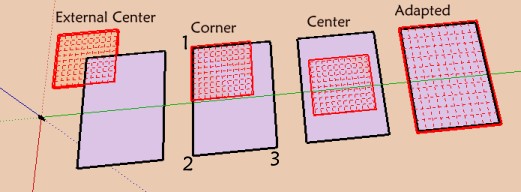
-
Dear Tig,
I'm just trying this new tool which seems to me very interesting, first to build something multileveled, and else to build a part of the drawing with peculiar axes: "non orthogonal",or perpendicular to the screen with the model twisted in some obscure direction.
Additionally it seems also to me that Your
TIG_Flatten to Plane v1.1
and also
Fredo_Tools On Surface - v1.2 (with Contour Editor)
can help a lot..I don't know if the problem I encounter with Tapper Tool which won't align guide lines with the WorkPlane grid is already referenced or not. But this kind of malfunction is diminishing the tool IMo
[flash=720,480:2yk2jx2w]http://www.youtube.com/v/ByD0mjaPnIk[/flash:2yk2jx2w]
My best wishes for the festivities,
simon.
-
Not see how the other icon

-
@guanjin said:
Not see how the other icon
[attachment=0:1rh50put]<!-- ia0 -->未命名.jpg<!-- ia0 -->[/attachment:1rh50put]What other icons ?
You can get additional tools' icons, but only IF you have those other scripts loading too... -
-
The other two icons only appear if you also have
clinesaxes.rbloading.
Get it here http://forums.sketchucation.com/viewtopic.php?p=273671#p273671 if you need them... -
@tig said:
The other two icons only appear if you also have
clinesaxes.rbloading.
Get it here http://forums.sketchucation.com/viewtopic.php?p=273671#p273671 if you need them...Thank you TIG, find you, always quick to solve the problem!
-
Sorry, but I can't get your plugin "Work Plane" working correct (Windows 7, Sketchup 8 - NOT Pro, only the free version). If I create a "New Plane" or a "New Disk", they always disappear, when I then try to use the pencil tool or any other drawing tool. Only the "New Protractor" works correct. What can I do?
-
@mmm-sued said:
Sorry, but I can't get your plugin "Work Plane" working correct (Windows 7, Sketchup 8 - NOT Pro, only the free version). If I create a "New Plane" or a "New Disk", they always disappear, when I then try to use the pencil tool or any other drawing tool. Only the "New Protractor" works correct. What can I do?
When you make the new WorkPlane you pick points in 3d to define it, then the final prompt tells you to "press <Enter> OR to Double-click to Confirm the new WorkPlane" - otherwise you will exit without saving the change ! So you are not confirming the WorkPlane but you are selecting another tool which then skips making a WorkPlane !!!
-
@tig said:
@mmm-sued said:
Sorry, but I can't get your plugin "Work Plane" working correct (Windows 7, Sketchup 8 - NOT Pro, only the free version). If I create a "New Plane" or a "New Disk", they always disappear, when I then try to use the pencil tool or any other drawing tool. Only the "New Protractor" works correct. What can I do?
When you make the new WorkPlane you pick points in 3d to define it, then the final prompt tells you to "press <Enter> OR to Double-click to Confirm the new WorkPlane" - otherwise you will exit without saving the change ! So you are not confirming the WorkPlane but you are selecting another tool which then skips making a WorkPlane !!!Thanks a lot! Great Tool!
-
TIg,
just wanted to thank you for the work plane plugin. I missed seeing it in 2010 and ran across it accidently while viewing a you tube tutorial.. Very very usefull timesaver.
-
I notice if I use the context menu on a selected working plane and choose Working Plane > Scale and then do a rescale, that the working plane becomes ungrouped.
Is this intended?
-
@jclements said:
I notice if I use the context menu on a selected working plane and choose Working Plane > Scale and then do a rescale, that the working plane becomes ungrouped.
Is this intended?
Probably not
I'll test it, if I understand you workflow correctly... -
If I use the context-menu WorkPlane > Scale, it scales the group as expected.
If I then use the native 'Reset Scale' item off the context-menu it resets it to its original size.
I assume this is the command to which you referred.
It does NOT ungroup [explode] the contents.
So, my version does it as expected, yours doesn't.
Do you have any third party scripts loading that might mess with this
-
Tig, the only other thing I didn't mention previously was after choosing Scale from the Context Menu, I grabbed a corner scale handle, dragged inward, and then typed a value in the VCB of .5
-
John
For me that method works just fine too.
So something is adrift between your setup and me [and most other users?]








Hello! It looks like you're interested in this conversation, but you don't have an account yet.
Getting fed up of having to scroll through the same posts each visit? When you register for an account, you'll always come back to exactly where you were before, and choose to be notified of new replies (either via email, or push notification). You'll also be able to save bookmarks and upvote posts to show your appreciation to other community members.
With your input, this post could be even better 💗
Register Login


Advertisement