[Plugin] Work Plane
-
-
The other two icons only appear if you also have
clinesaxes.rbloading.
Get it here http://forums.sketchucation.com/viewtopic.php?p=273671#p273671 if you need them... -
@tig said:
The other two icons only appear if you also have
clinesaxes.rbloading.
Get it here http://forums.sketchucation.com/viewtopic.php?p=273671#p273671 if you need them...Thank you TIG, find you, always quick to solve the problem!

-
Sorry, but I can't get your plugin "Work Plane" working correct (Windows 7, Sketchup 8 - NOT Pro, only the free version). If I create a "New Plane" or a "New Disk", they always disappear, when I then try to use the pencil tool or any other drawing tool. Only the "New Protractor" works correct. What can I do?
-
@mmm-sued said:
Sorry, but I can't get your plugin "Work Plane" working correct (Windows 7, Sketchup 8 - NOT Pro, only the free version). If I create a "New Plane" or a "New Disk", they always disappear, when I then try to use the pencil tool or any other drawing tool. Only the "New Protractor" works correct. What can I do?
When you make the new WorkPlane you pick points in 3d to define it, then the final prompt tells you to "press <Enter> OR to Double-click to Confirm the new WorkPlane" - otherwise you will exit without saving the change ! So you are not confirming the WorkPlane but you are selecting another tool which then skips making a WorkPlane !!!
-
@tig said:
@mmm-sued said:
Sorry, but I can't get your plugin "Work Plane" working correct (Windows 7, Sketchup 8 - NOT Pro, only the free version). If I create a "New Plane" or a "New Disk", they always disappear, when I then try to use the pencil tool or any other drawing tool. Only the "New Protractor" works correct. What can I do?
When you make the new WorkPlane you pick points in 3d to define it, then the final prompt tells you to "press <Enter> OR to Double-click to Confirm the new WorkPlane" - otherwise you will exit without saving the change ! So you are not confirming the WorkPlane but you are selecting another tool which then skips making a WorkPlane !!!Thanks a lot! Great Tool!
-
TIg,
just wanted to thank you for the work plane plugin. I missed seeing it in 2010 and ran across it accidently while viewing a you tube tutorial.. Very very usefull timesaver.
-
I notice if I use the context menu on a selected working plane and choose Working Plane > Scale and then do a rescale, that the working plane becomes ungrouped.
Is this intended?
-
@jclements said:
I notice if I use the context menu on a selected working plane and choose Working Plane > Scale and then do a rescale, that the working plane becomes ungrouped.
Is this intended?
Probably not
I'll test it, if I understand you workflow correctly... -
If I use the context-menu WorkPlane > Scale, it scales the group as expected.
If I then use the native 'Reset Scale' item off the context-menu it resets it to its original size.
I assume this is the command to which you referred.
It does NOT ungroup [explode] the contents.
So, my version does it as expected, yours doesn't.
Do you have any third party scripts loading that might mess with this
-
Tig, the only other thing I didn't mention previously was after choosing Scale from the Context Menu, I grabbed a corner scale handle, dragged inward, and then typed a value in the VCB of .5
-
John
For me that method works just fine too.
So something is adrift between your setup and me [and most other users?] -
Hello TIG,
Is there a way to keep the grid from being deleted when I use the native delete guides tool?
I started on this path with the SU teams's "Grid" plugin, and mitcorb suggested I try your work plane plugin v2.3. Am I doing something incorrectly that the work palane guides disappear when I use that native option?
BTW, really cool plugin

-
No.
The native guide deleter erases ALL guides everywhere !
Inside placed instances/groups and everywhere.
They cannot be protected - evened 'locked' containers etc will lose content!There are alternatives to the native guide-deleter...
Use one of those or accept that you cannot use the native guide-deleter OR that your WorkPlanes and any other object containing guides will loose them... -
Thanks TIG
Cool plugin. I'll use some alternatives to preserve when needed. -
Perhaps my couple of weeks of playing renders me to much a newbie to understand this plugin.

I found it when searching for a way to correct a model with two objects where in the process of building them they "went astray" of the original plane so that when I try to print them on my Printerbot they are askew.
How can I use this plugin to align the bottom plane of both objects so they are flat on the new plane?
I created a disk that lays flat on the XY axis and can clearly see the objects are not lying flat but are slightly tilted. I spend a lot of time trying to manually rotate to get things aligned on the xy axis but just cannot seem to get there.
Is there a simple explanation or instruction on how to select a component and then make sure it's bottom face is aligned FLAT to the new disk? Then repeat for the second object so their bottom faces are both exactly on the same plane?
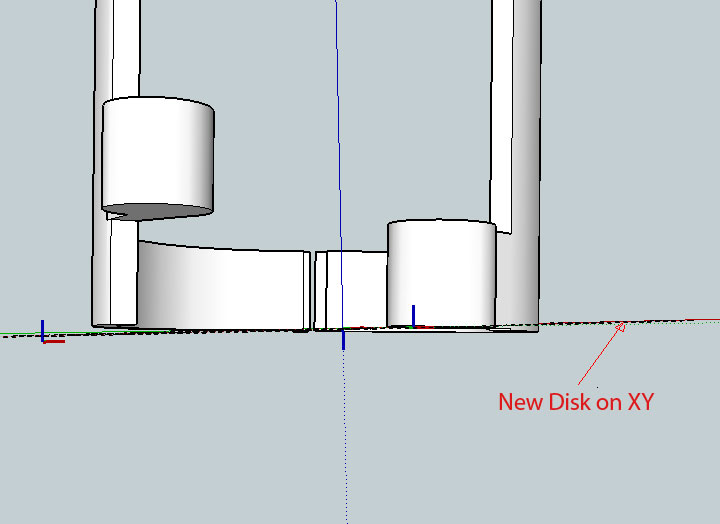
Be gentle with me...I am not yet familiar enough with Sketchup for someone to just assume I already know all the functions.
Thanks in advance your your help guys ( and gals )
-
Paul, you don't need a plugin of any sort to align the bottoms of the objects. You can do this with just the Move tool. Select the object you wish to move and get the Move tool. Grab the selection at a point along the bottom and start moving it in the blue direction. Press and hold Shift to lock the direction of the Move and then move the cursor to the bottom of the other object. You can also use the up or down cursor keys to lock the direction although I'm partial to using the Shift key because it's only one key for locking direction and it works on off axis moves, too.
-
I thought some of his components were skewed from the vertical?
-
They might be and of course that'll require other stuff. I didn't want to assmue, though.
-
I installed this today, it might be more useful, if the units were not feet, perhaps some variables, feet, inches or feet+inches. Granted is is a simple matter to convert the units, but in the case of 16 inches, I feel 1'4" might be better that 1.33333.
Just my 2¢ worth.








Hello! It looks like you're interested in this conversation, but you don't have an account yet.
Getting fed up of having to scroll through the same posts each visit? When you register for an account, you'll always come back to exactly where you were before, and choose to be notified of new replies (either via email, or push notification). You'll also be able to save bookmarks and upvote posts to show your appreciation to other community members.
With your input, this post could be even better 💗
Register Login


Advertisement