sketchucation logo sketchucation
    • 登入
    Oops, your profile's looking a bit empty! To help us tailor your experience, please fill in key details like your SketchUp version, skill level, operating system, and more. Update and save your info on your profile page today!
    🔌 Smart Spline | Fluid way to handle splines for furniture design and complex structures. Download

    [Plugin] Work Plane

    已排程 已置頂 已鎖定 已移動 Plugins
    183 貼文 32 Posters 118.2k 瀏覽 32 Watching
    正在載入更多貼文
    • 從舊到新
    • 從新到舊
    • 最多點贊
    回覆
    • 在新貼文中回覆
    登入後回覆
    此主題已被刪除。只有擁有主題管理權限的使用者可以查看。
    • TIGT 離線
      TIG Moderator
      最後由 編輯

      Here's v2.2 http://forums.sketchucation.com/viewtopic.php?p=274345#p274345
      'New Protractor' option added.
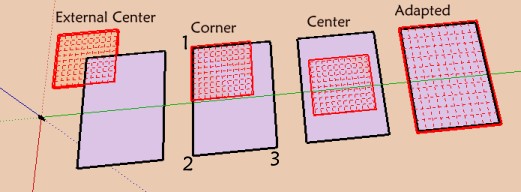
      'Adjust' now applies to a plane or a disk - with different dialogs to suit.
      'New Disk' now has number of 'Segments' and 'Rings' options.

      TIG

      1 條回覆 最後回覆 回覆 引用 0
      • D 離線
        dedmin
        最後由 編輯

        Why rectangle tool doesn't draw on the Workplane?

        1 條回覆 最後回覆 回覆 引用 0
        • EarthMoverE 離線
          EarthMover
          最後由 編輯

          Dedmin, check pages 5 & 6 of this thread. Rectangle issue has been covered there. 😉

          3D Artist at Clearstory 3D Imaging
          Guide Tool at Winning With Sketchup
          Content Creator at Skapeup

          1 條回覆 最後回覆 回覆 引用 0
          • TIGT 離線
            TIG Moderator
            最後由 編輯

            @dedmin said:

            Why rectangle tool doesn't draw on the WorkPlane?

            It's a known issue with Sketchup itself - it occurs on all faces in groups/instances that are not axial or planar through the origin - not just this tool.
            There is a 3pt rectangle tool that will work - see the earlier thread...
            We await a fix from Google...

            TIG

            1 條回覆 最後回覆 回覆 引用 0
            • D 離線
              dedmin
              最後由 編輯

              Sorry 😳 😳

              1 條回覆 最後回覆 回覆 引用 0
              • pilouP 離線
                pilou
                最後由 編輯

                Maybe Hide in the Context Menu 😉
                Adjust Protractor
                and why not a protractor "rectangular" 😄

                That becomes the Rolls Royce of Work Plane 😎

                Frenchy Pilou
                Is beautiful that please without concept!
                My Little site :)

                1 條回覆 最後回覆 回覆 引用 0
                • kenK 離線
                  ken
                  最後由 編輯

                  TIG

                  The new "Protractor" option is implemented better than I could even image. Again thanks so much.

                  Now, I will be quite as a mouse as I will be using the brand new tools.

                  Ken

                  Fight like your the third monkey on Noah's Ark gangway.

                  1 條回覆 最後回覆 回覆 引用 0
                  • CadFatherC 離線
                    CadFather
                    最後由 編輯

                    there may be a glitch in the adjust menu on disk - it worked once, then i got the settings for the rectangular grid instead

                    1 條回覆 最後回覆 回覆 引用 0
                    • TIGT 離線
                      TIG Moderator
                      最後由 編輯

                      Here's v2.3 http://forums.sketchucation.com/viewtopic.php?p=274345#p274345
                      Glitch when 'Adjust'ing a 'Disk' more than once is now fixed,
                      A new 'Hide/UnHide All' toggle option added to context-menu/tools-menu.

                      TIG

                      1 條回覆 最後回覆 回覆 引用 0
                      • CadFatherC 離線
                        CadFather
                        最後由 編輯

                        TIG, at least give me the time to finish writing my post! 😲 😎

                        1 條回覆 最後回覆 回覆 引用 0
                        • TIGT 離線
                          TIG Moderator
                          最後由 編輯

                          @cadfather said:

                          TIG, at least give me the time to finish writing my post! 😲 😎

                          The cause of the 'Adjust Disk' glitch was obvious to me as soon as you reported it - a line of code was not copied between the normal 'Disk Maker' and the 'Adjusted-Disk Maker' methods - thus the newly 'Adjusted' 'Disk' wasn't given its 'disk' attribute, and therefore the 'Adjust' tool thought it was a 'Plane' and so it 'Adjusted' it accordingly [wrongly!]. Note that 'Adjust' might still fail on older 'Disks', that were made before the recent updates and that don't have a 'disk' attribute - if so you need to re-make them and they will then be OK.

                          Pilou's Hide/UnHide [good] idea was also very simple to do - just a few lines of code switching the 'WORKPLANE' layer on/off...

                          🤓

                          TIG

                          1 條回覆 最後回覆 回覆 引用 0
                          • CadFatherC 離線
                            CadFather
                            最後由 編輯

                            ..i see, that actually makes sense.. still that was fast..
                            [speaking aside] ..and the day hasn't even started..!

                            Thanks! 👍 ☀

                            1 條回覆 最後回覆 回覆 引用 0
                            • pilouP 離線
                              pilou
                              最後由 編輯

                              👍

                              Seems this default will be a must 😉
                              (Toggle with Tab Key ?)Default.jpg

                              Frenchy Pilou
                              Is beautiful that please without concept!
                              My Little site :)

                              1 條回覆 最後回覆 回覆 引用 0
                              • simon le bonS 離線
                                simon le bon
                                最後由 編輯

                                Dear Tig,

                                I'm just trying this new tool which seems to me very interesting, first to build something multileveled, and else to build a part of the drawing with peculiar axes: "non orthogonal",or perpendicular to the screen with the model twisted in some obscure direction.
                                Additionally it seems also to me that Your
                                TIG_Flatten to Plane v1.1
                                and also
                                Fredo_Tools On Surface - v1.2 (with Contour Editor)
                                can help a lot..

                                I don't know if the problem I encounter with Tapper Tool which won't align guide lines with the WorkPlane grid is already referenced or not. But this kind of malfunction is diminishing the tool IMo

                                [flash=720,480:2yk2jx2w]http://www.youtube.com/v/ByD0mjaPnIk[/flash:2yk2jx2w]

                                My best wishes for the festivities,

                                simon.

                                1 條回覆 最後回覆 回覆 引用 0
                                • guanjinG 離線
                                  guanjin
                                  最後由 編輯

                                  Not see how the other icon
                                  未命名.jpg

                                  I come from China, is to learn

                                  1 條回覆 最後回覆 回覆 引用 0
                                  • TIGT 離線
                                    TIG Moderator
                                    最後由 編輯

                                    @guanjin said:

                                    Not see how the other icon
                                    [attachment=0:1rh50put]<!-- ia0 -->未命名.jpg<!-- ia0 -->[/attachment:1rh50put]

                                    What other icons ?
                                    You can get additional tools' icons, but only IF you have those other scripts loading too...

                                    TIG

                                    1 條回覆 最後回覆 回覆 引用 0
                                    • guanjinG 離線
                                      guanjin
                                      最後由 編輯

                                      @tig said:

                                      @guanjin said:

                                      Not see how the other icon
                                      未命名.jpg

                                      What other icons ?
                                      You can get additional tools' icons, but only IF you have those other scripts loading too...

                                      To see pictures, there are four icons! Thank you!
                                      未命名.jpg

                                      I come from China, is to learn

                                      1 條回覆 最後回覆 回覆 引用 0
                                      • TIGT 離線
                                        TIG Moderator
                                        最後由 編輯

                                        The other two icons only appear if you also have clinesaxes.rb loading.
                                        Get it here http://forums.sketchucation.com/viewtopic.php?p=273671#p273671 if you need them...

                                        TIG

                                        1 條回覆 最後回覆 回覆 引用 0
                                        • guanjinG 離線
                                          guanjin
                                          最後由 編輯

                                          @tig said:

                                          The other two icons only appear if you also have clinesaxes.rb loading.
                                          Get it here http://forums.sketchucation.com/viewtopic.php?p=273671#p273671 if you need them...

                                          Thank you TIG, find you, always quick to solve the problem! 👍 👍 👍

                                          I come from China, is to learn

                                          1 條回覆 最後回覆 回覆 引用 0
                                          • M 離線
                                            mmm-sued
                                            最後由 編輯

                                            Sorry, but I can't get your plugin "Work Plane" working correct (Windows 7, Sketchup 8 - NOT Pro, only the free version). If I create a "New Plane" or a "New Disk", they always disappear, when I then try to use the pencil tool or any other drawing tool. Only the "New Protractor" works correct. What can I do?


                                            1 條回覆 最後回覆 回覆 引用 0
                                            • 1
                                            • 2
                                            • 3
                                            • 4
                                            • 5
                                            • 6
                                            • 9
                                            • 10
                                            • 4 / 10
                                            • 第一個貼文
                                              最後的貼文
                                            Buy SketchPlus
                                            Buy SUbD
                                            Buy WrapR
                                            Buy eBook
                                            Buy Modelur
                                            Buy Vertex Tools
                                            Buy SketchCuisine
                                            Buy FormFonts

                                            Advertisement