sketchucation logo sketchucation
    • 登入
    Oops, your profile's looking a bit empty! To help us tailor your experience, please fill in key details like your SketchUp version, skill level, operating system, and more. Update and save your info on your profile page today!
    🔌 Smart Spline | Fluid way to handle splines for furniture design and complex structures. Download

    [Plugin] Work Plane

    已排程 已置頂 已鎖定 已移動 Plugins
    183 貼文 32 Posters 118.2k 瀏覽 32 Watching
    正在載入更多貼文
    • 從舊到新
    • 從新到舊
    • 最多點贊
    回覆
    • 在新貼文中回覆
    登入後回覆
    此主題已被刪除。只有擁有主題管理權限的使用者可以查看。
    • TIGT 離線
      TIG Moderator
      最後由 編輯

      When drawing onto a WorkPlane you need to watch the cursor's inferencing tooltips...
      If it says 'On Face', 'Intersection', 'EndPoint' etc then its on the WorkPlane or probably inferencing the grid or other geometry you have just added onto it.
      If you pull the cursor away from the WorkPlane, or accept an axial inference etc, then chances are the new line you make will NOT be on the WorkPlane.

      You get exactly the same effects drawing onto a sloping standard Face in your model.

      All a WorkPlane is, is a large transparent face with a guide-line grid, locked into place, to assist you in drawing in that plane - useful when you do not have faces or other geometry etc to inference onto.
      If does not magically 'constrain' the cursor [unlike my 2dTools which limit geometry to a flat plane with a specified Z].
      You can draw 'away' from a WorkPlane at any time - as you have found. 🤓

      TIG

      1 條回覆 最後回覆 回覆 引用 0
      • K 離線
        kaas
        最後由 編輯

        @tig said:

        All a WorkPlane is, is a large transparent face with a guide-line grid, locked into place, to assist you in drawing in that plane - useful when you do not have faces or other geometry etc to inference onto.
        If does not magically 'constrain' the cursor [unlike my 2dTools which limit geometry to a flat plane with a specified Z].
        You can draw 'away' from a WorkPlane at any time - as you have found.

        Thanks for your reply TIG. I was mistaken and was wrongly expecting the workplane would magically 'constrain' the cursor like in your 2dTools. My fault.

        1 條回覆 最後回覆 回覆 引用 0
        • kenK 離線
          ken
          最後由 編輯

          TIG

          I have downloaded the new version of Workplane. I can only set the plane in inches, no matter what my units are set too, the plane if always set in inches.

          Ex.

          Units, ft, set 200x200, I get a 200 inch workplane.

          Units, m, set 200x200, I get the same 200 inch workplance.

          Thanks in advance for you help.

          Ken

          Fight like your the third monkey on Noah's Ark gangway.

          1 條回覆 最後回覆 回覆 引用 0
          • Dave RD 離線
            Dave R
            最後由 編輯

            Ken, are you right clicking in space and setting the grid size and spacing as directed in the hints at the bottom of the screen? I just gave it a try and it picks up model units just fine.

            Etaoin Shrdlu

            %

            (THERE'S NO PLACE LIKE)

            G28 X0.0 Y0.0 Z0.0

            M30

            %

            1 條回覆 最後回覆 回覆 引用 0
            • TIGT 離線
              TIG Moderator
              最後由 編輯

              The latest version of WorkPlane ought to now work in any input units.
              So if your Model Units are inches, then 'plain numbers' are taken as inches.
              Or if the Model Units are feet, then 'plain numbers are taken as feet etc...
              BUT if you want something say in feet but the Model Units are inches yhen type 1' so it's read as one foot [12"], or say 1m so it ~40" [for the meter grid in an Inch-model] ?
              So to use units different from the Model Units just add a suffix "/'/m/cm/mm ?

              However, while checking I do see some inconsistencies in dialog's like 'Adjust' for changing grid-width etc, so I'm investigating...

              Thanks for the feedback though. 😄

              TIG

              1 條回覆 最後回覆 回覆 引用 0
              • TIGT 離線
                TIG Moderator
                最後由 編輯

                Here's v2.6 in the PluginStore.
                http://sketchucation.com/pluginstore?pln=WorkPlane

                A typo in the dialog to Set/Adjust Grid-width meant the grid-width always matched the grid-height !
                Now it works properly again and the grid's width and height can be set separately.

                TIG

                1 條回覆 最後回覆 回覆 引用 0
                • kenK 離線
                  ken
                  最後由 編輯

                  TIG, Dave

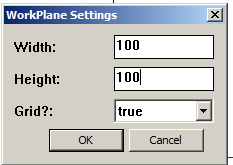
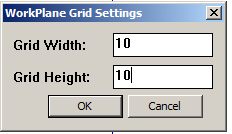
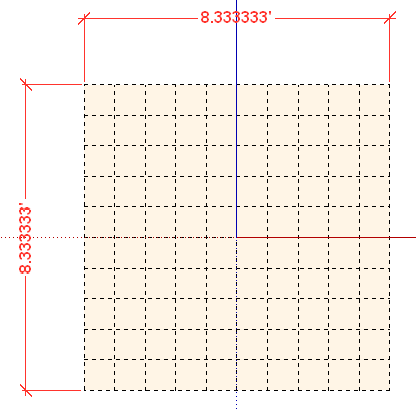
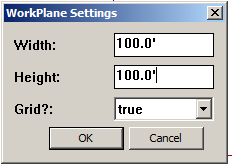
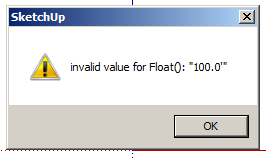
                  Here are screen shots of me trying to use feet. Note, the model units are in feet.

                  So what am I doing wrong?

                  Thanks in advance for your help.

                  Ken
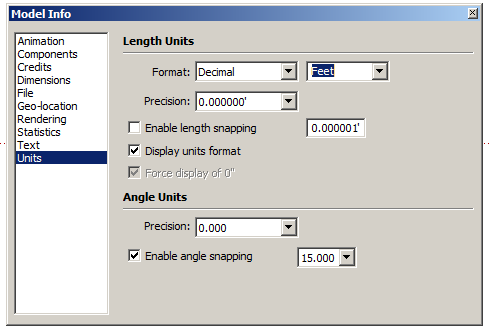

                  TP #1.png


                  TP #2.png


                  TP #3.png


                  TP #4.png


                  TP 4.5.png


                  TP #5.png

                  Fight like your the third monkey on Noah's Ark gangway.

                  1 條回覆 最後回覆 回覆 引用 0
                  • TIGT 離線
                    TIG Moderator
                    最後由 編輯

                    Are you manipulating WorkPlanes made in an earlier version, or perhaps using a SKP that had the earlier WorkPlanes used previously ?
                    These used a 'float' number, which was taken as 'meters' or 'feet' depending on your Model Units...

                    After several requests, the latest version allows you to input the sizes in ANY units format, unfortunately these are now 'Lengths' not 'Floats'...

                    I can trap for that... 😒
                    I should have trapped for that !!! 😳

                    Watch this space... 😛

                    Meanwhile running this line of code in the Ruby Console after opening your older SKP will wipe the now incompatible stored WorkPlane details:
                    Sketchup.active_model.attribute_dictionaries.delete("WorkPlane")

                    I'll try and fix it tomorrow... 😕

                    TIG

                    1 條回覆 最後回覆 回覆 引用 0
                    • kenK 離線
                      ken
                      最後由 編輯

                      TIG

                      Thanks, that did it.

                      However, even that one line of code made me look like an idiot. So I pasted the line of code into the Ruby Console, "thinking hard, now don't mess this up", didn't press the enter key. Darn, why didn't that work. Well, I went to paste the line again, but to do that I had to hit the enter key, darn that's why it didn't work. I guess thinking while doing something that is almost automatic, gave rise to the term, "over thinking the problem".

                      Thanks TIG

                      Fight like your the third monkey on Noah's Ark gangway.

                      1 條回覆 最後回覆 回覆 引用 0
                      • O 離線
                        othmanalazzam
                        最後由 編輯

                        wonderful, thanks, I suggest attaching this video into the original post so we can understand the plugin, I had have to search the youtube to understand it.

                        anyways, thanks

                        1 條回覆 最後回覆 回覆 引用 0
                        • TIGT 離線
                          TIG Moderator
                          最後由 編輯

                          Version v2.7 is now available in the PluginStore.
                          http://sketchucation.com/pluginstore?pln=WorkPlane

                          It fixes the glitch when you tried to use the new version in an older SKP that had previously setup WorkPlanes in the old format - old floats v. new lengths.
                          Now of you use such a SKP it's assumed that the previous float settings were lengths - so you may need to reset for new WorkPlanes if you were using meters... [right-click in open space or using the 'Adjust' context-menu option...]

                          TIG

                          1 條回覆 最後回覆 回覆 引用 0
                          • kenK 離線
                            ken
                            最後由 編輯

                            TIG

                            Good morning.

                            Well got up and installed v2.7 from the store, over my other installed Workplane. This install behaved just like the last install. The dimensions did not change from inches to feet as I changed the units in Sketchup.

                            So if this install was to clean out all the previous left over remnants, it didn't seem to accomplish this task.

                            I went into the plugin directory, removed all Workplane info, rb files, and directory. Re-installed v2.7 from the store. Plugin works correctly now.

                            Just letting you know.

                            Ken

                            Fight like your the third monkey on Noah's Ark gangway.

                            1 條回覆 最後回覆 回覆 引用 0
                            • E 離線
                              engineer10122
                              最後由 編輯

                              Is work plane.rb supported in 2014 SU Pro?
                              It doesn't seem to install the plugin.
                              err what am I doing wrong.
                              Thanks.
                              sg

                              1 條回覆 最後回覆 回覆 引用 0
                              • TIGT 離線
                                TIG Moderator
                                最後由 編輯

                                Works fine in v8 up to v2014 😕
                                I just reinstalled it in v2014 to be sure, and it worked fine. 😄

                                When loaded [and enabled if you are using the SCF Plugins Manager]...
                                It has a submenu named "WorkPlane Tools" under "Tools" menu.
                                I trust you have looked there and not under the "Plugins" menu***
                                If you select a WorkPlane object, then there are a number of tools enabled in the Context-menu - these differ depending on what you have selected.
                                There is a Toolbar named "WorkPlane Tools" too...

                                ***Have you actually read the usage instructions ??

                                If there's still a problem... do you have the latest version of v2014 - an update came out a few days ago...
                                Also are there any accented characters or single-quotes in your Windows User name ?
                                These have been reported as issues for many plugins' loading...

                                TIG

                                1 條回覆 最後回覆 回覆 引用 0
                                • Bob JamesB 離線
                                  Bob James
                                  最後由 編輯

                                  When I apply the normals tool the normal set is rotated. The primary axes are in the standard directions.
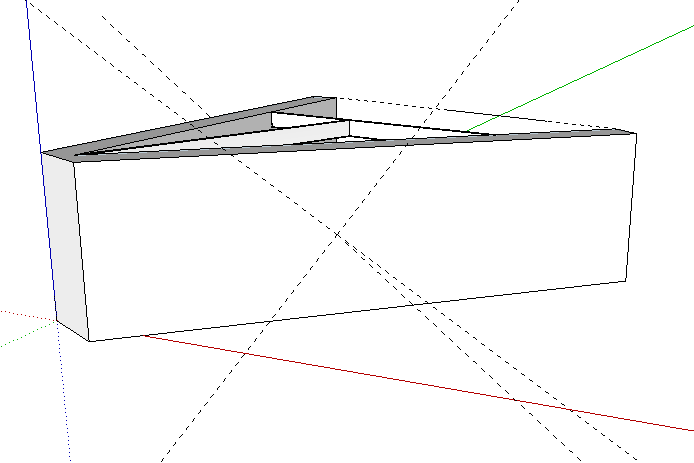
                                  normal.PNG

                                  i7-4930K 3.4Ghz, 2x GTX780 6GB, 32GB DDR3-1600 ECC, OCZ Vertex 4 500GB, WD Black 3TB, 32TB NAS, 4x 27" Monitors, SpaceMouse Pro, X-keys XK-60

                                  1 條回覆 最後回覆 回覆 引用 0
                                  • B 離線
                                    bdealva
                                    最後由 編輯

                                    Does Workplane work in SU 2015?

                                    1 條回覆 最後回覆 回覆 引用 0
                                    • Dave RD 離線
                                      Dave R
                                      最後由 編輯

                                      @bdealva said:

                                      Does Workplane work in SU 2015?

                                      Yes. Do you have any reason to think it wouldn't?

                                      Etaoin Shrdlu

                                      %

                                      (THERE'S NO PLACE LIKE)

                                      G28 X0.0 Y0.0 Z0.0

                                      M30

                                      %

                                      1 條回覆 最後回覆 回覆 引用 0
                                      • H 離線
                                        huajiet
                                        最後由 編輯

                                        I seem to have some trouble installing Work Plane on SU2014.

                                        I get this error message:

                                        "SketchUp was unable to install the Extension you have chosen for some unknown reason.
                                        Consult your Extension's documentation for additional help."

                                        What might be wrong?

                                        1 條回覆 最後回覆 回覆 引用 0
                                        • TIGT 離線
                                          TIG Moderator
                                          最後由 編輯

                                          Should work.
                                          Have you downloaded the latest RBZ from the PluginStore ?

                                          TIG

                                          1 條回覆 最後回覆 回覆 引用 0
                                          • B 離線
                                            brooklyndesigner
                                            最後由 編輯

                                            This is really great. Worked like a charm for me the first time. I was working in "top" "parallel" view on a floor plan (even though the model is 3D). Instead of having to orbit and go into perspective to make changesI was able to draw right onto the floor plane. Then when I tried it again when drawing a line it didn't lock to the work plane. It drew all over. I'm using Sketchup 2016 on a Mac. Any ideas?

                                            Thank you.

                                            1 條回覆 最後回覆 回覆 引用 0
                                            • 1
                                            • 2
                                            • 6
                                            • 7
                                            • 8
                                            • 9
                                            • 10
                                            • 9 / 10
                                            • 第一個貼文
                                              最後的貼文
                                            Buy SketchPlus
                                            Buy SUbD
                                            Buy WrapR
                                            Buy eBook
                                            Buy Modelur
                                            Buy Vertex Tools
                                            Buy SketchCuisine
                                            Buy FormFonts

                                            Advertisement