sketchucation logo sketchucation
    • 登入
    Oops, your profile's looking a bit empty! To help us tailor your experience, please fill in key details like your SketchUp version, skill level, operating system, and more. Update and save your info on your profile page today!
    🔌 Smart Spline | Fluid way to handle splines for furniture design and complex structures. Download

    [Example] V-Ray Displacement

    已排程 已置頂 已鎖定 已移動 V-Ray
    renderpluginsextensions
    54 貼文 27 Posters 173.8k 瀏覽 27 Watching
    正在載入更多貼文
    • 從舊到新
    • 從新到舊
    • 最多點贊
    回覆
    • 在新貼文中回覆
    登入後回覆
    此主題已被刪除。只有擁有主題管理權限的使用者可以查看。
    • broomstickB 離線
      broomstick
      最後由 編輯

      Hi there! Can you tell me exactly which siding material you are trying to use? I'll have a go to convert it into vismat 😉

      1 條回覆 最後回覆 回覆 引用 0
      • P 離線
        penumbra
        最後由 編輯

        @andybot. Would love to see that tutorial. Link appears to be dead?

        1 條回覆 最後回覆 回覆 引用 0
        • andybotA 離線
          andybot
          最後由 編輯

          which you can see a tutorial I did a while back on that method.

          Edit: updated link (I changed my blog domain name recently)

          http://charlottesvillearchitecturalrendering.com/

          1 條回覆 最後回覆 回覆 引用 0
          • andybotA 離線
            andybot
            最後由 編輯

            Thanks for pointing that out, 👍 I've fixed it in my post.

            the correct link is
            http://charlottesvillearchitecturalrendering.com/?p=127

            http://charlottesvillearchitecturalrendering.com/

            1 條回覆 最後回覆 回覆 引用 0
            • P 離線
              penumbra
              最後由 編輯

              Nice site Andy. And clean tutorial. Done any work with Nelson Byrd Wolf? They are doing some landscape architectures in a couple of our projects.
              Omar

              1 條回覆 最後回覆 回覆 引用 0
              • K 離線
                krschncrlo
                最後由 編輯

                hi, i had this problem in displacement, whenever im trying to render curves, it comes out segmented

                look at the yellow pillow
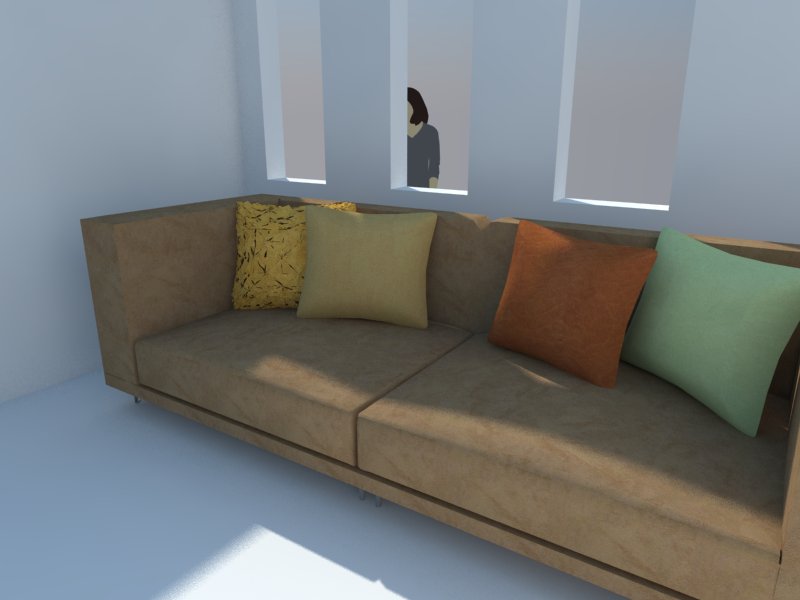

                h.jpg

                1 條回覆 最後回覆 回覆 引用 0
                • J 離線
                  jackwatson
                  最後由 編輯

                  Something useful to consider when creating a displacement map, courtesy of http://viscorbel.com/vray-materials-theory/#comment-6946

                  "The deformations work like this – middle grey [128;128;128] of the map does not change anything on the object, darker values push the surface inwards while lighter values pull it out. The further this value is from medium gray, the stronger is the effect. Color of the map is not taken into account and only the lightness value is used."

                  This is good to know when you don't want the geometry created by the displacement to extend beyond the modelling you've laid out... eg bricks protruding though picture frames hanging on the wall

                  1 條回覆 最後回覆 回覆 引用 0
                  • TedVitale_CGT 離線
                    TedVitale_CG
                    最後由 編輯

                    @moderat said:

                    I switched the displacement multiplier up to 50, but it doesn't change a thing.
                    I created a grey rectangle outside my model to check if it would work there (so it isn't connected to another material).. still the same?
                    Can someone check my sketchup file? Really stuck here. As far as I know I'm not using any groups for the model, maybe by accidence a while ago (been working on it for quite some time now..).
                    http://www.mediafire.com/?pxmhwih5p0t5li3
                    (if you open it, does it look like a heavy file? Sketchup blocks from time to time for a minute or 2..)

                    Thank you!

                    Bert

                    When sharing files, remember to use the "Pack Scene" tool in V-Rays tools. You can find it by going Plugins>V-Ray>Pack Scene. This will ensure your scene has all required materials and textures. The scene you shared does not have the associated displacement map you are using so I cant accurately test or check anything.

                    Also, download and try out the grass file I've attached.


                    Grass with Displacement

                    Ted Vitale
                    Owner | Creative Director
                    http://www.voxl.vision

                    1 條回覆 最後回覆 回覆 引用 0
                    • thomthomT 離線
                      thomthom
                      最後由 編輯

                      Oh neat! When was that feature added?

                      @tedvitale_cg said:

                      "Pack Scene" tool in V-Rays tools.

                      That might cause people to think it's a feature of my "V-Ray Tools" plugin... 😉

                      Thomas Thomassen — SketchUp Monkey & Coding addict
                      List of my plugins and link to the CookieWare fund

                      1 條回覆 最後回覆 回覆 引用 0
                      • T 離線
                        toninhox
                        最後由 編輯

                        Hello i have this problem with my displacement map

                        https://db.tt/bMHRwE9M

                        why is that happen? any help? pleeesa XD

                        Obs. it´s a night scene 😄

                        1 條回覆 最後回覆 回覆 引用 0
                        • Z 離線
                          zazracnedieta
                          最後由 編輯

                          hi guys.. try this way 😉


                          try this :)

                          1 條回覆 最後回覆 回覆 引用 0
                          • K 離線
                            kenancakir
                            最後由 編輯

                            This is my displacement try.. Sketchup 2015 and vray 2.0..
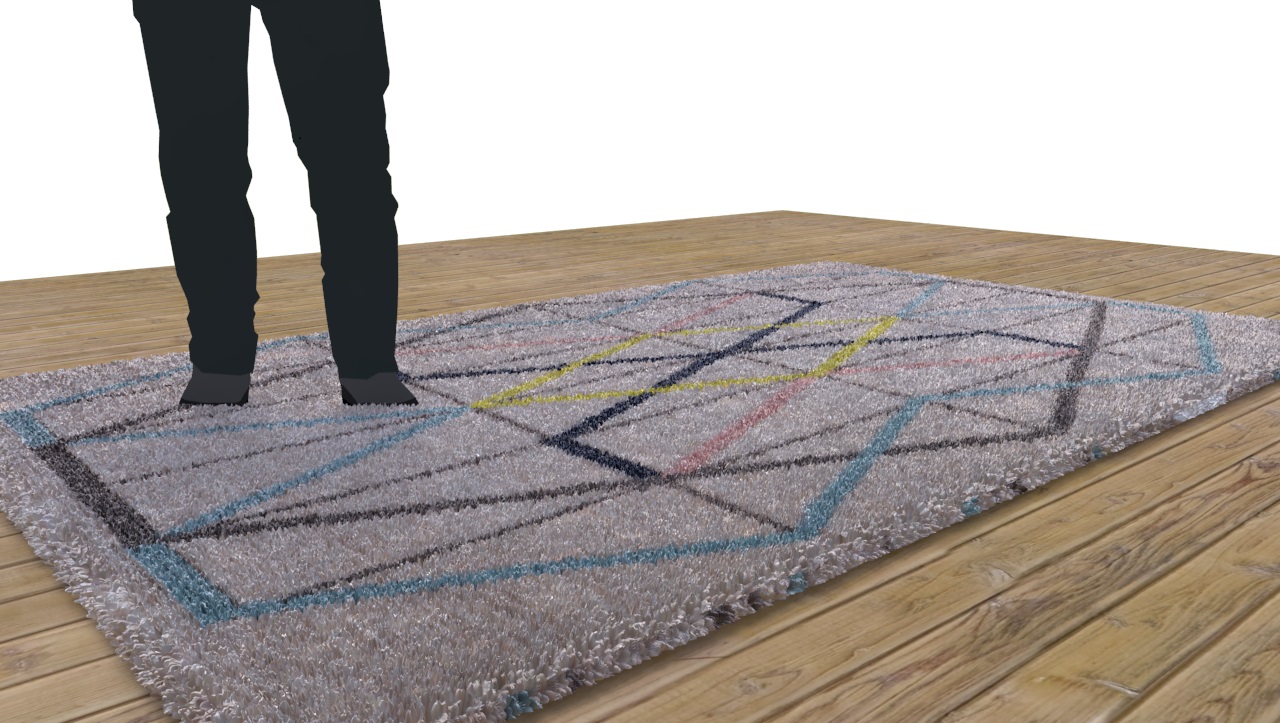

                            hali.jpg

                            1 條回覆 最後回覆 回覆 引用 0
                            • L 離線
                              luziusalbin
                              最後由 編輯

                              @kenancakir said:

                              This is my displacement try.. Sketchup 2015 and vray 2.0..

                              this is cool, how did you do it? can you share the material/texture?

                              1 條回覆 最後回覆 回覆 引用 0
                              • K 離線
                                kenancakir
                                最後由 編輯

                                @luziusalbin said:

                                @kenancakir said:

                                This is my displacement try.. Sketchup 2015 and vray 2.0..

                                this is cool, how did you do it? can you share the material/texture?

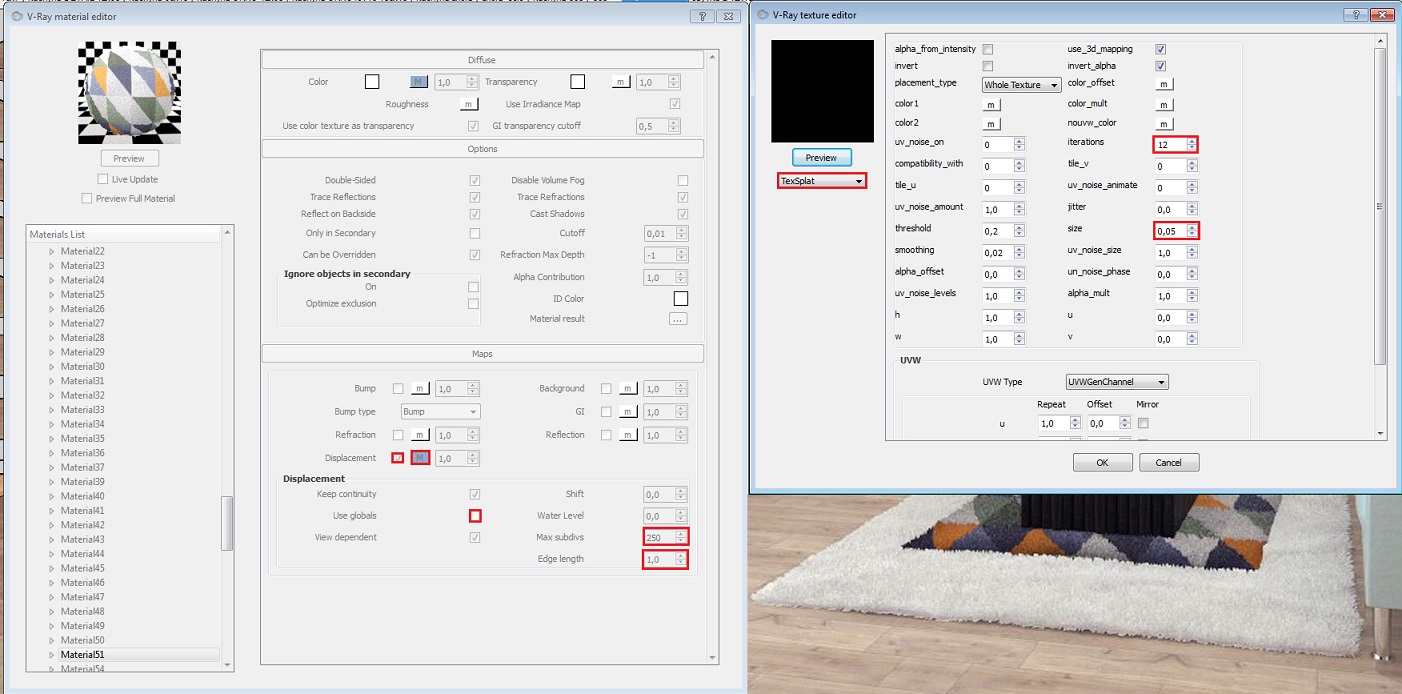
                                Thank you.. Here is my tutorial..

                                1 條回覆 最後回覆 回覆 引用 0
                                • 1
                                • 2
                                • 3
                                • 3 / 3
                                • 第一個貼文
                                  最後的貼文
                                Buy SketchPlus
                                Buy SUbD
                                Buy WrapR
                                Buy eBook
                                Buy Modelur
                                Buy Vertex Tools
                                Buy SketchCuisine
                                Buy FormFonts

                                Advertisement