sketchucation logo sketchucation
    • 登入
    Oops, your profile's looking a bit empty! To help us tailor your experience, please fill in key details like your SketchUp version, skill level, operating system, and more. Update and save your info on your profile page today!
    🔌 Smart Spline | Fluid way to handle splines for furniture design and complex structures. Download

    [Example] V-Ray Displacement

    已排程 已置頂 已鎖定 已移動 V-Ray
    renderpluginsextensions
    54 貼文 27 Posters 173.8k 瀏覽 27 Watching
    正在載入更多貼文
    • 從舊到新
    • 從新到舊
    • 最多點贊
    回覆
    • 在新貼文中回覆
    登入後回覆
    此主題已被刪除。只有擁有主題管理權限的使用者可以查看。
    • M 離線
      Moderat
      最後由 編輯

      @3deviator said:

      3deviator

      I followed your steps, I liked the result.
      When I preview render in the material editor it looks good, but when I do a render from my scene it doesn't show the displacement.. I have this when rendering other kind of materials with displacement too. So there must be something wrong, I checked all the settings from your images with mine.. and they are the same. Any idea? Really frustrating, been looking for days now (reason why my water material isn't working properly too, see other thread).
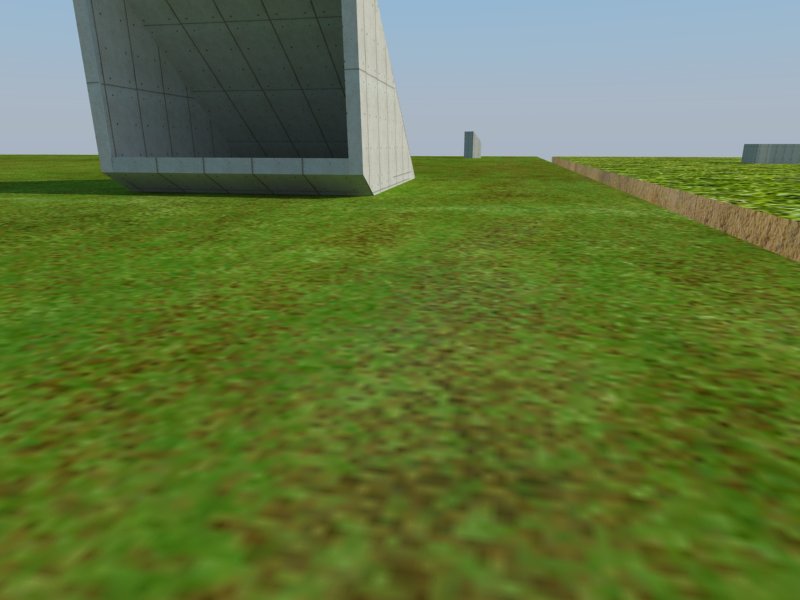
      grass
      waterrender

      Thank you,

      Bert

      1 條回覆 最後回覆 回覆 引用 0
      • thomthomT 離線
        thomthom
        最後由 編輯

        Note that the material editor scene isn't well suited to preview architectural materials. When you create displacement materials you will see that the displacement amount will look different. The displacement multiplier represent inches, so calculate how big your multiplier need to be.

        Then you also need to make sure that any displaced geometry is completely isolated. A geometry with a displacement material must not touch any geometry with any other material. That is very important.

        Thomas Thomassen — SketchUp Monkey & Coding addict
        List of my plugins and link to the CookieWare fund

        1 條回覆 最後回覆 回覆 引用 0
        • andybotA 離線
          andybot
          最後由 編輯

          also, make sure also that any edges in your group do not have any other material applied. That's tricked me up once or twice...

          http://charlottesvillearchitecturalrendering.com/

          1 條回覆 最後回覆 回覆 引用 0
          • M 離線
            Moderat
            最後由 編輯

            I switched the displacement multiplier up to 50, but it doesn't change a thing.
            I created a grey rectangle outside my model to check if it would work there (so it isn't connected to another material).. still the same?
            Can someone check my sketchup file? Really stuck here. As far as I know I'm not using any groups for the model, maybe by accidence a while ago (been working on it for quite some time now..).
            http://www.mediafire.com/?pxmhwih5p0t5li3
            (if you open it, does it look like a heavy file? Sketchup blocks from time to time for a minute or 2..)

            Thank you!

            Bert

            1 條回覆 最後回覆 回覆 引用 0
            • thomthomT 離線
              thomthom
              最後由 編輯

              Still downloading, but did you isolate the geometry? That is the most important thing to do.

              Also, exactly what version of VfSU do you use?

              Thomas Thomassen — SketchUp Monkey & Coding addict
              List of my plugins and link to the CookieWare fund

              1 條回覆 最後回覆 回覆 引用 0
              • andybotA 離線
                andybot
                最後由 編輯

                i wonder if he's confused that isolating geometry is not just having it separate but to actually make a "group" or "component" out of it. Haven't had a chance to look at the model either.

                http://charlottesvillearchitecturalrendering.com/

                1 條回覆 最後回覆 回覆 引用 0
                • thomthomT 離線
                  thomthom
                  最後由 編輯

                  Just opened the model - looking....

                  (Just a note on the model in general - I purged the model. erased all the scenes. Erased everything except the test square the camera was focused on and saved it - 1.9MB ... from 40MB. Please purge your model before sharing - everything will be smaller and quicker. People find a 2MB file easier to initiate a download for rather than 40MB.)

                  Thomas Thomassen — SketchUp Monkey & Coding addict
                  List of my plugins and link to the CookieWare fund

                  1 條回覆 最後回覆 回覆 引用 0
                  • thomthomT 離線
                    thomthom
                    最後由 編輯

                    @andybot said:

                    i wonder if he's confused that isolating geometry is not just having it separate but to actually make a "group" or "component" out of it.

                    This is true - everything was ungrouped.

                    Once grouped it worked fine.

                    (Though, I found that any geometry in the same context - connected or not - prevents displacement. Wonder if that changed since earlier versions. Before it could be in the same context. But alas not not. Complete isolation is required.)

                    Thomas Thomassen — SketchUp Monkey & Coding addict
                    List of my plugins and link to the CookieWare fund

                    1 條回覆 最後回覆 回覆 引用 0
                    • M 離線
                      Moderat
                      最後由 編輯

                      Hi,

                      thank you both for helping me out. It was the group thing that caused the render to 'misbehave'
                      I tried it on a small patch, and it worked. But it took a half an hour to render a small piece.. so I'm not going to use it in my large scene (will take ages to find the right settings & get the final render). Very frustrating that all your materials have to be put apart from each other to get a working render.. don't see how you can get walls aligned to each other properly if you have consider this. Going to try the sea water later this evening, it's crucial to get it right for this project.

                      Thank you again, and sorry for the large file. Will keep it in mind for the next time.

                      1 條回覆 最後回覆 回覆 引用 0
                      • thomthomT 離線
                        thomthom
                        最後由 編輯

                        Yea - I never liked displacement grass anyway. Just end up looking like a spikestrip.

                        I assign a colour to the Colour ID of the material and render out a Material ID pass which I use in Photoshop as a mask where I overlay real grass from photos.

                        Thomas Thomassen — SketchUp Monkey & Coding addict
                        List of my plugins and link to the CookieWare fund

                        1 條回覆 最後回覆 回覆 引用 0
                        • thomthomT 離線
                          thomthom
                          最後由 編輯

                          @andybot said:

                          which you can see a tutorial I did a while back on that method.

                          👍 👍

                          Thomas Thomassen — SketchUp Monkey & Coding addict
                          List of my plugins and link to the CookieWare fund

                          1 條回覆 最後回覆 回覆 引用 0
                          • M 離線
                            Moderat
                            最後由 編輯

                            Yes, seems a lot easier to do it post-rendering. Thanks, I'll be using it for my grass.

                            Now I've been trying again to get my (sea)water working. I managed to let vray render my material, but now it's coming out all wrong.
                            It looks exactly the same in the preview in material editor as in the youtube tutorial (http://youtu.be/vbHdi5bEdlI), but when rendering it comes out very pure blue and not transparent. I redid the whole process 3 times.. still the same result.
                            Anyone an idea? I'm really getting tired of this same kind of problem over and over again 😄.

                            sameproblem.jpg
                            http://www.mediafire.com/?52she3kywadj4yz
                            (I copied the water to another file so my SU-file isn't too big to download. )

                            Now to bed! 3 am here.
                            Thanks in advance,

                            Bert

                            1 條回覆 最後回覆 回覆 引用 0
                            • majidM 離線
                              majid
                              最後由 編輯

                              dear mate, do you mind to try this one?
                              it is just a quick tweak over glass material..... I'vnt changed the refraction IOR ( it is now 1.5 and must be 1.3 for real water) so you may yourself do it... or maybe you prefer a differend wave "size" on bumb section


                              waterminipack.zip

                              My inspiring A, B, Sketches book: https://sketchucation.com/shop/books/intermediate/2612-alphabet-inspired-sketches--inspiring-drills-for-architects--3d-artists-and-designers-

                              1 條回覆 最後回覆 回覆 引用 0
                              • Whiteowl77W 離線
                                Whiteowl77
                                最後由 編輯

                                Hi Thomas, SU Modelers

                                I am working on an exterior Rendering of a residence and currently working on the materials and textures. I have created my own custom stone from a photo I took and manipulated in photoshop. I was able to manipulate the displacement/bump-map images needed for that as well, as I found some good video tutorials on such.
                                I am wondering: Are there any repositories/resources for SketchUp/Vray exterior material displacement/bump-map images (alpha channel), or does the artist need to make each one him/herself?

                                Can you recommend any settings for painted wood siding -- I downloaded some siding from: http://www.vray-materials.de/register_complete.php?regkey=923c1bebe6cc014330075ecca8a6f87f -- but , as mentioned above, this is formatted for 3DS Max not SU. I am trying to use it regardless to create the displacement image. I cannot get the image to tile or repeat, or any effect to take place. I dont want to use the "out of the box" siding material in SketchUp due to the continuios lines that make up the generic pattern.
                                Maybe, I will take the siding image texture material in SU, save it, edit it in Photoshop, and use the B&W/grayscale to make the displacement, and then leave the material fill color/diffuse a solid color, and see if that renders correctly.
                                Any thoughts?

                                Whats the best way to render/depict exterior siding?
                                Thanks

                                Andrew

                                1 條回覆 最後回覆 回覆 引用 0
                                • broomstickB 離線
                                  broomstick
                                  最後由 編輯

                                  Hi there! Can you tell me exactly which siding material you are trying to use? I'll have a go to convert it into vismat 😉

                                  1 條回覆 最後回覆 回覆 引用 0
                                  • P 離線
                                    penumbra
                                    最後由 編輯

                                    @andybot. Would love to see that tutorial. Link appears to be dead?

                                    1 條回覆 最後回覆 回覆 引用 0
                                    • andybotA 離線
                                      andybot
                                      最後由 編輯

                                      which you can see a tutorial I did a while back on that method.

                                      Edit: updated link (I changed my blog domain name recently)

                                      http://charlottesvillearchitecturalrendering.com/

                                      1 條回覆 最後回覆 回覆 引用 0
                                      • andybotA 離線
                                        andybot
                                        最後由 編輯

                                        Thanks for pointing that out, 👍 I've fixed it in my post.

                                        the correct link is
                                        http://charlottesvillearchitecturalrendering.com/?p=127

                                        http://charlottesvillearchitecturalrendering.com/

                                        1 條回覆 最後回覆 回覆 引用 0
                                        • P 離線
                                          penumbra
                                          最後由 編輯

                                          Nice site Andy. And clean tutorial. Done any work with Nelson Byrd Wolf? They are doing some landscape architectures in a couple of our projects.
                                          Omar

                                          1 條回覆 最後回覆 回覆 引用 0
                                          • K 離線
                                            krschncrlo
                                            最後由 編輯

                                            hi, i had this problem in displacement, whenever im trying to render curves, it comes out segmented

                                            look at the yellow pillow
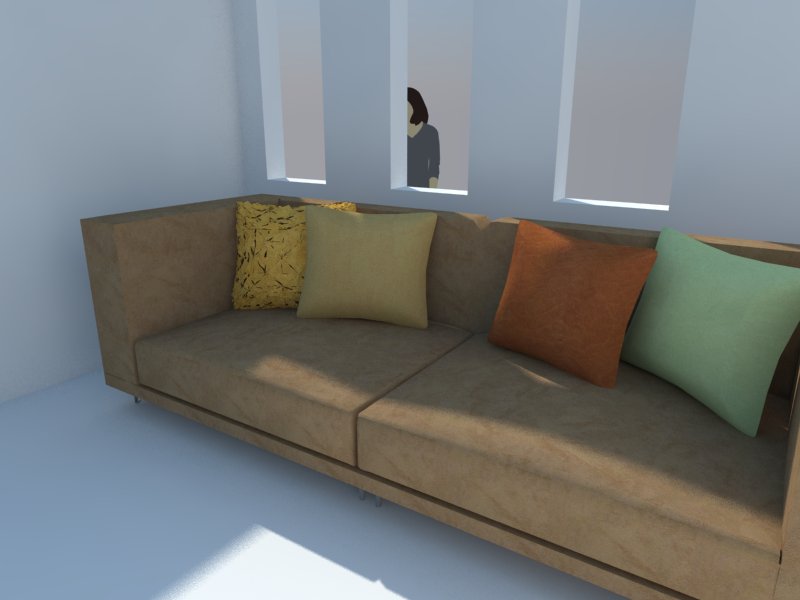

                                            h.jpg

                                            1 條回覆 最後回覆 回覆 引用 0
                                            • 1
                                            • 2
                                            • 3
                                            • 1 / 3
                                            • 第一個貼文
                                              最後的貼文
                                            Buy SketchPlus
                                            Buy SUbD
                                            Buy WrapR
                                            Buy eBook
                                            Buy Modelur
                                            Buy Vertex Tools
                                            Buy SketchCuisine
                                            Buy FormFonts

                                            Advertisement