sketchucation logo sketchucation
    • Login
    Oops, your profile's looking a bit empty! To help us tailor your experience, please fill in key details like your SketchUp version, skill level, operating system, and more. Update and save your info on your profile page today!
    Mac User? | Join the Rayscaper Beta for Mac Learn More

    [Example] V-Ray Displacement

    Scheduled Pinned Locked Moved V-Ray
    renderpluginsextensions
    54 Posts 27 Posters 180.0k Views 27 Watching
    Loading More Posts
    • Oldest to Newest
    • Newest to Oldest
    • Most Votes
    Reply
    • Reply as topic
    Log in to reply
    This topic has been deleted. Only users with topic management privileges can see it.
    • andybotA
      andybot
      last edited by

      which you can see a tutorial I did a while back on that method.

      Edit: updated link (I changed my blog domain name recently)

      http://charlottesvillearchitecturalrendering.com/

      1 Reply Last reply
      Reply Quote 0
      • andybotA
        andybot
        last edited by

        Thanks for pointing that out, πŸ‘ I've fixed it in my post.

        the correct link is
        http://charlottesvillearchitecturalrendering.com/?p=127

        http://charlottesvillearchitecturalrendering.com/

        1 Reply Last reply
        Reply Quote 0
        • P
          penumbra
          last edited by

          Nice site Andy. And clean tutorial. Done any work with Nelson Byrd Wolf? They are doing some landscape architectures in a couple of our projects.
          Omar

          1 Reply Last reply
          Reply Quote 0
          • K
            krschncrlo
            last edited by

            hi, i had this problem in displacement, whenever im trying to render curves, it comes out segmented

            look at the yellow pillow
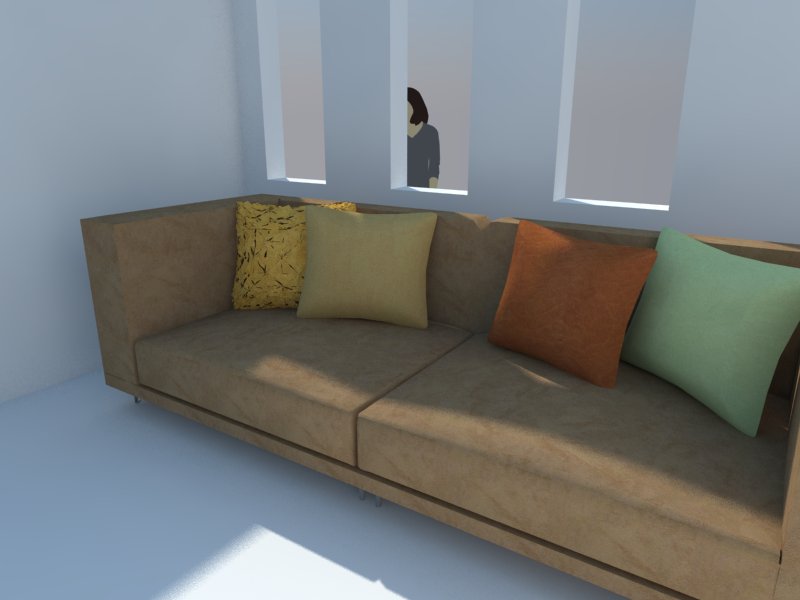

            h.jpg

            1 Reply Last reply
            Reply Quote 0
            • J
              jackwatson
              last edited by

              Something useful to consider when creating a displacement map, courtesy of http://viscorbel.com/vray-materials-theory/#comment-6946

              "The deformations work like this – middle grey [128;128;128] of the map does not change anything on the object, darker values push the surface inwards while lighter values pull it out. The further this value is from medium gray, the stronger is the effect. Color of the map is not taken into account and only the lightness value is used."

              This is good to know when you don't want the geometry created by the displacement to extend beyond the modelling you've laid out... eg bricks protruding though picture frames hanging on the wall

              1 Reply Last reply
              Reply Quote 0
              • TedVitale_CGT
                TedVitale_CG
                last edited by

                @moderat said:

                I switched the displacement multiplier up to 50, but it doesn't change a thing.
                I created a grey rectangle outside my model to check if it would work there (so it isn't connected to another material).. still the same?
                Can someone check my sketchup file? Really stuck here. As far as I know I'm not using any groups for the model, maybe by accidence a while ago (been working on it for quite some time now..).
                http://www.mediafire.com/?pxmhwih5p0t5li3
                (if you open it, does it look like a heavy file? Sketchup blocks from time to time for a minute or 2..)

                Thank you!

                Bert

                When sharing files, remember to use the "Pack Scene" tool in V-Rays tools. You can find it by going Plugins>V-Ray>Pack Scene. This will ensure your scene has all required materials and textures. The scene you shared does not have the associated displacement map you are using so I cant accurately test or check anything.

                Also, download and try out the grass file I've attached.


                Grass with Displacement

                Ted Vitale
                Owner | Creative Director
                http://www.voxl.vision

                1 Reply Last reply
                Reply Quote 0
                • thomthomT
                  thomthom
                  last edited by

                  Oh neat! When was that feature added?

                  @tedvitale_cg said:

                  "Pack Scene" tool in V-Rays tools.

                  That might cause people to think it's a feature of my "V-Ray Tools" plugin... πŸ˜‰

                  Thomas Thomassen β€” SketchUp Monkey & Coding addict
                  List of my plugins and link to the CookieWare fund

                  1 Reply Last reply
                  Reply Quote 0
                  • T
                    toninhox
                    last edited by

                    Hello i have this problem with my displacement map

                    https://db.tt/bMHRwE9M

                    why is that happen? any help? pleeesa XD

                    Obs. itΒ΄s a night scene πŸ˜„

                    1 Reply Last reply
                    Reply Quote 0
                    • Z
                      zazracnedieta
                      last edited by

                      hi guys.. try this way πŸ˜‰


                      try this :)

                      1 Reply Last reply
                      Reply Quote 0
                      • K
                        kenancakir
                        last edited by

                        This is my displacement try.. Sketchup 2015 and vray 2.0..
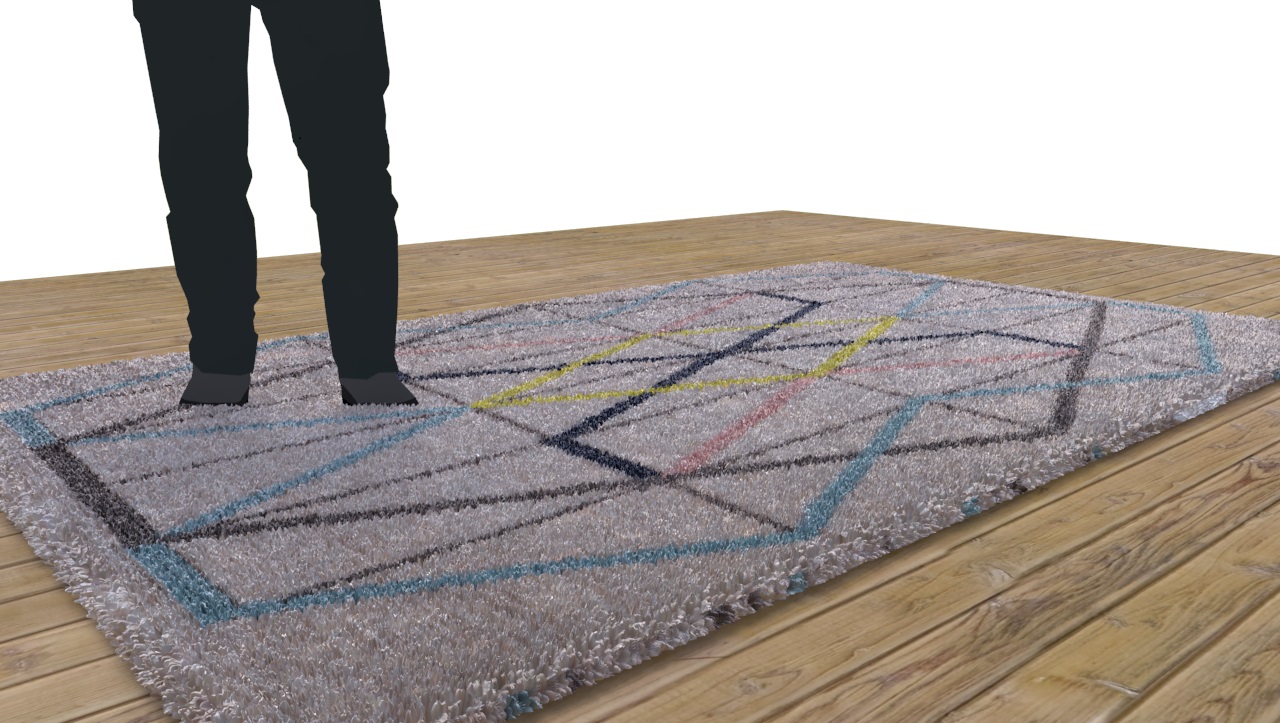

                        hali.jpg

                        1 Reply Last reply
                        Reply Quote 0
                        • L
                          luziusalbin
                          last edited by

                          @kenancakir said:

                          This is my displacement try.. Sketchup 2015 and vray 2.0..

                          this is cool, how did you do it? can you share the material/texture?

                          1 Reply Last reply
                          Reply Quote 0
                          • K
                            kenancakir
                            last edited by

                            @luziusalbin said:

                            @kenancakir said:

                            This is my displacement try.. Sketchup 2015 and vray 2.0..

                            this is cool, how did you do it? can you share the material/texture?

                            Thank you.. Here is my tutorial..

                            1 Reply Last reply
                            Reply Quote 0

                            Hello! It looks like you're interested in this conversation, but you don't have an account yet.

                            Getting fed up of having to scroll through the same posts each visit? When you register for an account, you'll always come back to exactly where you were before, and choose to be notified of new replies (either via email, or push notification). You'll also be able to save bookmarks and upvote posts to show your appreciation to other community members.

                            With your input, this post could be even better πŸ’—

                            Register Login
                            • 1
                            • 2
                            • 3
                            • 3 / 3
                            • First post
                              Last post
                            Buy SketchPlus
                            Buy SUbD
                            Buy WrapR
                            Buy eBook
                            Buy Modelur
                            Buy Vertex Tools
                            Buy SketchCuisine
                            Buy FormFonts

                            Advertisement