sketchucation logo sketchucation
    • 登入
    Oops, your profile's looking a bit empty! To help us tailor your experience, please fill in key details like your SketchUp version, skill level, operating system, and more. Update and save your info on your profile page today!
    🔌 Smart Spline | Fluid way to handle splines for furniture design and complex structures. Download

    [Plugin][$] Curviloft 2.0a - 31 Mar 24 (Loft & Skinning)


    已排程 已置頂 已鎖定 已移動 Plugins
    1.3k 貼文 299 Posters 2.5m 瀏覽 297 Watching
    正在載入更多貼文
    • 從舊到新
    • 從新到舊
    • 最多點贊
    回覆
    • 在新貼文中回覆
    登入後回覆
    此主題已被刪除。只有擁有主題管理權限的使用者可以查看。
    • R 離線
      Ralphxyz
      最後由 編輯

      Well Dave that's good as least you do not think of me as a pain int A..

      and gilles the answer is??

      Ralph

      1 條回覆 最後回覆 回覆 引用 0
      • Dave RD 離線
        Dave R
        最後由 編輯

        Thank you, Gilles.

        Ralph. not yet. 😉

        So how about giving us a screenshot of your Plugins folder and another showing the contents of the LibFredo folder? If that doesn't show us anything I'm going to remote into your computer and see if I can fix it. 😄

        Etaoin Shrdlu

        %

        (THERE'S NO PLACE LIKE)

        G28 X0.0 Y0.0 Z0.0

        M30

        %

        1 條回覆 最後回覆 回覆 引用 0
        • gillesG 離線
          gilles
          最後由 編輯

          @ralphxyz said:

          Well Dave that's good as least you do not think of me as a pain int A..

          and gilles the answer is??

          Ralph
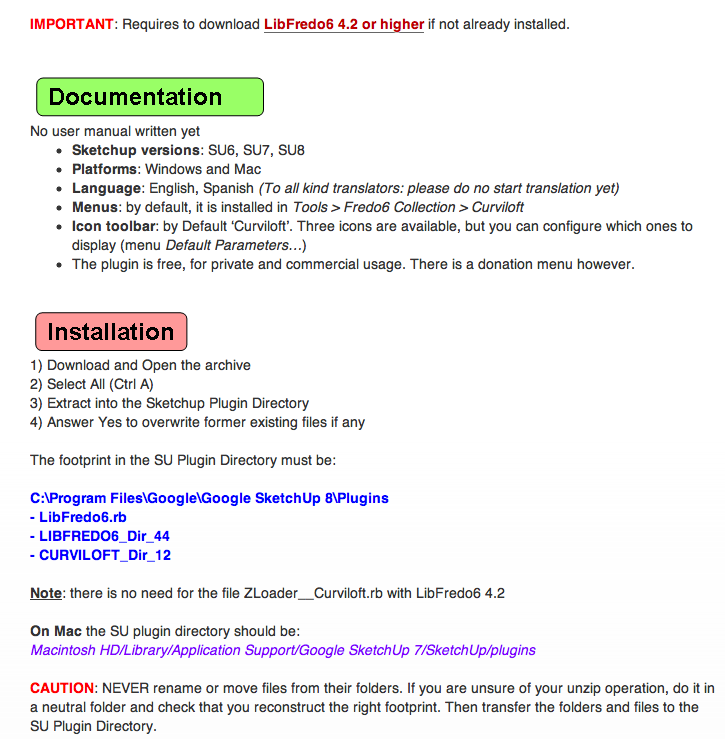

          footprint.png

          " c'est curieux chez les marins ce besoin de faire des phrases "

          1 條回覆 最後回覆 回覆 引用 0
          • R 離線
            Ralphxyz
            最後由 編輯

            I have a lot of Plugins.

            http://gettheworkdone.net/3Dprinting/SketchUp/Plugins2.png

            Here is Fredo

            http://gettheworkdone.net/3Dprinting/SketchUp/Fredo.png

            You guys absolutely are headed for sainthood.

            Ralph

            1 條回覆 最後回覆 回覆 引用 0
            • Dave RD 離線
              Dave R
              最後由 編輯

              Ralph! Don't make me come over there! 😡 🤣

              Your Plugins folder contains all those files that are supposed to be in the Curviloft folder. You must have tried installing them twice. Clear out every file from the Plugins folder that should be in the Curviloft folder. Make sure you also delete _loader.rb, too.
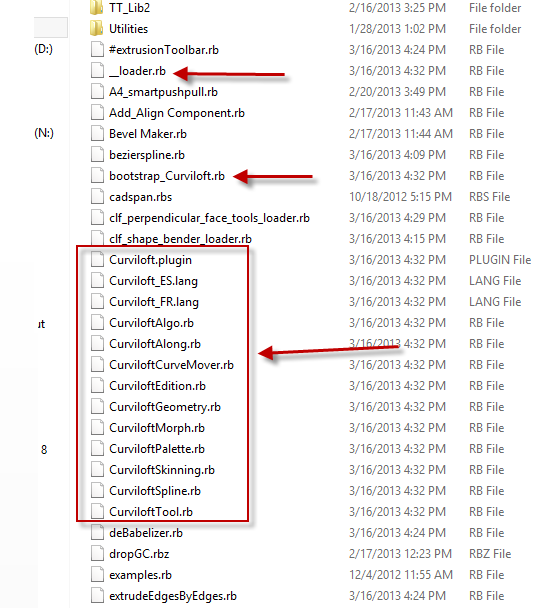

              cloft.png

              Etaoin Shrdlu

              %

              (THERE'S NO PLACE LIKE)

              G28 X0.0 Y0.0 Z0.0

              M30

              %

              1 條回覆 最後回覆 回覆 引用 0
              • R 離線
                Ralphxyz
                最後由 編輯

                Hot Dog!! That did it plus a bootstrap_Curviloft.rb.

                Yeah I probable did a number of installs.

                I tried to load the 10 must have plugins.

                Ralph

                1 條回覆 最後回覆 回覆 引用 0
                • Dave RD 離線
                  Dave R
                  最後由 編輯

                  Excellent! I knew we'd figure it out. We just needed the right clue.

                  Etaoin Shrdlu

                  %

                  (THERE'S NO PLACE LIKE)

                  G28 X0.0 Y0.0 Z0.0

                  M30

                  %

                  1 條回覆 最後回覆 回覆 引用 0
                  • thomthomT 離線
                    thomthom
                    最後由 編輯

                    Ralph, you can try to use either one of these utilities to assist you installing correctly:
                    http://sketchucation.com/forums/viewtopic.php?t=42315
                    http://sketchucation.com/forums/viewtopic.php?f=51330

                    They are RBZ packages so you use the Install Extension feature in SketchUp to install them. Then they will assist you in correctly install RB, RBS, RBZ or ZIP packaged plugins.

                    General guide on installing: http://www.thomthom.net/thoughts/2012/01/installing-plugins-for-google-sketchup/

                    Thomas Thomassen — SketchUp Monkey & Coding addict
                    List of my plugins and link to the CookieWare fund

                    1 條回覆 最後回覆 回覆 引用 0
                    • R 離線
                      Ralphxyz
                      最後由 編輯

                      Hi thomthom, I found those helpers after I had done the installs. I didn't think to just delete everything I had done and use the install helpers.

                      Could those links be made sticky at the start of the Forum.

                      Maybe there could be a Plugins Getting Started sticky header.

                      Ralph

                      1 條回覆 最後回覆 回覆 引用 0
                      • thomthomT 離線
                        thomthom
                        最後由 編輯

                        There is a "Zipped Plugins -- A Guide to Installing Them" sticky - but unfortunately it's not visibly that distinguishable. 😕

                        Thomas Thomassen — SketchUp Monkey & Coding addict
                        List of my plugins and link to the CookieWare fund

                        1 條回覆 最後回覆 回覆 引用 0
                        • Dave RD 離線
                          Dave R
                          最後由 編輯

                          It's a good idea Ralph. In my experience, though, most people won't take the time to read that sort of thing anyway. It's just easier to ask the question even in cases where it's been asked dozens of time before.

                          Etaoin Shrdlu

                          %

                          (THERE'S NO PLACE LIKE)

                          G28 X0.0 Y0.0 Z0.0

                          M30

                          %

                          1 條回覆 最後回覆 回覆 引用 0
                          • jgbJ 離線
                            jgb
                            最後由 編輯

                            @dave r said:

                            It's a good idea Ralph. In my experience, though, most people won't take the time to read that sort of thing anyway. It's just easier to ask the question even in cases where it's been asked dozens of time before.

                            When I was working an on-line/phone tech-help site, we got so many "asked & answered many times" we setup a list of "FAQs" and their answers as a set of clippable notes.

                            Then it was just cut&paste for about 65% of the time. Anything "new" was added to the list at the end of the call or email answer.

                            When I was monitoring the old Google Sketchup (before SketchUcation) I found myself doing a quick search, cut&paste for many of the same FAQs as well, especially the near field clipping solution.

                            Even providing an extensive published and promoted list of FAQ's, almost nobody would take the time to look up their problem first. Like Dave R said, easier to ask..........

                            But, part of the problem are folks that have difficulty forming the question/problem so that they can best use a FAQ's list. We see that here many times where the post "I got a problem......" sometimes does not say what the problem is on first go-round. Language barriers are only a small part of it.


                            jgb

                            1 條回覆 最後回覆 回覆 引用 0
                            • H 離線
                              hygicell
                              最後由 編輯

                              Hi Fredo,
                              I am working on a project for an aquaponics farm of which the building consists of shipping containers, with a greenhiouse on the south side
                              this building then has to be covered by a moat on the north side which includes two terrasses
                              to draw the moat landscape,
                              I drew the outlines, then tried to use Curviloft skinning
                              it didn't work in one piece
                              I then added some lines, tried again, no success
                              then I tried in segments, that worked for some, not for all
                              I had to further split them up
                              finally I succeeded, exploded all groups, smoothed the edges, painted all surfaces with grass
                              you can see my trials in the file attached
                              ooops, that didn't work: file too large
                              compressed it with 7-zip, more than halved the file size
                              http://download.cnet.com/7-Zip-64-bit/3000-2250_4-75133313.html?tag=dre

                              hope you appreciate the feedback
                              greetings
                              Frank


                              container farmhouse with moat.7z

                              1 條回覆 最後回覆 回覆 引用 0
                              • fredo6F 離線
                                fredo6
                                最後由 編輯

                                Franck,

                                I cannot open the file, even if I replace the extension .7z by .zip

                                Fredo

                                1 條回覆 最後回覆 回覆 引用 0
                                • H 離線
                                  hygicell
                                  最後由 編輯

                                  container farmhouse with moat.zip

                                  1 條回覆 最後回覆 回覆 引用 0
                                  • fredo6F 離線
                                    fredo6
                                    最後由 編輯

                                    @hygicell,

                                    Looking at your model, I found many unconnected contours.
                                    I think there is a plugin to connect segments which have their extre,ities very close.

                                    This explains why you have problems with the Skinning.

                                    Also, in some portions of the shapes, the contours look very shaky, with sharp angles. I am afraid that Curviloft won't give a very good result on these ones.

                                    Fredo

                                    1 條回覆 最後回覆 回覆 引用 0
                                    • K 離線
                                      Kanastrous
                                      最後由 編輯

                                      This plugin looks like just the thing for what I need to do in Sketchup Pro 8 (version 8.0.11752, running under Windows XP Pro ) but when I install it and then start sketchup I get the following message:

                                      Error Loading File bootstrap_Curviloft.rb
                                      uninitialized constant Curviloft::T6

                                      Sketchup then opens and appears to run normally, but the curviloft plugin does not appear.

                                      Any thoughts on how to get this install to work? Curviloft looks like a real life-saver, if only I can get it working...

                                      thanks,
                                      karl

                                      1 條回覆 最後回覆 回覆 引用 0
                                      • K 離線
                                        Kanastrous
                                        最後由 編輯

                                        So what happened above was the result of installing the Curviloft_Dir_12 with all files contained in it, in the 'plugins' folder.

                                        Extracting the files contained in the Curviloft_Dir_12 to the plugins folder resulted in -this- error message on starting sketchup:

                                        Error Loading File bootstrap_Curviloft.rb
                                        uninitialized constant Curviloft::T6Error Loading File CurviloftAlgo.rb
                                        uninitialized constant Curviloft::T6Error Loading File CurviloftCurveMover.rb
                                        uninitialized constant Curviloft::T6Error Loading File CurviloftPalette.rb
                                        uninitialized constant Curviloft::T6Error Loading File CurviloftTool.rb
                                        uninitialized constant Curviloft::T6

                                        So...that's different. But still not helpful.

                                        1 條回覆 最後回覆 回覆 引用 0
                                        • TIGT 離線
                                          TIG Moderator
                                          最後由 編輯

                                          @Karl

                                          Please remove all of the files you have incorrectly installed and start again.
                                          Having files in the wrong place will break SketchUp and prevent tools from working as intended...

                                          The first post in this thread clearly explains what is needed.
                                          C:\Program Files\...SketchUp...\Plugins\CURVILOFT_Dir_12 [folder of files]

                                          NEVER [re]move files from the folders that they come in inside their 'archive' [ZIP/RBZ] !

                                          You also need to have the latest LibFredo... with:
                                          ...\Plugins\LibFredo6.rb [file]
                                          and its
                                          ...\Plugins\LIBFREDO6_Dir_xx [folder of files]

                                          If you get tools as their RBZ version from the 'SCF PluginStore' [linked in the Resources menu above] you can automatically install their files/subfolders into Plugins, keeping all of the correct relationships etc - just use the menu item Window > Preferences > Extensions > Install from Archive button [this needs v8M2 or newer].

                                          An even easier way is to install the 'SketchUcation Plugin Store' toolset [download link in the Resources menu above]: this tool then AutoInstalls everything properly from a dialog within SketchUp itself - a single button click does everything for you... It also has some very useful Manager tools...

                                          TIG

                                          1 條回覆 最後回覆 回覆 引用 0
                                          • K 離線
                                            Kanastrous
                                            最後由 編輯

                                            Thanks TIG - I'll have another go at it with careful attention to those instructions...

                                            1 條回覆 最後回覆 回覆 引用 0
                                            • 1
                                            • 2
                                            • 37
                                            • 38
                                            • 39
                                            • 40
                                            • 41
                                            • 65
                                            • 66
                                            • 39 / 66
                                            • 第一個貼文
                                              最後的貼文
                                            Buy SketchPlus
                                            Buy SUbD
                                            Buy WrapR
                                            Buy eBook
                                            Buy Modelur
                                            Buy Vertex Tools
                                            Buy SketchCuisine
                                            Buy FormFonts

                                            Advertisement




