sketchucation logo sketchucation
    • Login
    Oops, your profile's looking a bit empty! To help us tailor your experience, please fill in key details like your SketchUp version, skill level, operating system, and more. Update and save your info on your profile page today!
    Mac User? | Join the Rayscaper Beta for Mac Learn More

    [Plugin] Make Fur v.2.1.0(20140323)

    Scheduled Pinned Locked Moved Plugins
    650 Posts 255 Posters 1.3m Views 254 Watching
    Loading More Posts
    • Oldest to Newest
    • Newest to Oldest
    • Most Votes
    Reply
    • Reply as topic
    Log in to reply
    This topic has been deleted. Only users with topic management privileges can see it.
    • CadFatherC
      CadFather
      last edited by

      Just when you think you've seen it all.. tak2hata comes along with another great idea...thanks! β˜€

      1 Reply Last reply
      Reply Quote 0
      • CadFatherC
        CadFather
        last edited by

        yes please.. πŸ‘

        1 Reply Last reply
        Reply Quote 0
        • thomthomT
          thomthom
          last edited by

          @unknownuser said:

          I have a request as a developer. Can you add an option to attach a fur parameters to a SU material as attributes. Multiple exporters to rendering programs could call your plugin to receive info on location and parameters of the fur. Instead of choking SU, an exporter would get the geometry info from your plugin and translate it into the rendering program entities, without creating it inside SU.

          Oooh! Good idea. Keep all data as attributes per face. And use simple lines (in reduced numbers) to represent the fur.

          Thomas Thomassen β€” SketchUp Monkey & Coding addict
          List of my plugins and link to the CookieWare fund

          1 Reply Last reply
          Reply Quote 0
          • N
            notareal
            last edited by

            @unknownuser said:

            I have a request as a developer. Can you add an option to attach a fur parameters to a SU material as attributes. Multiple exporters to rendering programs could call your plugin to receive info on location and parameters of the fur. Instead of choking SU, an exporter would get the geometry info from your plugin and translate it into the rendering program entities, without creating it inside SU.

            Would it be possible?

            Cheers
            Tomasz

            That would be great!

            Welcome to try Thea Render, Thea support | kerkythea.net -team member

            1 Reply Last reply
            Reply Quote 0
            • T
              tomasz
              last edited by

              Hi, Thanks a lot for such an interesting plugin!

              @tak2hata said:

              Creating Too Much Polygon is very slow.
              And to use code "entities.fill_from_mesh" must need blank Group.
              This Plugin executes each selected faces.
              Creating Group each new 800 polygons.
              so it parts.

              I have a request as a developer. Can you add an option to attach a fur parameters to a SU material as attributes. Multiple exporters to rendering programs could call your plugin to receive info on location and parameters of the fur. Instead of choking SU, an exporter would get the geometry info (EDIT: transformations of components) from your plugin and translate it into the rendering program entities, without creating it inside SU.

              Would it be possible?

              Cheers
              Tomasz

              Author of Thea Render for SketchUp

              1 Reply Last reply
              Reply Quote 0
              • olisheaO
                olishea
                last edited by

                one of the best plugins around!!

                i'm making everything furry! 😎

                render cooking πŸ˜„

                oli

                1 Reply Last reply
                Reply Quote 0
                • T
                  tomasz
                  last edited by

                  I am testing the plugin and have noticed that it doesn't take an area of a triangle into account. It think it won't be that hard to fix. πŸ˜„
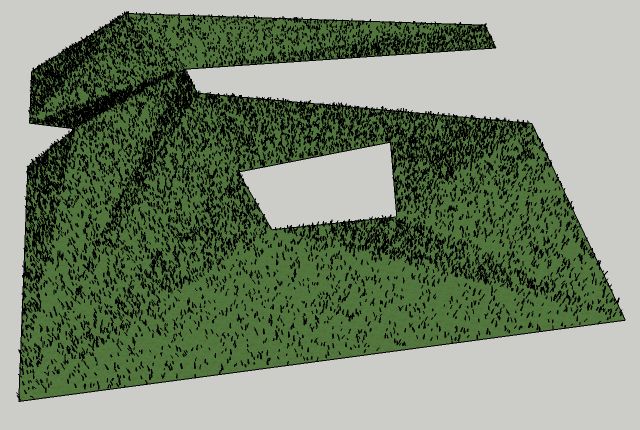

                  unequal density.jpg

                  Author of Thea Render for SketchUp

                  1 Reply Last reply
                  Reply Quote 0
                  • thomthomT
                    thomthom
                    last edited by

                    That's probably because of MaxNumber(/Face) setting you have set. The Dencity(Num/m2) appears to deal with the area, but larger faces needs more fur, so you need to increase the MaxNumber.

                    Thomas Thomassen β€” SketchUp Monkey & Coding addict
                    List of my plugins and link to the CookieWare fund

                    1 Reply Last reply
                    Reply Quote 0
                    • tridemT
                      tridem
                      last edited by

                      one more THANK YOU
                      ...and one more request πŸ˜† in such a tool it's usefull having the Esc key available, to stop the process if it take too long than expected

                      1 Reply Last reply
                      Reply Quote 0
                      • thomthomT
                        thomthom
                        last edited by

                        @tridem said:

                        ...and one more request πŸ˜† in such a tool it's usefull having the Esc key available, to stop the process if it take too long than expected

                        That is easier said than done. It's difficult to get any key press events while scripts are running. Though I thing Fredo has some feature like that...

                        Thomas Thomassen β€” SketchUp Monkey & Coding addict
                        List of my plugins and link to the CookieWare fund

                        1 Reply Last reply
                        Reply Quote 0
                        • massimoM
                          massimo Moderator
                          last edited by

                          Really funny thank you tak2hata! πŸ‘

                          1 Reply Last reply
                          Reply Quote 0
                          • K
                            KarinaGM
                            last edited by

                            Wow!
                            Amazing tool.
                            I've just downloaded it and can't wait to start (playing) experimenting

                            THANKS!

                            **"Aquel que sacrifica un poco de libertad por seguridad, no se merece ninguna y terminarΓ‘ perdiendo ambas"

                            -BenjamΓ­n Franklin.**

                            1 Reply Last reply
                            Reply Quote 0
                            • olisheaO
                              olishea
                              last edited by

                              so much fun!!

                              would be nice if there was a "set defaults" button....and if it remembered your settings between tweaking.

                              would also be good if the grass was automatically placed on a new layer so you can quickly turn it off or on....you could render the scene without the geometry even being present.

                              Sketchup view of an old model of mine:
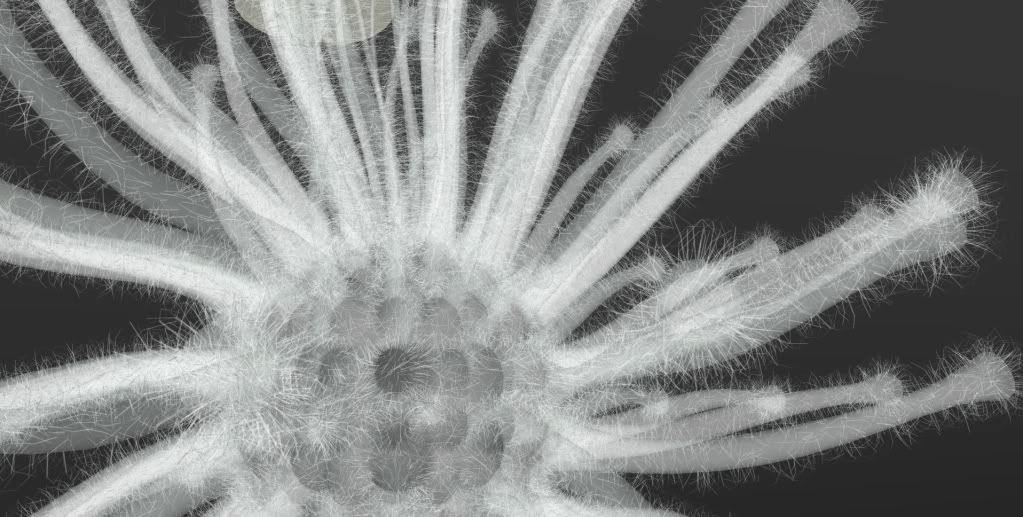
                              http://i654.photobucket.com/albums/uu269/olishea/urchin_hairy.jpg

                              oli

                              1 Reply Last reply
                              Reply Quote 0
                              • tridemT
                                tridem
                                last edited by

                                @thomthom said:

                                ..
                                Though I thing Fredo has some feature like that...

                                I believe so... eg 'round corner' can do it

                                1 Reply Last reply
                                Reply Quote 0
                                • T
                                  tak2hata
                                  last edited by

                                  I updated the plugin. it's version 1.0.

                                  I saw some requests now.
                                  It seems to be difficult in my skill.
                                  Hereafter, I will study Ruby more.


                                  by TAK2HATA

                                  1 Reply Last reply
                                  Reply Quote 0
                                  • thomthomT
                                    thomthom
                                    last edited by

                                    @tak2hata said:

                                    I updated the plugin. it's version 1.0.

                                    I saw some requests now.
                                    It seems to be difficult in my skill.
                                    Hereafter, I will study Ruby more.

                                    πŸ˜„ Yea, you've started something. πŸ˜„
                                    If you need help with anything just ask at this forum, people are happy to help.

                                    Thomas Thomassen β€” SketchUp Monkey & Coding addict
                                    List of my plugins and link to the CookieWare fund

                                    1 Reply Last reply
                                    Reply Quote 0
                                    • olisheaO
                                      olishea
                                      last edited by

                                      beautiful plugin.

                                      I placed the grass on hidden layer and replaced the component with a single line. Then rendered in twilight using "render all hidden layers" option.

                                      so each line represents blade of grass.

                                      close up of components
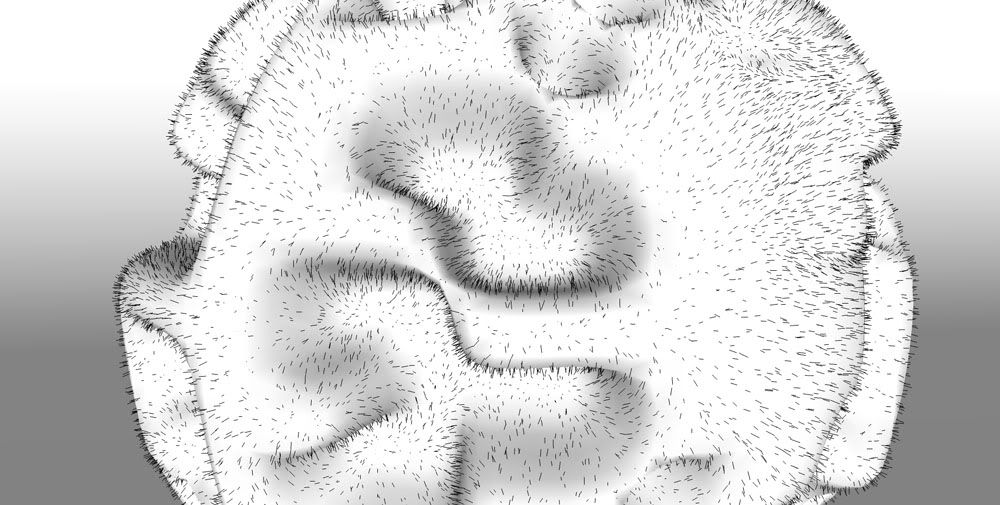
                                      http://i654.photobucket.com/albums/uu269/olishea/FUR2.jpg

                                      twilight render

                                      http://i654.photobucket.com/albums/uu269/olishea/FUR.jpg

                                      oli

                                      1 Reply Last reply
                                      Reply Quote 0
                                      • GaieusG
                                        Gaieus
                                        last edited by

                                        That's my nostril form inside, Oli 😲

                                        Definitely a very promising plugin! I really need to try it out (and Twilight's and Kerkythea's instancing abilities during rendering makes it easy to use hopefully)
                                        πŸ‘ πŸ‘ πŸ‘

                                        Gai...

                                        1 Reply Last reply
                                        Reply Quote 0
                                        • T
                                          tak2hata
                                          last edited by

                                          @thomthom said:

                                          @tak2hata said:

                                          I updated the plugin. it's version 1.0.

                                          I saw some requests now.
                                          It seems to be difficult in my skill.
                                          Hereafter, I will study Ruby more.

                                          πŸ˜„ Yea, you've started something. πŸ˜„
                                          If you need help with anything just ask at this forum, people are happy to help.

                                          Hi, thomas.
                                          I am variously studying the article on this site.
                                          Especially, Optimazition tips in Developer forum.
                                          It's very useful.
                                          Thanks.


                                          by TAK2HATA

                                          1 Reply Last reply
                                          Reply Quote 0
                                          • olisheaO
                                            olishea
                                            last edited by

                                            gai: just place the grass on a hidden layer and tell twilight to render all hidden layers. then bobs your uncle. its very very easy to do. you dont even need to rplace the grass with lines, i just did it so i knew where the grass was.

                                            right click>twilight>render all hidden layers

                                            chi ching

                                            and yes it is very nasal!

                                            oli

                                            1 Reply Last reply
                                            Reply Quote 0

                                            Hello! It looks like you're interested in this conversation, but you don't have an account yet.

                                            Getting fed up of having to scroll through the same posts each visit? When you register for an account, you'll always come back to exactly where you were before, and choose to be notified of new replies (either via email, or push notification). You'll also be able to save bookmarks and upvote posts to show your appreciation to other community members.

                                            With your input, this post could be even better πŸ’—

                                            Register Login
                                            • 1
                                            • 2
                                            • 5
                                            • 6
                                            • 7
                                            • 8
                                            • 9
                                            • 32
                                            • 33
                                            • 7 / 33
                                            • First post
                                              Last post
                                            Buy SketchPlus
                                            Buy SUbD
                                            Buy WrapR
                                            Buy eBook
                                            Buy Modelur
                                            Buy Vertex Tools
                                            Buy SketchCuisine
                                            Buy FormFonts

                                            Advertisement