sketchucation logo sketchucation
    • Anmelden
    Oops, your profile's looking a bit empty! To help us tailor your experience, please fill in key details like your SketchUp version, skill level, operating system, and more. Update and save your info on your profile page today!
    ⚠️ Important | Libfredo 15.6b introduces important bugfixes for Fredo's Extensions Update

    [Plugin] Blend ver 1.12.

    Geplant Angeheftet Gesperrt Verschoben Plugins
    80 Beiträge 35 Kommentatoren 65.1k Aufrufe 35 Watching
    Lade mehr Beiträge
    • Älteste zuerst
    • Neuste zuerst
    • Meiste Stimmen
    Antworten
    • In einem neuen Thema antworten
    Anmelden zum Antworten
    Dieses Thema wurde gelöscht. Nur Nutzer mit entsprechenden Rechten können es sehen.
    • K Offline
      kirill2008
      zuletzt editiert von

      @tomot said:

      I don't want you to misunderstand. This is not only related to the "y" shape. Other shapes have produced the same inconsistent results in SU 7.
      another example:
      make 2 identical closed shapes, scale one larger, apply bend, same code error occurs

      Looks like it is SU7 issue... SU6 processes correctly:
      [flash=425,344:1p1mvbbo]http://www.youtube.com/v/1D8WUYsS9hw&hl=ru&fs=1" type="application/x-shockwave-flash" allowscriptaccess="always" allowfullscreen="true" width="425" height="344"[/flash:1p1mvbbo]
      When processing faces it is necessary to select them by single click (not a fence).

      1 Antwort Letzte Antwort Antworten Zitieren 0
      • majidM Offline
        majid
        zuletzt editiert von

        woooow...it would be a dreamy plugin if no bugs!!..I gave it a try , but it seems that previous versions were better on freehand lines, while the last version doesn't works fine... also on closed line doesn;t works at all (su 6)..seeing forward to see the improvements mate btw thanks thanx thanx! 👍

        My inspiring A, B, Sketches book: https://sketchucation.com/shop/books/intermediate/2612-alphabet-inspired-sketches--inspiring-drills-for-architects--3d-artists-and-designers-

        1 Antwort Letzte Antwort Antworten Zitieren 0
        • Dave RD Offline
          Dave R
          zuletzt editiert von

          This is a useful plugin. Well, for me it was until I installed the latest version (1.5). Now I get what you see in the attached screen shot. Unfortunately I installed over the previous version. Keep working at it. I'm sure you'll get it all working.

          Thank you.
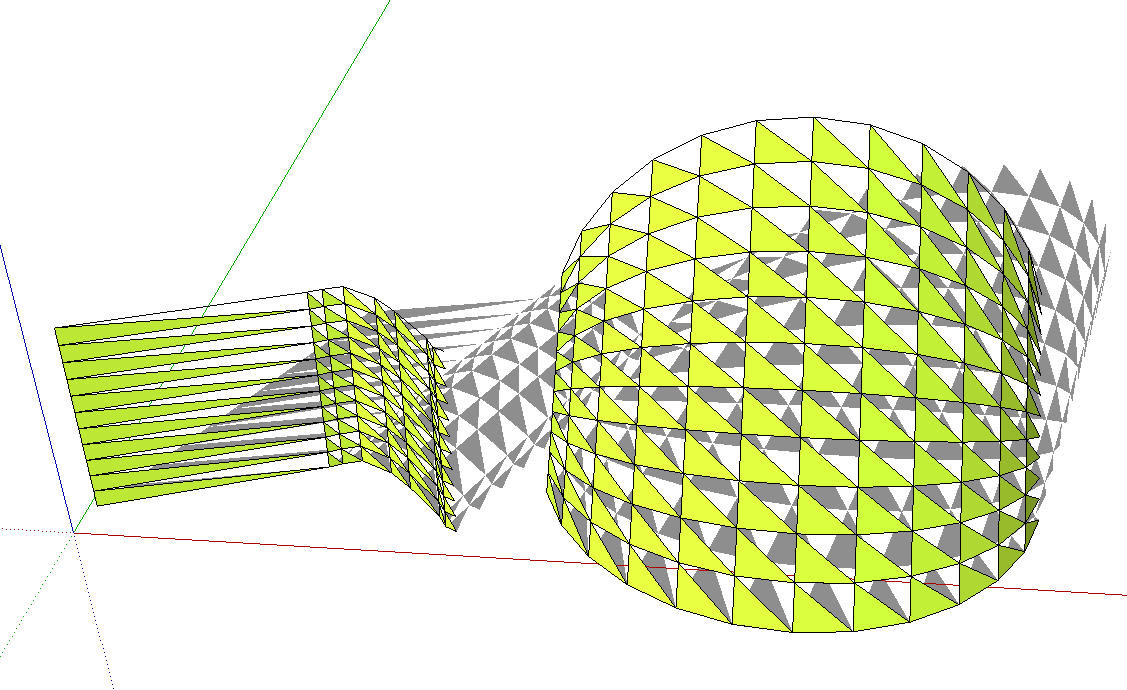
          Blend.jpg

          Etaoin Shrdlu

          %

          (THERE'S NO PLACE LIKE)

          G28 X0.0 Y0.0 Z0.0

          M30

          %

          1 Antwort Letzte Antwort Antworten Zitieren 0
          • D Offline
            Daniel S
            zuletzt editiert von

            Thank you for adding color blending 😍 😍 😍

            I have problems with this new version too (I use SU7).

            Sometimes work with results like the ones Dave R post above.
            In other cases the plugin dosen´t do anything and prints this in the ruby console:

            Error: #<NoMethodError: undefined method back_material' for #<Sketchup::Edge:0x67b7f70>> C:/Archivos de programa/Google/Google SketchUp 7/Plugins/sublend.rb:68:in blend'
            C:/Archivos de programa/Google/Google SketchUp 7/Plugins/sublend.rb:270
            C:/Archivos de programa/Google/Google SketchUp 7/Plugins/sublend.rb:248:in `call'

            Daniel S

            1 Antwort Letzte Antwort Antworten Zitieren 0
            • W Offline
              watkins
              zuletzt editiert von

              Dear Kirill,

              It might be a good idea to post versions 1.0 to 1.5 as the later versions seem to be problematic. Version 1.0 seemed to work quite nicely. I too have over-written previous versions and so cannot go back a step or two.

              Kind regards,
              Bob

              1 Antwort Letzte Antwort Antworten Zitieren 0
              • W Offline
                watkins
                zuletzt editiert von

                Dear Kirill,

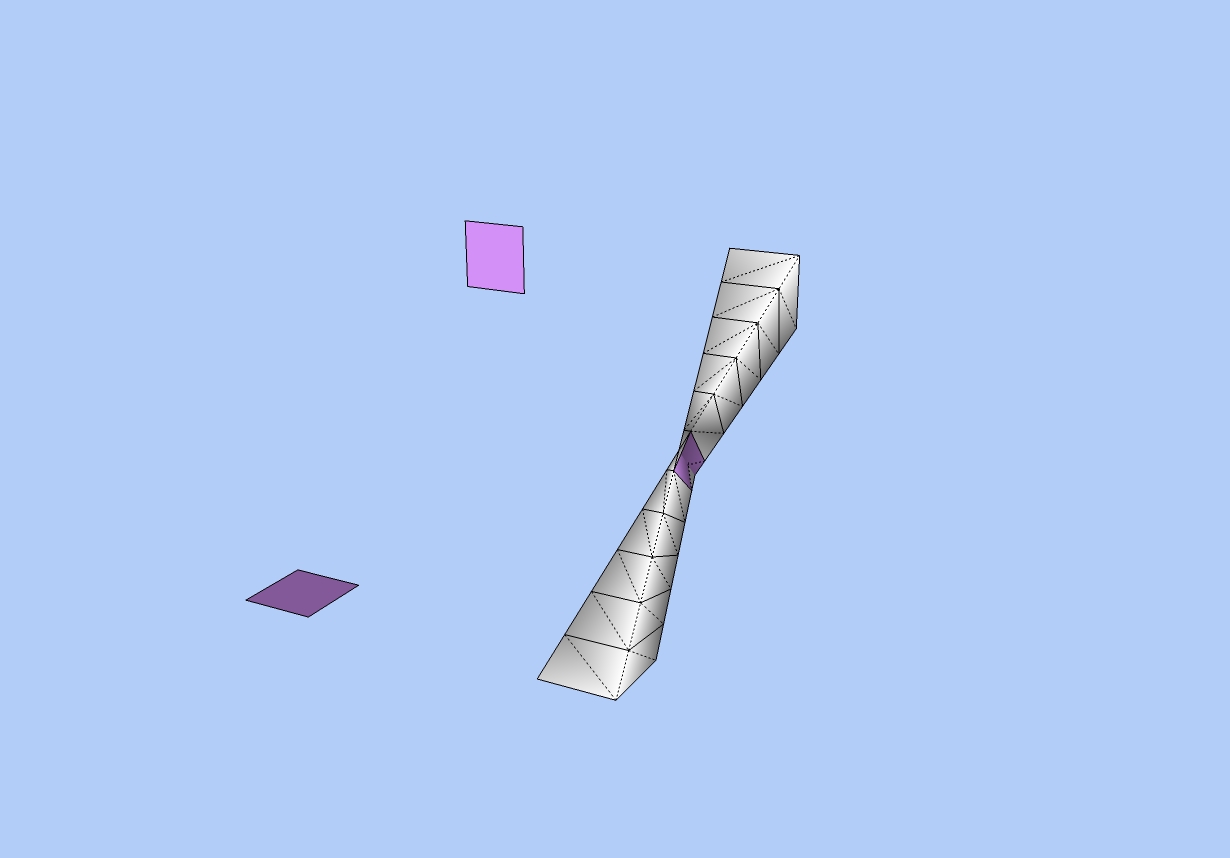
                Version 5 doesn't seem to work in SU Pro 7, even for simple shapes, but don't give up.
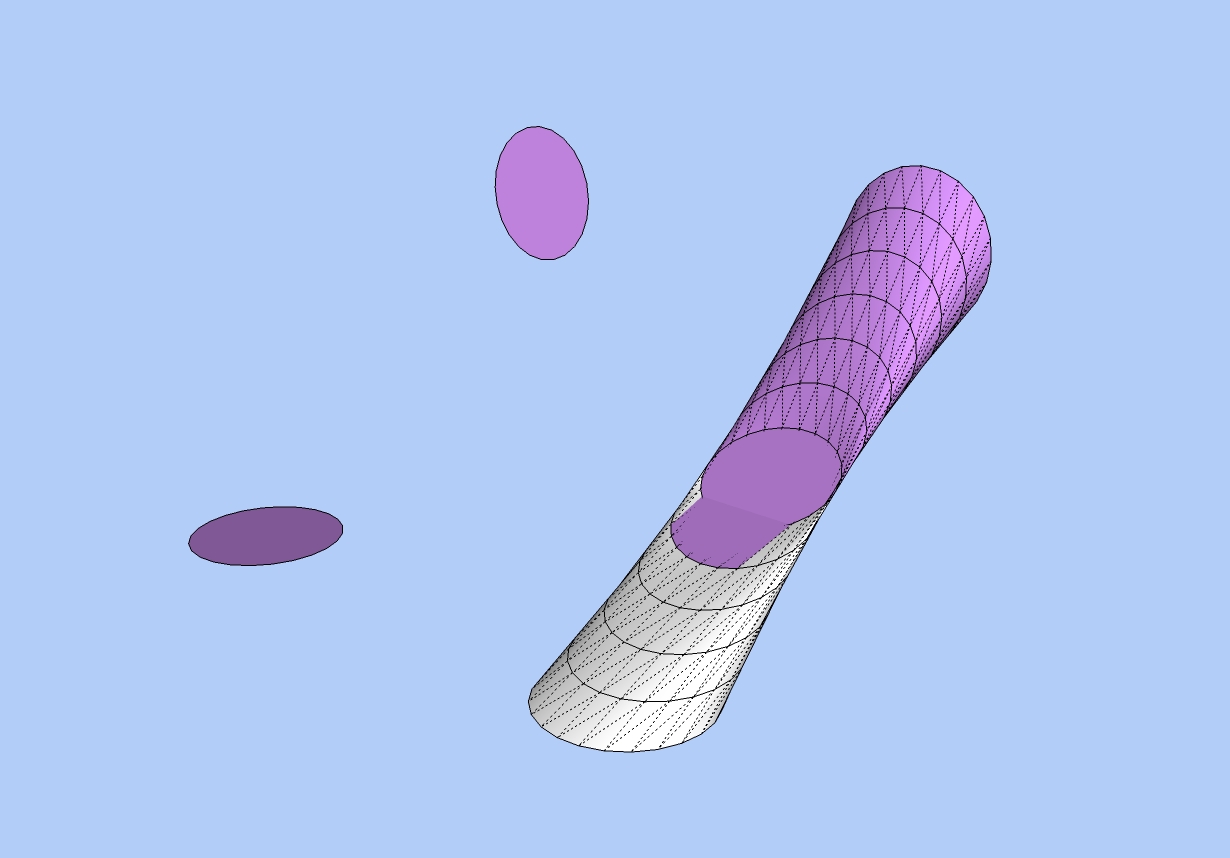

                Blending two circles.jpg


                Blending two squares.jpg

                1 Antwort Letzte Antwort Antworten Zitieren 0
                • W Offline
                  watkins
                  zuletzt editiert von

                  Thanks for posting versions 1.2 and 1.4. I will test them out with areas. Previously, I only tested this plugin with arcs, and that still works in V1.5.

                  1 Antwort Letzte Antwort Antworten Zitieren 0
                  • B Offline
                    blajnov
                    zuletzt editiert von

                    @watkins said:

                    Dear Kirill,

                    It might be a good idea to post versions 1.0 to 1.5 as the later versions seem to be problematic. Version 1.0 seemed to work quite nicely. I too have over-written previous versions and so cannot go back a step or two.

                    Kind regards,
                    Bob

                    There are three previous versions:
                    v 1.2
                    v 1.3
                    v 1.4
                    Rename files in sublend.rb


                    sublend__1.2.rb


                    sublend_1.4.rb


                    sublend_1.3.rb

                    1 Antwort Letzte Antwort Antworten Zitieren 0
                    • K Offline
                      kirill2008
                      zuletzt editiert von

                      Guys, I don't know yet how to prevent skin (mesh) turning inside out 😞 The point is that script processes vertices with corresponding indices: so maybe flipping normal or 180 degrees rotation (or 90) of one of 2 faces may help.
                      Missing triangles (they vanished after color blending feature addition) have come back now 😄 (ver. 1.6)
                      Error messages kind of "undefined method `back_material' for... " debugged (I guess 😄 ).

                      1 Antwort Letzte Antwort Antworten Zitieren 0
                      • W Offline
                        watkins
                        zuletzt editiert von

                        Dear Kirill,

                        Here is a quick question. You mention Sketchup 6 in both the first post and in the introduction to your plugin. Does this plugin work well in version 6? Many people have migrated to version 7, although with little added benefit.

                        Keep going, you are doing a great job.

                        Kind regards,
                        Bob

                        1 Antwort Letzte Antwort Antworten Zitieren 0
                        • C Offline
                          cosycat
                          zuletzt editiert von

                          Thanks for all of the updates, this is really getting there. I have noticed that the result (v6) does depend on the order in which the points are drawn (for closed shapes at least) - this might explain some of the inside out results people are getting.
                          Quick example, the numbers show the order in which the upper shape points were added
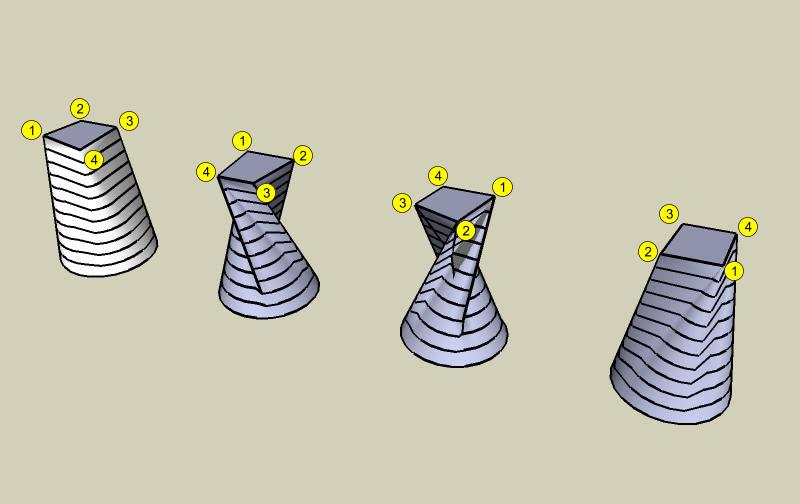
                          bendtwist.jpg

                          1 Antwort Letzte Antwort Antworten Zitieren 0
                          • K Offline
                            kirill2008
                            zuletzt editiert von

                            Ver 1.6 demo videos:
                            Filtration capabilities video:
                            [flash=425,344:17c3bm6v]http://www.youtube.com/v/Pml0gn-5fuY&hl=ru&fs=1" type="application/x-shockwave-flash" allowscriptaccess="always" allowfullscreen="true" width="425" height="344"[/flash:17c3bm6v]

                            Blending between different types of entities demo:
                            [flash=425,344:17c3bm6v]http://www.youtube.com/v/0gchAp7Yje8&hl=ru&fs=1" type="application/x-shockwave-flash" allowscriptaccess="always" allowfullscreen="true" width="425" height="344"[/flash:17c3bm6v]

                            Fixing inside out problem variant:
                            [flash=425,344:17c3bm6v]http://www.youtube.com/v/6PvRKfzm-g4&hl=ru&fs=1" type="application/x-shockwave-flash" allowscriptaccess="always" allowfullscreen="true" width="425" height="344"[/flash:17c3bm6v]
                            As cosycat mentioned:

                            @cosycat said:

                            the result (v6) does depend on the order in which the points are drawn

                            1 Antwort Letzte Antwort Antworten Zitieren 0
                            • olisheaO Offline
                              olishea
                              zuletzt editiert von

                              WOW. This is an awesome plugin. I tried using skin.rb for meshing between edges but it never worked for mac (i think). so im glad you can do it with this plugin!!

                              Amazing work, one of the best plugins around. the modeling possibilities are endless, I'm loving it!

                              oli

                              1 Antwort Letzte Antwort Antworten Zitieren 0
                              • utilerU Offline
                                utiler
                                zuletzt editiert von

                                Kirill2008,
                                Have you thought about adding a path function to this script?
                                [see attached]
                                Blend-Path.png

                                Your generosity is much appreciated, I only wish I knew ruby too so I could reply the favor....

                                Just Curious...

                                1 Antwort Letzte Antwort Antworten Zitieren 0
                                • K Offline
                                  kirill2008
                                  zuletzt editiert von

                                  @utiler said:

                                  Have you thought about adding a path function to this script?

                                  Yes, I think about it almost every day (and some times night 😄 too). I want to add a path processing very much, but it looks like such task is less obvious than already implemented algorithm. And maybe it's better to make a brand-new plugin with path processing, because it will work the other way than existing plugin.
                                  Ver. 1.7. demo video, shows blending between face and construction point and context menu "Blend" command usage.
                                  [flash=425,344:269yb5p5]http://www.youtube.com/v/-dfMofxc3pw&hl=ru&fs=1" type="application/x-shockwave-flash" allowscriptaccess="always" allowfullscreen="true" width="425" height="344"[/flash:269yb5p5]

                                  I don't know yet how to implement custumization of context menu items, so "Blend" command appears always when more than 1 object is selected

                                  1 Antwort Letzte Antwort Antworten Zitieren 0
                                  • kenK Offline
                                    ken
                                    zuletzt editiert von

                                    Not sure how you are fixing the inside out problem. I can't tell exactly what you are doing. Could you please try again?

                                    Thanks in advance

                                    Ken

                                    Fight like your the third monkey on Noah's Ark gangway.

                                    1 Antwort Letzte Antwort Antworten Zitieren 0
                                    • B Offline
                                      Ben Ritter
                                      zuletzt editiert von

                                      Kirill,

                                      Thank you so much for the script, very useful.

                                      Is there a bug with the blending of colors, I can't seem to get that to work?

                                      1 Antwort Letzte Antwort Antworten Zitieren 0
                                      • K Offline
                                        kirill2008
                                        zuletzt editiert von

                                        @unknownuser said:

                                        Not sure how you are fixing the inside out problem. I can't tell exactly what you are doing. Could you please try again?
                                        Ken

                                        I'm flipping the face normal (lower one).

                                        @ben ritter said:

                                        Is there a bug with the blending of colors, I can't seem to get that to work?

                                        Maybe. Note that color blending enabled only for 2 faces yet (does not work for curves, edges and construction points) and both face front material and face back material has to differ from default one. Hope that helps.

                                        1 Antwort Letzte Antwort Antworten Zitieren 0
                                        • K Offline
                                          kirill2008
                                          zuletzt editiert von

                                          Olishea, glad to hear sublend works on mac 👍 (I was just going to ask someone to try it on mac). Thank's for testing and feedback and happy blendings 😄
                                          Ofcourse it's not my achievement 😄 , it's just because ruby is cross platform.

                                          1 Antwort Letzte Antwort Antworten Zitieren 0
                                          • K Offline
                                            kirill2008
                                            zuletzt editiert von

                                            Now the implementation of interaction is in progress (it is not yet stable so ver 1.8 will appear a little bit later). I think that interaction ability will solve (more or less) the inside out problem. I mean it will be easier to fix it by moving, rotating and/or flipping one of the initial faces and the result mesh or set of intermediate faces/curves will refresh automatically. This will be the step towards path processing also.
                                            [flash=425,344:f7q8z0yv]http://www.youtube.com/v/IYS69O6idg8&hl=ru&fs=1" type="application/x-shockwave-flash" allowscriptaccess="always" allowfullscreen="true" width="425" height="344"[/flash:f7q8z0yv]


                                            1 Antwort Letzte Antwort Antworten Zitieren 0
                                            • 1
                                            • 2
                                            • 3
                                            • 4
                                            • 2 / 4
                                            • Erster Beitrag
                                              Letzter Beitrag
                                            Buy SketchPlus
                                            Buy SUbD
                                            Buy WrapR
                                            Buy eBook
                                            Buy Modelur
                                            Buy Vertex Tools
                                            Buy SketchCuisine
                                            Buy FormFonts

                                            Advertisement