sketchucation logo sketchucation
    • Anmelden
    Oops, your profile's looking a bit empty! To help us tailor your experience, please fill in key details like your SketchUp version, skill level, operating system, and more. Update and save your info on your profile page today!
    ⚠️ Important | Libfredo 15.6b introduces important bugfixes for Fredo's Extensions Update

    [Plugin] Blend ver 1.12.

    Geplant Angeheftet Gesperrt Verschoben Plugins
    80 Beiträge 35 Kommentatoren 65.1k Aufrufe 35 Watching
    Lade mehr Beiträge
    • Älteste zuerst
    • Neuste zuerst
    • Meiste Stimmen
    Antworten
    • In einem neuen Thema antworten
    Anmelden zum Antworten
    Dieses Thema wurde gelöscht. Nur Nutzer mit entsprechenden Rechten können es sehen.
    • K Offline
      kirill2008
      zuletzt editiert von kirill2008

      This plugin became obsolete but you can find all its functionality in 'Blend' tool of 'LSS Toolbar 2.0' extension. It is still only a beta version though. This particular tool works more or less stable. Find out more at http://sketchucation.com/forums/viewtopic.php?f=323&t=47399

      1 Antwort Letzte Antwort Antworten Zitieren 0
      • W Offline
        watkins
        zuletzt editiert von

        Dear Kirill,

        You have been busy! Can you use this plugin with Bezier lines? I assume that both curves must have the same number of segments.

        Regards,
        Bob

        1 Antwort Letzte Antwort Antworten Zitieren 0
        • W Offline
          watkins
          zuletzt editiert von

          Dear Kirill,

          From your video example, the step count does not seem to correspond to the number of lines drawn.

          I note that the end-points for the new lines are terminated on the X-Y plane. Would it be possible to modify the script so that the end-points are determined by a third, curved line connecting the end-points of the boundary lines. The number of steps could then be determined/chosen by altering the number of segments of the third line.

          Regards,
          Bob

          1 Antwort Letzte Antwort Antworten Zitieren 0
          • K Offline
            kirill2008
            zuletzt editiert von

            @watkins said:

            Can you use this plugin with Bezier lines? I assume that both curves must have the same number of segments.
            Bob

            I'm not sure about Bezier lines, but you can use plugin with freehand lines regardless of segments count. It is also possible to select an arc curve and freehand curve, because ArcCurve is a subclass of Curve.

            @watkins said:

            From your video example, the step count does not seem to correspond to the number of lines drawn.

            Thank's. Bug is fixed check ver. 1.1. for update.

            @watkins said:

            I note that the end-points for the new lines are terminated on the X-Y plane.

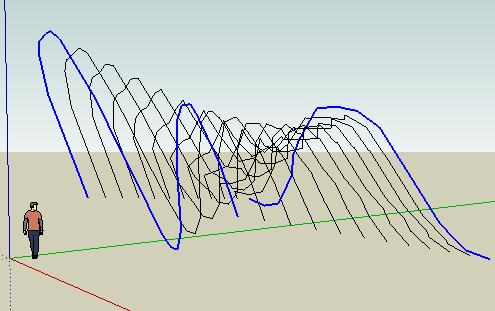
            Well, actually it's not exactly such a way. Points for the new curves are at vectors between corresponding vertices of 2 initial curves (refer to the attachment).

            @watkins said:

            Would it be possible to modify the script so that the end-points are determined by a third, curved line connecting the end-points of the boundary lines.

            Yes, it is possible for sure 😄 I'll try to implement such feature.


            blend.JPG

            1 Antwort Letzte Antwort Antworten Zitieren 0
            • W Offline
              watkins
              zuletzt editiert von

              Dear Kirill,

              This is beginning to look like a very useful plugin. Thank you for all your hard work, and your generosity.

              Kind regards,
              Bob

              1 Antwort Letzte Antwort Antworten Zitieren 0
              • MALAISEM Offline
                MALAISE
                zuletzt editiert von

                Hi Kirill
                Thanks you for the job you've done on this second plugin. It's opening a new world of shapes.. 👍 👍

                MALAISE 😄

                La Connaissance n'a de valeur que partagée

                1 Antwort Letzte Antwort Antworten Zitieren 0
                • W Offline
                  watkins
                  zuletzt editiert von

                  Dear Kirill,

                  I have just been trying out your plugin and note the following:

                  • that the 'undo' doesn't work with your plugin, i.e., I cannot revert back to the drawing before your plugin is used, and

                  • your plugin creates lines (steps) which are outside the group which contains the surface. One has to hide the group and then delete the lines. Is this how the plugin is meant to work?

                  Looking good.

                  Regards,
                  Bob

                  1 Antwort Letzte Antwort Antworten Zitieren 0
                  • A Offline
                    accabrera
                    zuletzt editiert von

                    Great Plugin!!!

                    Big Thank you

                    1 Antwort Letzte Antwort Antworten Zitieren 0
                    • JClementsJ Offline
                      JClements
                      zuletzt editiert von

                      Krill, nice work. If you can get two objects to follow and blend along a third, curve (path) as was suggested above, then we've got a nice, easy-to-use taper tool.

                      I am hoping you can do it.

                      Thanks, John

                      John | Illustrator | Beaverton, Oregon

                      1 Antwort Letzte Antwort Antworten Zitieren 0
                      • K Offline
                        kirill2008
                        zuletzt editiert von

                        Hi, Bob.
                        Thank's a lot for your feedback, it really helps to improve the script. 👍

                        @watkins said:

                        Dear Kirill,

                        • that the 'undo' doesn't work with your plugin, i.e., I cannot revert back to the drawing before your plugin is used, and

                        Well, actually 'undo' works, but yes it sometimes (big steps count value and/or big segments count of initial curves) cannot revert back drawing.
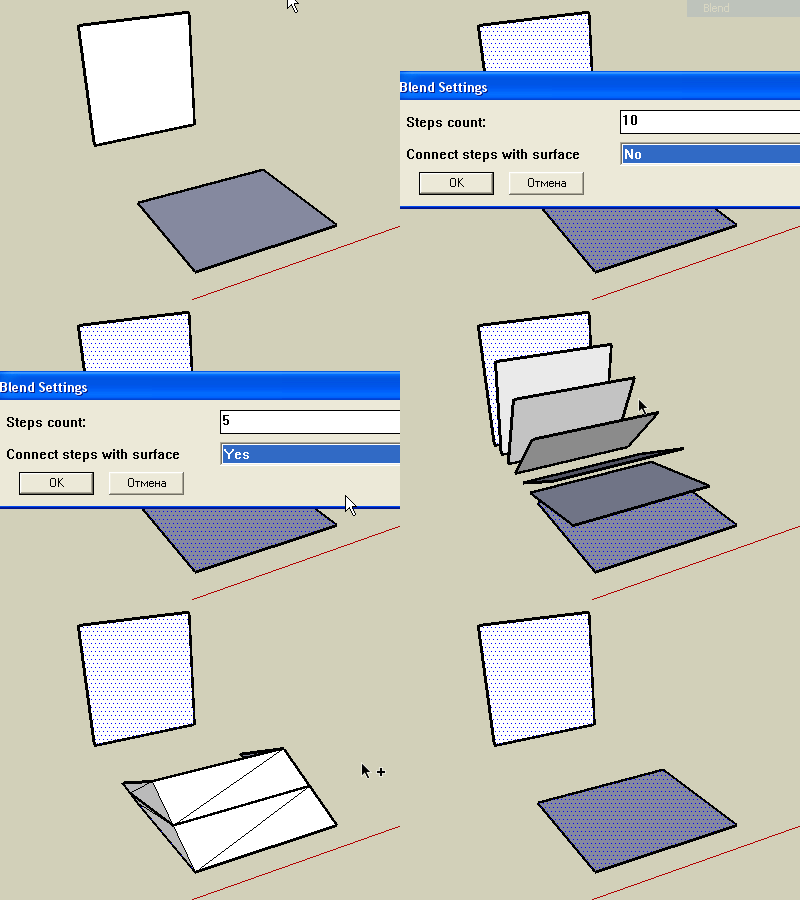
                        undodemo.gif
                        Animation shows '<Ctrl>+z' combination pressed effect.
                        Now (ver 1.3) all steps of Blend command joined to the single command and can be undone as one single action.

                        @watkins said:

                        • your plugin creates lines (steps) which are outside the group which contains the surface. One has to hide the group and then delete the lines. Is this how the plugin is meant to work?

                        Yes, they are supposed to be separated. But now (ver 1.3) I decided to put curves to another separate group.

                        @jclements said:

                        If you can get two objects to follow and blend along a third, curve (path) as was suggested above, then we've got a nice, easy-to-use taper tool.

                        Well, the final destination is an interactive blended object, that consists of 2 initial curves/faces and maybe a path. Interacting with initial curves and/or path has to affect the whole object. Sounds like a kind of challenge for me...

                        1 Antwort Letzte Antwort Antworten Zitieren 0
                        • mitcorbM Offline
                          mitcorb
                          zuletzt editiert von

                          Very interesting tool, kirill:
                          Seems to have qualities of Skin.rb and Simple Loft.rb but on steroids.
                          Excellent work!
                          mitcorb

                          I take the slow, deliberate approach in my aimless wandering.

                          1 Antwort Letzte Antwort Antworten Zitieren 0
                          • K Offline
                            kirill2008
                            zuletzt editiert von

                            Little bonus video:
                            [flash=480,385:2yb89gf7]http://www.youtube.com/p/910E7CBB59CD05F8&amp;hl=ru&amp;fs=1" type="application/x-shockwave-flash" width="480" height="385" allowscriptaccess="always" allowfullscreen="true"[/flash:2yb89gf7]
                            Ver. 1.4 is able to process more or less complex geometry.

                            1 Antwort Letzte Antwort Antworten Zitieren 0
                            • D Offline
                              Daniel S
                              zuletzt editiert von

                              This plugins looks great!
                              What about blend colors too?
                              Here an example that creates intermediate faces and colors from two existing ones (2 steps).
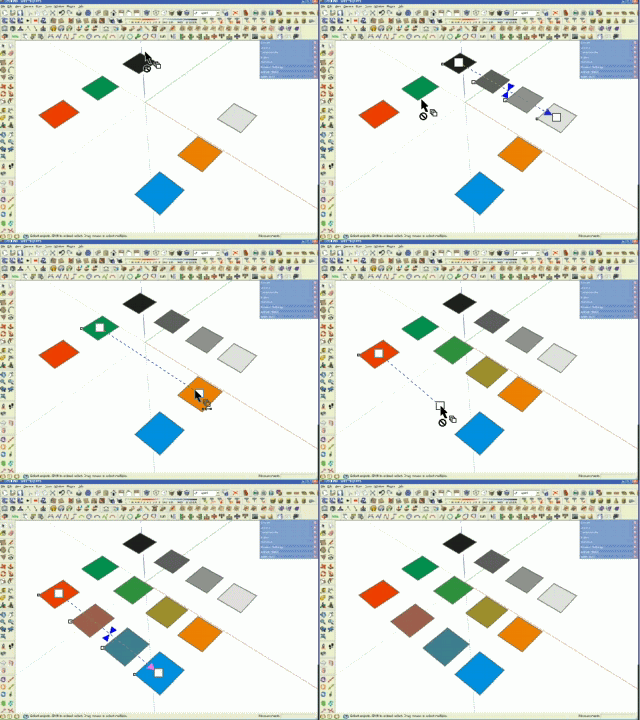
                              colorblend.gif
                              Of course this is not sketchup, is only a simulation.

                              Daniel S

                              1 Antwort Letzte Antwort Antworten Zitieren 0
                              • C Offline
                                cosycat
                                zuletzt editiert von

                                Great script, i've been waiting for something like this for ages. Couple of odd bugs with circles (v1.4)

                                1. seems to miss out a segment when doing a blend
                                  circles2.jpg

                                2. if you create the second circle with a move copy, you often get something like this
                                  circles1.jpg

                                1 Antwort Letzte Antwort Antworten Zitieren 0
                                • kenK Offline
                                  ken
                                  zuletzt editiert von

                                  Note sure if it me or note. But I tried V3 and was pleased with the results, however, V4 does not seem to display the same results. Note, I dont' have V3 any more, as I copied over the script, so this is from memory.

                                  I particular like how if blended a square to a circle, now every time the output has folds or is not a straight blend from the square to the circle.

                                  Ken

                                  Fight like your the third monkey on Noah's Ark gangway.

                                  1 Antwort Letzte Antwort Antworten Zitieren 0
                                  • mitcorbM Offline
                                    mitcorb
                                    zuletzt editiert von

                                    yeah, I had a gap between the originating curve and the next intervening step toward the destination curve. Easily knitted together with line tool, and so forth, but just mentioning.

                                    I take the slow, deliberate approach in my aimless wandering.

                                    1 Antwort Letzte Antwort Antworten Zitieren 0
                                    • utilerU Offline
                                      utiler
                                      zuletzt editiert von

                                      This is a nice plugin, mate! I'm going to play!!!!

                                      Just Curious...

                                      1 Antwort Letzte Antwort Antworten Zitieren 0
                                      • T Offline
                                        tomot
                                        zuletzt editiert von

                                        Nice plugin! but still needs some tweaking.
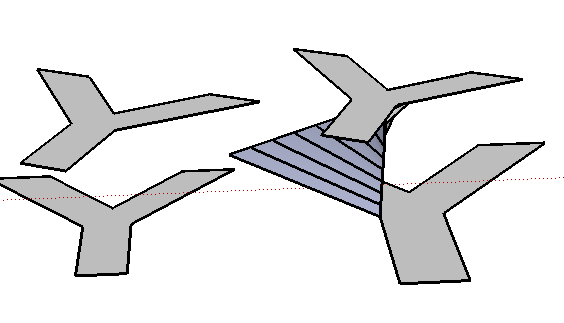
                                        I find it first works with a new fresh startup screen. but then the more experimenting I do with Blend the more inconsistant the results become, finally the Bend of the left Y's in the picture did not take place at all.

                                        Error; #<NoMethodError; undefined method `vertices' for nil;NilClass>
                                        C;/Program Files (x86)/Google/Google SketchUp 7/Plugins/sublend.rb;45;in `blend'
                                        C;/Program Files (x86)/Google/Google SketchUp 7/Plugins/sublend.rb;174
                                        C;/Program Files (x86)/Google/Google SketchUp 7/Plugins/sublend.rb;153;in `call'


                                        please don't give up!


                                        y.png

                                        [my plugins](http://thingsvirtual.blogspot.ca/)
                                        tomot

                                        1 Antwort Letzte Antwort Antworten Zitieren 0
                                        • K Offline
                                          kirill2008
                                          zuletzt editiert von

                                          Color blending demo video (for Daniel S 😉 😞
                                          [flash=425,344:1ki2zgl4]http://www.youtube.com/v/CqqRssCqONk&hl=ru&fs=1&" type="application/x-shockwave-flash" allowscriptaccess="always" allowfullscreen="true" width="425" height="344"[/flash:1ki2zgl4]

                                          cosycat, please try ver. 1.5. I tried to solve the problem of missing mesh pieces.

                                          tomot, I'll try to find out, what's the problem with rotated Y's...

                                          And speaking about the 3'd curve (the path): looks like, it demands a kind of major refactoring 😕 It is more complex task than I thought and it will take a little time...

                                          1 Antwort Letzte Antwort Antworten Zitieren 0
                                          • T Offline
                                            tomot
                                            zuletzt editiert von

                                            I don't want you to misunderstand. This is not only related to the "y" shape. Other shapes have produced the same inconsistent results in SU 7.
                                            another example:
                                            make 2 identical closed shapes, scale one larger, apply bend, same code error occurs

                                            cheers.

                                            [my plugins](http://thingsvirtual.blogspot.ca/)
                                            tomot

                                            1 Antwort Letzte Antwort Antworten Zitieren 0
                                            • 1
                                            • 2
                                            • 3
                                            • 4
                                            • 1 / 4
                                            • Erster Beitrag
                                              Letzter Beitrag
                                            Buy SketchPlus
                                            Buy SUbD
                                            Buy WrapR
                                            Buy eBook
                                            Buy Modelur
                                            Buy Vertex Tools
                                            Buy SketchCuisine
                                            Buy FormFonts

                                            Advertisement