sketchucation logo sketchucation
    • 登入
    Oops, your profile's looking a bit empty! To help us tailor your experience, please fill in key details like your SketchUp version, skill level, operating system, and more. Update and save your info on your profile page today!
    🔌 Smart Spline | Fluid way to handle splines for furniture design and complex structures. Download

    [Plugin][$] RoundCorner - v3.4a - 31 Mar 24


    已排程 已置頂 已鎖定 已移動 Plugins
    1.5k 貼文 473 Posters 3.4m 瀏覽 472 Watching
    正在載入更多貼文
    • 從舊到新
    • 從新到舊
    • 最多點贊
    回覆
    • 在新貼文中回覆
    登入後回覆
    此主題已被刪除。只有擁有主題管理權限的使用者可以查看。
    • brookefoxB 離線
      brookefox
      最後由 編輯

      My first use of this wonderful tool leads me to make a newb suggestion and ask a newb question.

      S: It would be nice to have persistent settings for each of the three round types independently as, for instance, I generally want beveled edges unsmoothed but the others likely not.

      Q: With a surface whose edges have been beveled and unsmoothed and which appears flat and untextured, what causes the slightly modeled appearance (slight shading effects not visible elsewhere)?

      ~ Brooke

      1 條回覆 最後回覆 回覆 引用 0
      • TIGT 離線
        TIG Moderator
        最後由 編輯

        If a 'followme' type tool makes faces with dims <~1mm it will cause failures - a limitation of OpenGL ?
        I thought you might be making the equivalent of a 'followme' around a tight curve that made these small facets and crashed - but maybe not ?
        Can you successfully make the equivalent rounded/chamfer using the FollowMe tool 'raw' ?

        TIG

        1 條回覆 最後回覆 回覆 引用 0
        • ken28875K 離線
          ken28875
          最後由 編輯

          Hi TIG,

          I don't have any problems with the Follow-me tool.

          Sketchup crashes only when I use RoundCorner. 😢

          Thanks,

          _KN

          Follow Your Dreams.

          1 條回覆 最後回覆 回覆 引用 0
          • fredo6F 離線
            fredo6
            最後由 編輯

            @ken28875 said:

            Hi TIG,

            I don't have any problems with the Follow-me tool.

            Sketchup crashes only when I use RoundCorner. 😢

            Thanks,

            _KN

            Ken,

            Could you post or send me the model, so that I can have a look at whatcrashes.
            I assume that you also upgraded to the latest version. There was a previous release that had reported crashes.

            Fredo

            1 條回覆 最後回覆 回覆 引用 0
            • fredo6F 離線
              fredo6
              最後由 編輯

              @brookefox said:

              S: It would be nice to have persistent settings for each of the three round types independently as, for instance, I generally want beveled edges unsmoothed but the others likely not.

              Normally the persistence is done for each individual tool, including the custom saving by the icons A, B, C, D

              @brookefox said:

              Q: With a surface whose edges have been beveled and unsmoothed and which appears flat and untextured, what causes the slightly modeled appearance (slight shading effects not visible elsewhere)?

              I am not clear of what is the bad visual effect. Coul you post a picture or the model.

              Fredo

              1 條回覆 最後回覆 回覆 引用 0
              • ken28875K 離線
                ken28875
                最後由 編輯

                @unknownuser said:

                Ken,

                Could you post or send me the model, so that I can have a look at whatcrashes.
                I assume that you also upgraded to the latest version. There was a previous release that had reported crashes.

                Fredo

                Hi Fredo,

                I just sent you a private message. Unfortunately I could not attach the file. It's bigger than the allowed size of 4mb.

                Thanks,

                _KN

                Follow Your Dreams.

                1 條回覆 最後回覆 回覆 引用 0
                • brookefoxB 離線
                  brookefox
                  最後由 編輯

                  @unknownuser said:

                  @brookefox said:

                  S: It would be nice to have persistent settings for each of the three round types independently as, for instance, I generally want beveled edges unsmoothed but the others likely not.

                  Normally the persistence is done for each individual tool, including the custom saving by the icons A, B, C, D
                  Fredo

                  Sorry, I missed that and will investigate further. Thank you.

                  @unknownuser said:

                  @brookefox said:

                  Q: With a surface whose edges have been beveled and unsmoothed and which appears flat and untextured, what causes the slightly modeled appearance (slight shading effects not visible elsewhere)?

                  I am not clear of what is the bad visual effect. Coul you post a picture or the model.

                  Fredo

                  Its only very slightly 'bad'. My understanding is worse, though, and that is what I was wanting to improve.
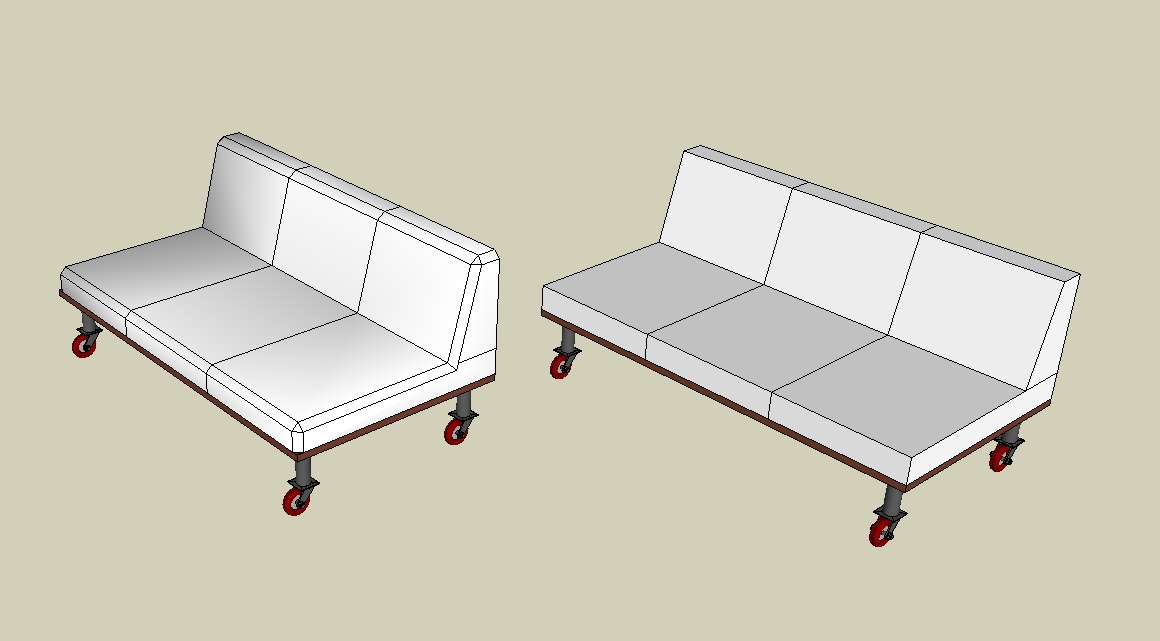

                  couches-caster.jpg

                  ~ Brooke

                  1 條回覆 最後回覆 回覆 引用 0
                  • thomthomT 離線
                    thomthom
                    最後由 編輯

                    Are the edges Smooth by any chance?

                    Thomas Thomassen — SketchUp Monkey & Coding addict
                    List of my plugins and link to the CookieWare fund

                    1 條回覆 最後回覆 回覆 引用 0
                    • brookefoxB 離線
                      brookefox
                      最後由 編輯

                      Well, obviously, I mean, well, er....

                      I thought I had checked that but obviously my methodology was seriously flawed.

                      Thanks, t.

                      ~ Brooke

                      1 條回覆 最後回覆 回覆 引用 0
                      • C 離線
                        Cris999
                        最後由 編輯

                        Hello

                        Is there another place to download this plugin?
                        I tried with this one, but it gave me the message "The Compressed (zipped) Folder is invalid or corrupted".

                        Thank You, Cris999

                        1 條回覆 最後回覆 回覆 引用 0
                        • TIGT 離線
                          TIG Moderator
                          最後由 編輯

                          The 2.1c zip is fine I just re-downloaded it to test... Try again.

                          TIG

                          1 條回覆 最後回覆 回覆 引用 0
                          • C 離線
                            Cris999
                            最後由 編輯

                            I tried on other PC too. Same problem. Can somebody send me the unzipped files on PM?
                            Thank You

                            1 條回覆 最後回覆 回覆 引用 0
                            • fredo6F 離線
                              fredo6
                              最後由 編輯

                              @cris999 said:

                              I tried on other PC too. Same problem. Can somebody send me the unzipped files on PM?
                              Thank You

                              Which unzip program do you use?

                              Fredo

                              1 條回覆 最後回覆 回覆 引用 0
                              • C 離線
                                Cris999
                                最後由 編輯

                                First: I tried to selfextract the file.
                                Second: it was 7-Zip
                                Third: WinAce
                                Forth: I used a online unzipper service
                                Fifth: I sent the file to somebody, asking him to unzip
                                Sixth: I downloaded from another PC and tried unsuccessfully to unzip
                                Only WinAce showed my the 2 "IMAGES" folders and english pdf file (the french one is corrupt) and no other files in "ROUNDCORNER_Dir_21" folder

                                Thank You, Cris999

                                1 條回覆 最後回覆 回覆 引用 0
                                • fredo6F 離線
                                  fredo6
                                  最後由 編輯

                                  @cris999 said:

                                  First: I tried to selfextract the file.
                                  Second: it was 7-Zip
                                  Third: WinAce
                                  Forth: I used a online unzipper service
                                  Fifth: I sent the file to somebody, asking him to unzip
                                  Sixth: I downloaded from another PC and tried unsuccessfully to unzip
                                  Only WinAce showed my the 2 "IMAGES" folders and english pdf file (the french one is corrupt) and no other files in "ROUNDCORNER_Dir_21" folder

                                  Thank You, Cris999

                                  Maybe you should try to download WinZip (this is what I use to zip the files).
                                  In any case, be attentive to the hierarchy of folders that should be recreated. I would suggest you unzip in a neutral place, then check and then copy the folder and small file in the SU Plugin directory.

                                  Fredo

                                  1 條回覆 最後回覆 回覆 引用 0
                                  • X 離線
                                    xrok1
                                    最後由 編輯

                                    i dblclick to open with 7zip then drag and drop files/folders to SU plugins in another open explorer window. never fails. 😄

                                    “There are three classes of people: those who see. Those who see when they are shown. Those who do not see.”

                                    http://www.Twilightrender.com try it!

                                    1 條回覆 最後回覆 回覆 引用 0
                                    • B 離線
                                      blair
                                      最後由 編輯

                                      Some time ago I used Fred06.s "[Plugin] RoundCorner" to round/bevel an edge then saved the file. Now I have decided the round/bevel edge is to large. Is there a way to undo the round/bevel and start over from a square edge and do it all over again without a re-draw?

                                      1 條回覆 最後回覆 回覆 引用 0
                                      • B 離線
                                        blair
                                        最後由 編輯

                                        There is probably a better way to do the above but I do not know what it is. What I did was go back and re-build each and every corner 1 x 1. Sure makes me hope I get the rounds right next time and have a back up copy just in case.

                                        1 條回覆 最後回覆 回覆 引用 0
                                        • X 離線
                                          xrok1
                                          最後由 編輯

                                          you could always make a copy of your original stuff and put it on a hidden layer before you do major edits like round corner.

                                          “There are three classes of people: those who see. Those who see when they are shown. Those who do not see.”

                                          http://www.Twilightrender.com try it!

                                          1 條回覆 最後回覆 回覆 引用 0
                                          • GaieusG 離線
                                            Gaieus
                                            最後由 編輯

                                            Or even better; use Didier's Ghost Component plugin to keep the original (unrounded) as ghost and round the "real" to anything. Then you can always get back to the original.


                                            Gai...

                                            1 條回覆 最後回覆 回覆 引用 0
                                            • 1
                                            • 2
                                            • 14
                                            • 15
                                            • 16
                                            • 17
                                            • 18
                                            • 73
                                            • 74
                                            • 16 / 74
                                            • 第一個貼文
                                              最後的貼文
                                            Buy SketchPlus
                                            Buy SUbD
                                            Buy WrapR
                                            Buy eBook
                                            Buy Modelur
                                            Buy Vertex Tools
                                            Buy SketchCuisine
                                            Buy FormFonts

                                            Advertisement




