sketchucation logo sketchucation
    • 登入
    Oops, your profile's looking a bit empty! To help us tailor your experience, please fill in key details like your SketchUp version, skill level, operating system, and more. Update and save your info on your profile page today!
    🔌 Smart Spline | Fluid way to handle splines for furniture design and complex structures. Download

    Updated version of Draw Metal plugins

    已排程 已置頂 已鎖定 已移動 Developers' Forum
    25 貼文 14 Posters 4.4k 瀏覽 14 Watching
    正在載入更多貼文
    • 從舊到新
    • 從新到舊
    • 最多點贊
    回覆
    • 在新貼文中回覆
    登入後回覆
    此主題已被刪除。只有擁有主題管理權限的使用者可以查看。
    • M 離線
      max-cx
      最後由 max-cx 編輯

      The latest versions (1.1) of the Curve Maker, Taper Maker and Stock Maker plugins are now available here:
      http://www.drawmetal.com/download

      All current users are encouraged to install it. SketchUp 7 is required to use the new interactive features.

      The major enhancements are to Curve Maker:

      1. New interactive tools for drawing the following spirals: Archimedes, Bernoulli (aka logarithmic or equiangular), Euler (aka Clothoid or Cornu), Fermat, Golden, Helix, Hyperbolic and Lituus
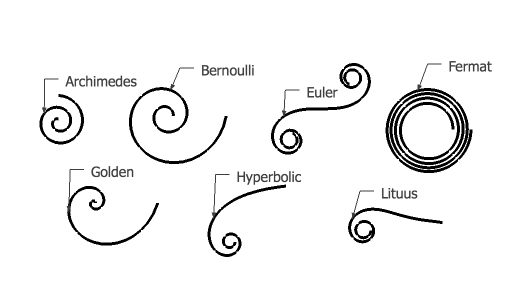
        Spirals.jpg

      This brief (3 min) video provides information on how to use these tools: http://www.youtube.com/watch?v=JW7VyVvSiwY

      1. The capability to draw Cornu splines. This tool draws a smooth curve that passes through a given set of points. For example, the Cornu spline on the left in the figure below passes through the endpoints of the line segments shown on the right.
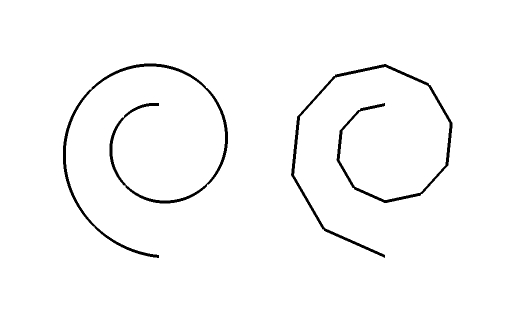
        Cornu.jpg

      You can use an existing line as the basis for creating a Cornu spline or you can draw a Cornu spline interactively. You can also interactively edit a Cornu spline.

      This tool is computationally intensive. Larger values of the parameters that control the algorithm (i.e. iterations of 100, 200 or more and sides/segment of 50, 100 or more) produce nicer curves but at a computational price. In practice, you probably want to use smaller values when drawing interactively (i.e. iterations = 50, sides/segment = 20). You can always go back and edit the algorithm parameters to draw a smoother curve.

      At the 1:50 mark of this brief (3 min) video, there is a demo of interactive drawing and editing using the Cornu spline tool: http://www.youtube.com/watch?v=UX1HptFLObM

      ** Please note that this capability is a Ruby adaptation of path.py created by Raph Levien (http://www.levien.com) aided by insights from Cornu for Nodebox (nodebox.net/code/index.php/Cornu). Thanks to Raph and to the Nodebox team for their expertise, creativity and generosity. **

      1. The capability to draw Euler spirals. This derives from the Cornu spline code because that logic is based on Euler spirals. I used this capability to design a part of this sculpture I recently completed:
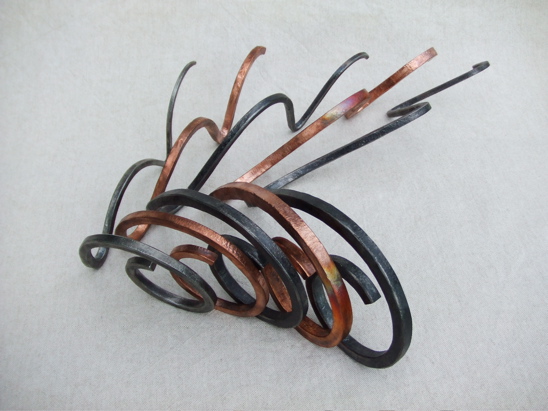
        Euler_element.jpg

      Please let me know if you have any questions or problems.

      Terry
      http://www.drawmetal.com

      1 條回覆 最後回覆 回覆 引用 0
      • GaieusG 離線
        Gaieus
        最後由 編輯

        Hi Terry,

        Well, what could I say? It's terrific! Thanks a lot for the excellent plugin as well as the update of it.! 👍 👍 👍

        Gai...

        1 條回覆 最後回覆 回覆 引用 0
        • Dave RD 離線
          Dave R
          最後由 編輯

          This is great Terry. thank you. Any chance of getting rid of the sounds? So far I haven't seen anything that requires the sound and it occurs during operations such as right clicking on a curve before editing it.

          Etaoin Shrdlu

          %

          (THERE'S NO PLACE LIKE)

          G28 X0.0 Y0.0 Z0.0

          M30

          %

          1 條回覆 最後回覆 回覆 引用 0
          • M 離線
            max-cx
            最後由 編輯

            Dave -

            Thanks for reporting this problem. There is nothing in my code that wants or seeks to make a sound, and it doesn't happen on my machine. Let me see what I can find.

            Terry

            Terry
            http://www.drawmetal.com

            1 條回覆 最後回覆 回覆 引用 0
            • J 離線
              Jim
              最後由 編輯

              @dave r said:

              This is great Terry. thank you. Any chance of getting rid of the sounds? So far I haven't seen anything that requires the sound and it occurs during operations such as right clicking on a curve before editing it.

              The housebuilder plugin is one that is known to cause sounds. Temporarily disabled it and see if that helps.

              Hi

              1 條回覆 最後回覆 回覆 引用 0
              • pilouP 離線
                pilou
                最後由 編輯

                Nice plug indeed 😎

                Frenchy Pilou
                Is beautiful that please without concept!
                My Little site :)

                1 條回覆 最後回覆 回覆 引用 0
                • Dave RD 離線
                  Dave R
                  最後由 編輯

                  Thank you very kindly for that. My ears appreciate it.

                  Etaoin Shrdlu

                  %

                  (THERE'S NO PLACE LIKE)

                  G28 X0.0 Y0.0 Z0.0

                  M30

                  %

                  1 條回覆 最後回覆 回覆 引用 0
                  • M 離線
                    max-cx
                    最後由 編輯

                    OK, the irritating sound mystery is solved.

                    Some example code I had used featured a UI.beep which I had not noticed, and the machines I use have the alert sound muted.

                    I have updated the download code at: http://www.drawmetal.com/download

                    Sorry for the inconvenience.

                    Terry
                    http://www.drawmetal.com

                    1 條回覆 最後回覆 回覆 引用 0
                    • Bob JamesB 離線
                      Bob James
                      最後由 編輯

                      @dave r said:

                      Thank you very kindly for that. My ears appreciate it.

                      Amen

                      i7-4930K 3.4Ghz, 2x GTX780 6GB, 32GB DDR3-1600 ECC, OCZ Vertex 4 500GB, WD Black 3TB, 32TB NAS, 4x 27" Monitors, SpaceMouse Pro, X-keys XK-60

                      1 條回覆 最後回覆 回覆 引用 0
                      • fredo6F 離線
                        fredo6
                        最後由 編輯

                        Terry,

                        Very impressed by this suite of tools. Great job and very neat programming!

                        One question: do you know if mathematically you can extend the Cornu curve to a suite of control points in 3D space (i.e. not in a plane)?

                        Fredo

                        1 條回覆 最後回覆 回覆 引用 0
                        • JClementsJ 離線
                          JClements
                          最後由 編輯

                          The Cornu function looks like it could be very useful.

                          John | Illustrator | Beaverton, Oregon

                          1 條回覆 最後回覆 回覆 引用 0
                          • massimoM 離線
                            massimo Moderator
                            最後由 編輯

                            Hi Terry, your plugin is really good thanks. It works well, but i've noticed a strange thing. In SU6 free when i do right click on a face i had this:

                            Error: #<NoMethodError: undefined method active_path' for #<Sketchup::Model:0x879db90>> (eval):3406:in valid_group?'
                            (eval):3458:in selected_stuff' C:/Programmi/Google/Google SketchUp 6/Plugins/ctsMaker/curve_menu.rb:46 C:/Programmi/Google/Google SketchUp 6/Plugins/ctsMaker/curve_menu.rb:45:in call'

                            I've tried it on SU7 pro (with no other plugin installed) and no error message.
                            Maybe a plugin conflict?
                            Massimo

                            1 條回覆 最後回覆 回覆 引用 0
                            • Didier BurD 離線
                              Didier Bur
                              最後由 編輯

                              active_path is a "SU7 only" method.

                              As the author says:
                              @unknownuser said:

                              SketchUp 7 is required to use the new interactive features.

                              DB

                              1 條回覆 最後回覆 回覆 引用 0
                              • massimoM 離線
                                massimo Moderator
                                最後由 編輯

                                Oh... sorry, thanks Didier

                                1 條回覆 最後回覆 回覆 引用 0
                                • M 離線
                                  max-cx
                                  最後由 編輯

                                  Fredo -

                                  @unknownuser said:

                                  One question: do you know if mathematically you can extend the Cornu curve to a suite of control points in 3D space (i.e. not in a plane)?

                                  Sorry to be slow in responding. The mathematical extension to 3D is discussed in Chapter 11 of Raph Levien's forthcoming PhD thesis (http://levien.com/phd/thesis.pdf). That does not imply, however, that I will be programming such an extension.

                                  Terry
                                  http://www.drawmetal.com

                                  1 條回覆 最後回覆 回覆 引用 0
                                  • I 離線
                                    IAGDint
                                    最後由 編輯

                                    Your great.
                                    This is a very useful tool.
                                    Thanks.
                                    Cheers.

                                    1 條回覆 最後回覆 回覆 引用 0
                                    • E 離線
                                      Efrado
                                      最後由 編輯

                                      Indeed It is a great plugin,THANKS.But I get trouble with the icons, does not show ,only the blanks.I use Mac 😞

                                      1 條回覆 最後回覆 回覆 引用 0
                                      • jeff hammondJ 離線
                                        jeff hammond
                                        最後由 編輯

                                        this plugin doesn't have any icons (at least no toolbar icons which i think you're talking about).. it's functions are accessible via the plugins menu -> curve maker

                                        maybe your blank icons are from a different plugin?

                                        dotdotdot

                                        1 條回覆 最後回覆 回覆 引用 0
                                        • M 離線
                                          max-cx
                                          最後由 編輯

                                          So far, the only time the toolbar icons have not worked is when they had not been installed in the right place in the file hierarchy. After installation, the file hierarchy for the plugin should appear as shown in this figure.
                                          toolbar_installed.pdf

                                          Terry
                                          http://www.drawmetal.com

                                          1 條回覆 最後回覆 回覆 引用 0
                                          • jeff hammondJ 離線
                                            jeff hammond
                                            最後由 編輯

                                            well in that case, i think the icons are missing from the mac zip package.. i'll check the dmg

                                            dotdotdot

                                            1 條回覆 最後回覆 回覆 引用 0
                                            • 1
                                            • 2
                                            • 1 / 2
                                            • 第一個貼文
                                              最後的貼文
                                            Buy SketchPlus
                                            Buy SUbD
                                            Buy WrapR
                                            Buy eBook
                                            Buy Modelur
                                            Buy Vertex Tools
                                            Buy SketchCuisine
                                            Buy FormFonts

                                            Advertisement





