Updated version of Draw Metal plugins
-
The latest versions (1.1) of the Curve Maker, Taper Maker and Stock Maker plugins are now available here:
http://www.drawmetal.com/downloadAll current users are encouraged to install it. SketchUp 7 is required to use the new interactive features.
The major enhancements are to Curve Maker:
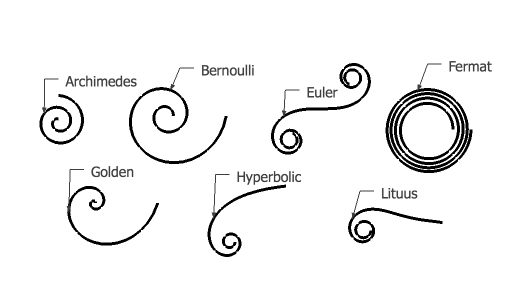
- New interactive tools for drawing the following spirals: Archimedes, Bernoulli (aka logarithmic or equiangular), Euler (aka Clothoid or Cornu), Fermat, Golden, Helix, Hyperbolic and Lituus
This brief (3 min) video provides information on how to use these tools: http://www.youtube.com/watch?v=JW7VyVvSiwY
- The capability to draw Cornu splines. This tool draws a smooth curve that passes through a given set of points. For example, the Cornu spline on the left in the figure below passes through the endpoints of the line segments shown on the right.
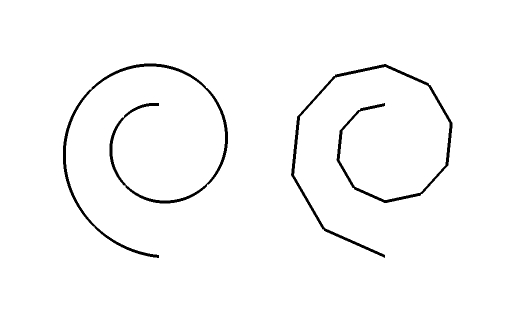
You can use an existing line as the basis for creating a Cornu spline or you can draw a Cornu spline interactively. You can also interactively edit a Cornu spline.
This tool is computationally intensive. Larger values of the parameters that control the algorithm (i.e. iterations of 100, 200 or more and sides/segment of 50, 100 or more) produce nicer curves but at a computational price. In practice, you probably want to use smaller values when drawing interactively (i.e. iterations = 50, sides/segment = 20). You can always go back and edit the algorithm parameters to draw a smoother curve.
At the 1:50 mark of this brief (3 min) video, there is a demo of interactive drawing and editing using the Cornu spline tool: http://www.youtube.com/watch?v=UX1HptFLObM
** Please note that this capability is a Ruby adaptation of path.py created by Raph Levien (http://www.levien.com) aided by insights from Cornu for Nodebox (nodebox.net/code/index.php/Cornu). Thanks to Raph and to the Nodebox team for their expertise, creativity and generosity. **
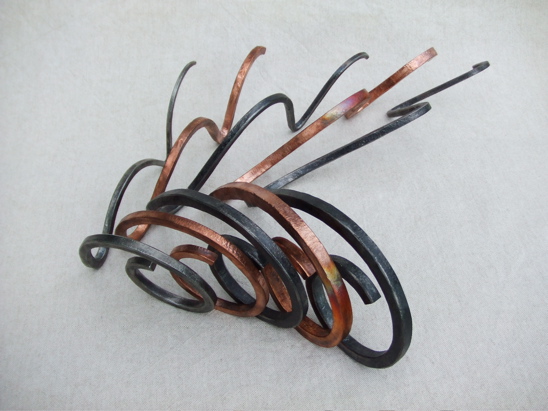
- The capability to draw Euler spirals. This derives from the Cornu spline code because that logic is based on Euler spirals. I used this capability to design a part of this sculpture I recently completed:
Please let me know if you have any questions or problems.
- New interactive tools for drawing the following spirals: Archimedes, Bernoulli (aka logarithmic or equiangular), Euler (aka Clothoid or Cornu), Fermat, Golden, Helix, Hyperbolic and Lituus
-
Hi Terry,
Well, what could I say? It's terrific! Thanks a lot for the excellent plugin as well as the update of it.!

-
This is great Terry. thank you. Any chance of getting rid of the sounds? So far I haven't seen anything that requires the sound and it occurs during operations such as right clicking on a curve before editing it.
-
Dave -
Thanks for reporting this problem. There is nothing in my code that wants or seeks to make a sound, and it doesn't happen on my machine. Let me see what I can find.
Terry
-
@dave r said:
This is great Terry. thank you. Any chance of getting rid of the sounds? So far I haven't seen anything that requires the sound and it occurs during operations such as right clicking on a curve before editing it.
The housebuilder plugin is one that is known to cause sounds. Temporarily disabled it and see if that helps.
-
Nice plug indeed

-
Thank you very kindly for that. My ears appreciate it.
-
OK, the irritating sound mystery is solved.
Some example code I had used featured a UI.beep which I had not noticed, and the machines I use have the alert sound muted.
I have updated the download code at: http://www.drawmetal.com/download
Sorry for the inconvenience.
-
-
Terry,
Very impressed by this suite of tools. Great job and very neat programming!
One question: do you know if mathematically you can extend the Cornu curve to a suite of control points in 3D space (i.e. not in a plane)?
Fredo
-
The Cornu function looks like it could be very useful.
-
Hi Terry, your plugin is really good thanks. It works well, but i've noticed a strange thing. In SU6 free when i do right click on a face i had this:
Error: #<NoMethodError: undefined method
active_path' for #<Sketchup::Model:0x879db90>> (eval):3406:invalid_group?'
(eval):3458:inselected_stuff' C:/Programmi/Google/Google SketchUp 6/Plugins/ctsMaker/curve_menu.rb:46 C:/Programmi/Google/Google SketchUp 6/Plugins/ctsMaker/curve_menu.rb:45:incall'I've tried it on SU7 pro (with no other plugin installed) and no error message.
Maybe a plugin conflict?
Massimo -
active_path is a "SU7 only" method.
As the author says:
@unknownuser said:SketchUp 7 is required to use the new interactive features.
-
Oh... sorry, thanks Didier
-
Fredo -
@unknownuser said:
One question: do you know if mathematically you can extend the Cornu curve to a suite of control points in 3D space (i.e. not in a plane)?
Sorry to be slow in responding. The mathematical extension to 3D is discussed in Chapter 11 of Raph Levien's forthcoming PhD thesis (http://levien.com/phd/thesis.pdf). That does not imply, however, that I will be programming such an extension.
-
Your great.
This is a very useful tool.
Thanks.
Cheers. -
Indeed It is a great plugin,THANKS.But I get trouble with the icons, does not show ,only the blanks.I use Mac

-
this plugin doesn't have any icons (at least no toolbar icons which i think you're talking about).. it's functions are accessible via the plugins menu -> curve maker
maybe your blank icons are from a different plugin?
-
So far, the only time the toolbar icons have not worked is when they had not been installed in the right place in the file hierarchy. After installation, the file hierarchy for the plugin should appear as shown in this figure.
toolbar_installed.pdf -
well in that case, i think the icons are missing from the mac zip package.. i'll check the dmg









Hello! It looks like you're interested in this conversation, but you don't have an account yet.
Getting fed up of having to scroll through the same posts each visit? When you register for an account, you'll always come back to exactly where you were before, and choose to be notified of new replies (either via email, or push notification). You'll also be able to save bookmarks and upvote posts to show your appreciation to other community members.
With your input, this post could be even better 💗
Register Login


Advertisement