sketchucation logo sketchucation
    • Conectarse
    Oops, your profile's looking a bit empty! To help us tailor your experience, please fill in key details like your SketchUp version, skill level, operating system, and more. Update and save your info on your profile page today!
    🔌 Smart Spline | Fluid way to handle splines for furniture design and complex structures. Download

    [Plugin][$] FredoScale - v3.6a - 01 Apr 24


    Programado Fijo Cerrado Movido Plugins
    1.1k Mensajes 345 Posters 2.4m Visitas 342 Watching
    Cargando más mensajes
    • Más antiguo a más nuevo
    • Más nuevo a más antiguo
    • Mayor número de Votos
    Responder
    • Responder como tema
    Accede para responder
    Este tema ha sido borrado. Solo los usuarios que tengan privilegios de administración de temas pueden verlo.
    • R Desconectado
      rv1974
      Última edición por

      @thomthom said:

      @unknownuser said:

      @unknownuser said:

      The stretch command isn't uniform.

      And you can use the "moving Plan" for make it Uniform by part 😉

      Still won't be a uniform stretch.


      OK "Uniform" is wrong definition. But what hamper to allwindows in bulding #3 to become the same "win1_3" (if say original window in unstreched building#1 is "win1"?
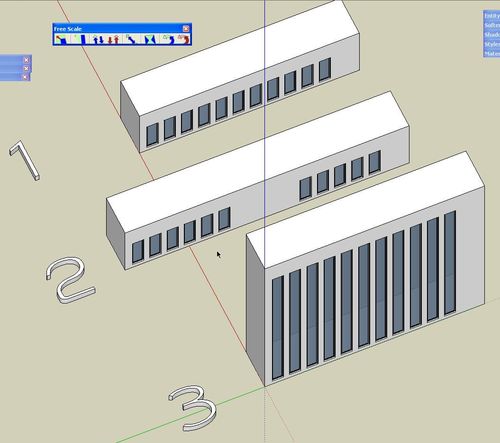

      ScreenShot031.jpg

      1 Respuesta Última respuesta Responder Citar 0
      • Dave RD Desconectado
        Dave R
        Última edición por

        Fredo, thank you. The Bend operation is way cool. It even works on unconnected geometry.

        bend_test.jpg

        Etaoin Shrdlu

        %

        (THERE'S NO PLACE LIKE)

        G28 X0.0 Y0.0 Z0.0

        M30

        %

        1 Respuesta Última respuesta Responder Citar 0
        • thomthomT Desconectado
          thomthom
          Última edición por

          @rv1974 said:

          OK "Uniform" is wrong definition. But what hamper to allwindows in bulding #3 to become the same "win1_3" (if say original window in unstreched building#1 is "win1"?

          That would be nice. Just wondering how easy it is to work out which components remain the same... But if Fredo can solve that I'll make another donation to him.

          Thomas Thomassen — SketchUp Monkey & Coding addict
          List of my plugins and link to the CookieWare fund

          1 Respuesta Última respuesta Responder Citar 0
          • P Desconectado
            pibuz
            Última edición por

            Fredo! Thank you so much for this unbelieveable plugin!
            One step closer to 3dsMax 😄

            WEB (ita) - https://filipposcarso.wixsite.com/ordinentropico

            1 Respuesta Última respuesta Responder Citar 0
            • jeff hammondJ Desconectado
              jeff hammond
              Última edición por

              @xrok1 said:

              @unknownuser said:

              Just in case nobody else has noticed, there's an html file (freescale.donation.html) in the freescale_dir_20 folder.. you can make a donation via that link.

              i would love to see the donation page in english too so i could give you some kudos. please post english donation link, and thankyou very much.

              the donation is via paypal so you can go to your language version of that and send to:

              fredosix{at}hotmail{dot}com
              

              dotdotdot

              1 Respuesta Última respuesta Responder Citar 0
              • E Desconectado
                Ecuadorian
                Última edición por

                👍 👍
                I don't know what they taught you at the École Polytechnique, but they certainly did a good job with you, Fredo!

                -Miguel Lescano
                Subscribe to my house plans YouTube channel! (30K+ subs)

                1 Respuesta Última respuesta Responder Citar 0
                • kenK Desconectado
                  ken
                  Última edición por

                  Fredo

                  I am still having some problems. If I install FS, Ver. 2 with FS, Ver. 1 installed I get the message below, pic. V1&2. If I removed Ver. 1, than I get the next message, pic. V2 only.

                  After I click the OK, the script seems to work OK.

                  Thanks for the script.

                  Ken
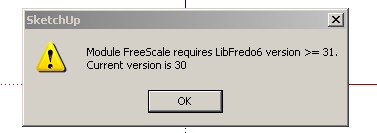

                  V1&2.jpg

                  Fight like your the third monkey on Noah's Ark gangway.

                  1 Respuesta Última respuesta Responder Citar 0
                  • J Desconectado
                    jmmad
                    Última edición por

                    @unknownuser said:

                    @unknownuser said:

                    jmmad wrote:
                    I only have one problem with the stretch tool some times when I strech something even a simple geometry SU freezes and does not respond, and i have to restart SU.

                    Fredo6 wrote:
                    a) Do you apply it to a selection made of embedded components, with several instances (insinde or outside the selection)?
                    b) Is this something you can reproduce on a given model (if so, can you post it)

                    Yes here i post the model
                    It's a component bench with 1 nested component for the legs that repeats 4 times. I don't have any problems when i stretch the model normally, but when i hit control key to stretch from the center it freezes while I am still stretching the component.

                    Here i attach a image and the corresponding component

                    Thxs
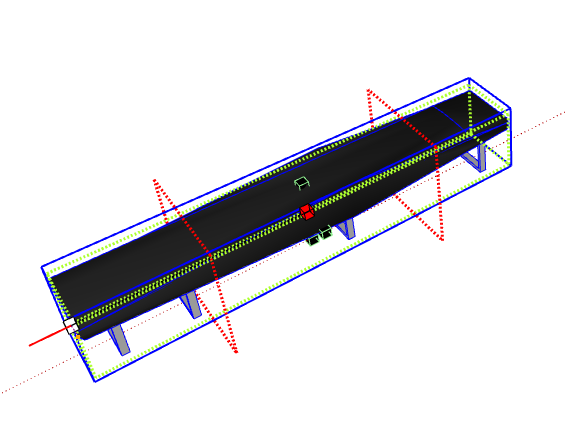

                    Bench_Modern.skp


                    Freeform2.0 Bug.png

                    Get Upa !

                    1 Respuesta Última respuesta Responder Citar 0
                    • kenK Desconectado
                      ken
                      Última edición por

                      Fredo

                      Well it seems on one attachment made the trip. Here is pic 2 error message with only FS Ver 2 installed.
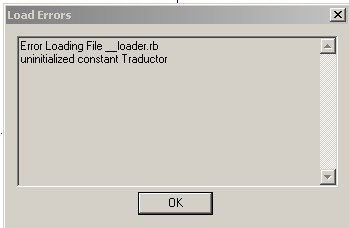

                      V2 Only.jpg

                      Fight like your the third monkey on Noah's Ark gangway.

                      1 Respuesta Última respuesta Responder Citar 0
                      • J Desconectado
                        jmmad
                        Última edición por

                        Fredo,
                        In this image i get the same problem with stretch
                        but with normal stretch (no control key hit)
                        Its the same component only thing i just bet it before 90º then try to strech one end.
                        Then Freeze SU

                        Thxs


                        Bench.png

                        Get Upa !

                        1 Respuesta Última respuesta Responder Citar 0
                        • D Desconectado
                          Daniel S
                          Última edición por

                          Fredo, not big problems but something that i find using FreeScale 2.0:

                          • Trying to change the deformation before clicking to validate the transformation it makes a unexpected result. I don`t know how to explain this in english so i attach a video showing the problem in the twist and taper tool:
                            twist-taper.wmv
                          • In the plugin configuration (Icons visible in the toolbar option) I remove the Make Unique, the box rotation, and the rotation (free) icons. Works well but it leaves the icon separators. I attach a image of this too:
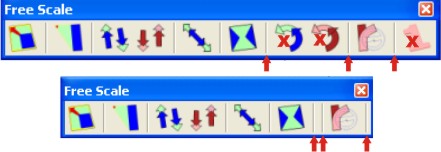
                            icons.jpg
                          • A feature of the native protactor-rotate tool is missing... The ability of holding down the primary mouse button, and dragging the protractor is great:
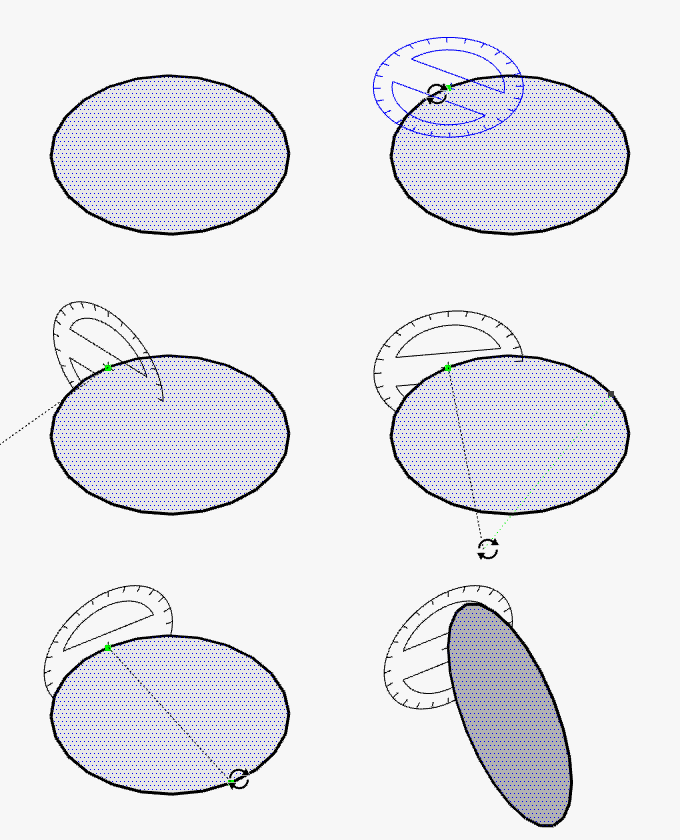
                            Animation_Rotate_Tool.gif
                            http://sites.google.com/site/sketchupsage/tweak/rotate
                            This option can be added?

                          Thank you again for this amazings tools,
                          Daniel S

                          1 Respuesta Última respuesta Responder Citar 0
                          • D Desconectado
                            DonVid
                            Última edición por

                            This is a great addition to SU. Thanks.

                            I installed the pluging and when I use Radial bending it just rotate the group. I wonder what may be wrong.

                            Please see attached caption.

                            Thanks again.

                            DonVid.
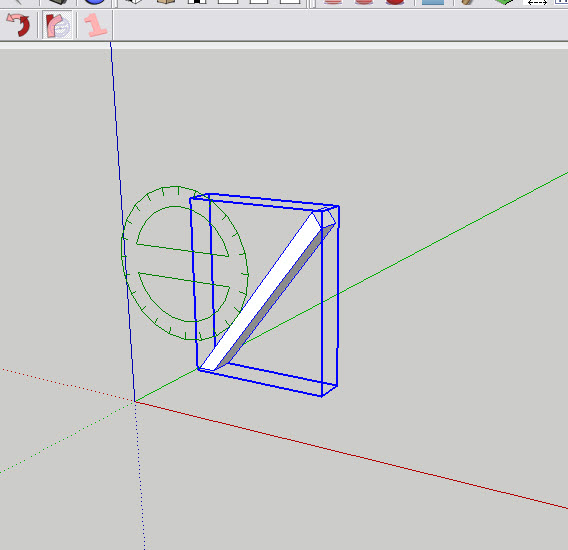

                            RADIAL BENDING.jpg

                            1 Respuesta Última respuesta Responder Citar 0
                            • pilouP Desconectado
                              pilou
                              Última edición por

                              @unknownuser said:

                              Just wondering how easy it is to work out which components remain the same
                              But what hamper to all windows in bulding?

                              Not so a big deal 😉 Stretch before if you want ☀
                              Just using 2 cool Plugins : "Remove Inner faces" by Wikii, "Clean up Model" by John H. Aughey
                              That takes 2 seconds for a building of 50 levels 💚 (if x = * 50)
                              Stretch after if you want ☀
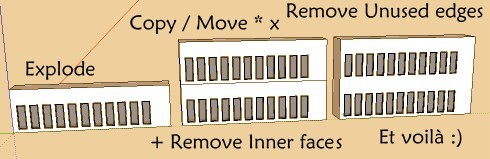
                              strecht.jpg

                              Frenchy Pilou
                              Is beautiful that please without concept!
                              My Little site :)

                              1 Respuesta Última respuesta Responder Citar 0
                              • Dave RD Desconectado
                                Dave R
                                Última edición por

                                DonVid,

                                You need to break the geometry into sections to get the bend. After selecting the tool, hit Tab. Then enter a value in the first line of the dialog box. Someone else suggested 20 which is what I used for the bent text example I posted.

                                I didn't follow (understand) the thing about the negative value for that box, though.

                                Etaoin Shrdlu

                                %

                                (THERE'S NO PLACE LIKE)

                                G28 X0.0 Y0.0 Z0.0

                                M30

                                %

                                1 Respuesta Última respuesta Responder Citar 0
                                • D Desconectado
                                  dtrarch
                                  Última edición por

                                  Fredo

                                  WOW
                                  Thanks for this miracle of code.

                                  $ in the mail-de verdad

                                  dtr

                                  1 Respuesta Última respuesta Responder Citar 0
                                  • D Desconectado
                                    DonVid
                                    Última edición por

                                    Thanks Fredo and Dave for the explanation:

                                    Now it works. This is a true evolution on Architectural Design applications and 3D Modeling.

                                    *The Guggenheim Museum Bilbao had been easier by using this code.

                                    Thanks again.

                                    DonVid

                                    1 Respuesta Última respuesta Responder Citar 0
                                    • spenceS Desconectado
                                      spence
                                      Última edición por

                                      This is an awesome set of tools, soooo nice Appreciate the time and effort into such quality tools, thank you! I'm having lots of fun with this.

                                      Spence

                                      1 Respuesta Última respuesta Responder Citar 0
                                      • fredo6F Desconectado
                                        fredo6
                                        Última edición por

                                        @jmmad said:

                                        @unknownuser said:

                                        @unknownuser said:

                                        jmmad wrote:
                                        I only have one problem with the stretch tool some times when I strech something even a simple geometry SU freezes and does not respond, and i have to restart SU.

                                        Fredo6 wrote:
                                        a) Do you apply it to a selection made of embedded components, with several instances (insinde or outside the selection)?
                                        b) Is this something you can reproduce on a given model (if so, can you post it)

                                        Yes here i post the model
                                        It's a component bench with 1 nested component for the legs that repeats 4 times. I don't have any problems when i stretch the model normally, but when i hit control key to stretch from the center it freezes while I am still stretching the component.

                                        Here i attach a image and the corresponding component

                                        Thxs

                                        I cannot reproduce the freeze (see video attached). Is it something always reproducable in your environment?
                                        Can any other user try to reproduce it?

                                        Bench Moder trial.wmv
                                        Fredo

                                        1 Respuesta Última respuesta Responder Citar 0
                                        • fredo6F Desconectado
                                          fredo6
                                          Última edición por

                                          @daniel s said:

                                          Fredo, not big problems but something that i find using FreeScale 2.0:

                                          • Trying to change the deformation before clicking to validate the transformation it makes a unexpected result. I don`t know how to explain this in english so i attach a video showing the problem in the twist and taper tool:
                                            [attachment=2:1dhudg9p]<!-- ia2 -->twist-taper.wmv<!-- ia2 -->[/attachment:1dhudg9p]

                                          Thanks for logging this. One thing I may have forgotten to mention is that the script must break the curves when deformed. Then I have tried to reconstruct them after deformation. apparently, it does not always work. Can you try with the same geometry, but enclosed in a group or component?
                                          I'll try to fix it in the next update

                                          @daniel s said:

                                          • In the plugin configuration (Icons visible in the toolbar option) I remove the Make Unique, the box rotation, and the rotation (free) icons. Works well but it leaves the icon separators. I attach a image of this too:
                                            [attachment=1:1dhudg9p]<!-- ia1 -->icons.jpg<!-- ia1 -->[/attachment:1dhudg9p]

                                          Thanks also for that. I fixed it and it will go the next update

                                          @daniel s said:

                                          • A feature of the native protactor-rotate tool is missing... The ability of holding down the primary mouse button, and dragging the protractor is great:
                                            [attachment=0:1dhudg9p]<!-- ia0 -->Animation_Rotate_Tool.gif<!-- ia0 -->[/attachment:1dhudg9p]
                                            http://sites.google.com/site/sketchupsage/tweak/rotate
                                            This option can be added?

                                          I have to think hard about that. As you notice, the GUI becomes quite complex to manage with all possibilities, Escape, Undos, VCB typing, etc..., and I want to make sure this does not break other things and remain usable. In between, I hope that just hitting Shift to lock the plane will be sufficient.

                                          Thanks again Daniel for your help. Do not hesitate if you find other problems.

                                          Fredo

                                          1 Respuesta Última respuesta Responder Citar 0
                                          • fredo6F Desconectado
                                            fredo6
                                            Última edición por

                                            @unknownuser said:

                                            Fredo

                                            Well it seems on one attachment made the trip. Here is pic 2 error message with only FS Ver 2 installed.

                                            Ken,

                                            Please do the following:
                                            Open the ZIP files you dowloaded, and for each of them in Winzip, do a Select ALL and then extract to the Sketchup Plugins directory. Make sure you answer YES to overwrite existing files. DO NOT RENAMEany folder or file.
                                            You should have subfolders LIBFREDO6_Dir_31 and FREESCALE_Dir_20, and 2 ruby files LibFredo6.rb and ZLoader__FreeScale.rb. That's all you need.

                                            Fredo

                                            PS: the reason why you must not rename anything is that I use a convention with version numbers. LibFredo6.rb has the only purpose to detect the latest version of LibFredo6 library (and 31 > 30). And ZLoader__FreeScale.rb is a one_line ruby which just loads the right version of FreeScale, which is supposed to be in FREESCALE_Dir_20.
                                            I know this seems more complex than just dropping a single ruby file in the Sketchup plugin folder, but that's also the way I can manage compatibility, configuration, translation, etc....


                                            1 Respuesta Última respuesta Responder Citar 0
                                            • 1
                                            • 2
                                            • 3
                                            • 4
                                            • 5
                                            • 6
                                            • 7
                                            • 8
                                            • 56
                                            • 57
                                            • 6 / 57
                                            • First post
                                              Last post
                                            Buy SketchPlus
                                            Buy SUbD
                                            Buy WrapR
                                            Buy eBook
                                            Buy Modelur
                                            Buy Vertex Tools
                                            Buy SketchCuisine
                                            Buy FormFonts

                                            Advertisement