sketchucation logo sketchucation
    • Conectarse
    Oops, your profile's looking a bit empty! To help us tailor your experience, please fill in key details like your SketchUp version, skill level, operating system, and more. Update and save your info on your profile page today!
    šŸ”Œ Smart Spline | Fluid way to handle splines for furniture design and complex structures. Download

    [Plugin][$] FredoScale - v3.6a - 01 Apr 24


    Programado Fijo Cerrado Movido Plugins
    1.1k Mensajes 345 Posters 2.4m Visitas 342 Watching
    Cargando mƔs mensajes
    • MĆ”s antiguo a mĆ”s nuevo
    • MĆ”s nuevo a mĆ”s antiguo
    • Mayor nĆŗmero de Votos
    Responder
    • Responder como tema
    Accede para responder
    Este tema ha sido borrado. Solo los usuarios que tengan privilegios de administración de temas pueden verlo.
    • D Desconectado
      Daniel S
      Última edición por

      @unknownuser said:

      Daniel,

      Can you try if this works for you (drop the attached file into LIBFREDO6_Dir_31 folder). I must say that I did not know this function, but using it a little bit, it seems very convenient. So thank you for signaling it and evangelizing other users.

      Fredo

      Works great for endpoints but if you place the protactor on edges and drag it dosen“t lock in the exact point you start the operation. Is like the protactor slips. The same happens if you place the protactor on a face and drag.

      Thank you for adding this option!!!
      Daniel S

      1 Respuesta Última respuesta Responder Citar 0
      • fredo6F Desconectado
        fredo6
        Última edición por

        of course.
        Sorry for that

        Fredo


        Lib6Protractor.rb

        1 Respuesta Última respuesta Responder Citar 0
        • D Desconectado
          Daniel S
          Última edición por

          The protactor still slips for me.

          Daniel S

          1 Respuesta Última respuesta Responder Citar 0
          • fredo6F Desconectado
            fredo6
            Última edición por

            @daniel s said:

            The protactor still slips for me.

            Daniel S

            Re-sorry.
            I guess this is better now

            Fredo


            Lib6Protractor.rb

            1 Respuesta Última respuesta Responder Citar 0
            • pilouP Desconectado
              pilou
              Última edición por

              Is it possible to use the radial Bending only for "slicer" a volume without to bend?
              If yes how?
              If I click (start end) a "straight line" along an edge nothing append when release the protractor without bending 😳

              Frenchy Pilou
              Is beautiful that please without concept!
              My Little site :)

              1 Respuesta Última respuesta Responder Citar 0
              • fredo6F Desconectado
                fredo6
                Última edición por

                @unknownuser said:

                Is it possible to use the radial Bending only for "slicer" a volume without to bend?
                If yes how?
                If I click (start end) a "straight line" along an edge nothing append when release the protractor without bending 😳

                I had the idea to isolate the slicer as a separate tool (then in 3 directions). so at least one requestor.
                In between, you have one in SketchyFFD

                Fredo

                PS: If you don't bend, then nothing happens, which is the natural and intentional behavior

                1 Respuesta Última respuesta Responder Citar 0
                • D Desconectado
                  Daniel S
                  Última edición por

                  The latest Lib6Protractor.rb works very well like the native SU tool.

                  Thank you Again!!!

                  Daniel S

                  1 Respuesta Última respuesta Responder Citar 0
                  • Jean-FrancoJ Desconectado
                    Jean-Franco
                    Última edición por

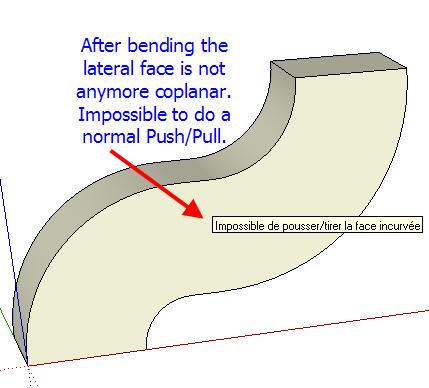
                    Hi, Fredo I've a recurent problem after bending. See my picture.
                    Any idea of what happens ?
                    FreeScale_20_problem.jpg

                    Jean-Franco

                    1 Respuesta Última respuesta Responder Citar 0
                    • thomthomT Desconectado
                      thomthom
                      Última edición por

                      @jean-franco said:

                      Hi, Fredo I've a recurent problem after bending. See my picture.
                      Any idea of what happens ?

                      They are still co-planar. But there is hidden lines created there. Turn on Hidden Geometry and erase the lines on that surface and you can do a regular push/pull.

                      Thomas Thomassen — SketchUp Monkey & Coding addict
                      List of my plugins and link to the CookieWare fund

                      1 Respuesta Última respuesta Responder Citar 0
                      • fredo6F Desconectado
                        fredo6
                        Última edición por

                        Very simple;
                        If you show hidden geometry you'll see all the subface.
                        In your case, you can easily clean up all those coplanar edges, and then have a surface you can push pull with the native Sketchup tool.

                        Fredo

                        Actually, I could have the script do the clean up of coplanar edges automatically as an option. Maybe I'll do that.

                        1 Respuesta Última respuesta Responder Citar 0
                        • Chris FullmerC Desconectado
                          Chris Fullmer
                          Última edición por

                          @unknownuser said:

                          Actually, I could have the script do the clean up of coplanar edges automatically as an option. Maybe I'll do that.

                          +1 for that idea.

                          Great Plugin!

                          Chris

                          Lately you've been tan, suspicious for the winter.
                          All my Plugins I've written

                          1 Respuesta Última respuesta Responder Citar 0
                          • Jean-FrancoJ Desconectado
                            Jean-Franco
                            Última edición por

                            Thank you all, effectively I missed the point !

                            Jean-Franco

                            1 Respuesta Última respuesta Responder Citar 0
                            • D Desconectado
                              Daniel S
                              Última edición por

                              I make alternative icons and cursors for this plugin:

                              FreeScale Icons.jpg

                              Here you can download:

                              IMAGES_Alternative1.zip

                              Extract into FREESCALE_Dir_20 and set this ones in "Tools>Fredo6 Collection>Free Scale>Default Parameters"

                              Daniel S

                              1 Respuesta Última respuesta Responder Citar 0
                              • Dave RD Desconectado
                                Dave R
                                Última edición por

                                Daniel, thank you for those alternative icons. They look nice. For some reason I seem to be missing the tools in the 2nd, 4th, 6th and 9th positions on your toolbar. They did copied into the directory, though. It looks like I'm missing the ones with the target.

                                Etaoin Shrdlu

                                %

                                (THERE'S NO PLACE LIKE)

                                G28 X0.0 Y0.0 Z0.0

                                M30

                                %

                                1 Respuesta Última respuesta Responder Citar 0
                                • fredo6F Desconectado
                                  fredo6
                                  Última edición por

                                  Dave,

                                  It might simply be that the icons were not 'enabled'. So, whether with Daniel's or the standard icons, they won't show up.
                                  Just go to FreeScale default parameters to select the ones you want to appear in the toolbar.

                                  Fredo

                                  1 Respuesta Última respuesta Responder Citar 0
                                  • Dave RD Desconectado
                                    Dave R
                                    Última edición por

                                    Thanks Fredo. Dumb question then. In which menu do I find "FreeScale default parameters"? I've looked but don't seem to see it.

                                    I found LibFredo6 Settings>Default Parameters

                                    Etaoin Shrdlu

                                    %

                                    (THERE'S NO PLACE LIKE)

                                    G28 X0.0 Y0.0 Z0.0

                                    M30

                                    %

                                    1 Respuesta Última respuesta Responder Citar 0
                                    • thomthomT Desconectado
                                      thomthom
                                      Última edición por

                                      @dave r said:

                                      Thanks Fredo. Dumb question then. In which menu do I find "FreeScale default parameters"? I've looked but don't seem to see it.

                                      Tools->Fredo Collection

                                      Thomas Thomassen — SketchUp Monkey & Coding addict
                                      List of my plugins and link to the CookieWare fund

                                      1 Respuesta Última respuesta Responder Citar 0
                                      • J Desconectado
                                        jmmad
                                        Última edición por

                                        Nice Icons

                                        Thxs Daniel S

                                        Get Upa !

                                        1 Respuesta Última respuesta Responder Citar 0
                                        • mitcorbM Desconectado
                                          mitcorb
                                          Última edición por

                                          Hi, Fredo:
                                          Thank you for an excellent group of tools.
                                          I am attaching a skp.I was testing the FS plugin on my machine and in the process I created what looks like a proxy after a stretch operation on the grey portion,and then a bend. I pulled the "proxy" away from the parent. I don't understand why these things became groups.
                                          By the way, do I need to download the updated rubies you provided in later posts?


                                          freescale20 test skp

                                          I take the slow, deliberate approach in my aimless wandering.

                                          1 Respuesta Última respuesta Responder Citar 0
                                          • fredo6F Desconectado
                                            fredo6
                                            Última edición por

                                            @mitcorb said:

                                            Hi, Fredo:
                                            Thank you for an excellent group of tools.
                                            I am attaching a skp.I was testing the FS plugin on my machine and in the process I created what looks like a proxy after a stretch operation on the grey portion,and then a bend. I pulled the "proxy" away from the parent. I don't understand why these things became groups.

                                            That's a bug, already signaled by Daniel S. I may have fixed it.
                                            For Stretch, you have to know that I have to enclose the natural geometry in a group in order to keep it in the selection. It is exploded at the end. The drawback is that if you do an undo outside the tool or if something goes wrong, you may end up with the group still there. In general, it is better to enclose natural geometry at model level within a group or component.

                                            @mitcorb said:

                                            By the way, do I need to download the updated rubies you provided in later posts?

                                            I'll publish a new version soon. So you must not bother with the individual rubies posted here and there in this thread.

                                            1 Respuesta Última respuesta Responder Citar 0
                                            • 1
                                            • 2
                                            • 6
                                            • 7
                                            • 8
                                            • 9
                                            • 10
                                            • 56
                                            • 57
                                            • 8 / 57
                                            • First post
                                              Last post
                                            Buy SketchPlus
                                            Buy SUbD
                                            Buy WrapR
                                            Buy eBook
                                            Buy Modelur
                                            Buy Vertex Tools
                                            Buy SketchCuisine
                                            Buy FormFonts

                                            Advertisement






