sketchucation logo sketchucation
    • Conectarse
    Oops, your profile's looking a bit empty! To help us tailor your experience, please fill in key details like your SketchUp version, skill level, operating system, and more. Update and save your info on your profile page today!
    🔌 Smart Spline | Fluid way to handle splines for furniture design and complex structures. Download

    [Plugin][$] FredoScale - v3.6a - 01 Apr 24


    Programado Fijo Cerrado Movido Plugins
    1.1k Mensajes 345 Posters 2.4m Visitas 342 Watching
    Cargando más mensajes
    • Más antiguo a más nuevo
    • Más nuevo a más antiguo
    • Mayor número de Votos
    Responder
    • Responder como tema
    Accede para responder
    Este tema ha sido borrado. Solo los usuarios que tengan privilegios de administración de temas pueden verlo.
    • urgenU Desconectado
      urgen
      Última edición por

      ---Thanks!!!!! 👍
      ------Thanks!!!!! 👍
      ----------Thanks!!!!! 👍 😄

      --pupil forever...------

      1 Respuesta Última respuesta Responder Citar 0
      • PixeroP Desconectado
        Pixero
        Última edición por

        Fantastic!
        I was waiting for the bend tool and now we got the others as well.
        Then the stretch tool. Just wow! What a timesaver.
        I'm shocked at what you can do by yourself.

        It would be quite interesting to be a fly in the SU teams office when they see this plugin. 😉
        Google team shame on you +2.

        1 Respuesta Última respuesta Responder Citar 0
        • S Desconectado
          sepo
          Última edición por

          "1) For Bend, I would recommend that you configure the slicer with a 'negative' number. This allows to adjust automatically the number of slices based on the angle. With a small angle, you will only get a few slices. The convention is based on a 12-sides circle (360 degree). For instance "-3" corresponds to a circle of 36 edges."

          How do you do that? I do not seem to have any GUI. In your video there is one.

          1 Respuesta Última respuesta Responder Citar 0
          • thomthomT Desconectado
            thomthom
            Última edición por

            @unknownuser said:

            1. Plane Shear is a simple transformation, but it also 'shears' the axes of the components, so that they are no longer orthogonal. Although in most cases you do not have to bother, it might be that some scripts encounter problems with those components if they assume that the axes

            I might be working on one at the moment. A script that generates a second cutout for cutout components so you can cut through double faced walls. I haven't checked yet, but I have a suspicion that it might not work out the position properly. So I'll see if I can account for this.

            Thomas Thomassen — SketchUp Monkey & Coding addict
            List of my plugins and link to the CookieWare fund

            1 Respuesta Última respuesta Responder Citar 0
            • soloS Desconectado
              solo
              Última edición por

              Hit the tab button

              http://www.solos-art.com

              If you see a toilet in your dreams do not use it.

              1 Respuesta Última respuesta Responder Citar 0
              • fredo6F Desconectado
                fredo6
                Última edición por

                One thing I forgot to repeat and insist on.

                All transformations in FreeScale are purely geometric. So they totally ignore the behavior of Dynamic Components.

                I simply hope it does not mess up anything however.
                Personally, I have not played yet with Dynamic Components (I don't have the Pro version) and I have found nothing in the API allowing to inspect or act on such DC behaviors.

                Please tell me if you encounter any problem between FreeScale and Dynamic Components.

                Fredo

                1 Respuesta Última respuesta Responder Citar 0
                • S Desconectado
                  sepo
                  Última edición por

                  Cheers Solo
                  😳

                  1 Respuesta Última respuesta Responder Citar 0
                  • soloS Desconectado
                    solo
                    Última edición por

                    Works great for rigging too, see Matrix bullet dodge timelapse.


                    http://img27.imageshack.us/img27/6888/matrixmoves.gif

                    http://www.solos-art.com

                    If you see a toilet in your dreams do not use it.

                    1 Respuesta Última respuesta Responder Citar 0
                    • D Desconectado
                      dacad
                      Última edición por

                      That's cool solo, but don't you mean posing solo?:)

                      That gave me an idea for an update to ffd plugin for use in posing characters, if we could just place the ffd points in the mesh instead of the standart box position they appear. Is that possible? 😄

                      1 Respuesta Última respuesta Responder Citar 0
                      • soloS Desconectado
                        solo
                        Última edición por

                        DacaD, Posing and rigging, same thing.
                        What would be great is to be able to select a spot and make joints, then using the bend option it only bend at the joint.

                        however what we have now works pretty good.


                        http://img27.imageshack.us/img27/7100/neobend.jpg

                        http://www.solos-art.com

                        If you see a toilet in your dreams do not use it.

                        1 Respuesta Última respuesta Responder Citar 0
                        • D Desconectado
                          Dan
                          Última edición por

                          Cher Fredo, je n'ai qu'un seul mot a vous dire: SUPERBE!

                          Hey, Google SketchUp, don't you think Fredo deserves a free license of SU 7 PRO ? I think that his plugins brought you a bunch of extra buyers.

                          1 Respuesta Última respuesta Responder Citar 0
                          • D Desconectado
                            dacad
                            Última edición por

                            ups, my mistake then, but i tough rigging was the stuff related with doing the bones for a mesh and conecting them that was then used to animate or pose the mesh, at least from what i can remember from animating in 3dsmax. I also called it posing because of the transpose feature of zbrush that they say artists use to pose characters wihtout doing any rigging... i'm not even sure if that name is righ (in technincal terms and english terms 😛)

                            That's a good ideia too, to animate in sketchup, a mix between sketchyphisics and freedo's free scale/bend. the Phisend plugin....lolol

                            1 Respuesta Última respuesta Responder Citar 0
                            • pilouP Desconectado
                              pilou
                              Última edición por

                              @unknownuser said:

                              clean selection?

                              Yes clean selection by architectboy or cleanup_model.rb by J.H. Aughey ☀

                              Frenchy Pilou
                              Is beautiful that please without concept!
                              My Little site :)

                              1 Respuesta Última respuesta Responder Citar 0
                              • pilouP Desconectado
                                pilou
                                Última edición por

                                And then after use Fredo's bend, clean selection can be useful for lighten the object 😉
                                clean selection by architectboy or cleanup_model.rb by J.H. Aughey ☀
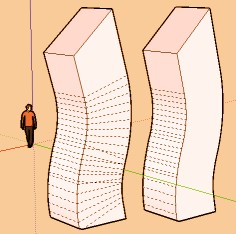

                                clean.jpg

                                Frenchy Pilou
                                Is beautiful that please without concept!
                                My Little site :)

                                1 Respuesta Última respuesta Responder Citar 0
                                • thomthomT Desconectado
                                  thomthom
                                  Última edición por

                                  @thomthom said:

                                  @unknownuser said:

                                  1. Plane Shear is a simple transformation, but it also 'shears' the axes of the components, so that they are no longer orthogonal. Although in most cases you do not have to bother, it might be that some scripts encounter problems with those components if they assume that the axes

                                  I might be working on one at the moment. A script that generates a second cutout for cutout components so you can cut through double faced walls. I haven't checked yet, but I have a suspicion that it might not work out the position properly. So I'll see if I can account for this.

                                  Did some testing; no problems at all. I don't have to do any consideration for skewing. 😄

                                  Thomas Thomassen — SketchUp Monkey & Coding addict
                                  List of my plugins and link to the CookieWare fund

                                  1 Respuesta Última respuesta Responder Citar 0
                                  • T Desconectado
                                    troyhome
                                    Última edición por

                                    @dan said:

                                    Cher Fredo, je n'ai qu'un seul mot a vous dire: SUPERBE!

                                    Hey, Google SketchUp, don't you think Fredo deserves a free license of SU 7 PRO ? I think that his plugins brought you a bunch of extra buyers.

                                    Free for life if you contribute something this helpful without asking anything but feedback in return.
                                    😄

                                    IOviz.com
                                    SU Pro 2024 PC

                                    1 Respuesta Última respuesta Responder Citar 0
                                    • J Desconectado
                                      jmmad
                                      Última edición por

                                      I wrote this not so long ago for your last plugin.

                                      @jmmad said:

                                      Thxs a lot Fred for this plugin, your ruby scripts are amazing.
                                      Do you think you could add more transformations to it, like bend, twist, Bulge
                                      Maybe for a commercial plugin?

                                      http://www.sketchucation.com/forums/scf/download/file.php?id=20380&t=1

                                      And now you make all of our dreams come true and freely?
                                      SU was needing trasformations badly
                                      Thanks for this plugin and for your generosity

                                      I really love the user interface of those deformations, specially Stretch and Bend, so easy and precise to use.
                                      Bend Shear Taper are even easier to use than Bonzai3D deformations.
                                      And stretch its amazing I have never seen something like that before, your solution to the problem of keeping some geometry untouch its genius. Only one feature you could add is to give the strech tool the ability to make more paralel planes that deform the model, so it can afect more parts of the geometry at the same time.
                                      I only have one problem with the stretch tool some times when i strech something even a simple geometry SU freezes and does not respond, and i have to restart SU.

                                      With all your plugins you are giving Sketchup so many atractive and usefull features it's geting updated constantly.
                                      Google should change the name of the program for something like FredoUP
                                      Thanks again.
                                      And yes i think Google should give you a eternal Licence + 1000 for that

                                      Get Upa !

                                      1 Respuesta Última respuesta Responder Citar 0
                                      • utilerU Desconectado
                                        utiler
                                        Última edición por

                                        thanks you Fredo, there is nothing more I can say....

                                        Just Curious...

                                        1 Respuesta Última respuesta Responder Citar 0
                                        • S Desconectado
                                          ScottPara
                                          Última edición por

                                          Shame shame shame on Google for not patting this guys back! How is it that a lone programmer can take sketchup to this level with little resources in comparison to Google? Yet we get Version 7 which is a polished version of 6 yet we all had to pay. Google should either hire Fredo, Whaat, and a few others (did not mean to leave anyone out) or leave the programming to them for 2 years and see what Sketchup becomes!

                                          Fredo....thank you for an absolutely AMAZING plugin!

                                          Google.....take notice!

                                          Scott

                                          Love the fact that some HATE my avatar.....

                                          1 Respuesta Última respuesta Responder Citar 0
                                          • X Desconectado
                                            xrok1
                                            Última edición por

                                            @unknownuser said:

                                            Just in case nobody else has noticed, there's an html file (freescale.donation.html) in the freescale_dir_20 folder.. you can make a donation via that link.

                                            i would love to see the donation page in english too so i could give you some kudos. please post english donation link, and thankyou very much.

                                            Now for the soft selection! 😄

                                            “There are three classes of people: those who see. Those who see when they are shown. Those who do not see.”

                                            http://www.Twilightrender.com try it!

                                            1 Respuesta Última respuesta Responder Citar 0
                                            • 1
                                            • 2
                                            • 3
                                            • 4
                                            • 5
                                            • 6
                                            • 56
                                            • 57
                                            • 4 / 57
                                            • First post
                                              Last post
                                            Buy SketchPlus
                                            Buy SUbD
                                            Buy WrapR
                                            Buy eBook
                                            Buy Modelur
                                            Buy Vertex Tools
                                            Buy SketchCuisine
                                            Buy FormFonts

                                            Advertisement





