sketchucation logo sketchucation
    • Conectarse
    Oops, your profile's looking a bit empty! To help us tailor your experience, please fill in key details like your SketchUp version, skill level, operating system, and more. Update and save your info on your profile page today!
    🔌 Smart Spline | Fluid way to handle splines for furniture design and complex structures. Download

    [Plugin][$] FredoScale - v3.6a - 01 Apr 24


    Programado Fijo Cerrado Movido Plugins
    1.1k Mensajes 345 Posters 2.4m Visitas 342 Watching
    Cargando más mensajes
    • Más antiguo a más nuevo
    • Más nuevo a más antiguo
    • Mayor número de Votos
    Responder
    • Responder como tema
    Accede para responder
    Este tema ha sido borrado. Solo los usuarios que tengan privilegios de administración de temas pueden verlo.
    • jeff hammondJ Desconectado
      jeff hammond
      Última edición por

      @unknownuser said:

      Vital Addition! 👍

      I must try it for see if that gives the same result than a nurbs modeler! 😉

      i tested a few things against rhino and as far as i can tell, it gives the same exact results.. 👍
      but the crazy thing is, fredo's version is faster ☀
      the offset/rotate idea is very clever and well implemented.
      bravo!

      dotdotdot

      1 Respuesta Última respuesta Responder Citar 0
      • jeff hammondJ Desconectado
        jeff hammond
        Última edición por

        @utiler said:

        @Jeff - thanks for the challenge, I wasted hours on that bloody thing!!!! 😉

        @dave r said:

        And yes, Jeff, thanks for the challenge. I won't ever do it the hard way again.

        i'm just waiting for someone to come up with the next one!

        dotdotdot

        1 Respuesta Última respuesta Responder Citar 0
        • pilouP Desconectado
          pilou
          Última edición por

          And no more problem in the Big Zoom! ☀ 😉

          Frenchy Pilou
          Is beautiful that please without concept!
          My Little site :)

          1 Respuesta Última respuesta Responder Citar 0
          • pilouP Desconectado
            pilou
            Última edición por

            @unknownuser said:

            it gives the same exact results..

            Only one decimal point difference! 😉
            1.3239127m Nurbs (height of brace cut vertically) Pilars are 1 * 1 * 10 , brace 1 * 1 * x : unity meter
            1.323913m SU
            Seems very similar! ☀

            Frenchy Pilou
            Is beautiful that please without concept!
            My Little site :)

            1 Respuesta Última respuesta Responder Citar 0
            • jeff hammondJ Desconectado
              jeff hammond
              Última edición por

              @unknownuser said:

              @unknownuser said:

              it gives the same exact results..

              Only one decimal point difference! 😉
              1.3239127 Nurbs (height of brace cut vertically) Pilars are 1 * 1 * 10 , brace 1 * 1 * x : unity meter
              1.323913m SU
              Seems very similar! ☀

              well, no.. sketchup just ran out of zeros ☀

              9127 rounds up to 913 in sketchup..

              .

              dotdotdot

              1 Respuesta Última respuesta Responder Citar 0
              • pilouP Desconectado
                pilou
                Última edición por

                A great mini-challenge with some headaches! 💚

                Maybe another solution without plug can be found who knows! 😉

                Frenchy Pilou
                Is beautiful that please without concept!
                My Little site :)

                1 Respuesta Última respuesta Responder Citar 0
                • jeff hammondJ Desconectado
                  jeff hammond
                  Última edición por

                  @unknownuser said:

                  A great mini-challenge with some headaches! 💚

                  Maybe another solution without plug can be found who knows! 😉

                  probably. but I don't care anymore. this solves it in my book.
                  😆

                  dotdotdot

                  1 Respuesta Última respuesta Responder Citar 0
                  • D Desconectado
                    d12dozr
                    Última edición por

                    Sweet update...Thanks, Fredo! 👍 ...and Jeff for the inspiration 😄

                    3D Printing with SketchUp Book
                    http://goo.gl/f7ooYh

                    1 Respuesta Última respuesta Responder Citar 0
                    • D Desconectado
                      Daniel S
                      Última edición por

                      Great Update Fredo!!! 😍 😍 😍

                      I remember a lot this request...
                      http://forums.sketchucation.com/viewtopic.php?f=180&t=24831

                      I just tried your plugin and I had perfect results in seconds!!
                      Thank you for making a much more powerful Sketchup Fredo!!!

                      Daniel S

                      1 Respuesta Última respuesta Responder Citar 0
                      • fredo6F Desconectado
                        fredo6
                        Última edición por

                        NEW FEATURES: with LibFredo6 4.5- 08 May 12

                        If you upgrade to LibFredo6 4.5, you will get two new features for the Free Rotate tool (and other tools based on rotation such as Box Rotate, Twist, Free Planar Shearing).

                        These new functions are largely inspired from Jeff Hammond's mini-challenge.

                        1. Rotate with Offset
                          In the SU Rotate tool and previous versions of FredoScale Free Rotate, the inferences are only done about the base line of rotation. This makes difficult to perform rotation when the target point to infer is not on the base line.
                          In the new version of Free Rotate, there is an extra step where you can select a target line at a certain offset to be used for inference. This is shown on the video below.
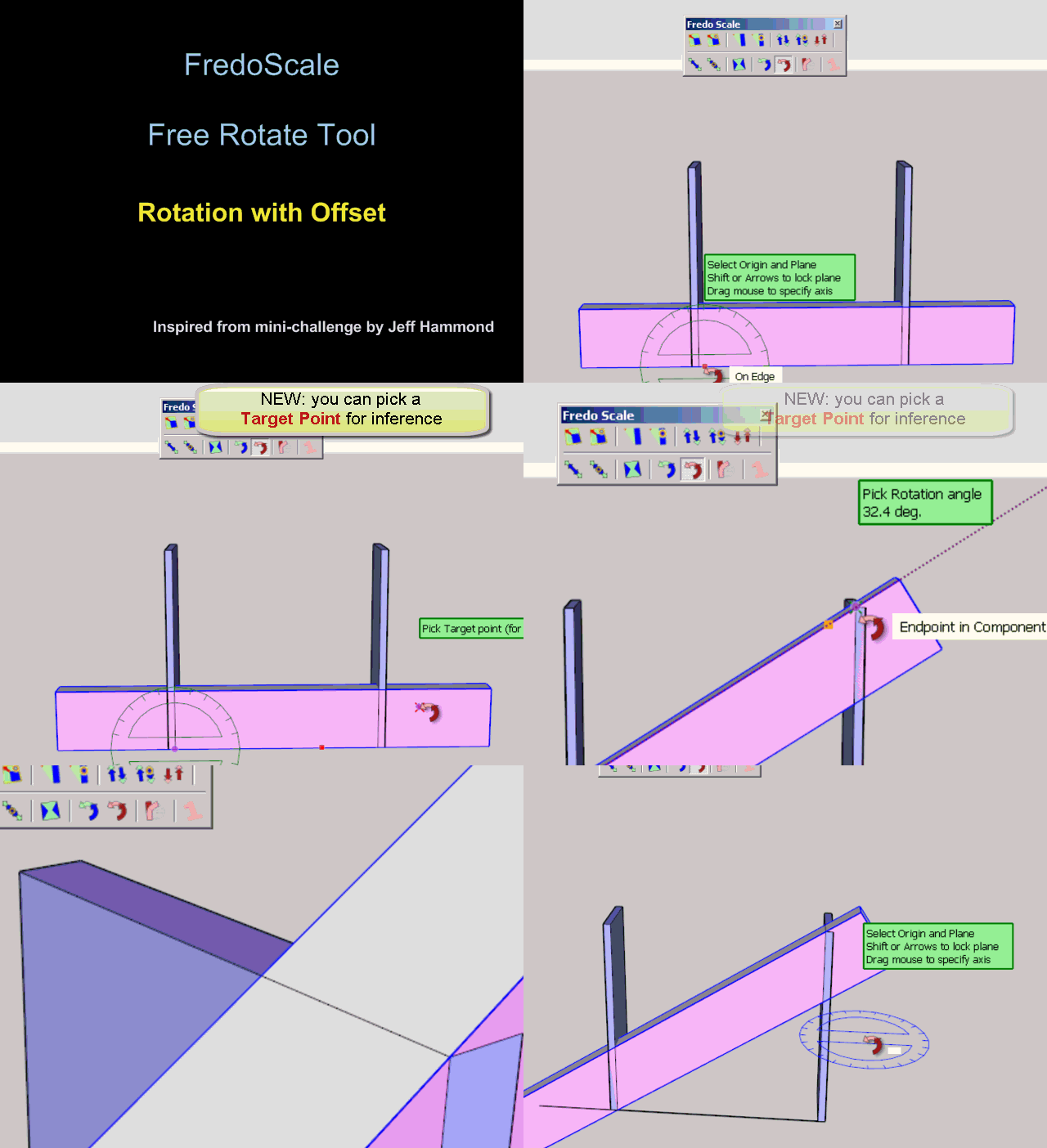
                        Free Rotate - Rotate with offset.gif
                        Note that this step is proposed by default in Free Rotate (just click again if you don't need it) and as an option for other tools (via a long click).

                        1. Inference on line
                          The typical situation is to rotate a line until it exactly touches another line. This is a typical limitation of the SU Rotate tool which does not provide inference for this case.
                          Free Rotate now proposes this inference.
                          This is an old request from Daniel S, also mentioned by Jeff in his mini-challenge.
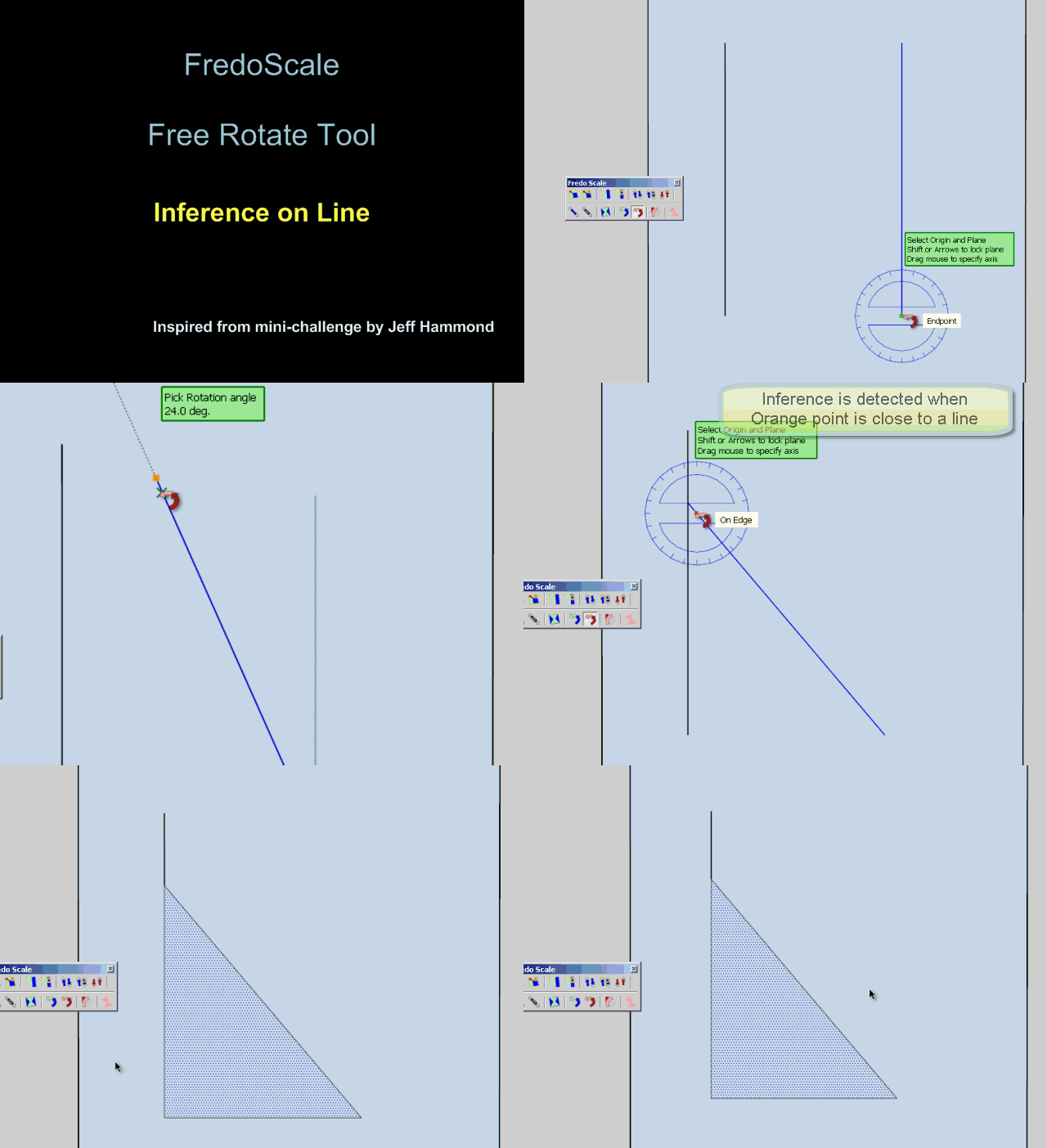
                        Free Rotate - Inference on line.gif

                        Please see this post for downloading the latest version of LibFredo6.

                        Fredo

                        1 Respuesta Última respuesta Responder Citar 0
                        • W Desconectado
                          Wong CK
                          Última edición por

                          Help!!!! I am a newbie of SU.... I get nothing after installed your plugin... 😢

                          1 Respuesta Última respuesta Responder Citar 0
                          • TIGT Desconectado
                            TIG Moderator
                            Última edición por

                            @wong ck said:

                            Help!!!! I am a newbie of SU.... I get nothing after installed your plugin... 😢
                            Have you got the supporting 'Fredo Lib' file/subfolder downloaded/installed as explained on the download page ?

                            Have you activated the tool under Window > Preferences > Extensions > FredoScale ?
                            Have you then activated its toolbar from View > Toolbars > Fredo Scale ?
                            Have you then got the menu item Tools > Fredo6 Collection > FredoScale ... ?

                            TIG

                            1 Respuesta Última respuesta Responder Citar 0
                            • R Desconectado
                              redlerred7
                              Última edición por

                              @wong ck said:

                              Help!!!! I am a newbie of SU.... I get nothing after installed your plugin... 😢

                              do you also have the Fredo file library, which has a link found in the first post, that you need to use the plugin?

                              1 Respuesta Última respuesta Responder Citar 0
                              • K Desconectado
                                kira
                                Última edición por

                                thank you

                                1 Respuesta Última respuesta Responder Citar 0
                                • S Desconectado
                                  SnowTiger
                                  Última edición por

                                  This is an Excellent Plugin that I would recommend to anyone and everyone who might ever need to create organic shapes such as boat sails and/or tensile roof structures and the like.

                                  It is extremely easy to use and works very well.
                                  The fact that it is Free is also amazing because it certainly does have value and will save you tons of time regardless what you are trying to create with it.

                                  Thanks again so much for sharing this excellent Plugin as well as for continuing to make improvements/updates.
                                  😎

                                  1 Respuesta Última respuesta Responder Citar 0
                                  • S Desconectado
                                    sags
                                    Última edición por

                                    thanks...This is an Excellent Plugin. 👍

                                    1 Respuesta Última respuesta Responder Citar 0
                                    • R Desconectado
                                      Rosta
                                      Última edición por

                                      what should I do - look at the attachment, thanks for an answer
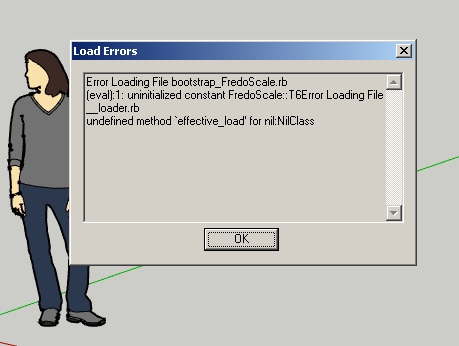

                                      after  the start of SketchUp

                                      1 Respuesta Última respuesta Responder Citar 0
                                      • Dave RD Desconectado
                                        Dave R
                                        Última edición por

                                        Looks like a bad install.

                                        Show us a screen shot of your Plugins folder as well as one showing the contents of the folder called FREDOSCALE_Dir_22. It appears you haven't got _loader.rb inside that folder. If you didn't get that one in there, you probably have others you didn't get in there, too. Follow the instructions in the first post of this thread and take a look at the sticky post about installing zipped plugins.

                                        Etaoin Shrdlu

                                        %

                                        (THERE'S NO PLACE LIKE)

                                        G28 X0.0 Y0.0 Z0.0

                                        M30

                                        %

                                        1 Respuesta Última respuesta Responder Citar 0
                                        • R Desconectado
                                          Rosta
                                          Última edición por

                                          Thanks, I did a new install and now it is ok. But I have another problem. I'd like to have Toolbar of FredoScale. I have the check of FredoScale ON in View -> Toolbars but I have nothing. Thanks

                                          1 Respuesta Última respuesta Responder Citar 0
                                          • Dave RD Desconectado
                                            Dave R
                                            Última edición por

                                            Perhaps your install still isn't correct. Did the toolbar icons get extracted to the right folder? Did you check the box for FredoScale under Extensions?

                                            Etaoin Shrdlu

                                            %

                                            (THERE'S NO PLACE LIKE)

                                            G28 X0.0 Y0.0 Z0.0

                                            M30

                                            %

                                            1 Respuesta Última respuesta Responder Citar 0
                                            • 1
                                            • 2
                                            • 33
                                            • 34
                                            • 35
                                            • 36
                                            • 37
                                            • 56
                                            • 57
                                            • 35 / 57
                                            • First post
                                              Last post
                                            Buy SketchPlus
                                            Buy SUbD
                                            Buy WrapR
                                            Buy eBook
                                            Buy Modelur
                                            Buy Vertex Tools
                                            Buy SketchCuisine
                                            Buy FormFonts

                                            Advertisement




