sketchucation logo sketchucation
    • 登入
    Oops, your profile's looking a bit empty! To help us tailor your experience, please fill in key details like your SketchUp version, skill level, operating system, and more. Update and save your info on your profile page today!
    🔌 Smart Spline | Fluid way to handle splines for furniture design and complex structures. Download

    [Plugin][$] Tools On Surface - v2.6a - 01 Apr 24


    已排程 已置頂 已鎖定 已移動 Plugins
    638 貼文 203 Posters 1.6m 瀏覽 202 Watching
    正在載入更多貼文
    • 從舊到新
    • 從新到舊
    • 最多點贊
    回覆
    • 在新貼文中回覆
    登入後回覆
    此主題已被刪除。只有擁有主題管理權限的使用者可以查看。
    • N 離線
      Nentautako
      最後由 編輯

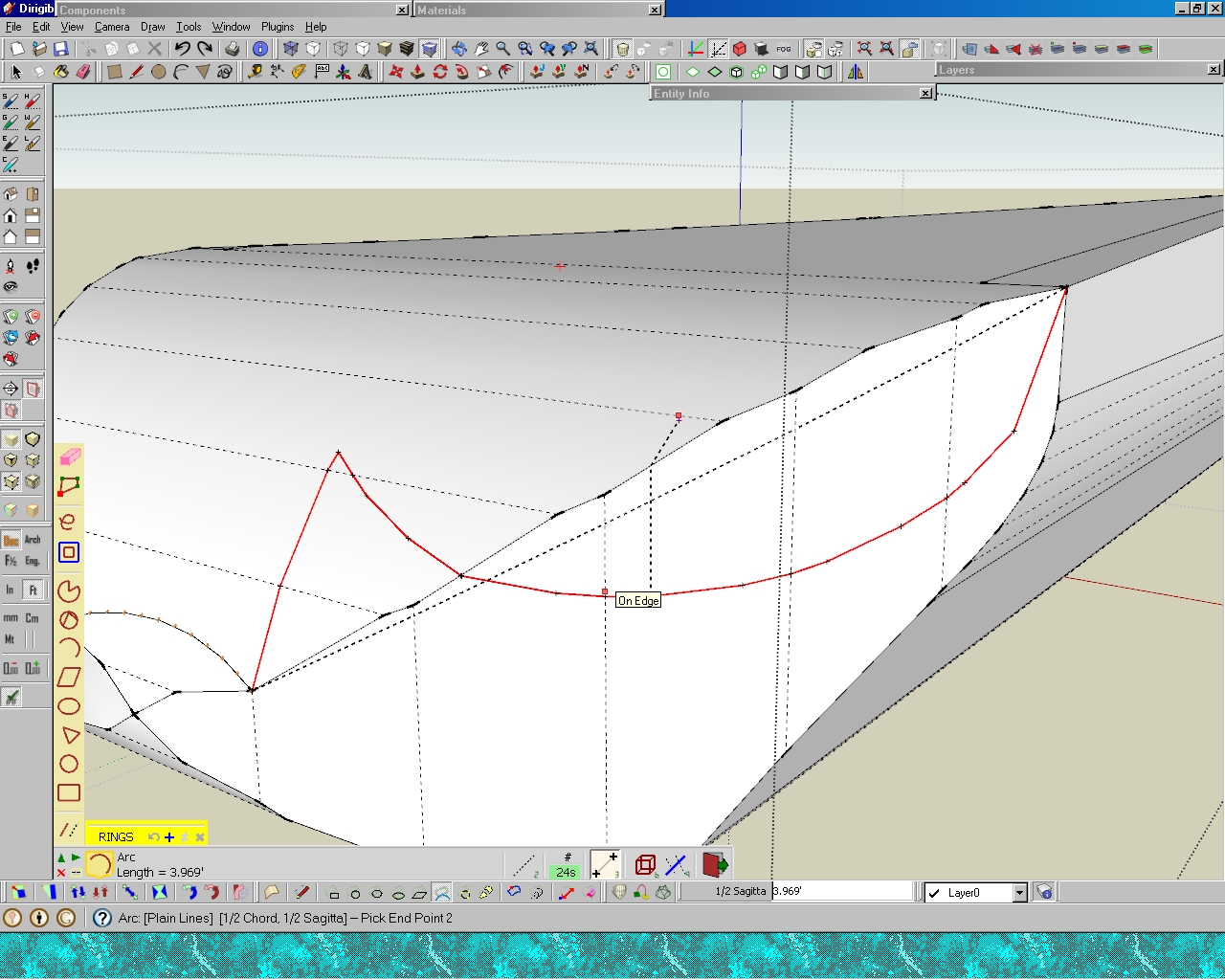
      just a month i've been playing with tools on surface by freddo. how do i erase the dots left by "arc" tools [included on tools on surface]...

      see dots on hood on this model... 😄

      Error 404 (Not Found)!!1

      favicon

      (sketchup.google.com)

      1 條回覆 最後回覆 回覆 引用 0
      • massimoM 離線
        massimo Moderator
        最後由 編輯

        Just go to edit-->delete guides.

        1 條回覆 最後回覆 回覆 引用 0
        • R 離線
          rv1974
          最後由 編輯

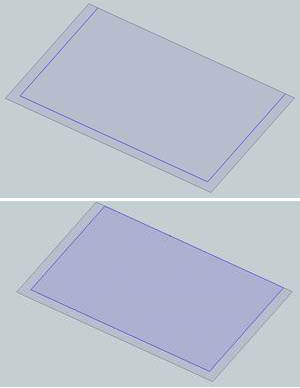
          I have problem: I can't offset the preselected curve on the face, the offset tool always select the whole face (with unwanted additional edges). How to disable this mode?
          Thanks.

          11.JPG

          1 條回覆 最後回覆 回覆 引用 0
          • Dave RD 離線
            Dave R
            最後由 編輯

            Where's the unwanted edge? I get what you show in the second view. The edge that didn't get the offset is divided at the intersection of the neighboring edges but that's normal behavior for the native Offset tool as well.

            Etaoin Shrdlu

            %

            (THERE'S NO PLACE LIKE)

            G28 X0.0 Y0.0 Z0.0

            M30

            %

            1 條回覆 最後回覆 回覆 引用 0
            • pilouP 離線
              pilou
              最後由 編輯

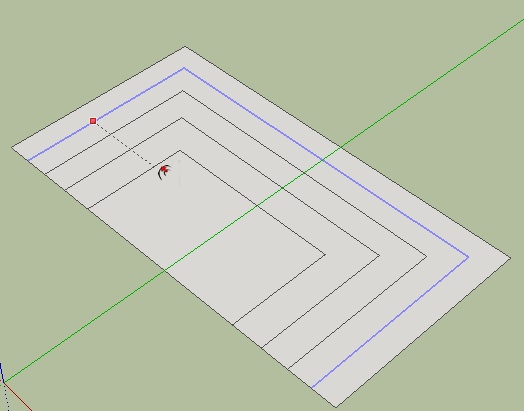
              Curious, I don't see any problem : Just no select surface only edges! 😄
              If I select the 3 edges, Offset Tools works like it must work! 😄
              Curious.jpg

              Frenchy Pilou
              Is beautiful that please without concept!
              My Little site :)

              1 條回覆 最後回覆 回覆 引用 0
              • thomthomT 離線
                thomthom
                最後由 編輯

                @unknownuser said:

                Curious, I don't see any problem : Just no select surface only edges! 😄

                SketchUp's native Offset tool - or Tools on Surface Offset tool (which is the topic here).

                Thomas Thomassen — SketchUp Monkey & Coding addict
                List of my plugins and link to the CookieWare fund

                1 條回覆 最後回覆 回覆 引用 0
                • T 離線
                  thall26
                  最後由 編輯

                  Hi,

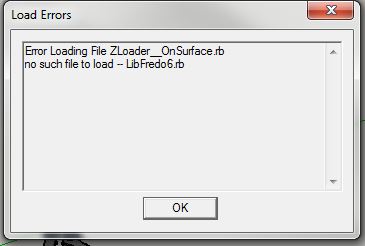
                  I am really excited to use your tool for Sketchup but this message appears when I start up Sketchup. (see attachment) Let me know what can be done. Thanks!

                  ErrorMSG3.JPG

                  1 條回覆 最後回覆 回覆 引用 0
                  • Dave RD 離線
                    Dave R
                    最後由 編輯

                    Quell your excitement long enough to go back and thoroughly read the first post in this thread and then install the required LibFredo files as clearly spelled out there.

                    Etaoin Shrdlu

                    %

                    (THERE'S NO PLACE LIKE)

                    G28 X0.0 Y0.0 Z0.0

                    M30

                    %

                    1 條回覆 最後回覆 回覆 引用 0
                    • T 離線
                      TheIsingGuy
                      最後由 編輯

                      When I put this into Sketchup 8, I get the following Error message:

                      Error Loading File ZLoader__OnSurface.rb
                      no such file to load -- LibFredo6.rb

                      1 條回覆 最後回覆 回覆 引用 0
                      • GaieusG 離線
                        Gaieus
                        最後由 編輯

                        Please, go back to the first post and under the download section, re-read what's needed. In this case:

                        "IMPORTANT: Requires to download LibFredo6 3.6 or higher if not already installed"

                        Install this library as well.

                        Gai...

                        1 條回覆 最後回覆 回覆 引用 0
                        • thomthomT 離線
                          thomthom
                          最後由 編輯

                          Also - the second post before your post contained the exact same question.

                          Thomas Thomassen — SketchUp Monkey & Coding addict
                          List of my plugins and link to the CookieWare fund

                          1 條回覆 最後回覆 回覆 引用 0
                          • jgbJ 離線
                            jgb
                            最後由 編輯

                            Fredo, anybody........

                            What am I doing wrong here? ❓ ❓

                            I've had this problem before, but solved it in a roundabout way. Messy but it worked. 🤢
                            It used to work as I recall, then it didn't, but until now I just went on.

                            I am trying to draw an arc on a curved surface. But the end segments of the arc bend away from the arc, (in a consistent manner every time) effectively destroying a nice arc.

                            The black dotted precurve is OK, but the red lined curve distorts. I do keep the cursor on the surface or on a line on the surface, but nothing seems to work.

                            I'm trying to form a contour for Curviloft to round out the edges of the flight deck on my airship.

                            I have 2 complete screen-shots of the problem. If you want a SKP of the object, I'll post it.
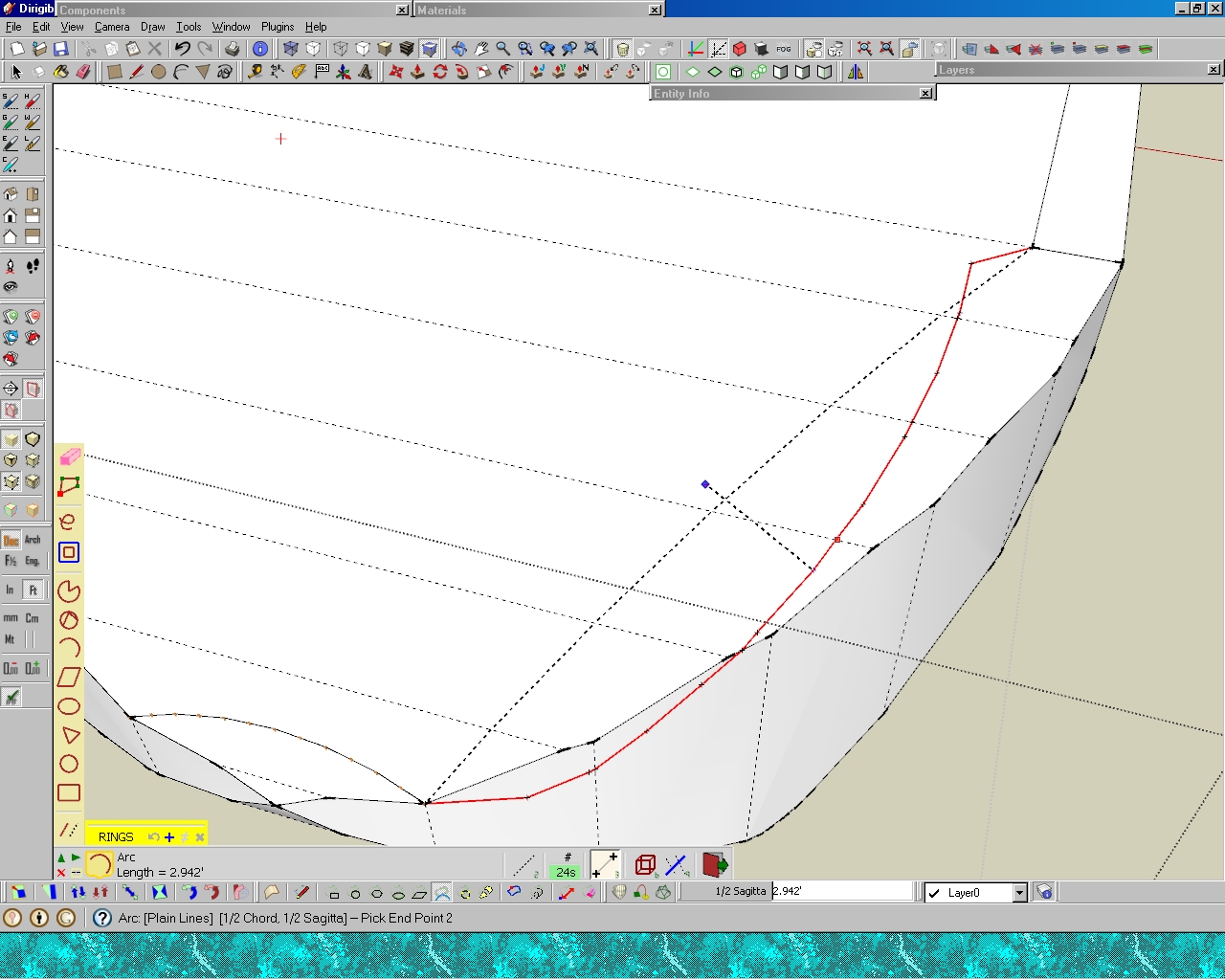
                            Arc on upper surface failed

                            Arc on side surface failed


                            jgb

                            1 條回覆 最後回覆 回覆 引用 0
                            • fredo6F 離線
                              fredo6
                              最後由 編輯

                              Joel,

                              That's a big deficiency of Tools on Surface and in particular for Arc drawing when the arc is on fully on the surface. I am afraid I have no workaround quickly for that.

                              Fredo

                              1 條回覆 最後回覆 回覆 引用 0
                              • jgbJ 離線
                                jgb
                                最後由 編輯

                                @unknownuser said:

                                Joel,

                                That's a big deficiency of Tools on Surface and in particular for Arc drawing when the arc is on fully on the surface. I am afraid I have no workaround quickly for that.

                                Fredo

                                Kinda makes the Arc function a little less than useful, ya think??? 😮

                                Is there at least a plan to fix?


                                jgb

                                1 條回覆 最後回覆 回覆 引用 0
                                • fredo6F 離線
                                  fredo6
                                  最後由 編輯

                                  @jgb said:

                                  Is there at least a plan to fix?

                                  No immediate plan I am afraid!

                                  Maybe you can extrude the surface to prolong it and draw the arc over it.

                                  Possibly, send me the model so that I have a quick look.

                                  Fredo

                                  1 條回覆 最後回覆 回覆 引用 0
                                  • jgbJ 離線
                                    jgb
                                    最後由 編輯

                                    @unknownuser said:

                                    @jgb said:

                                    Is there at least a plan to fix?

                                    No immediate plan I am afraid!

                                    Maybe you can extrude the surface to prolong it and draw the arc over it.

                                    Possibly, send me the model so that I have a quick look.

                                    Fredo

                                    Don't understand what you mean to extrude the surface to prolong it.

                                    Anyway, I made the curves manually and completed that portion of the model, so posting it will not be of use to you. Next time, I will save a copy of what I'm doing for you.

                                    Funny thing though, ARC did work on a smaller section over 2 or 3 faces. The difference in size was significant (30 ft did not work, 20 inches did work) and I believe the segment count was different for each.

                                    Tomorrow I will experiment with sizes & segments to see if there is a pattern. If there is, that should be a clue for you.


                                    jgb

                                    1 條回覆 最後回覆 回覆 引用 0
                                    • G 離線
                                      galinette
                                      最後由 編輯

                                      Dear all,

                                      First, thanks for the awesome plugins.

                                      I'm trying to use Tools on Surface without success. I installed the latest 1.8a with the LibFredo6 4.6, but I have no toolbar, no menu, and nothing under preferences/extensions

                                      I could install Joint Push Pull without any issue and it worked well.

                                      Here is my plugins folder:
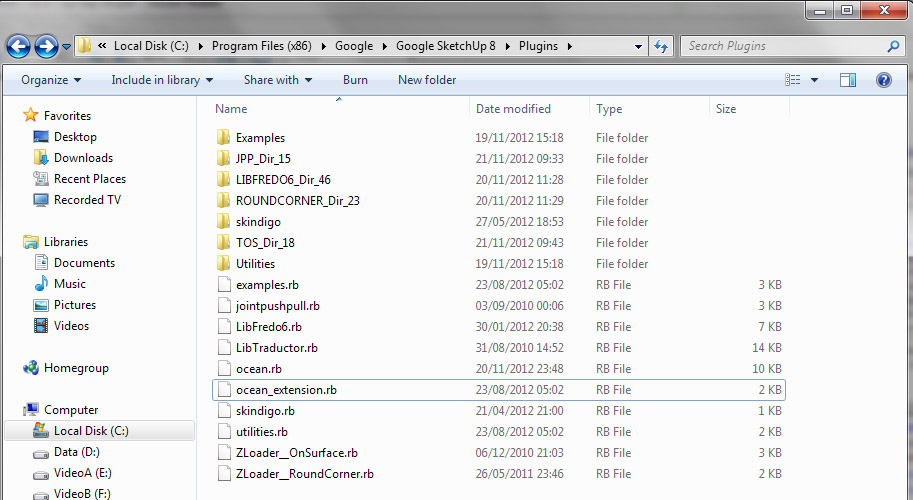
                                      tos.jpg

                                      Thanks for help! I have to draw a pretty complicated curved building facade with openings in it, joint push/pull with curves on surfaces should do it!

                                      Regards,

                                      Etienne

                                      1 條回覆 最後回覆 回覆 引用 0
                                      • TIGT 離線
                                        TIG Moderator
                                        最後由 編輯

                                        Do you have FULL security permissions to the Plugins folder ?
                                        Check/change in context-menu; select its icon and > Properties > Security > Edit.
                                        You [and 'everyone else using SUp'] should have FULL permissions to read/write/change the Plugins, Components, Materials and Style folders - simply being an Admin is not sufficient.
                                        It might be that you have got the files in the right locations/subfolders etc BUT some of Fredo's tools need to read/write log/dat files to Plugins/subfolders etc and with even the slightest limitations on the folder's permissions can stop things working. Reinstall the files after fixing the permissions to FULL in case there are residual issues...

                                        What's inside the subfolder TOS_Dir_18 ?

                                        But assuming it's still broken! I wouldn't expect a clash with it... but try renaming skindigo.rb to skindigo.rb! [also the 'ocean.rb' ??? what's that] and then restarting SketchUp; see if TOS appears then... Sometimes 'uncommon' scripts have unexpected results on 3rd party tools...

                                        TIG

                                        1 條回覆 最後回覆 回覆 引用 0
                                        • G 離線
                                          galinette
                                          最後由 編輯

                                          I moved away skindigo.rb, skindigo dir, and ocean.rb (which is a small script I made)

                                          I add my user full privileges to the plugins folder and subfolders

                                          I also checked the ruby console, no errors or warnings when the plugin loads
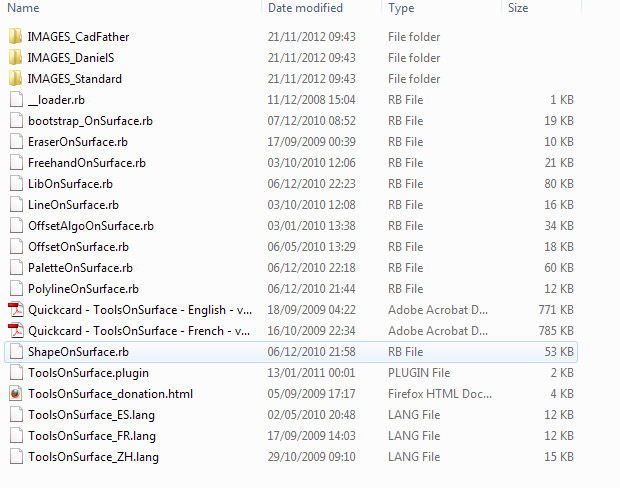
                                          tos2.jpg

                                          1 條回覆 最後回覆 回覆 引用 0
                                          • cottyC 離線
                                            cotty
                                            最後由 編輯

                                            @tig said:

                                            but try renaming skindigo.rb to skindigo.rb! and restarting SketchUp; see if TOS appears then... Sometimes uncommon scripts have unexpected results on 3rd party tools...

                                            I don't think that Skindigo by Whaat have to do with this, I use both without any problems ...

                                            my SketchUp gallery

                                            1 條回覆 最後回覆 回覆 引用 0
                                            • 1
                                            • 2
                                            • 27
                                            • 28
                                            • 29
                                            • 30
                                            • 31
                                            • 32
                                            • 29 / 32
                                            • 第一個貼文
                                              最後的貼文
                                            Buy SketchPlus
                                            Buy SUbD
                                            Buy WrapR
                                            Buy eBook
                                            Buy Modelur
                                            Buy Vertex Tools
                                            Buy SketchCuisine
                                            Buy FormFonts

                                            Advertisement