sketchucation logo sketchucation
    • Login
    Oops, your profile's looking a bit empty! To help us tailor your experience, please fill in key details like your SketchUp version, skill level, operating system, and more. Update and save your info on your profile page today!
    โš ๏ธ Update | Sketchucation Tools 5.0.8 released with licensing improvements and bugfixes Download

    [Plugin][$] Tools On Surface - v2.6a - 01 Apr 24


    Scheduled Pinned Locked Moved Plugins
    638 Posts 203 Posters 1.8m Views 202 Watching
    Loading More Posts
    • Oldest to Newest
    • Newest to Oldest
    • Most Votes
    Reply
    • Reply as topic
    Log in to reply
    This topic has been deleted. Only users with topic management privileges can see it.
    • kenK
      ken
      last edited by

      Fredo

      I believe Page 13, "Drawing without a surface" one of the following lines is incorrect.

      LEFT: for vertical plane defined by Red and Blue axis
      RIGTH: for vertical plane defined by Red and Blue axis - I think this should be Green and Blue axis

      So thanks for the great plugin

      Ken

      Fight like your the third monkey on Noah's Ark gangway.

      1 Reply Last reply
      Reply Quote 0
      • D
        Daniel S
        last edited by

        Thank you Fredo!!!

        Great update!!

        Here I made alternative icons and cursors

        Tools on Surface.jpg

        Download from:
        IMAGES_DanielS.zip

        Tools On Surface has 13 tools... I'm not superstitious but I vote for a new tool (Tape measure on Surface?)

        Daniel S

        1 Reply Last reply
        Reply Quote 0
        • fredo6F
          fredo6
          last edited by

          Thanks Daniel,
          I integrated them in the version 1.5c, updated in the main post
          Fredo

          1 Reply Last reply
          Reply Quote 0
          • soloS
            solo
            last edited by

            Marvelous set of tools, Thanks a ton Fredo, these will empower me to push SU even further.

            http://www.solos-art.com

            If you see a toilet in your dreams do not use it.

            1 Reply Last reply
            Reply Quote 0
            • thomthomT
              thomthom
              last edited by

              Can the TOS_Dir_13 folder be removed?

              Thomas Thomassen โ€” SketchUp Monkey & Coding addict
              List of my plugins and link to the CookieWare fund

              1 Reply Last reply
              Reply Quote 0
              • thomthomT
                thomthom
                last edited by

                The Any button is brilliant! Save so much precious space. ๐Ÿ‘

                btw, how are you drawing the icons for your viewport toolbar? most of them looks like simple line drawinsgs - but some, like the exit button looks more complicated? bitmap?

                And how do you draw coloured filled areas?

                Thomas Thomassen โ€” SketchUp Monkey & Coding addict
                List of my plugins and link to the CookieWare fund

                1 Reply Last reply
                Reply Quote 0
                • N
                  notareal
                  last edited by

                  Welcome to try Thea Render, Thea support | kerkythea.net -team member

                  1 Reply Last reply
                  Reply Quote 0
                  • CadFatherC
                    CadFather
                    last edited by

                    to delete the old TOS_Dir_13 folder, it seems you must copy LibTraductor_20.rb from TOS_Dir_13 folder to your new TOS_Dir_15

                    also need to change the line TOS_Dir_13 to TOS_Dir_15 in libfredo6.rb

                    [require 'TOS_Dir_15/LibTraductor_20.rb' if Sketchup.find_support_file('TOS_Dir_13/LibTraductor_20.rb', "Plugins") #Compatibility]

                    Fredo (Thanks) will know better but this works here

                    1 Reply Last reply
                    Reply Quote 0
                    • J
                      j_forrester
                      last edited by

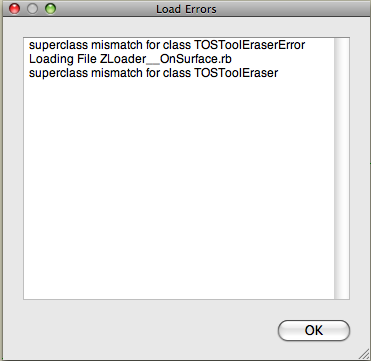
                      Had a look and cant see anyone with similar problem. On startup I get the below dialogue box. Any ideas? Installed Fredo 3.4c and run Mac Pro.

                      Many thanks.
                      Picture 1.png

                      1 Reply Last reply
                      Reply Quote 0
                      • D
                        dylan
                        last edited by

                        Thanks, really nice improvement ๐Ÿ‘

                        Can't get Daniels icons to show. If I choose them from Default Parameters and ok it, nothing happens. If I open again, the tick in the box is gone.

                        http://dmdarchitecture.co.uk/

                        1 Reply Last reply
                        Reply Quote 0
                        • fredo6F
                          fredo6
                          last edited by

                          @thomthom said:

                          Can the TOS_Dir_13 folder be removed?

                          YES, I forgot to say it.
                          Anyway, the folder is passive, as no loader is pointing at it.

                          Fredo

                          1 Reply Last reply
                          Reply Quote 0
                          • FrederikF
                            Frederik
                            last edited by

                            Thanks for this, Fredo...! ๐Ÿ˜„

                            Cheers
                            Kim Frederik

                            1 Reply Last reply
                            Reply Quote 0
                            • D
                              Dan
                              last edited by

                              @unknownuser said:

                              Can't get Daniels icons to show. If I choose them from Default Parameters and ok it, nothing happens. If I open again, the tick in the box is gone.

                              I replaced the icons in "IMAGES_Standard" subfolder with the icons set of choice and all went ok.

                              1 Reply Last reply
                              Reply Quote 0
                              • D
                                Dan
                                last edited by

                                I don't remember if I gave thanks to you, Fredo, but if I did, I repeat them: THANK YOU VERY MUCH for your life saving, incredible tools! ๐Ÿ˜

                                A wish, though: can you make the additional TOS palette to remember its position on screen from a SU session to another?

                                1 Reply Last reply
                                Reply Quote 0
                                • takesh hT
                                  takesh h
                                  last edited by

                                  @dan said:

                                  I replaced the icons in "IMAGES_Standard" subfolder with the icons set of choice and all went ok.

                                  Yes the trick did the job, thanks Dan. ๐Ÿ‘

                                  1 Reply Last reply
                                  Reply Quote 0
                                  • D
                                    dylan
                                    last edited by

                                    Thanks Dan, perfect!
                                    I was trying to replace them in images DanielS.

                                    http://dmdarchitecture.co.uk/

                                    1 Reply Last reply
                                    Reply Quote 0
                                    • olisheaO
                                      olishea
                                      last edited by

                                      I love this tool, I use it all the time.

                                      Endless thanks ๐Ÿ˜ ๐Ÿ˜ ๐Ÿ˜

                                      oli

                                      1 Reply Last reply
                                      Reply Quote 0
                                      • fredo6F
                                        fredo6
                                        last edited by

                                        @dan said:

                                        A wish, though: can you make the additional TOS palette to remember its position on screen from a SU session to another?

                                        You can specify the default position in the SeTtings dialog box of LibFredo6 (so in the Windows > LibFredo6 Settings menu).

                                        Fredo

                                        1 Reply Last reply
                                        Reply Quote 0
                                        • fredo6F
                                          fredo6
                                          last edited by

                                          @unknownuser said:

                                          Can't get Daniels icons to show. If I choose them from Default Parameters and ok it, nothing happens. If I open again, the tick in the box is gone.

                                          It seems there is a problem with that, but only on Mac.
                                          I am checking this issue.

                                          Fredo

                                          1 Reply Last reply
                                          Reply Quote 0
                                          • MALAISEM
                                            MALAISE
                                            last edited by

                                            Merci Fredo, I watched the video, that gives us new horizons.... ๐Ÿ‘

                                            MALAISE

                                            La Connaissance n'a de valeur que partagรฉe

                                            1 Reply Last reply
                                            Reply Quote 0

                                            Hello! It looks like you're interested in this conversation, but you don't have an account yet.

                                            Getting fed up of having to scroll through the same posts each visit? When you register for an account, you'll always come back to exactly where you were before, and choose to be notified of new replies (either via email, or push notification). You'll also be able to save bookmarks and upvote posts to show your appreciation to other community members.

                                            With your input, this post could be even better ๐Ÿ’—

                                            Register Login
                                            • 1
                                            • 2
                                            • 25
                                            • 26
                                            • 27
                                            • 28
                                            • 29
                                            • 30
                                            • 31
                                            • 32
                                            • 27 / 32
                                            • First post
                                              Last post
                                            Buy SketchPlus
                                            Buy SUbD
                                            Buy WrapR
                                            Buy eBook
                                            Buy Modelur
                                            Buy Vertex Tools
                                            Buy SketchCuisine
                                            Buy FormFonts

                                            Advertisement