[Plugin][$] FredoBend - v1.5b - 23 Jul 26




-
There is a new video on FredoBend by TheSketchupEssentials.
-
Awesome plugin! I downloaded both the plugin and library and get this error when trying to bend items.
Date: 31-Mar-26 16:58:45 - SU2021.0 - LibFredo6 - v15.9a An error occurred in FredoBend Along Curve Error in Bend Generation undefined method `glued_to' for #<Deleted Entity:0x54da1088> fredobendcurvealgo.rbe: 199 -- tolid_prepare fredobendcurvealgo.rbe: 133 -- tolid_construct_mono fredobendcurvetool.rbe: 2402 -- generation_step_replica fredobendcurvetool.rbe: 3200 -- job_perform fredobendcurvetool.rbe: 3139 -- job_notification body_lib6webprogress.rbe: 104 -- call body_lib6webprogress.rbe: 104 -- process_notify body_lib6webprogress.rbe: 388 -- fast_process_next_step body_lib6webprogress.rbe: 358 -- fast_process_start body_lib6webprogress.rbe: 370 -- fast_process_next body_lib6webprogress.rbe: 397 -- fast_process_end body_lib6webprogress.rbe: 383 -- fast_process_next_step body_lib6webprogress.rbe: 391 -- fast_process_next_step body_lib6webprogress.rbe: 358 -- fast_process_start body_lib6webprogress.rbe: 370 -- fast_process_next body_lib6webprogress.rbe: 346 -- fast_process_top body_lib6webprogress.rbe: 123 -- invoke fredobendcurvetool.rbe: 3085 -- job_start fredobendcurvetool.rbe: 2341 -- block in generation_launch -
Would you have the model, because I don't understand how the error can happen. Thanks
-
NEW RELEASE: FredoBend v1.2g - 01 Apr 26
Requirements
- LibFredo6: v15.9a or above
- Sketchup version: SU2017 and above
FredoBend 1.2g is a maintenance release including:
- Bug fixing for SU versions prior to SU2021.1
Home Page of FredoBend for information and Download.
-
@fredo6 Just checked it out, It works now! I am soo happy to have an extension like this for my line of work. Thanks for all of your hard work and dedication!!
-
NEW RELEASE: FredoBend v1.2k - 09 Apr 26
Requirements
- LibFredo6: v15.9a or above
- Sketchup version: SU2017 and above
FredoBend 1.2k is a maintenance release including:
- Bug fixing related to replicas
Home Page of FredoBend for information and Download.
-
NEW RELEASE: FredoBend v1.2l - 10 Apr 26
Requirements
- LibFredo6: v15.9a or above
- Sketchup version: SU2017 and above
FredoBend 1.2l is a maintenance release including:
- Major bug fixing related to directions
Home Page of FredoBend for information and Download.
-
NEW RELEASE: FredoBend v1.3a - 01 May 26
Requirements
- LibFredo6: v15.9a or above
- Sketchup version: SU2017 and above
FredoBend 1.3a is a major release including:
- Introduction of the Circular Bend tool
- Adjustment of the bending algorithms
- Bug fixing
- Other evolutions
Circular Bend: Overview
Home Page of FredoBend for information and Download.
-
NEW RELEASE: FredoBend v1.3b - 04 May 26
Requirements
- LibFredo6: v15.9a or above
- Sketchup version: SU2017 and above
FredoBend 1.3b is a maintenance release including:
- Bug fixing for Circular Bend tool
Home Page of FredoBend for information and Download.
-
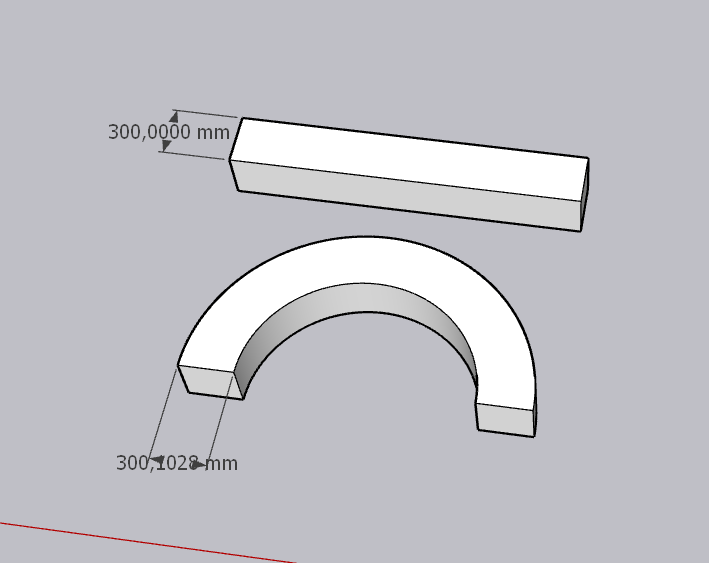
Hello!!
I am a user from Greece. Thanks for this amazing plugin.
Nevertheless I noticed that Circular bending deforms a little bit the object which I think is not convenient for the accuracy I don't know, is this a bad handle by me or is a small bug in the code? (I attach a screenshot trying to show what I mean).
Thanks for your attention in advance!! -
This is a choice you have to make.
There is a thread on this question in the Sketchup forum.
In your case, you can play with this parameter (Offset Mode)

-
@fredo6 Hello!!
Thank you very much for the instructions. I choose Vertex-to-Vertex end everything is fine. Now I Know that I have two options to use.
I saw the topic in the forum and I somehow understood the mechanism of bending, and the difficulties that appears.
Thanks again! -
@fredo6
I think it's best for a bent object's geometry to follow a 'curve' and start perpendicular to the start/end segment. But if the path is a full circle the bending should start perpendicular to a mid-segment, to keep the objects 'endmost' dimensions correct: and if it's around an arc [partial circle] that's user-defined it should be treated like any other curve: but if it's a swept form around a notional partial-circular path, that should then start/end perpendicular to a half-segment - that way the bent form stays as dimensionally true as it can be. -
NEW RELEASE: FredoBend v1.4a - 20 Jun 26
Requirements
- LibFredo6: v15.9a or above
- Sketchup version: SU2017 and above
FredoBend 1.4a is a maintenance release including:
- Bug fixing
- Technical adjustments
- functional adjustments
Note that applying the Circular Bend tool to a component will impact all other instances. So, if this is not intended, please make sure you make the component instance unique before.
Home Page of FredoBend for information and Download.
-
NEW RELEASE: FredoBend v1.5a - 30 Jun 26
Requirements
- LibFredo6: v15.9a or above
- Sketchup version: SU2017 and above
FredoBend 1.5a is a major release including:
- Introduction of the Dome tool
- Bug fixing
- Technical adjustments
- functional adjustments
Note that applying the Circular and Dome Bend tool to a component will impact all other instances. So, if this is not intended, please make sure you make the component instance unique before.
Home Page of FredoBend for information and Download.
-
@fredo6 Dome works great. Do you plan to add support to maintain UVs?
Download the free D'oh Book for SketchUp 📖
-
@fredo6 Do you plan to add support to maintain UVs?
Maybe, although I am not entirely sure there is a technical solution. What is sure is that it is not trivial and there will be an impact to performance.
-
I really need to investigate deeper what is going on.
The generation is done by deformation, that is, without creating geometry, just moving vertices.
In the meantime, there is ThruPaint to correct the issues.
-
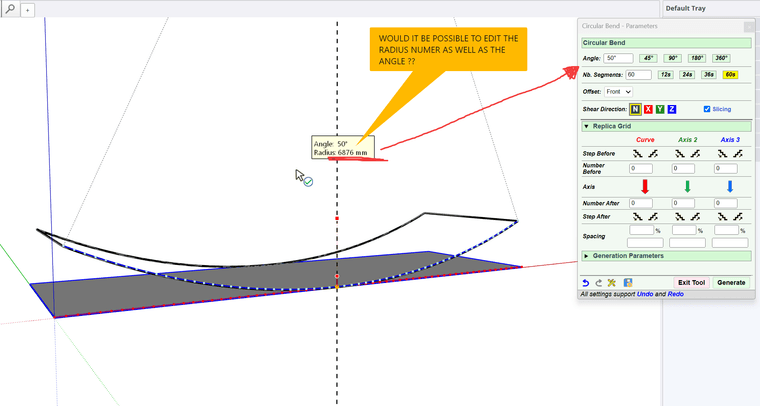
Hi. Would editing radius be a possibility as well as angle ??
-





Hello! It looks like you're interested in this conversation, but you don't have an account yet.
Getting fed up of having to scroll through the same posts each visit? When you register for an account, you'll always come back to exactly where you were before, and choose to be notified of new replies (either via email, or push notification). You'll also be able to save bookmarks and upvote posts to show your appreciation to other community members.
With your input, this post could be even better 💗
Register Login


Advertisement