Sketchucation Tools 5.0...
-
@fredo6
More and more puzzling. There seems to be something corrupted in the way Sketchup handles external files, including Ruby script files.In the trace file, I see that you have just LibFredo6, other of my plugins installed. The trace indicates that their startup sequences did perform well. So, the crash occurs after the plugins are loaded.
In another forum, Dan Rathbun pointed out that the onExtensionsLoaded method of AppObserver is called right after the extensions are loaded. I found several extensions that have a derived AppObserver class. I'm not sure how to determine if any of them may be to blame or may be somehow interacting with Fredo_Tools.
-
After upgrading SketchUcationTools to version 5.0.3, the Extension Store toolbar keeps appearing in the same spot every time I launch the software—even after I close it. Is there a way to fix this?

-
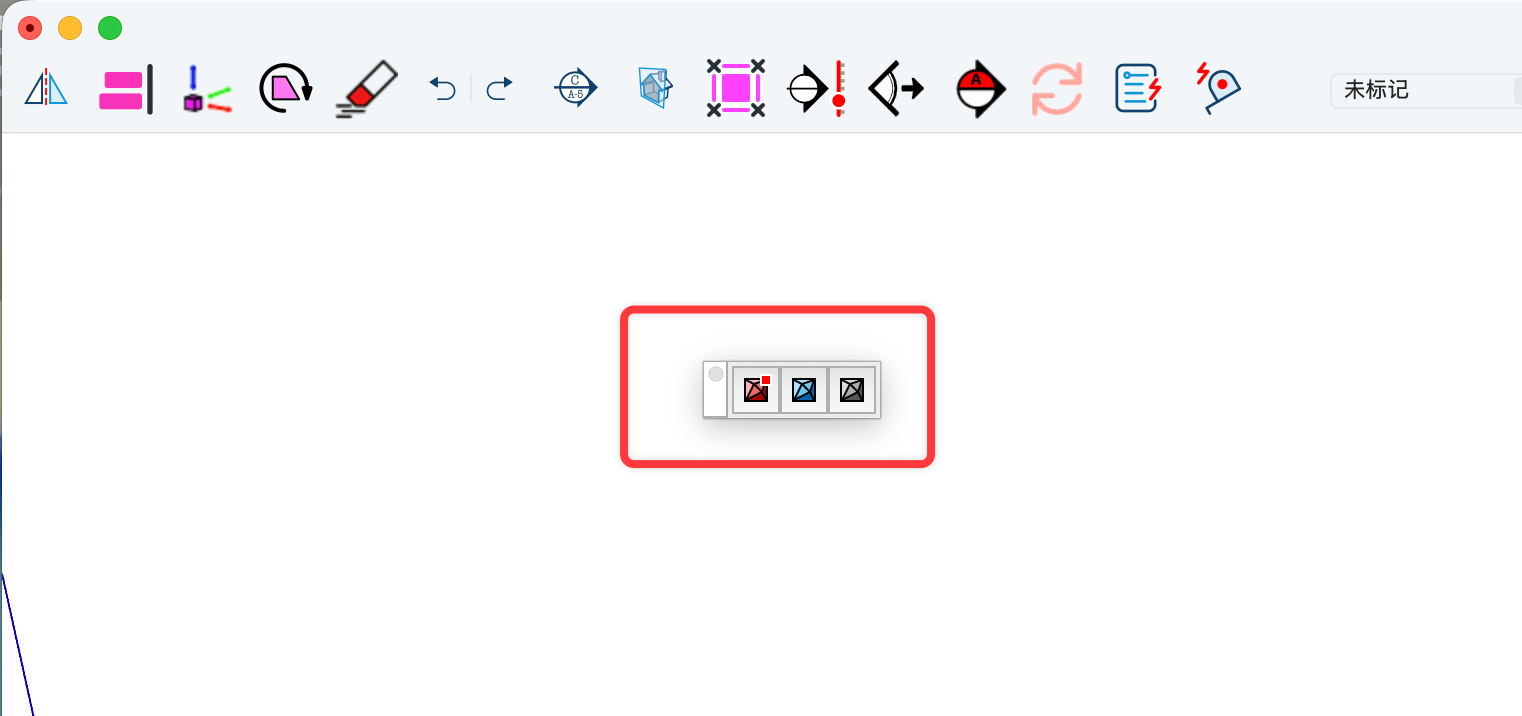
After upgrading SketchUcationTools to version 5.0.3, the Extension Store toolbar keeps appearing in the same spot every time I launch the software—even after I close it. Is there a way to fix this?
-
@Wantao
The red dot on the toolbar button shows shows that updates are available.
If updates are available then the toolbar shows up by default even if you have closed it previously. This is to ensure you see the availability.
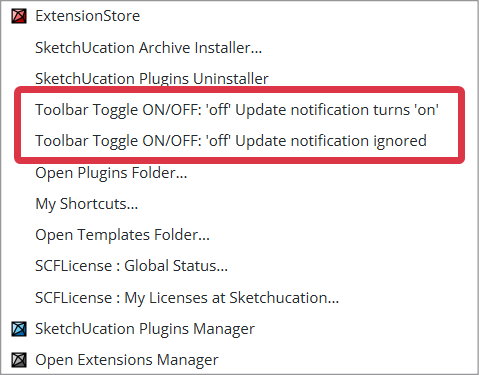
However there are two options in the Extensions > SketchUcation submenu, covering the toolbar close/open status. The first is the same as opening/closing the toolbar manually with the update-availability auto-opening it later if appropriate, but the second one let's you close it and then ignore update alerts, it you choose that you need to manually check for updates by opening the toolbar or ExtensionStore dialog.
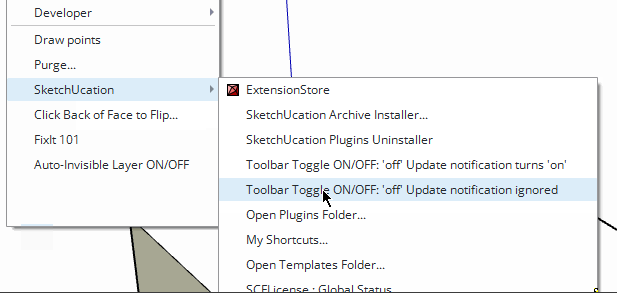
-
Moving all toolbars in a new project (No model) and saving as a template usually works for me New tools, new template.
-
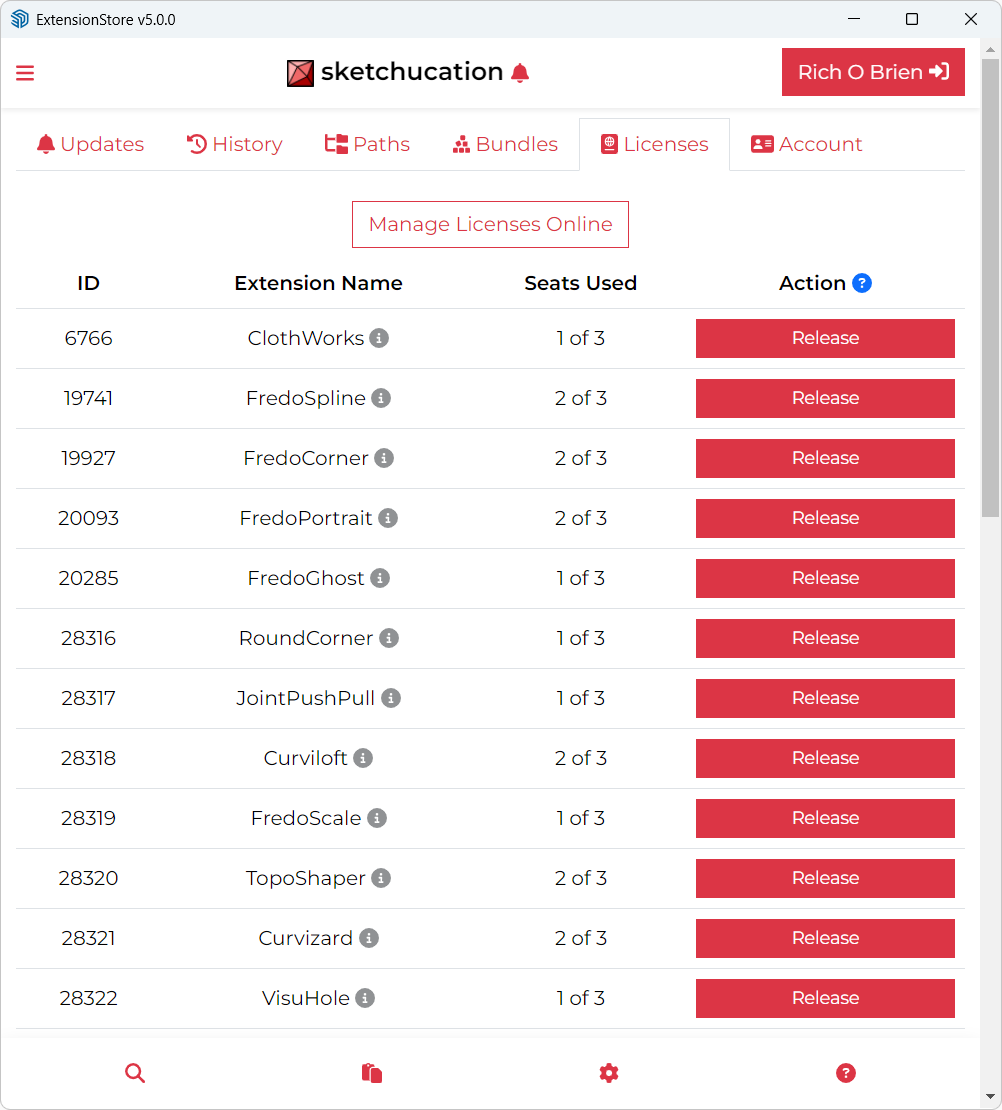
I'm using SketchUcation Store 5.0.3 in SU 2026 and it seems flaky. It reports that everything in my library needs updating even though that's not correct. Also, clicking on Settings gets me this Update list. What's it supposed to look like when you click Settings?
-
@RTCool said in Sketchucation Tools 5.0.3:
What's it supposed to look like when you click Settings?
You should see a tabbed UI with various headings.
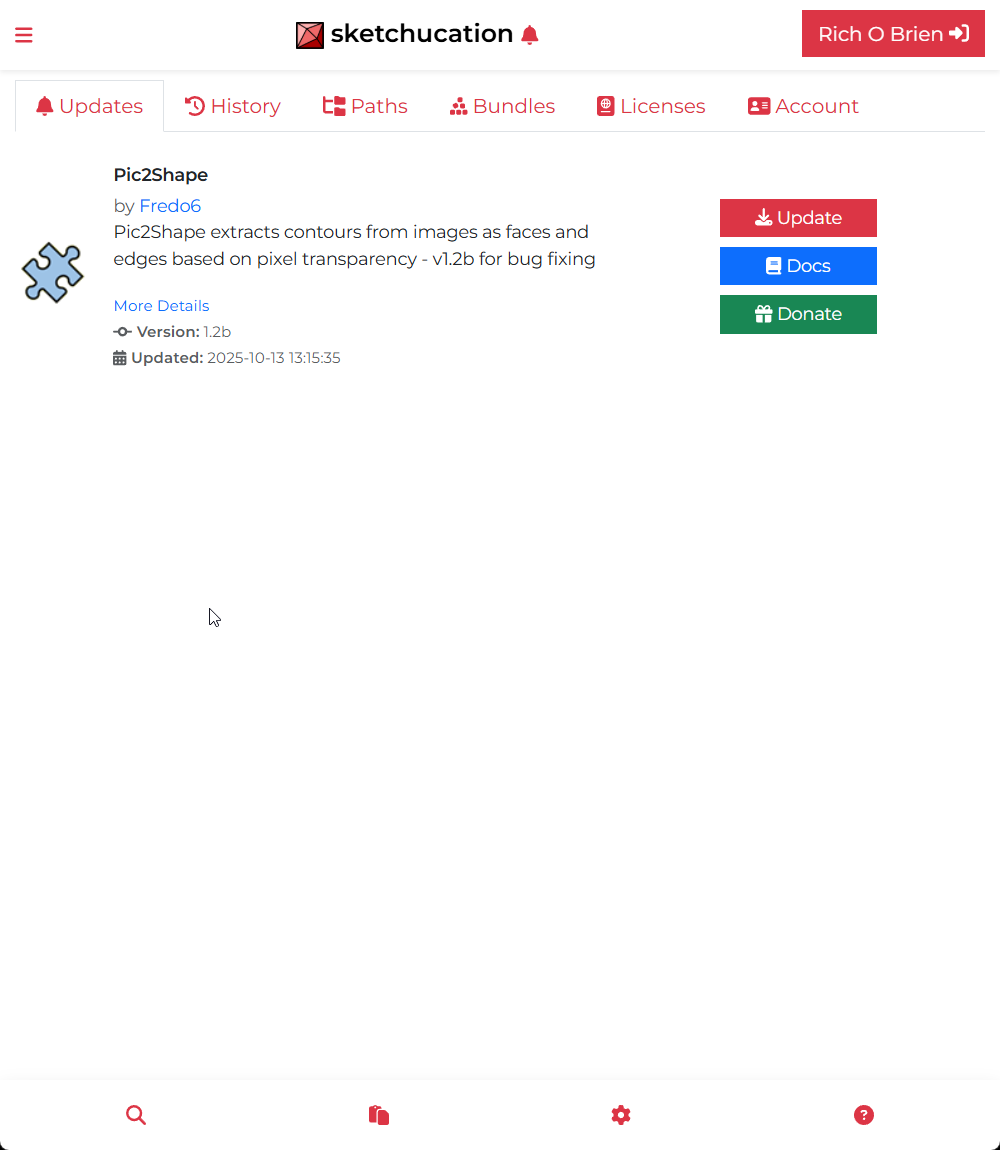
-
It occurred to me afterward that's what you're supposed to see. I guess getting used to the new interface, I was confused by two methods of arriving at that tab: clicking the bell for notifications of updates as well as the being the first tab under settings.
I was having trouble with the thing hanging when I would try updating anything, but that seems to be working now. Maybe I just tell it to update all these plugins it thinks need updating and it will remember all this correctly going forward.
-
Sketchucation Tools 5.0.4 released
Bugfixing and improvements to toolbar toggling and update notifications.
-
Is it possible to add an option to not update a particular plugin in the updates list, meaning it should no longer show the update for that plugin and display it with a flag?
-
@alexpacio2013 said in Sketchucation Tools 5.0.4:
Is it possible to add an option to not update a particular plugin in the updates list, meaning it should no longer show the update for that plugin and display it with a flag?
Ignore? We can look at that.
-
@alexpacio2013 what extensions would you not want to update when the author has made updates?
-
@Dave-R Some plugins have caused me issues with updates, some I want to finish current projects before updating, while others I'm confident are useful updates.
-
Hi, the Sketchucation plugin in SketchUp 2026 displays the following window every time I open the program.

Extension error report
SketchUp: 26.0.429
OS: Windows 10
Ruby: 3.2.2Extensión: SketchUcation (5.0.4)
Error: NameError (uninitialized constant SCF::TOOLBARTOGGLEup)
c:/users/usuario/appdata/roaming/sketchup/sketchup 2026/sketchup/plugins/sketchucation/scf_loader.rbe:193:in<module:SCF>' c:/users/usuario/appdata/roaming/sketchup/sketchup 2026/sketchup/plugins/sketchucation/scf_loader.rbe:13:in<main>'
C:/Program Files/SketchUp/SketchUp 2026/SketchUp/Tools/extensions.rb:197:ineval' C:/Program Files/SketchUp/SketchUp 2026/SketchUp/Tools/extensions.rb:197:inrequire'
C:/Program Files/SketchUp/SketchUp 2026/SketchUp/Tools/extensions.rb:197:inload' C:/Users/Usuario/AppData/Roaming/SketchUp/SketchUp 2026/SketchUp/Plugins/SketchUcation.rb:173:inregister_extension'
C:/Users/Usuario/AppData/Roaming/SketchUp/SketchUp 2026/SketchUp/Plugins/SketchUcation.rb:173:in<module:SCF>' C:/Users/Usuario/AppData/Roaming/SketchUp/SketchUp 2026/SketchUp/Plugins/SketchUcation.rb:17:in<top (required)>' -
This error is very unexpected.
As SketchUp starts it loads from your Plugins folder the ../SketchUcation.rb file to set up the rest of the code.
This in turn loads ../SketchUcation/SCF_loader.rbe
Which makes the toolbars, menus etc, and loads the various other code files needed to work the extension.
It's failing at the loader's line#193 with the NameError uninitialized constant SCF::TOOLBARTOGGLEup
This is one of many Constants set up to set the text for the toolbar button's tool-tips etc.
Because earlier lines of code have already set 27 similar Constants like SCF::TOOLBARTOGGLE, without any errors I can't immediately see what might be causing this issue for you. These Constants are read in from a text file shipped with the set - ../Strings/SCF-EN-US.strings
I've checked them and the correct file is included in the file set archive 5.0.4
Since the TOOLBARTOGGLEup Constant was just added in for this revision, then it looks like you might have a earlier version of the strings file [e.g. <=5.0.3], that the needed newer 5.0.4 l, and the loadedr is then tripping up later as that particular Constant hasn't been defined.How did you install the newest version ? From the ExtensionStore dialog, or from a downloaded RBZ - if that. then how did you install the files/folders ? Using the Native Extension Manager's Install function should copy all over and overwrite any preexisting files etc - which it clearly has for the loader etc; or did you manually copy the RBZ's contents into your Plugins folder ? If you did that then maybe you inadvertently skipped the new strings file version ?
You can see if the existing installation for ../Strings/SCF-EN-US.strings is correct by opening it with Notepad++.exe and around line#31 TOOLBARTOGGLEup= .. defines the Constant. If it's there then something is weirdly adrift, as your other files aren't loading it: but I suggest that it will almost certainly be an older version with that liine missing.
If it is missing something when wrong with the installation - probably skipped that file's newer version etc - if so the some other files might also be suspect.
Please try SketchUp's Extension Manager Install function again and pick the 5.0.4 RBZ . After it installs that, then restart SketchUp and see if the error recurs...
Alternatively you can use a manual way - close SketchUp, then extract the RBZ's contents using 7-Zip or similar [an RBZ is a renamed ZIP file], then manually copy all of its contents - i.e. parts 1) the SketchUcation.rb file and 2) the subfolder SketchUcation [and of course all of that folder's contents intact - files and subfolders of more files etc. When prompted choose to Replace the 118 or so existing files [never Skip them]. Afterwards restart SketchUp to sync everything and see what happens...
Please let us know what happens... -
Maybe I'm missing something but I don't see the Update All option from earlier versions. Was it removed?
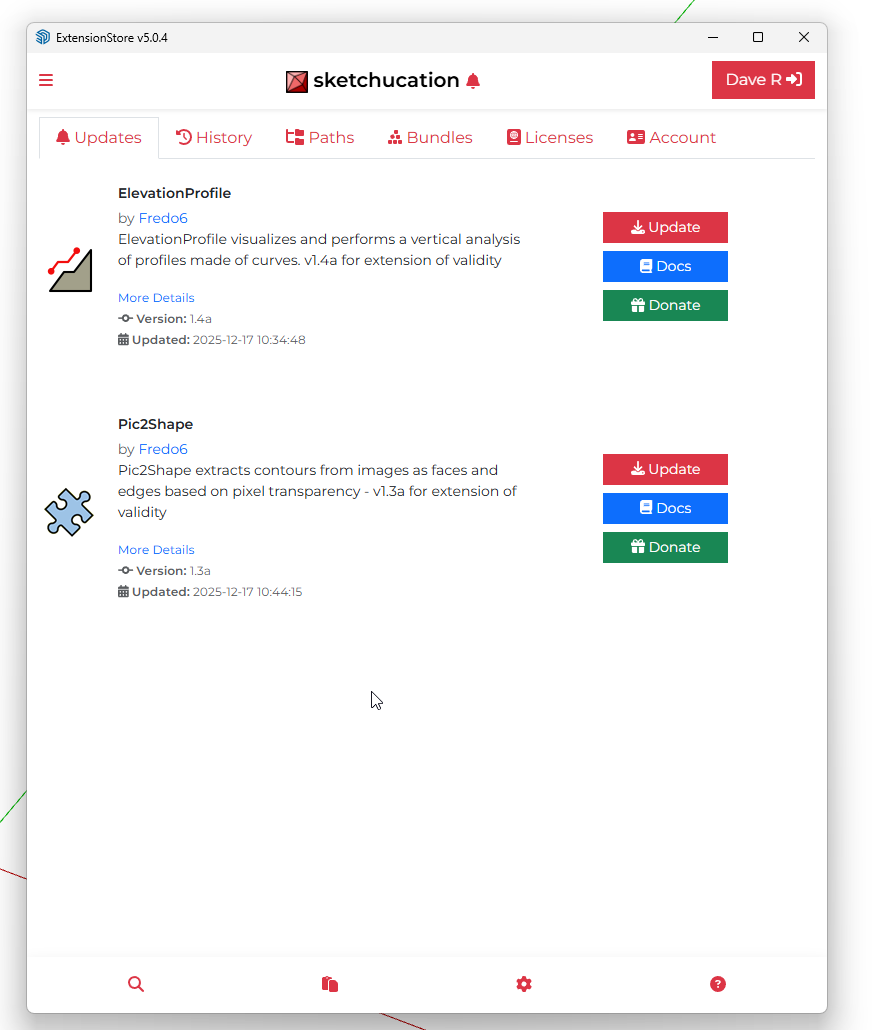
-
I had it but noticed it was not correctly the other day.
We will take a look now.
-
@Dave-R We haven't removed it, for me it is displayed correctly. When you have a few minutes to test, please PM me.
-
@Gábor I did send a PM.
-
said in Sketchucation Tools 5.0.4:
@Dave-R We haven't removed it, for me it is displayed correctly. When you have a few minutes to test, please PM me.
Thank you







Hello! It looks like you're interested in this conversation, but you don't have an account yet.
Getting fed up of having to scroll through the same posts each visit? When you register for an account, you'll always come back to exactly where you were before, and choose to be notified of new replies (either via email, or push notification). You'll also be able to save bookmarks and upvote posts to show your appreciation to other community members.
With your input, this post could be even better 💗
Register Login


Advertisement