sketchucation logo sketchucation
    • Login
    Oops, your profile's looking a bit empty! To help us tailor your experience, please fill in key details like your SketchUp version, skill level, operating system, and more. Update and save your info on your profile page today!
    ⚠️ Update | Sketchucation Tools 5.0.8 released with licensing improvements and bugfixes Download

    [Plugin][$] Curviloft 2.0a - 31 Mar 24 (Loft & Skinning)


    Scheduled Pinned Locked Moved Plugins
    1.3k Posts 300 Posters 3.1m Views 298 Watching
    Loading More Posts
    • Oldest to Newest
    • Newest to Oldest
    • Most Votes
    Reply
    • Reply as topic
    Log in to reply
    This topic has been deleted. Only users with topic management privileges can see it.
    • P
      py1998
      last edited by

      Hi,
      I was trying to use this plugin, but after installing it in the warehouse manager, it says that the plugin is expired. But this is the first time I have installed it

      1 Reply Last reply
      Reply Quote 0
      • A
        Andru Chena
        last edited by

        This actually works... Thank you goys!

        1 Reply Last reply
        Reply Quote 0
        • M
          Miho Mihov
          last edited by

          Hi Fredo,

          I recently purchased the whole bundle of the tools and they are amazing. I have experienced a problem with one of the tools - Curviloft - Skinning. It does not seem to produce consistent results for a simple system of edges which create a triangulated 3D surface. There are always a number of triangles which become distorted - not planar.

          I wonder what I am doing wrong. Would appreciate if you can assist.

          Attached is the sample file containing the edges as well as the result after the command is executed.

          Looking forward from hearing from you.

          Regards

          Miho Mihov


          Sample - skinning

          1 Reply Last reply
          Reply Quote 0
          • M
            Mrkay
            last edited by

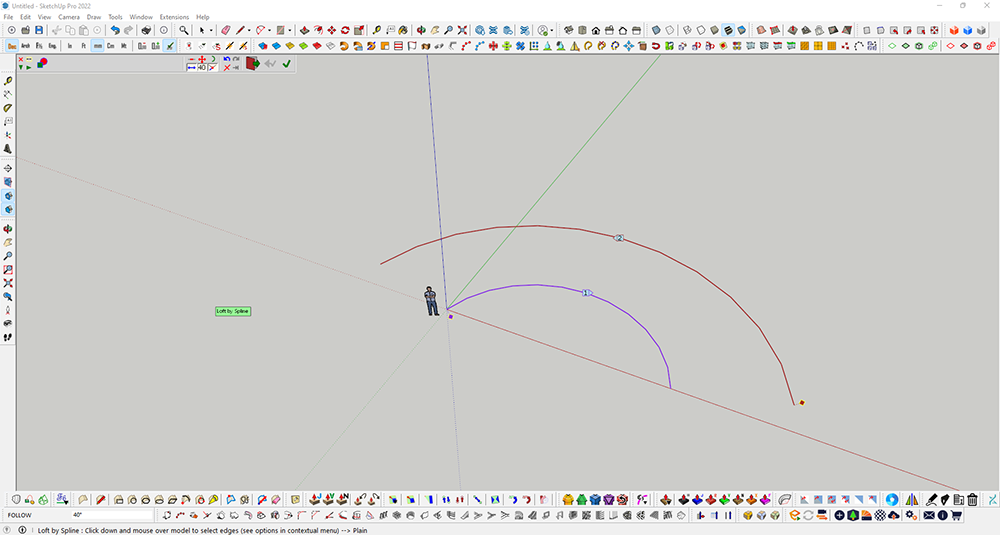
            Hi, could someone help me. my licensed curviloft (loft by spline) seems does not working today. I created a simple curve and offset it. when I tried to apply the loft by spline, it doesn't do anything except like in the image attached. Please advise

            curvilof 2t.png

            1 Reply Last reply
            Reply Quote 0
            • Dave RD
              Dave R
              last edited by

              @mrkay said:

              Hi, could someone help me.

              Upload the SketchUp model file so we can see exactly what you've got.

              Etaoin Shrdlu

              %

              (THERE'S NO PLACE LIKE)

              G28 X0.0 Y0.0 Z0.0

              M30

              %

              1 Reply Last reply
              Reply Quote 0
              • P
                phoebemaylim
                last edited by

                First time downloading Curviloft and RoundCorner and it says license is expired. Never used the extension before. We suppose to get the trial for 30 days right? Rather no need to mention free trial if there's no intention to give free trial.

                1 Reply Last reply
                Reply Quote 0
                • Dave RD
                  Dave R
                  last edited by

                  @phoebemaylim said:

                  First time downloading Curviloft and RoundCorner and it says license is expired.

                  Did you download and install the required Sketchucation Extension Store tool before downloading Curviloft and RoundCorner and then use it to install the extensions?

                  Etaoin Shrdlu

                  %

                  (THERE'S NO PLACE LIKE)

                  G28 X0.0 Y0.0 Z0.0

                  M30

                  %

                  1 Reply Last reply
                  Reply Quote 0
                  • D
                    DCDP
                    last edited by

                    Helo Fredo
                    Thanks for your amazing tool. It helps me a lot to create special surfaces.

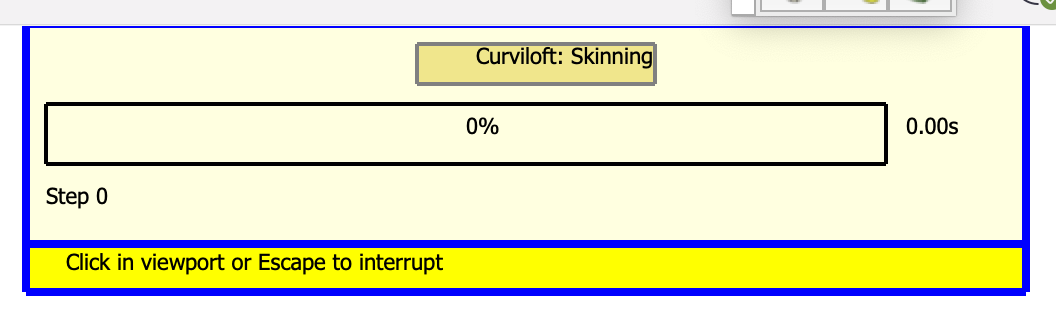
                    Sometimes when I use skinning tool, Curviloft seems blocked and does not create the surface. the control panel appears and stays at 0%.
                    Do you know why ?

                    Thanks for your help.


                    Capture d’écran 2022-07-17 à 22.12.58.png

                    1 Reply Last reply
                    Reply Quote 0
                    • fredo6F
                      fredo6
                      last edited by

                      @dcdp said:

                      Sometimes when I use skinning tool, Curviloft seems blocked and does not create the surface. the control panel appears and stays at 0%.
                      Do you know why ?

                      Difficult to know without the model.
                      Also, could you open the Ruby Console before launching Curviloft. There may be some errors displayed.

                      1 Reply Last reply
                      Reply Quote 0
                      • D
                        DCDP
                        last edited by

                        @fredo6 said:

                        @dcdp said:

                        Sometimes when I use skinning tool, Curviloft seems blocked and does not create the surface. the control panel appears and stays at 0%.
                        Do you know why ?

                        Difficult to know without the model.
                        Also, could you open the Ruby Console before launching Curviloft. There may be some errors displayed.

                        "Points are not planar"
                        The same kind of surface was created on the opposite side of my model.

                        Here is the Ruby message :
                        "
                        Error: #<ArgumentError: Points are not planar>
                        /users/dominiqueconvard/library/application support/sketchup 2022/sketchup/plugins/fredo6_curviloft/curviloftgeometry.rbe:123:in add_face' /users/dominiqueconvard/library/application support/sketchup 2022/sketchup/plugins/fredo6_curviloft/curviloftgeometry.rbe:123:in geometry_link_flat'
                        /users/dominiqueconvard/library/application support/sketchup 2022/sketchup/plugins/fredo6_curviloft/curviloftgeometry.rbe:148:in geometry_link_bz' /users/dominiqueconvard/library/application support/sketchup 2022/sketchup/plugins/fredo6_curviloft/curviloftgeometry.rbe:263:in step_geometry'
                        /users/dominiqueconvard/library/application support/sketchup 2022/sketchup/plugins/fredo6_curviloft/curviloftgeometry.rbe:37:in block in execute_geometry' /users/dominiqueconvard/library/application support/sketchup 2022/sketchup/plugins/fredo6_!libfredo6/lib6operation.rbe:381:in block in launch_execution'
                        /users/dominiqueconvard/library/application support/sketchup 2022/sketchup/plugins/fredo6_!libfredo6/lib6operation.rbe:369:in step_geometry' /users/dominiqueconvard/library/application support/sketchup 2022/sketchup/plugins/fredo6_!libfredo6/lib6operation.rbe:418:in start_execution'
                        /users/dominiqueconvard/library/application support/sketchup 2022/sketchup/plugins/fredo6_!libfredo6/lib6operation.rbe:381:in launch_execution' /users/dominiqueconvard/library/application support/sketchup 2022/sketchup/plugins/fredo6_curviloft/curviloftgeometry.rbe:37:in execute_geometry'
                        /users/dominiqueconvard/library/application support/sketchup 2022/sketchup/plugins/fredo6_curviloft/curvilofttool.rbe:736:in execute_geometry' /users/dominiqueconvard/library/application support/sketchup 2022/sketchup/plugins/fredo6_curviloft/curvilofttool.rbe:281:in execute_validate'
                        /users/dominiqueconvard/library/application support/sketchup 2022/sketchup/plugins/fredo6_curviloft/curvilofttool.rbe:269:in execute_from_palette' /users/dominiqueconvard/library/application support/sketchup 2022/sketchup/plugins/fredo6_curviloft/curvilofttool.rbe:217:in notify_from_palette'
                        /users/dominiqueconvard/library/application support/sketchup 2022/sketchup/plugins/fredo6_curviloft/curviloftpalette.rbe:529:in call' /users/dominiqueconvard/library/application support/sketchup 2022/sketchup/plugins/fredo6_curviloft/curviloftpalette.rbe:529:in block in init_palette'
                        /users/dominiqueconvard/library/application support/sketchup 2022/sketchup/plugins/fredo6_!libfredo6/body_lib6palette.rbe:4076:in execute_button' /users/dominiqueconvard/library/application support/sketchup 2022/sketchup/plugins/fredo6_!libfredo6/body_lib6palette.rbe:3830:in onLButtonUp'
                        /users/dominiqueconvard/library/application support/sketchup 2022/sketchup/plugins/fredo6_!libfredo6/lib6palette.rbe:103:in onLButtonUp' /users/dominiqueconvard/library/application support/sketchup 2022/sketchup/plugins/fredo6_curviloft/curvilofttool.rbe:503:in onLButtonUp' "

                        1 Reply Last reply
                        Reply Quote 0
                        • E
                          Einstein
                          last edited by

                          Hello,
                          I feel like I need some clarification here.
                          Am I thinking right that Curviloft 1.8a is the last version that can be used for free without any time limit?

                          1 Reply Last reply
                          Reply Quote 0
                          • Rich O BrienR
                            Rich O Brien Moderator
                            last edited by

                            TIG's ExtrudeTools extensions are similar to CurviLoft if you want a free alternative.

                            Link Preview Image
                            SketchUp Plugins | PluginStore | SketchUcation

                            SketchUp Plugin and Extension Store by SketchUcation provides free downloads of hundreds of SketchUp extensions and plugins

                            favicon

                            (sketchucation.com)

                            Download the free D'oh Book for SketchUp 📖

                            1 Reply Last reply
                            Reply Quote 0
                            • A
                              Astrid Findreng
                              last edited by

                              Hi
                              I would like to purchase curviloft after free trial expired.
                              But how do I do it.
                              Cannot find any buy option. should the donate button be used instead?

                              Help!
                              Astrid

                              1 Reply Last reply
                              Reply Quote 0
                              • Rich O BrienR
                                Rich O Brien Moderator
                                last edited by

                                Link Preview Image
                                SketchUcation | List of Plugin Licences

                                favicon

                                (sketchucation.com)

                                Download the free D'oh Book for SketchUp 📖

                                1 Reply Last reply
                                Reply Quote 0
                                • P
                                  Pat58
                                  last edited by

                                  Hi Fredo6,

                                  I have a problem with the currently release of Curviloft and associated products, the tool palette has disappeared I only get part of the toolbar.
                                  Please see attached image.
                                  I using Sketchup Pro 2022 on a MAC
                                  Fredo6 Libfredo6 version 13.6a 29 Nov
                                  Curviloft 1.9a

                                  I look forward to hearing from you
                                  regards

                                  1 Reply Last reply
                                  Reply Quote 0
                                  • Gus RG
                                    Gus R
                                    last edited by

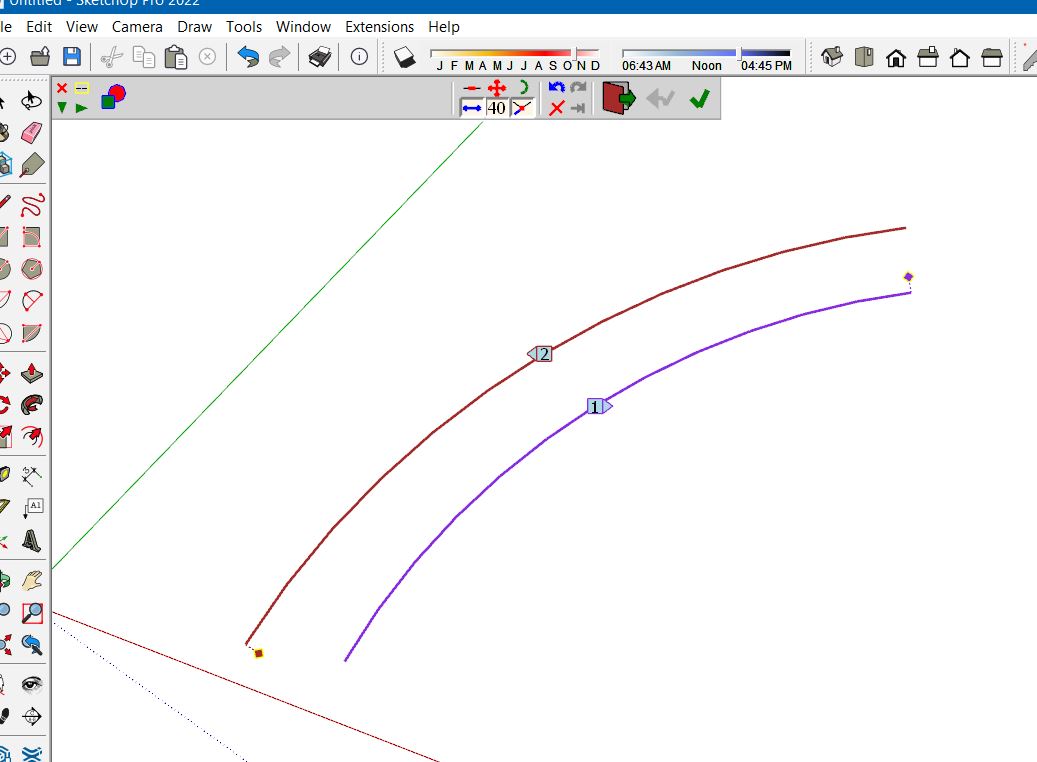
                                    I can't seem to be able to Loft by Spline between two simple arcs. What could I be doing wrong?

                                    www.instagram.com/gusrobatto/

                                    www.facebook.com/gusrobatto

                                    www.flickr.com/photos/gusrobatto

                                    1 Reply Last reply
                                    Reply Quote 0
                                    • Gus RG
                                      Gus R
                                      last edited by

                                      @gus r said:

                                      I can't seem to be able to Loft by Spline between two simple arcs. What could I be doing wrong?

                                      It suddenly started working again. 😲

                                      www.instagram.com/gusrobatto/

                                      www.facebook.com/gusrobatto

                                      www.flickr.com/photos/gusrobatto

                                      1 Reply Last reply
                                      Reply Quote 0
                                      • Dave RD
                                        Dave R
                                        last edited by

                                        @gus r said:

                                        I can't seem to be able to Loft by Spline between two simple arcs.

                                        It works for me in SU2022. Share your .skp file so we can see what you have set up.

                                        Etaoin Shrdlu

                                        %

                                        (THERE'S NO PLACE LIKE)

                                        G28 X0.0 Y0.0 Z0.0

                                        M30

                                        %

                                        1 Reply Last reply
                                        Reply Quote 0
                                        • Gus RG
                                          Gus R
                                          last edited by

                                          Thanks Dave. I don't know what happened. Was working in the past but then this morning it wasn't working. I cleared my temp directory and then it started working right again. Was just between to simple arcs for a brick arch texture set-up. This is what it looked like when it wasn't working. Between Windows and potential plug-in conflicts there's no telling what could have caused it.
                                          Curviloft Between 2 Arcs.JPG

                                          www.instagram.com/gusrobatto/

                                          www.facebook.com/gusrobatto

                                          www.flickr.com/photos/gusrobatto

                                          1 Reply Last reply
                                          Reply Quote 0
                                          • fredo6F
                                            fredo6
                                            last edited by

                                            @gus r said:

                                            Thanks Dave. I don't know what happened. Was working in the past but then this morning it wasn't working. I cleared my temp directory and then it started working right again. Was just between to simple arcs for a brick arch texture set-up. This is what it looked like when it wasn't working. Between Windows and potential plug-in conflicts there's no telling what could have caused it.

                                            Could you upgrade to LibFredo6 v13.6a. It should solve the problem.

                                            1 Reply Last reply
                                            Reply Quote 0

                                            Hello! It looks like you're interested in this conversation, but you don't have an account yet.

                                            Getting fed up of having to scroll through the same posts each visit? When you register for an account, you'll always come back to exactly where you were before, and choose to be notified of new replies (either via email, or push notification). You'll also be able to save bookmarks and upvote posts to show your appreciation to other community members.

                                            With your input, this post could be even better 💗

                                            Register Login
                                            • 1
                                            • 2
                                            • 62
                                            • 63
                                            • 64
                                            • 65
                                            • 66
                                            • 64 / 66
                                            • First post
                                              Last post
                                            Buy SketchPlus
                                            Buy SUbD
                                            Buy WrapR
                                            Buy eBook
                                            Buy Modelur
                                            Buy Vertex Tools
                                            Buy SketchCuisine
                                            Buy FormFonts

                                            Advertisement