Camera totally lost, ans Zoom Extents doesn't help
-
Hello to everybody, I'm ManuHeel.
I've been using SketchUp for 3 or 4 years now.I was adding the last things to my model when moving a part led me to nowhere, and I can't find my model anymore. I searched in forums for a solution but I didn't manage to fix this, I tried Zoom Extents, but nothing came up.
I can't see my model, I can't see the axes, sometimes I found the origin as a dot, but I can zoom as much as I want without finding my model. My last backup is also in this state.
Please help me, I lost all my work

ManuHeel.
-
Did you check: layers, styles, hidden geometry, model statistics, outliner, ...?
If you use Ctrl+A, is there something in the entitiy info window?Is it a model you can share?
-
If I select all, it says that i selected 7 entities, which are my 7 components in the model.
I can share it if this can help.
I don't know where to found layers, styles, model statistics, outliner, sorry -_-'EDIT : Found them, and my components are here, but can't be displayed
-
Is it possible you've got some little line segment or something at a long distance from the origin? When you hit Zoom Extents, where on the screen does the origin display?
Posting the SKP file would be helpful.
-
@manuheel said:
If I select all, it says that i selected 7 entities, which are my 7 components in the model.
I can share it if this can help.
I don't know where to found layers, styles, model statistics, outliner, sorry -_-'EDIT : Found them, and my components are here, but can't be displayed
Why not ?
Have you used Model Info > Statistic > Fix problems ?
Are all Layers ON ?
Is View > Hidden Geometry ON ?
Are Guides set ON ?
If you Zoom-extents what happens ?
If you activate a Scene-tab what happens ?
If you export the Model's Components [7] to a Collection and then edit each one of those SKPs in turn, fixing issues etc and erasing guides/points, and any rogue geometry far far from the origin etc... what happens ?
Reload the Components one at a time into the problem SKP and see what happens ?
Load the Components one at a time into an empty SKP and see what happens ? -
@Dave :
I was moving a part when this happened so maybe it went 10000000 miles away, so yes.
Zoom Extents get the origin (when I manage to get it) to the left middle.
I can't post the file, it's 5.7 Mio and I can't post over 4 Mio
Everything is on, but I'll try to add the components in an empty SKP
-
Okay, I found the component which was causing trouble.
I was adding the black notes to my piano model and I think a black note is causing trouble.
Adding this particular component gives me the problem.If you can find a way to fix it, here is the model, if not, it's not that bad as I got my other components back.
-
It looks to me as if you deleted all the geometry in the component while it was open for editing. That'll certainly cause you problems. I guess I'd start over.
-
@dave r said:
It looks to me as if you deleted all the geometry in the component while it was open for editing. That'll certainly cause you problems. I guess I'd start over.
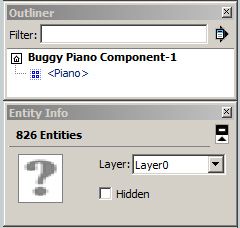
If you edit the piano component and select all entities, there are 826 entities:
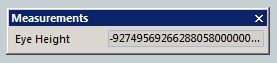
If you use the position camera tool, you get this eye height:
-
Yeah, I don't know what happened ><
Don't bother, the piano is the only thing I can rebuild without problem, as I have the measures.
-
m=Sketchup.active_model #<Sketchup::Model:0x5ae8378> bb=m.bounds #<Geom::BoundingBox:0x88ce15c> bb.min Point3d(-3.06746, 0, -1.1692e+049) bb.max Point3d(53.2677, 9.35361e+049, 12.0827)
Clearly something nasty is a zillion miles away
Those values are astronomical ! -
Ah ha! It is the distant geometry thing.
-
At
9.35361e+049 inches
Something is @
1,476,264,204,545,454,550,000,000,000,000,000,000,000,000,000 miles
from the origin !
OR
~25,112,920,5364,175,316,000,000,000,000,000,000 light-years
which is a LOT more than the diameter of the Milky Way Galaxy @
~120,000 light-years
OR the observable Universe itself @
~93,000,000,000 light-years
However, if you Select All, get the Component and then Explode it etc... then query the Edges in the model [there are only Faces and Edges in it] - for 'small' and 'large' we get this:
Sketchup.active_model.entities.grep(Sketchup::Edge).each{|e| p e.length.to_mm if e.length < 0.25.mm || e.length > 1500.mm} 0.0639867005970645 0.0639867005970814
The very tiny edges could cause issues but this suggests that some of them are simply far far away ?
This code finds just one culprit:
Sketchup.active_model.entities.grep(Sketchup::Edge).each{|e|p e.bounds.max if e.bounds.max.y > 10.m} Point3d(0.19685, 9.35361e+049, -1e+030)
So we can delete it thus:
Sketchup.active_model.entities.grep(Sketchup::Edge).each{|e|e.erase! if e.bounds.max.y > 10.m}
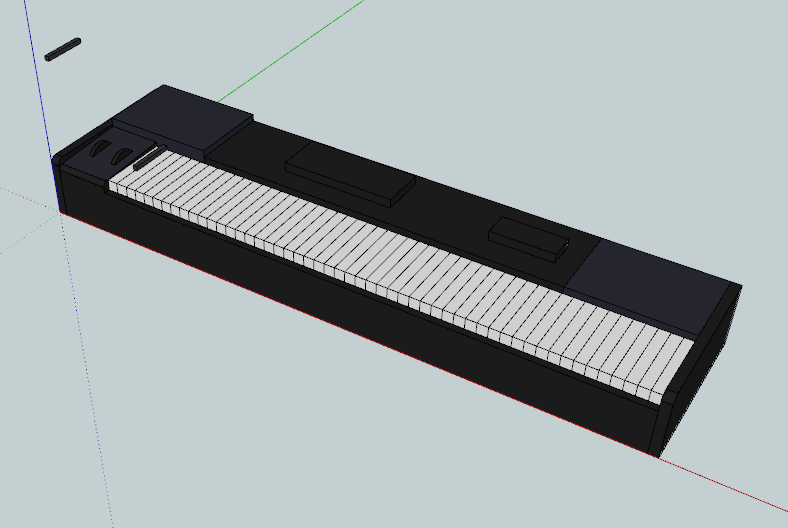
Then a Zoom-extents works... and all is well again !
A v8 of the fixed SKP is attached...
-
That has to set a record for most distant geometry in SketchUp.
-
Did you find a talking donkey at far far away.
-
Woah, thanks TIG.
Next time I'll try not to destroy the space-time continuum
-
I believe Tig has just discovered a way to reduce the time of the light-year travel !
-
@ely862me said:
I believe Tig has just discovered a way to reduce the time of the light-year travel !
I'm looking forward to the day he implements this technique in his plugins to increase their speed
-
@cotty said:
@ely862me said:
I believe Tig has just discovered a way to reduce the time of the light-year travel !
I'm looking forward to the day he implements this technique in his plugins to increase their speed
I believe that are not his plugins that are not up to speed, but the universe we use them in .





Hello! It looks like you're interested in this conversation, but you don't have an account yet.
Getting fed up of having to scroll through the same posts each visit? When you register for an account, you'll always come back to exactly where you were before, and choose to be notified of new replies (either via email, or push notification). You'll also be able to save bookmarks and upvote posts to show your appreciation to other community members.
With your input, this post could be even better 💗
Register Login


Advertisement