[Plugin] BezierSpline - v2.2a - 22 Apr 21
-
You have a wrong installation
jointpushpull_main.rb should be in JPP_Dir_20, NOT in the main SU Plugins directory.
Fredo
-
You are right. I moved it. Bezier lasted this time for maybe 8 curves, then bugsplat:(((
-
Fredo, I'm seeing the same thing on my Mac. I successfully drew 5 Bezier curves but while drawing the 6th, SketchUp crashed without a Bug Splat.
-
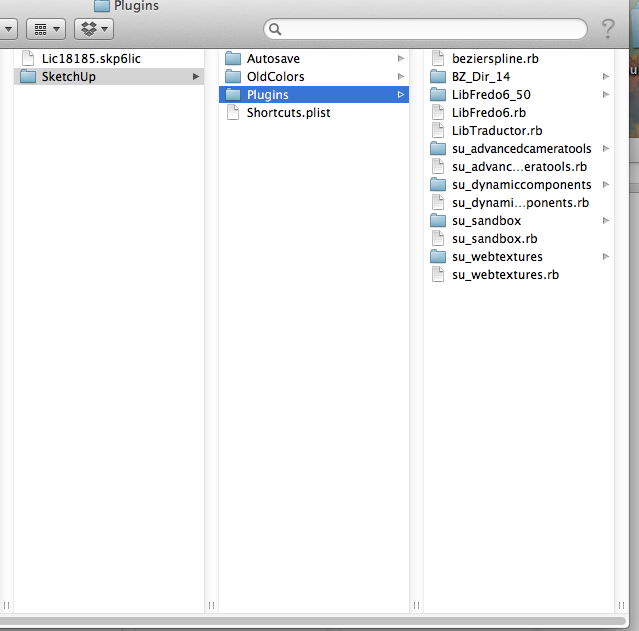
I am attaching a new screen shot - got rid of all plugins but native sketch up and bezier. Still Crashes!
-
What is the FULL path to that Plugins folder ?
You leak out the story drip by drip...

-
the normal for mac:library/application support/sketchup2013/plugins/
Everything else works. And Dave R apparently encountered the same thing...I got rid temporarily of other plugins to make sure they do not affect that one. No change. -
Not sure what it can be and why it appears now (I did not change anything to the plugin for a while).
Since you have a deterministic crash situation (after a few curve), would you mind to remove the file LibTraductor.rb (or rename it .rb!). Since you have LibFredo6 installed, it should be harmless.
Fredo
-
I disabled LibTraductor.rb and opened SU. I got the following:
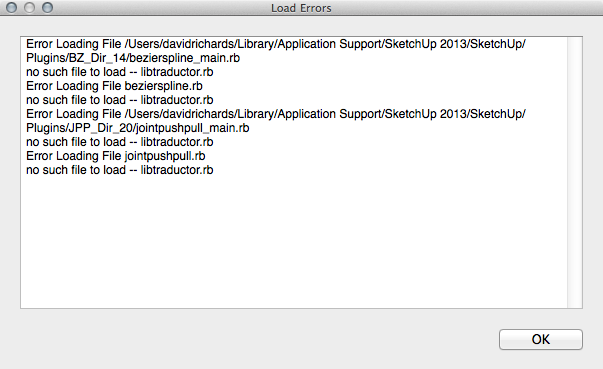
I do have the most recent LibFredo6 installed.
-
Dave,
But do you still get BezierSpline loaded?
And if so, do you get the crash?
Fredo
-
No. With LibTraductor disabled I don't get BezierSpline loaded at all. No option for toolbar nor any menu entry.
-
@dave r said:
No. With LibTraductor disabled I don't get BezierSpline loaded at all. No option for toolbar nor any menu entry.
My mistake,
You should replace the statement
rescuebyrescue LoadErroron line 35 of bezierspline_main.rb.This will allow checking for potential conflicts ebtween the old version (libTraductor.rb) and the new one embedded in LibFredo6.
If you still get a crash, then it is something else
Fredo
-
I can't easily see line numbers. "rescue" appears several times. Could you give me a bit of surrounding text?
-
require 'sketchup.rb' begin require 'libtraductor.rb' # for language translation rescue end #Specify the two curve extensions; Bezier Classic and Polyline BZ____LIST = ["BZ__BezierClassic", "BZ__Polyline"] -
10Q
-
OK, LibTraductor disabled. The rescue statement revised.
Upon opening SketchUp I still get the error:
%(#4000BF)[Error Loading File /Users/davidrichards/Library/Application Support/SketchUp 2013/SketchUp/Plugins/BZ_Dir_14/bezierspline_main.rb
uninitialized constant Bezierspline::BezierContext::Traductor
Error Loading File bezierspline.rb
uninitialized constant Bezierspline::BezierContext::Traductor
Error Loading File /Users/davidrichards/Library/Application Support/SketchUp 2013/SketchUp/Plugins/JPP_Dir_20/jointpushpull_main.rb
no such file to load -- libtraductor.rb
Error Loading File jointpushpull.rb
no such file to load -- libtraductor.rb]Edit to add: After clicking OK, I see an entry for the BezierSpline toolbar but when I enable that toolbar it is blank with only space for one button.
-
Hi. Im having the same issue. Done all of the above and still crashes after a few curves. Anything else I can try?
-
Bloody well brilliant tool! Thank you so much!


-
Hi,
I am struggling to work out how to install this onto my sketchup 8 system on a mac. any help would be much appreciated

-
Hi, Ross:
Did you read the advice for Mac users on the first page of this topic?
Alternatively, have you considered using the Sketchucation Plugin Store tool?
http://sketchucation.com/resources/plugin-store-download
At the top of this page, there is a selection called Resources and in the drop down is the link to the download.There may be some other issue, so post back for someone to assist.
-
Fantastic. I can finally get more segments and smooth bezier curves. Thank you!






Hello! It looks like you're interested in this conversation, but you don't have an account yet.
Getting fed up of having to scroll through the same posts each visit? When you register for an account, you'll always come back to exactly where you were before, and choose to be notified of new replies (either via email, or push notification). You'll also be able to save bookmarks and upvote posts to show your appreciation to other community members.
With your input, this post could be even better 💗
Register Login


Advertisement