Goggin, the path to find video card info on mac should be - launch pad > other > systems info > graphics/displays for SU settings, open SU click on sketch up in toolbar, path is - preferences > open GL , you'll see 3 settings ,
use hardware acceleration, use max texture size, use fast feedback. try different combo's on or off. see if problem clears up. you have to close SU and reopen for changes to be active. FWIW on on my macbook pro & iMac I have hardware accel. and fast feedback selected and no problems.
Oops, your profile's looking a bit empty! To help us tailor your experience, please fill in key details like your SketchUp version, skill level, operating system, and more. Update and save your info on your profile page today!
Urasik Extensions | Lots of new extensions to check out Learn More
 Offline
Posts
-
RE: Wavy Tape Measure Lines
-
RE: My mouse is playing up but only in sketchup
Graham, I'm running an iMac / mavericks have used the magic mouse a lot . Have never got a popup when selecting a tool but have noticed if I speed real fast when I click on a tool it won't always select. Have to kind of slow down and pause over tool to make sure I get the selection. It behaves the same way with a logitec mouse. I think it is a known problem. The popup is a new one? As Rich mentioned what does the popup say?
-
RE: Latest project
great table. love the legs it looks like it's ready to walk around the room! just wonderful!
-
RE: BWALL
looks great except for the rug, not trying to be harsh I see the rumpled rug in a lot of images. don't get it. it draws your eye away from the rest of the image and becomes a focal point. never seen rugs like that in peoples homes. maybe the family dog napping on they rug would give a better look? again not trying to be harsh it is a great image otherwise.
-
RE: Mouse on a Mac (orbiting)
like the magic mouse for everyday use, but terrible with SU or CAD. tried a cheap Logitech, scroll wheel click would only take me to the widget dashboard. drove me nuts , didn't know how to change it. bought a logitec m325 the scroll wheel clicks left, right and down. click down still takes you to widgets but push to right and you get your orbit, yeah!!!
-
RE: Good book on stairs? Anyone.
Also , Modern Practical Stairbuilding & Handrailing by George Ellis. another you might find interesting is
Circular Work in Carpentry and Joinery by George Collings. -
RE: OSX Yosemite is coming...Problems?
F.W.I.W. , the 2011 macbook pros have a history of frying the logic board/ graphics cards. I know from personal experiance! I wonder if that issue could be contributing to your problems?
-
RE: Frank Gehry’s "paper bag"
interesting design , not my cup of tea I'm more of a mid-century modern kind of guy. found the comments about what the bricklayers must have thought somewhat funny. when I worked in the construction industry 20 odd years ago masons were paid by the number of blocks of bricks they laid in a day. yes in my part of the U.S. the masons would not have been happy with this thing….
-
RE: SU2015 Pro Material Folder on a Mac
John, I really appriciate you taking the time to help me out. I'll take your advice to create a material folder inside the "old color" folder in user/library path. thanks, chuck.
P.S. - Rich, Thanks again for your input also. you helped me learn some more about checking under the hood and that's always a good thing!
-
RE: SU2015 Pro Material Folder on a Mac
Rich, found the materials folder, ruby console gave me this path -
Applications/Sketchup2015/Sketchup.app/Contents/Resources/Content/Materials
to get down to materials folder I had to right click Sketchup and select "show package contents"
Driven, I had found the "old colors" folder in the user/library path in my search for the "material" folder.
Now I have what seems to be conflicting info, is it preferred to drop the "suc" texture folders into the "material" folder on the application path per Rich's post or do I create a new "material" folder in the "old color" folder as suggested by Driven?
Rich, Driven I do thank you both for your replies , now I'm just a little confused as which way would be best. as I said in the op I 'm dumb as a brick when it comes to poking around under the hood and don't want to "break" something. thanks, chuck.
-
RE: SU2015 Pro Material Folder on a Mac
Rich, thanks for the input, I'll give it a try when I get to the office in the morning and see were it takes me. chuck.
-
SU2015 Pro Material Folder on a Mac
Upgraded from SU8 to 2015 Pro , no problem with plugins thanks to sketchUcation installer , thanks guys. Started downloading some textures from the store and surprise no materials folder to put them in??? Do I need to create a "Materials" folder to drop them into? The path would be user>library>application support>sketchup 2015>sketch up , is that correct?. Then I just download the textures I need and drag them to the materials folder? I'm dumb as a brick when it comes down to poking around under the hood on these machines..... don't want to screw something up. f.y.i. I'm running Mavericks. And a big thanks to Jeff H. for the tip in an older post on how to unhide the users library , it was making me a little nuts when I couldn't find it. thanks , chuck.
-
RE: Projected Texture - Help!!
Alan, All information is helpful ! Thanks again, Chuck.
-
RE: Projected Texture - Help!!
Alan, I really appreciate your reply. I've been approaching projecting the texture as you have described. Just not having much luck in getting an acceptable result. Been reading all the post I kind find on UV mapping and this kind of texturing. Have downloaded the sketchUV plugin and messed about with that, got me closer but still not were I'd like to be. Suspected the mapping might be something I need to do outside of SU. Thanks for the tip about Ultimate Unwrap3D, will look into it for sure. As I need to build a library of this sort of stuff for my work I guess my late night study and practice sessions will continue ! Again thanks so much for your input. Chuck.
-
Projected Texture - Help!!
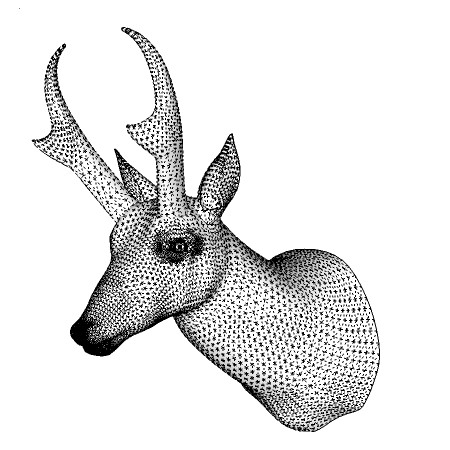
I've been working on my organic modeling skills and have hit a roadblock of sorts. Have tried to project a realistic texture to the model from an imported image of the animal. Have used native paint tool and Fredo's Thru Paint. I'm having no luck at a positive result. Was hoping some of the organic modeling wizards might be able to steer me in the right direction. Attached a pic of the model to give an idea of the mesh. thanks, chuck.
-
RE: Twisted Dovetail
if memory strikes right , the late Tage Frid shows how to layout , cut and fit this joint in his book " Tage Frid Teaches Woodworking" . Hope to give it a try just for grins one of these days.
-
RE: How To Cut Cylinder at Angle
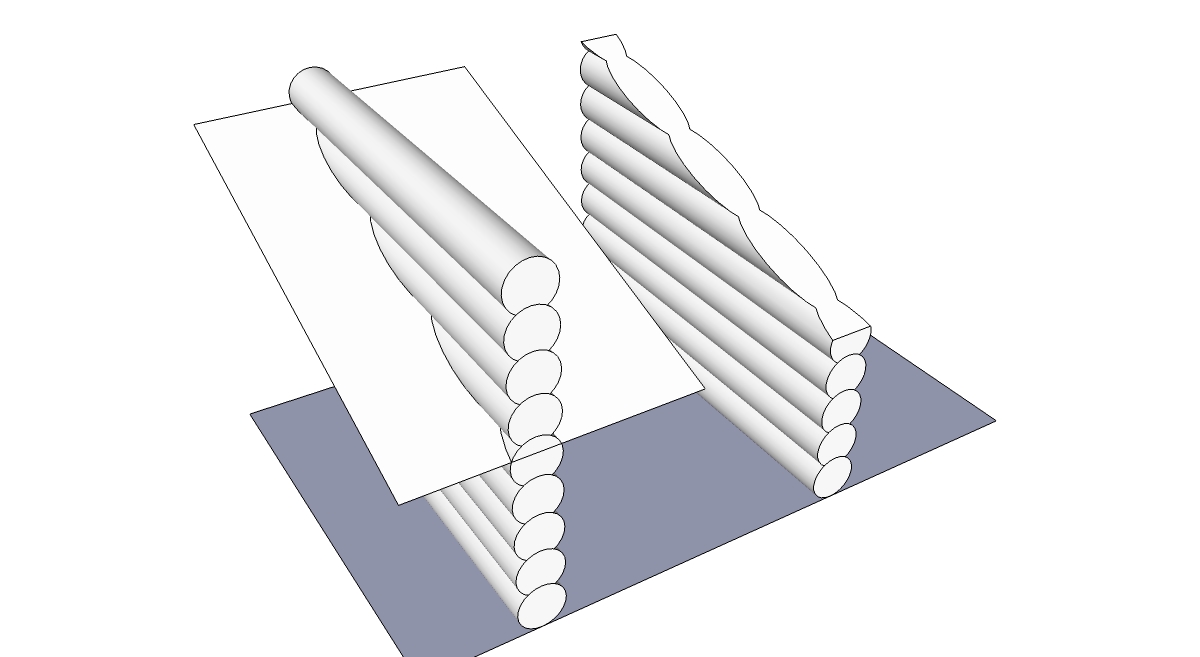
Phil, same cut with intersected plane through horizontal logs ( gable end ). chuck.
-
RE: How To Cut Cylinder at Angle
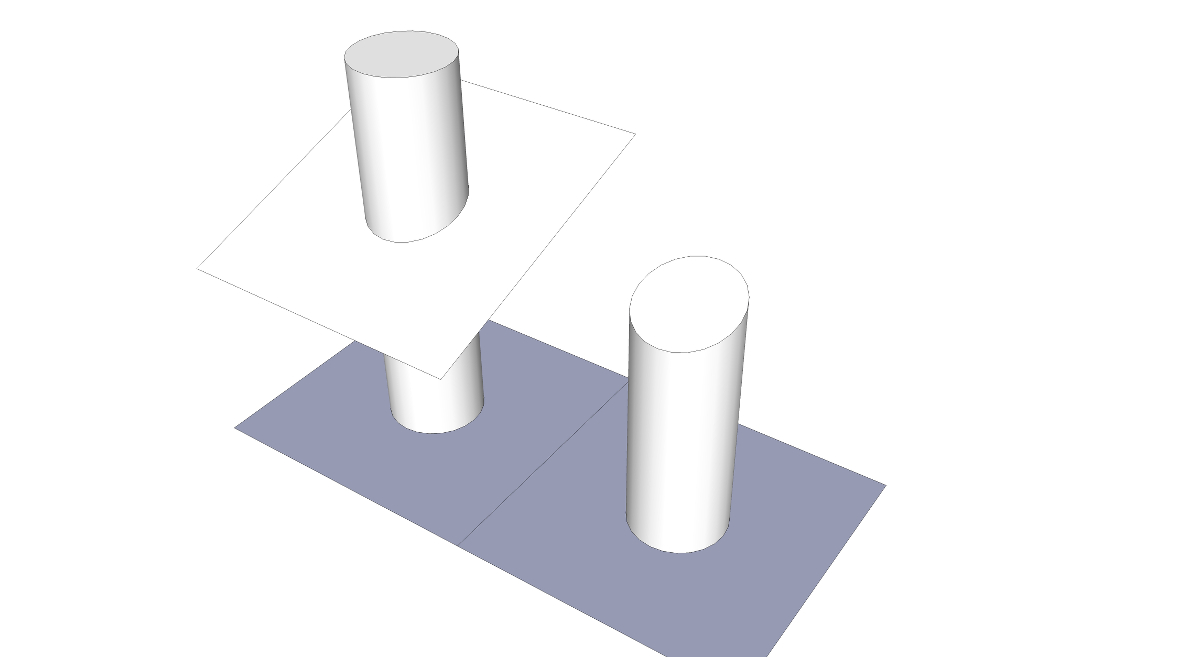
Phil, draw an angled plane through the structure where you want to trim the logs. intersect the plane and structure. erase what you don't want. takes longer to describe than to do. chuck.
-
RE: Rotating texture in a component
jerry, if you do a lot of wood textures on curved surfaces you might want to download the Fredo Tools plugin. in the package is ThruPaint it makes orienting wood grain on curves a lot easier than with the native tool. chuck.
-
RE: Plugins-Donations-$-?
Gentlemen, Thanks for the input, was kind of hoping there was a rule of thumb kind of like tipping after a good meal.. Now I just have to figure out how to navigate a foreign pay-pal site… A shout out to Solo, just the kind of dry humor I'd expect from somebody from dallas… bye the way checked out your web site, some pretty impressive stuff. chuck.