sketchucation logo sketchucation
    • Login
    1. Home
    2. Tandem
    3. Posts
    Oops, your profile's looking a bit empty! To help us tailor your experience, please fill in key details like your SketchUp version, skill level, operating system, and more. Update and save your info on your profile page today!
    ⚠️ Important | Libfredo 15.6b introduces important bugfixes for Fredo's Extensions Update
    Offline
    • Profile
    • Following 0
    • Followers 0
    • Topics 10
    • Posts 99
    • Groups 1

    Posts

    Recent Best Controversial
    • RE: Who said SketchUp doesn't need to be 64 bit?

      Can someone please explain to me how is it that with all the improvements in 2014 SketchUp still struggles just navigating through a large model while a third party plugin like LightUp has no difficulty at all to do a high res fly through and running a screen capture software at the same time.

      64 bit or not , It seems to me that even the latest SU release is still not able to take a full advantage of currently available hardware.

      See the Templar Town Tour topic for a good example.

      edit: forgot to include the link.

      posted in SketchUp Discussions
      TandemT
      Tandem
    • RE: Templar Town tour

      Thank you Adam,

      I was not questioning LightUp requirements, I was mainly amazed how smooth your movement around the model was.

      I think there maybe something wrong with my system. I can't navigate the model this smoothly even without LightUp and with all plugins disabled. Every time I move all textures disappear until I stop.

      Here are my specs:

      3.2 GHz Intel Core i5
      32 GB 1600 MHz DDR3
      GeForce GT 755M 1024 MB
      OS X 10.9.3

      posted in Gallery
      TandemT
      Tandem
    • RE: Xfrog Public Trees - KT Model Libraries

      Here is an updated link to the KT Library:
      http://www.kerkythea.net/cms/index.php/downloads/resources

      posted in Extensions & Applications Discussions
      TandemT
      Tandem
    • RE: SketchUp 2015 Wishlist

      Better Color, Material, Components Management on Mac.
      Better Toolbar Control
      Better UI on Mac in general especially window management.
      Better Documentation or Detailed PDF Manual

      I find the SketchUp / LayOut documentation available in the Knowledge Center lacking both in content and usability and quite unacceptable for a $590 software package.

      posted in SketchUp Feature Requests
      TandemT
      Tandem
    • RE: Free Architectural Design Aid for SketchUp

      I see, thank you.

      posted in Newbie Forum
      TandemT
      Tandem
    • RE: Free Architectural Design Aid for SketchUp

      @trebld said:

      .....
      TreblD is an architectural design aid for SketchUp. Its been put together to help new SketchUp users design their own homes.

      We are currently offering the full version of TreblD, for FREE ...Save $40 😄 ......
      Its actually fun for experienced users to play around with, so feel free to download it at http://www.trebld.com

      .......

      Mal

      From looking at your website it is not clear which Operating System does your plugin support. Also, could you please provide more details about the US$49.00 Copyright Consent Fee Per Dwelling?

      I did look at the explanation on the download page and would like to know what it all means in terms of being able or not to use LayOut to prepare the construction docs, the ability to work with the TrebleD generated model within default SU environment etc.

      posted in Newbie Forum
      TandemT
      Tandem
    • RE: Templar Town tour

      @adamb said:

      Captured on a Macbook using decent screencast software (ScreenFlow) gives a much better sense of the smoothness.

      😲 Thank you Adam, tThis is amazing. Could you please post the specs of the MacBook this walkthrough was taken on.

      posted in Gallery
      TandemT
      Tandem
    • RE: [Plugin] SU2POV 3.5

      Does anyone got this plugin to work with SU 2014?

      I just installed this using SketchUcation Tools 2.6.0, installation was successful, but after restarting SU I get this error message:

      Error; /users/Jane_Doe/library/application support/sketchup 2014/sketchup/plugins/su2pov35.rbs;859; invalid multibyte char (UTF-8)
      /users/Jane_Doe/library/application support/sketchup 2014/sketchup/plugins/su2pov35.rbs;859; syntax error, unexpected '=', expecting ')'
      	str = str.gsub(/([ -#;'"$£=()|{}&+,;@-])/, '')
      	                           ^
      /users/Jane_Doe/library/application support/sketchup 2014/sketchup/plugins/su2pov35.rbs;859; syntax error, unexpected ','
      	str = str.gsub(/([ -#;'"$£=()|{}&+,;@-])/, '')
      	                                   ^
      /users/Jane_Doe/library/application support/sketchup 2014/sketchup/plugins/su2pov35.rbs;859; `@-' is not allowed as an instance variable name
      /Users/Jane_Doe/Library/Application Support/SketchUp 2014/SketchUp/Plugins/su2pov35Toolbar.rb;2;in `eval'
      /Users/Jane_Doe/Library/Application Support/SketchUp 2014/SketchUp/Plugins/su2pov35Toolbar.rb;2;in `require'
      /Users/Jane_Doe/Library/Application Support/SketchUp 2014/SketchUp/Plugins/su2pov35Toolbar.rb;2;in `<top (required)>'
      Error Loading File su2pov35Toolbar.rb
      Error; #<NameError; undefined local variable or method `ocr_env' for main;Object>
      /Users/Jane_Doe/Library/Application Support/SketchUp 2014/SketchUp/Plugins/su2pov35Toolbar.rb;4;in `<top (required)>'
      
      
      posted in Plugins
      TandemT
      Tandem
    • RE: [Plugin] Bitmap To Mesh

      @iichiversii said:

      Ok i got the Lib thing sorted but im still running into that issue where "mesh from heightmap" wont allow me to select depth, still confused, anyone else had this issue and solved it?

      I was stuck on the exact same problem and was able to make it work by changing my steps to:

      1. File > Import...
      2. Navigate to your image file, select it and click Import.
      3. Place and size the image in SU.
      4. Right-Click on the placed image and select Mesh from Heightmap.
      5. Pick depth by clicking somewhere on the blue axis above the image.
      6. The plugin will take some time to index the points and generate the mesh.
        May have something to do with file format. I don't know.

      Thanks thomtom for a great plugin. I am trying to use it to generate terrain from downloaded TIF heightmaps. Still trying to figure out what size image is doable.

      posted in Plugins
      TandemT
      Tandem
    • RE: [Plugin] FloorGenerator ( Updated 6-Apr-2017)

      @sdmitch said:

      ...Is there a way for me to add it to the plugin store or do you have to do that?

      There really should be a page or topic that explains the process of adding a plugin to the SketchUcation Plugin Store. I have searched the whole site, but could not find anything. Would be useful for developers and end users.

      posted in Plugins
      TandemT
      Tandem
    • RE: [Plugin] SketchUcation Tools 2.6

      Is there a page or post that explains the process of adding a plugin to the SketchUcation Plugin Store and Tools Plugin?

      posted in Plugins
      TandemT
      Tandem
    • RE: Request DIBAC Cad 2D+3D GOOGLE SKETCHUP Plugin

      Dibac at Extension Warehouse

      Dibac Store

      posted in Plugins
      TandemT
      Tandem
    • RE: [Plugin]SketchThis Kitchen Designer

      Thank you TIG.

      posted in Plugins
      TandemT
      Tandem
    • RE: Layout - Angular Dimensions True to Model

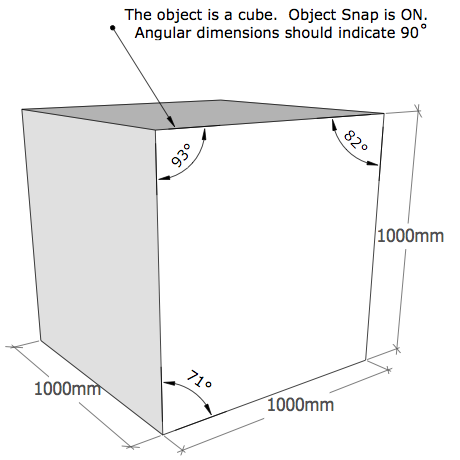
      I reported this issue to SketchUp and they confirmed that angular dimensions are only respecting Paper Space and not Model Space.

      posted in LayOut Discussions
      TandemT
      Tandem
    • RE: [Plugin]SketchThis Kitchen Designer

      The latest version 2.0 is available from the SketchUp Extensions Warehouse. The SketchUcation Plugin Store for some reason only has the 1.1.4 version available.

      posted in Plugins
      TandemT
      Tandem
    • RE: Group or Component

      Thank you all for your detailed explanation, much appreciated.

      @jql said:

      ...
      I Use groups for:

      • Walls, façades, roofs, floors (all the big parts of the building that don't repeat but I need so I can organize the project I'm working on and distribute to layers that can be made invisible/visible and also that I don't need to make a Xref from
        ....

      JQL

      JQL, in your experience, what is the advantage to Group walls, facades, roof, floors etc. versus making them also components?

      posted in Newbie Forum
      TandemT
      Tandem
    • RE: Who said SketchUp doesn't need to be 64 bit?

      @frederik said:

      I suppose you haven't read the entire thread... 😐
      As far as I've seen so far, no-one is claiming that 64bit will make SU run any faster...
      The primary reason users want to see a 64bit version is the use of i.e. 3rd party integrated render applications, where SU - being 32bit - is the culprit because of the RAM limitation...
      But it's also a request to make SU compatible with future computer systems as well as a hope that it will be able to handle high poly models better than what it can today...

      I have the impression that Bacus is either not aware of this or does not understand the problems as most of his comments point out the performance part of the discussion.

      posted in SketchUp Discussions
      TandemT
      Tandem
    • RE: Who said SketchUp doesn't need to be 64 bit?

      @jeff hammond said:

      i highly doubt anybody from trimble is going to talk about this anymore.. pretty much anything that can be said about it already has.. at this point, it's either going to be 64bit or not and i don't think the end users have any say in the matter.. up to now, the stance is pretty much "if you want sketchup to be 64bit then too bad"

      I agree, it does not look like SketchUp is going the 64bit route anytime soon.

      Architosh recently stated that: "As a realtime rendering system (OpenGL-driven) there is no performance benefit for making SketchUp a 64-bit application." and quoted Bacus saying: "While there are increasing numbers of CAD developers offering 64-bit versions of their applications, it really isn’t a given that 64-bit computing (access to more memory) improves their performance.”

      Bacus also claims that: "SketchUp won’t run out of system memory until there are tens of millions of polygons in a model, well past the point where any modern graphics card is capable of rendering the scene.”

      Link to article @ Architosh. The 32/64bit part is covered at the end on page 2.

      posted in SketchUp Discussions
      TandemT
      Tandem
    • Layout - Angular Dimensions True to Model

      Is it possible to have Layout base Angular dimensions on the actual angles of the model?

      When I add an Angular dimension to a page in Layout the angle is measured based on the lines on the Layout page not of the model. Linear dimensions seem to work correctly.

      Am I missing some settings or is this a limitation of the current version of Layout?

      Sketchup / Layout Version 14.0.4899 OS X

      Thank you in advance.
      Layout-Angular_Dims.png

      posted in LayOut Discussions layout
      TandemT
      Tandem
    • 1
    • 2
    • 3
    • 4
    • 5
    • 5 / 5