sketchucation logo sketchucation
    • Login
    1. Home
    2. tak2hata
    3. Posts
    Oops, your profile's looking a bit empty! To help us tailor your experience, please fill in key details like your SketchUp version, skill level, operating system, and more. Update and save your info on your profile page today!
    ⚠️ Important | Libfredo 15.6b introduces important bugfixes for Fredo's Extensions Update
    T
    Offline
    • Profile
    • Following 0
    • Followers 1
    • Topics 16
    • Posts 308
    • Groups 2

    Posts

    Recent Best Controversial
    • RE: [PLUGIN]MITSUBA Render Exporter v1.5.0(20141109)

      Hi,All.
      I update this to v1.2.4. in 2014-03-21.
      I finally understood this problem of running mtsimport.
      I add code setting current directory in ruby.
      So mtsimport will make "textures" in setter directory.
      Thanks John.

      @mike amos said:

      Thanks John, I feel like a right muppet not including specs, not as if I do not know, please put it down to a muppet day. I have tried the 64 bit program from that site/location.

      Specs as in the attached image.

      NVIDIA graphics card 1gb vram. This is updated as of about 1 week ago for drivers.

      Hi,Mike.
      There is "vcredist_2013_x64.exe" in folder unzipped mitsuba render package.
      It is microsoft visual studio 2014 x64 redisributable package"
      Please install it.
      Mitsuba will work.

      Thanks!

      posted in Plugins
      T
      tak2hata
    • RE: [PLUGIN]MITSUBA Render Exporter v1.5.0(20141109)

      @driven said:

      downloaded v1.2.1 and notice you left the log code in...

      		system(commandline, ;out => ['/tmp/log.txt', 'a'], ;err => ['/tmp/log.txt', 'a'])
      

      not sure if it breaks PC's
      john

      Sorry.

      Now I deleted that log option.and updated.

      Thanks john!

      posted in Plugins
      T
      tak2hata
    • RE: [PLUGIN]MITSUBA Render Exporter v1.5.0(20141109)

      @sadyo said:

      Mitsuba seem work fine on my Sketchup 2014-Windowc 8.1 64bit
      But,
      How to implementing the clipmap/2D object in Mitsuba ❓ ❓

      http://s1.postimg.org/jtfu9opfj/image.jpg

      it won't appear in Renderer

      Hi sadyo.
      This problem is still exists.
      if it is clip mapped material ,please use mask option in "OTHER" tab of material editor.

      But the Image object is not material.
      So it can not edit by material editor.
      Please explode it to face and material.

      The image object is no supported in this plugin ,yet
      It will support in future version.
      But clipping of Image object will not be supported.

      And other notice,mitsuba render can not read TIFF and PSD.

      Thanks!

      posted in Plugins
      T
      tak2hata
    • RE: [PLUGIN]MITSUBA Render Exporter v1.5.0(20141109)

      @driven said:

      hi
      got it working...
      will need tidying...
      line 264

      			commandline = %Q{cd /Applications && Mitsuba.app/Contents/MacOS/mtsimport #{objfile.gsub(/\\/,'/')} #{xmlfile.gsub(/\\/,'/')}}
      > 
      

      OSX 10.9.2 must be stricter about the context...

      john

      Hi,john.
      Thanks!!!

      I change that line.and I update this to v1.2.1.

      I am very Happy.

      Thank you very much!

      posted in Plugins
      T
      tak2hata
    • RE: [PLUGIN]MITSUBA Render Exporter v1.5.0(20141109)

      @driven said:

      I just had a thought and did some tests...

      commandline tool need to modify .bashrc to point to python...

      I don't use a .bashrc file, i use .bashprofile, so I created one under User/me/.bashrc and it's not written to...

      where is your .bashrc located, and exactly what does it contain??

      john

      I search in my mac.
      I found "bashrc" in "/private/etc"
      it contains this.

      # System-wide .bashrc file for interactive bash(1) shells.
      if [ -z "$PS1" ]; then
         return
      fi
      
      PS1='¥h;¥W ¥u¥$ '
      # Make bash check its window size after a process completes
      shopt -s checkwinsize
      # Tell the terminal about the working directory at each prompt.
      if [ "$TERM_PROGRAM" == "Apple_Terminal" ] && [ -z "$INSIDE_EMACS" ]; then
          update_terminal_cwd() {
              # Identify the directory using a "file;" scheme URL,
              # including the host name to disambiguate local vs.
              # remote connections. Percent-escape spaces.
      	local SEARCH=' '
      	local REPLACE='%20'
      	local PWD_URL="file;//$HOSTNAME${PWD//$SEARCH/$REPLACE}"
      	printf '¥e]7;%s¥a' "$PWD_URL"
          }
          PROMPT_COMMAND="update_terminal_cwd; $PROMPT_COMMAND"
      fi


      posted in Plugins
      T
      tak2hata
    • RE: [PLUGIN]MITSUBA Render Exporter v1.5.0(20141109)

      @driven said:

      that returns

      dyld; Symbol not found; __cg_jpeg_resync_to_restart
      >   Referenced from; /System/Library/Frameworks/ImageIO.framework/Versions/A/ImageIO
      >   Expected in; /usr/local/lib/libJPEG.dylib
      >  in /System/Library/Frameworks/ImageIO.framework/Versions/A/ImageIO
      > Trace/BPT trap; 5
      

      Avoiding this problem,

      I will write the code for serialized mesh exporter in ruby.

      Thanks.

      posted in Plugins
      T
      tak2hata
    • RE: [PLUGIN]MITSUBA Render Exporter v1.5.0(20141109)

      @driven said:

      and if you use this version, you get the same error as the log file in Ruby Console...

      %x(/Applications/Mitsuba.app/Contents/MacOS/mtsimport /Applications/su_render/mitsuba_main.dae /Applications/su_render/mitsuba_main.xml 2>&1)
      

      2014-03-18 14:42:03 INFO main [converter.cpp:127] Creating directory "textures" .. Caught a critical exception: boost::filesystem::create_directory: Permission denied: "textures"

      I get this return.

      > %x(/Applications/Mitsuba.app/Contents/MacOS/mtsimport /Applications/su_render/mitsuba_main.dae /Applications/su_render/mitsuba_main.xml 2>&1)
      2014-03-18 23;58;34.268 mtsimport[472;507] ApplePersistenceIgnoreState; Existing state will not be touched. New state will be written to /var/folders/v2/nc5st2054wvghywgtfrszpf00000gn/T/org.mitsuba.Mitsuba.savedState
      2014-03-18 23;58;34 INFO  main [converter.cpp;137] Beginning conversion ..
      2014-03-18 23;58;34 INFO  main [collada.cpp;1596] Loading "mitsuba_main.dae" ..
      2014-03-18 23;58;34 INFO  main [collada.cpp;1642] Importing materials ..
      2014-03-18 23;58;34 INFO  main [collada.cpp;1669] Importing scene ..
      2014-03-18 23;58;34 WARN  main [collada.cpp;1288] instance_geometry does not contain a <bind_material> element!
      2014-03-18 23;58;34 WARN  main [collada.cpp;615] Referenced material could not be found, substituting a diffuse BRDF.
      2014-03-18 23;58;34 WARN  main [collada.cpp;1288] instance_geometry does not contain a <bind_material> element!
      2014-03-18 23;58;34 WARN  main [collada.cpp;615] Referenced material could not be found, substituting a diffuse BRDF.
      2014-03-18 23;58;34 WARN  main [collada.cpp;1288] instance_geometry does not contain a <bind_material> element!
      2014-03-18 23;58;34 WARN  main [collada.cpp;615] Referenced material could not be found, substituting a diffuse BRDF.
      2014-03-18 23;58;34 WARN  main [collada.cpp;1288] instance_geometry does not contain a <bind_material> element!
      2014-03-18 23;58;34 WARN  main [collada.cpp;615] Referenced material could not be found, substituting a diffuse BRDF.
      2014-03-18 23;58;34 WARN  main [collada.cpp;1288] instance_geometry does not contain a <bind_material> element!
      2014-03-18 23;58;34 WARN  main [collada.cpp;615] Referenced material could not be found, substituting a diffuse BRDF.
      2014-03-18 23;58;34 WARN  main [collada.cpp;1288] instance_geometry does not contain a <bind_material> element!
      2014-03-18 23;58;34 WARN  main [collada.cpp;615] Referenced material could not be found, substituting a diffuse BRDF.
      2014-03-18 23;58;34 WARN  main [collada.cpp;1288] instance_geometry does not contain a <bind_material> element!
      2014-03-18 23;58;34 WARN  main [collada.cpp;615] Referenced material could not be found, substituting a diffuse BRDF.
      2014-03-18 23;58;34 WARN  main [collada.cpp;1288] instance_geometry does not contain a <bind_material> element!
      2014-03-18 23;58;34 WARN  main [collada.cpp;615] Referenced material could not be found, substituting a diffuse BRDF.
      2014-03-18 23;58;34 INFO  main [collada.cpp;1680] Done, took 0.0s
      2014-03-18 23;58;34 INFO  main [mtsimport.cpp;156] Encountered 16 warnings -- please check the messages above for details.
      Finished conversion (took 42 ms)
      

      Is this problem security permission?

      posted in Plugins
      T
      tak2hata
    • RE: [PLUGIN]MITSUBA Render Exporter v1.5.0(20141109)

      @driven said:

      I can trap the create_directory error by appending at line 269 in mitsuba_main.rb
      the serialisation never occurs from the plugin...

      system(commandline, ;out => ['/tmp/log.txt', 'a'], ;err => ['/tmp/log.txt', 'a'])
      

      In my mac that occurs.
      Here is log.txt.

      2014-03-18 23;21;32.391 mtsimport[308;507] ApplePersistenceIgnoreState; Existing state will not be touched. New state will be written to /var/folders/v2/nc5st2054wvghywgtfrszpf00000gn/T/org.mitsuba.Mitsuba.savedState
      2014-03-18 23;21;32 INFO  main [converter.cpp;137] Beginning conversion ..
      2014-03-18 23;21;32 INFO  main [collada.cpp;1596] Loading "mitsuba_main.dae" ..
      2014-03-18 23;21;32 INFO  main [collada.cpp;1642] Importing materials ..
      2014-03-18 23;21;32 INFO  main [collada.cpp;1669] Importing scene ..
      2014-03-18 23;21;32 WARN  main [collada.cpp;1288] instance_geometry does not contain a <bind_material> element!
      2014-03-18 23;21;32 WARN  main [collada.cpp;615] Referenced material could not be found, substituting a diffuse BRDF.
      2014-03-18 23;21;32 WARN  main [collada.cpp;1288] instance_geometry does not contain a <bind_material> element!
      2014-03-18 23;21;32 WARN  main [collada.cpp;615] Referenced material could not be found, substituting a diffuse BRDF.
      2014-03-18 23;21;32 WARN  main [collada.cpp;1288] instance_geometry does not contain a <bind_material> element!
      2014-03-18 23;21;32 WARN  main [collada.cpp;615] Referenced material could not be found, substituting a diffuse BRDF.
      2014-03-18 23;21;32 WARN  main [collada.cpp;1288] instance_geometry does not contain a <bind_material> element!
      2014-03-18 23;21;32 WARN  main [collada.cpp;615] Referenced material could not be found, substituting a diffuse BRDF.
      2014-03-18 23;21;32 WARN  main [collada.cpp;1288] instance_geometry does not contain a <bind_material> element!
      2014-03-18 23;21;32 WARN  main [collada.cpp;615] Referenced material could not be found, substituting a diffuse BRDF.
      2014-03-18 23;21;32 WARN  main [collada.cpp;1288] instance_geometry does not contain a <bind_material> element!
      2014-03-18 23;21;32 WARN  main [collada.cpp;615] Referenced material could not be found, substituting a diffuse BRDF.
      2014-03-18 23;21;32 WARN  main [collada.cpp;1288] instance_geometry does not contain a <bind_material> element!
      2014-03-18 23;21;32 WARN  main [collada.cpp;615] Referenced material could not be found, substituting a diffuse BRDF.
      2014-03-18 23;21;32 INFO  main [collada.cpp;1680] Done, took 0.0s
      2014-03-18 23;21;32 INFO  main [mtsimport.cpp;156] Encountered 14 warnings -- please check the messages above for details.
      Finished conversion (took 60 ms)


      In Sketchup Ruby Console
      system(%Q{'/Applications/Mitsuba.app/Contents/MacOS/mtsimport' '/Applications/su_render/mitsuba_main.dae' '/Applications/su_render/mitsuba_main.xml'})
      this return False?

      posted in Plugins
      T
      tak2hata
    • RE: [PLUGIN]MITSUBA Render Exporter v1.5.0(20141109)

      Hi
      Here is the Flow of exporting to mitsuba in my plugin.

      1.Create collada mesh without materials and transformation.(for instancing)
      2.Convert the collada mesh to serialized mesh by mtsimport tool.
      3.Export scene information iclude materials and instancing and transformation for serialized mesh.

      Please open "mitsuba_scene.xml" in mitsuba render ,if there is correct serialized mesh "mitsuba_main.serialized" created from "mitsuba_main.dae".

      That will be shown all correctly.

      Mtsimport work fine?
      Collada file created fine?
      Seriarize file is not zero byte?

      posted in Plugins
      T
      tak2hata
    • RE: [PLUGIN]MITSUBA Render Exporter v1.5.0(20141109)

      @driven said:

      Hi,

      think I found the problem, but not the solution...

      2014-03-18 11:44:26 INFO main [converter.cpp:127] Creating directory "textures" .. Caught a critical exception: boost::filesystem::create_directory: Permission denied: "textures"

      john

      Hi,john.
      Ummm...

      I guess the problem is delay of writing file.

      Please search "mitsuba_main.dae" in "/applications/su_render" folder.
      Tell me that file size.
      And Start Mitsuba and import "mitsuba_main.dae" file.

      Is there anything displayed on mitsuba window.

      Now "mitsuba_main.serialized" is created in that folder.and it is not zero byte.

      Seriarized file is binary mesh file of mitsuba render.

      Please send me your "mtsuba_main.dae" If "mitsuba_main.serialized" is zero byte.

      I will analyze it.

      Thanks.

      posted in Plugins
      T
      tak2hata
    • RE: [PLUGIN]MITSUBA Render Exporter v1.5.0(20141109)

      Hi,Unclex.
      Thank for your enjoying!

      Hi,Driven.
      I tested this on macOS 10.9.1 and sketchup2014 and mitsuba render 0.5.0.

      Select Mitsuba.app as Render engine like this video.

      And,I execute "commanline-access" from mitsuba menu once before test on mac.
      This maybe connect anything working well or,not.

      I hope this help you.

      Thanks.

      posted in Plugins
      T
      tak2hata
    • RE: [PLUGIN]MITSUBA Render Exporter v1.5.0(20141109)

      Hi,All.
      I update this to V1.2.0. in 2014.03.16.

      Fix Bumpmap export problem.
      Add Motion Blur Export.
      Improve Material Editor.

      Enjoy!

      posted in Plugins
      T
      tak2hata
    • RE: [Plugin]Fly Through v1.4.0-Feb 27,2014.

      @tspco said:

      I tried this today, it worked well, but I have a suggestion, any way to ass a maintain camera height, say from the native su camera eye height? I do terrains a lot and it would be real cool to not look at the underside when moving across it. Floating Camera has this function, but the rest of the plugin has issues.
      Thanks Ryan

      Hi,Ryan.
      I guess from your suggestion.
      Is it walk tool of sketchup?
      Or,Flying and collision with land and no gravity?
      Thanks!

      posted in Plugins
      T
      tak2hata
    • [PLUGIN]MITSUBA Render Exporter v1.5.0(20141109)

      Hi,All.
      I upload t2h_su2objmtl_mitsuba.
      This plugin is exporter from sketch up to Mitsuba render.
      General disclaimer
      I MAKES NO GUARANTEE OF VALIDITY about this script.
      Please use this script at your own risk.

      V1.2.0 (20140316):Fix Bumpmap export problem.Add Motion Blur Export.Improve Material Editor.
      V1.2.1 (20140320):BugFix on MacOS 10.9.2.Thanks John!
      V1.2.3(20140320):Imrpove on MacOS.Export folder move into user documents.
      V1.2.4(20140321):BugFix.Add setting current directory in ruby.
      V1.2.9(20140330):

      @unknownuser said:

      Improves and bug fixs.
      Add Toolbar icons.
      Add Material Picker.
      Default Material Color bug fix.
      Mask option for Image entity.

      V1.3.2(20140426):Improve material editor and add selector image format,and bug fix.
      v1.3.3:Auto find alpha of png file.
      v1.3.3:Add Selector between mitsuba "GUI" and "CUI"
      v1.3.4:Bug fix "*" texture problem.
      v1.3.5:Unit Length problem fixed.Local comma problem fixed.
      v1.3.6:Fix the texture offset problem.
      v1.3.7:Add Rendering Parameter in dialog.and set better default values.
      v1.4.0:Improve material editor.
      v1.4.1:2014.09.17update-Bugfix.Now Work well when default material is set as dielectric.
      v1.4.4:Bug fix:Additional texture scalings.
      v1.4.5:Bug fix about local numeric format.
      v1.5.0:Imrpove and add many parameters on dialog.
      DOWNLOAD:
      http://sketchucation.com/pluginstore?pln=t2h_su2objmtl_mitsuba
      Get the latest version from the PluginStore:
      http://sketchucation.com/pluginstore?pln=t2h_su2objmtl_mitsuba
      or AutoInstall from within SketchUp using the [url=http://sketchucation.com/resources/plugin-store-download:24p04tb2]SketchUcation Tools[/url:24p04tb2]

      Mitsuba render is physically based renderer written by Wenzel Jakob.
      It is developed as open source and free software.
      [url:24p04tb2]http://www.mitsuba-renderer.org[/url:24p04tb2]
      If mitsuba can not run on windows os,
      Please install "vcredit_2013_x64.exe".
      It is exists in Unzipped folder of mistune render.
      At first time,Please run mitsuba and accept the security permission.

      How To Use.

      V1.2.0 ADD NEW FUNCTION:Export Motion Blur

      V1.2.9 How to Mask for Image Entity.

      V1.3.2 Update information.

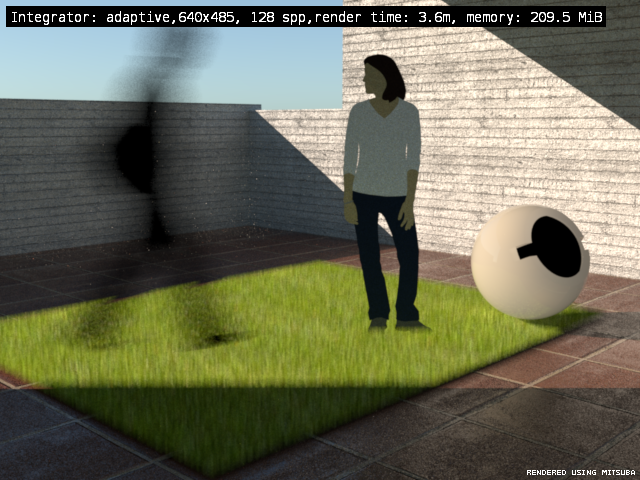
      Fake Grass by motion blur
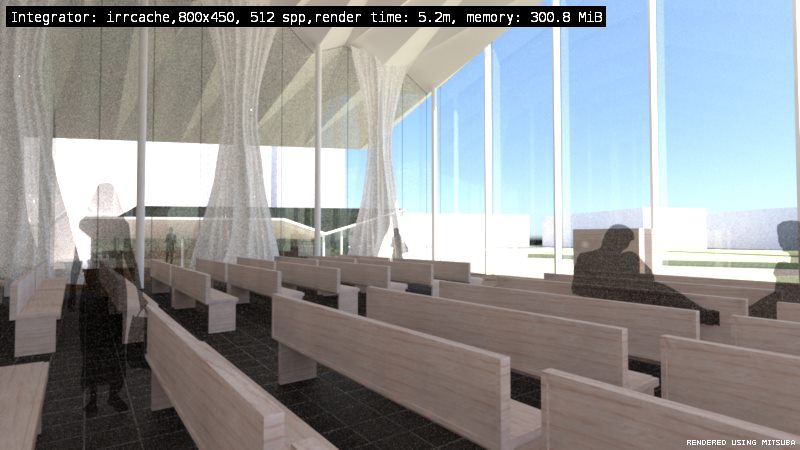
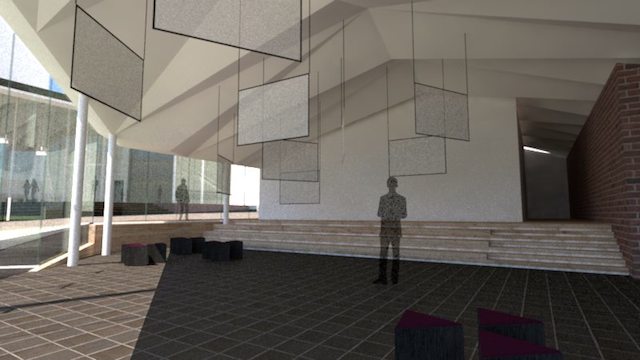
      SampleImage
      Image1 rendered by Mitsuba render.
      Image2 rendered by Mitsuba render.
      Rendering Image of ClassRoom

      posted in Plugins
      T
      tak2hata
    • RE: [Plugin]Fly Through v1.4.0-Feb 27,2014.

      Hi,All.
      I update this to v1.4.0.
      small improve.
      Thanks.

      posted in Plugins
      T
      tak2hata
    • RE: [Plugin]Throw_to.rb(Mar 31,2013.)

      Hi,mitcorb.
      I think that is bug.
      This plugin check the collision between vertices and faces(plane).
      So the collision between faces and faces is not valid.
      I all improve this problem in future version.
      Thanks!

      posted in Plugins
      T
      tak2hata
    • RE: [Plugin] Create Section Drawing V1.3(update Dec16.2012.)

      @luqmanuel1985 said:

      Hy TAK2HATA,

      i have a problem, i am using SU2013, the toolbar menu disappear,
      when i create section from plug in menu show up notice "Here is no Section for this tool".
      Please help me.

      Hi,luqmanue.

      @unknownuser said:

      the toolbar menu disappear

      Does it means this plugin menu disappear in "plugins" menu?
      or Menu bar disappear?
      This tool has no toolbar.

      Did you watch the tutorial video on top of this thread?
      http://sketchucation.com/forums/viewtopic.php?f=323%26amp;t=45039#p402561

      Please place the section plane in sketchup.
      Select it, and show pulldown menu from right click.
      You can find the command "Section Drawing".

      Or not select section plane ,and Select command from "Section Drawing" in "plugins" menu.
      Thanks.

      posted in Plugins
      T
      tak2hata
    • RE: [Plugin]SOLID QUANTIFY v2.5.1 (20131215)

      Hi,hebeijianke.
      I fix the problems in using Solid Material Changer.
      Sorry for keep you waiting long time.
      Thanks.

      posted in Plugins
      T
      tak2hata
    • RE: [Plugin] Create Section Drawing V1.3(update Dec16.2012.)

      @leiferik said:

      I have made an Section and export it to dxf but nothing turns up in AutoCad

      Help me fix this

      From Leif Eriksson

      Hi,Leif .
      I need to know your problem.

      Please send me your skp file and the section dxf.

      And tell me does this plugin work well with your other file.

      Please start sketchup and open the skp file.
      And show ruby console window from window menu.
      And run this plugin.
      Is there any error messages?
      Please send me the messages If the error message exist.

      I need the informations for knowing and fixing the problem .
      Thanks.

      posted in Plugins
      T
      tak2hata
    • RE: [Plugin]T2H_BuildingStructureTools2.2.4 in20141207

      @setyabudi73 said:

      Hallo tak2hata
      thank you for your attention in my problem loading pflist on BST 1.95, but that is not solve my problem. Still blank when i try load from BST. If you don't mind please help me . Like your plug in very much since BST 1.2. Thank you

      Hi,setyabudi73.
      I can not watch your "Still blank".
      You mean the Webdialog is blank? or Listbox is blank? or Table editor is blank.
      Please capture the screen of the webdialog of your sketchup.

      And please show ruby console from windows menu in sketchup.
      And start the BST.
      Please copy the message on the ruby console,if error message was shown in ruby console.
      And post the paste here.

      and I want to know your pflist file path if I could.
      and your OS is Windows or Mac.

      Please tell me.
      I should consider well about your problem.

      @cadmunkey said:

      Hi tak2hata, do you have a donate button anywhere? I get a lot of use out of this great tool and feel you deserve a reward for your time and effort. Many thanks.

      Hi,Cadmunkey.
      Thanks for your thanks.
      I do not have donate button.
      I get a mug of beer each month from youtube and adsense.
      It is my good reward.

      Thanks!

      posted in Plugins
      T
      tak2hata
    • 1
    • 2
    • 3
    • 4
    • 5
    • 15
    • 16
    • 3 / 16