I think it is a bug. I looked up the formula for perimeter of an ellipse and compared that with what SketchUp's entity info returns. For a 10x20 ellipse, the result should be 96.88. SketchUp variously returned 62.83 (20*pi), 111.3, and 113.27.
Oops, your profile's looking a bit empty! To help us tailor your experience, please fill in key details like your SketchUp version, skill level, operating system, and more. Update and save your info on your profile page today!
⚠️ Important | Libfredo 15.8b introduces important bugfixes for Fredo's Extensions Update
S
Offline
Posts
-
RE: Line length on circle scaled to ellipse is very wrong
-
RE: Line length on circle scaled to ellipse is very wrong
I did some probing via Ruby, and it seems there is a chain of bugs causing this. First, when you scale a circle to make it an ellipse, SketchUp should drop the metadata defining it as a circle and treat it as just a closed loop of segments (a Curve). It does not do so, it continues to carry the center point, radius, and normal vector as if the loop is still a circle, and the edges still say they are part of an ArcCurve. This evidently triggers a second bug in the method that calculates the circumference of the loop. In some cases it still calculates the mathematical 2pir as if the circle hasn't been scaled. In other cases it calculates a strange value that has no evident relationship to anything. In no case does it return the sum of the lengths of the edges!
-
RE: Extract some data like areas, facades orientations...
You could likely do what you need using the C/C++ SketchUp SDK, which can read and write the SketchUp file format. But there is no official support for C# or java as such. You would be on your own getting a bridge from those languages to the API working. The file format is proprietary and unpublished, so you could not legally roll your own API. SketchUp embeds a Ruby interpreter for extensions, and you could use that as well - though not as a standalone Ruby program. SketchUp would have to be running to execute the Ruby internally.
-
RE: Scale-up breaking validity check
Looking at the way that the faces get triangulated during the "fix" (which I too can reproduce), I suspect the following:
The circular holes in your model are located at off-axis locations and orientations (this is an observation, not a criticism). As a result, their vertex locations had to be calculated when they were placed on the faces. The calculations had typical finite-precision arithmetic effects, but they were initially within SketchUp's tolerance for accepting points as being on the planes of both the ArcCurve and the surrounding face. When you scale up, those trailing digits also scale up, and they come to be larger than SketchUp's tolerance, so it concludes that the circles are no longer planar. Hence all the error messages about start or end vertices of a CArcCurve not valid. The fixup moves the points so that they are once again coplanar to within tolerance. But this convinces SketchUp that edges have been moved in your model, so it draws new edges from each circle vertex to the corners of the plane or to the neighboring circle (or in some cases both) in an effort to make sure every face is planar.
I found that I could delete a lot but not all of the new edges without losing a face. My interpretation is that the ArcCurves are repaired based on the plane defined by their center and normal vector, not based on the surrounding plane. Just like the vertices, the center and normal contain finite-precision effects. As a result, some of the "fixed" vertices come to lie in the surrounding face during the fix, but some do not.
To me this all suggests a possible alternative strategy for your model, building on what Jim already wrote: if you use Components instead of loose geometry, when you scale up, the geometry itself is not modified, only the transformation that maps it into model space. As a result, there is no need for SketchUp to recalculate any geometry during the scaling nor to fix up the model if it was ok before scaling. I tried this by making a single Component of your entire model and got no errors or fixups after scaling up by 64x!
Equally important, since there is a lot of repeated structure and symmetry in your model, you should be using Components for many parts and placing/rotating instances to assemble the whole.
By the way, I agree that this behavior could arguably be regarded as a bug - though some could also argue it is just a result of pushing the limits of model accuracy.
Edit: I wrote a little Ruby script that explores the planarity of an ArcCurve via the Ruby Console. It verified my theory: scaling up causes some vertices of some circles to be off plane by more than SketchUp's tolerance.
-
RE: Keyboard shortcuts stopped working 2015
Kathryn, I fear that (to paraphrase Simon and Garfunkel) when they're gone, they're gone. Unless you had a backup. To protect yourself in the future, the Window->Preferences->Shortcuts panel has import and export buttons you can use to create a copy in a safe place.
-
RE: Making SketchUp use More RAM ?
We went through endless debates and misinformation about this back before SketchUp went to 64-bit, with many people arguing (erroneously) that this would affect performance. Now, in a post expansion reality check, it should be clear to everyone that increasing RAM just increases the size of the model you can work without encountering virtual memory swapping. It does nothing, per se, to improve the performance of SketchUp.
-
RE: Push/pull double click wrong direction
As I think has already been noted, software does not act randomly. The problem is that sometimes the logic is obscure and confusing. SketchUp has some "helpful" behaviors such as always orienting a new face at z=0 so that the "front" faces downward, and automatically creating a "hole" when pushpulling a face that is inset in another face, having a hidden sign to the direction of pushpull, etc. The interaction of these behaviors can be quite confusing, but it isn't random.
-
RE: Copy axes
Like Box, I can't see any difference between your two images. But I think I understand what you want?
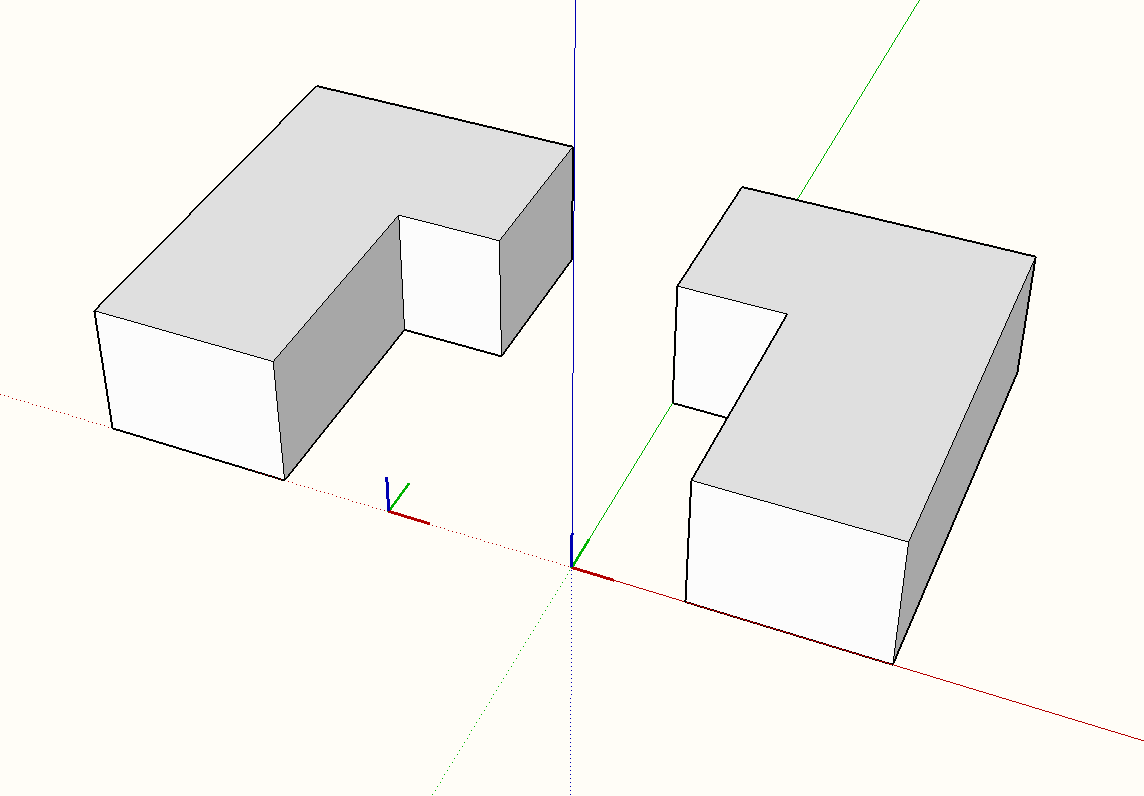
The problem is that the component axes are what define the locations of the geometry within the ComponentDefinition. When you place a ComponentInstance, you apply a Transformation to the ComponentDefinition, which takes those locations and places, scales, and orients them in the surrounding context. SketchUp shows you the transformed version of the axes because they are still what defines the locations inside the ComponentDefinition. To preserve the orientation of the axes with respect to the surrounding context, you have to also transform the locations of all the entities in the ComponentDefinition so that they are correct with respect to the new Axes orientation. That's what Change Axes does.
So, it shouldn't be terribly difficult to create a plugin that does what you want as an alternative version of "Flip Along" or perhaps a constrained version of Change Axes, but I don't know of any existing one that does so.
-
RE: STOP whatever you're doing button!
Seems like a useful idea, but it could be much harder to implement than it sounds. Depending on what was going on, the current activity might have the model in a broken or unstable condition that would have to be repaired or risk crashing SketchUp. Also, while a Ruby plugin is running the main event loop of SketchUp is blocked (that's why you get the spinning cursor and not responding messages), which means that user inputs can't be processed. Not saying it's impossible, just that it might be hard to get it to work right.
-
RE: Save As questions
What you are probably missing is that you bring a component into the model by locating it in the component window, selecting it, and then placing it in the model. If you just open a file in which you saved a component, it opens as a model.
-
RE: Altering axes in a model.
@mike amos said:
When I alter the axes in a group or component I will often find that when I late go back to that group or component the axes have reverted. This is something I have seen many times.
It really does not help for you to tell me you have never seen this, it really is not relevant as I am reporting what I have seen.
Why add this comment?
Unfortunately, Dave phrased his reply in a way that suggested skepticism to you. But I think his point is that what you report is not a known or common issue so it must be somehow tied to exactly what you do or, no offense intended, to misunderstanding of what you observe. That is not to say there can't be a bug, rather, that something that you do is provoking it. So, please provide a more detailed discussion of all the steps you follow and if possible an example of a model that suffers this effect. Then others can see whether they can reproduce it and provide a diagnosis.
-
RE: Handling instanced objects
Yes, the SketchUp entities you want are either Groups or Components. These are very similar, the main difference being whether each instance is intended to be independent (Group) or whether all instances share a common template so that editing any one of them causes the same change to propagate immediately to all the other instances (Component). From what you describe, I suspect you want Components. However, Groups are actually implemented as a special case of Components so the differences for your purpose are in details not fundamentals.
There is likely no exporter that does exactly what you want, particularly as your target is a game engine you wrote yourself. So you are indeed going to have to dig into the Ruby API and write your own. However, this should not be too difficult, as Components are implemented very much the way you want. The actual geometry (Edges and Faces) defining a Component are owned by a ComponentDefinition. Each ComponentInstance of that ComponentDefinition contains the Transformation that scales, places, and orients the instance in the model (detail: if the instance is nested inside another Component, the Transformation relates it to the enclosing Component, not to the model. In this case you have to build up the full Transformation stage by stage through the nesting).
So, give it a shot and see whether you grasp the workings of the Ruby API. If you run into trouble you should post over in the Developers' area, where you will find people with years of experience.
-
RE: [Plugin] Angular Dimension
I request that you post this as a feature request for discussion at the general level of SketchUp, as it has far broader implications than here. In effect you are asking that I "mask" (i.e. not show) or perhaps even heal small modeling errors. I don't agree at all. Such errors are the source of numerous "why doesn't pushpull (or whatever tool) work right?" posts. I see the "~" as a feature, not a flaw. It tells you when you have been sloppy. But, more importantly, if such a change is to be made, it should be consistent across all units displays in SketchUp, not just provided by this extension.
-
RE: [Plugin] Angular Dimension
You are asking me to make a decision for the user about whether the full precision of a value is important or not. I simply conform to the behavior of all the other units in SketchUp. I don't see why consistency should cause confusion.
For example, if you have length units set to 0.0m and an actual length is 0.02m would you expect a linear dimension to display it as 0.0m rather than ~0.0m?
By the way, my experience is different from yours. I just rotated a guide by 30 degrees and the angular dimension displays exactly 30.000 without any ~. Did you type 30 to get an exact value, or click after rotating in the view?
-
RE: [Plugin] Angular Dimension
You are mistaking the display format for a limit on calculation precision. The units settings in the model info affect how many decimal places SketchUp will display. But it is still perfectly possible to calculate or set a value to more places. For example, if the value is 30.0002 degrees, it will display as ~30.000, telling you that the actual value was rounded based on the display units. This is the same as occurs for all SketchUp units.
-
RE: Round corner info tab
Your profile indicates you are on a Mac. Is it perhaps a MacBook Pro Retina or a 5k iMac? If so, you are seeing a known problem with SketchUp's support for high-dpi screens: things on the viewport are drawn at full pixel resolution, which makes them tiny and very hard to see. Fredo draws his own on-viewport menus, so they suffer from this effect. In the Window->LibFredo6 Settings...->Default Parameters screen you can check the Retina Screen option, and this will help with the graphics parts, but the text will still be very small. The SketchUp developers have been working on adding better view text support, but as of the initial release of 2016 it doesn't quite provide enough to let Fredo make the text bigger.
On a Mac you can work around the problem somewhat clumsily by enabling System Preferences->Accessibility->Zoom to let you zoom a portion of the display. Not a good solution, but it helps...
-
RE: Pan and Orbit > New Modifier Keys
He means there is no "new" way because there never was a way. The requested features were never implemented.
-
RE: Inktspace--pdf---dwg---sketch up
At one point I was working on a plugin to import a vector PDF directly into SketchUp as geometry, not an image. There were some unsurmountable technical issues (e.g. PDF has line with width, fill pattern, corner joins, and end caps which all have no equivalent in SketchUp). Also the sample PDFs people had at the time were sloppy, with lots of carelessly placed line segments that didn't match up. I don't need this for my own use, and there was no expression of interest on the forum, so I moved on to other things. If you would like, send me your file and I'll see what the plugin makes of it.
Steve
-
RE: Importing new textures
On a Mac, local collections of materials are subfolders of
~/Library/Application Support/SketchUp 2015/SketchUp/Materials
where "~" designates your home folder. The Library folder is hidden by default, so you can use Finder's Go->Go To Folder to get there or can unhide it via View->Show View Options->Show Library Folder.