Most of the time you should be ok. I can think of two situations that could cause issues. First, if the computers have different versions of SketchUp you will need to be sure that the one from which you are copying plugins has all the latest versions. Plugins often need to be updated when there is a new version of SketchUp. Second, some plugins create folders at non-standard locations. If any of these are in your suite, you will have to copy the support folders too. And finally, if any of the plugins are licensed you need to be certain you are not violating the license terms.
Oops, your profile's looking a bit empty! To help us tailor your experience, please fill in key details like your SketchUp version, skill level, operating system, and more. Update and save your info on your profile page today!
⚠️ Important | Libfredo 15.8b introduces important bugfixes for Fredo's Extensions Update
S
Offline
Posts
-
RE: Is it OK to share plugins simply by copy&pasting the files?
-
RE: UI.inputbox
I don't think the UI.inputbox can do such a thing. But you could accomplish it in a WebDialog using javascript.
-
RE: Creating a Solid with a set of points
Since this is in the developers' forum, also have a look at the PolygonMesh class in the Ruby API.
-
RE: SU - better on Mac or PC
I agree with Box. It's a question of the particular hardware available, not the OS. A lightweight PC or Mac will struggle with a very large model. The only real difference is that with many models of Mac, especially laptops, you can't upgrade anything after purchase.
-
RE: 4k menus
That is most likely a result of the way the author of the plugin programmed the HTML for the web dialog, not a SketchUp issue per-se. It is possible to set things up in HTML so that a web page refuses to resize its contents.
-
RE: A Shortcut for Intersect?
I don't know if the same is true on Windows but on Mac, commands that are on context-sensitive flyout menus (e.g. Edit/Context Menu Flyout/Flip Along/Red Direction) don't appear in the preferences shortcuts list unless something is selected that would cause them to be in the context menu (whew! sentence too complicated). Even in SU 2016.
-
RE: A Shortcut for Intersect?
To expand on Cotty's post: A shortcut can be wired for just about any SketchUp command, but the preferences dialog shows only the ones that are available in the current state of the UI. Anything that is hooked to a top menu item is always available via a multi-step path such as "Edit/Intersect Faces/With Context". Some others, such as the flip-along axis commands appear only when a suitable target is selected in the GUI. They can still be hooked up as shortcuts, but just like the context menu items, the shortcut won't work until something is selected.
-
RE: Texture position bug
Um, could there be confusion about the fact that the texture position tool tiles the material over a plane, so that you can see how it will repeat/tile depending on where you position and scale it?
-
RE: Help for drawing pulleys
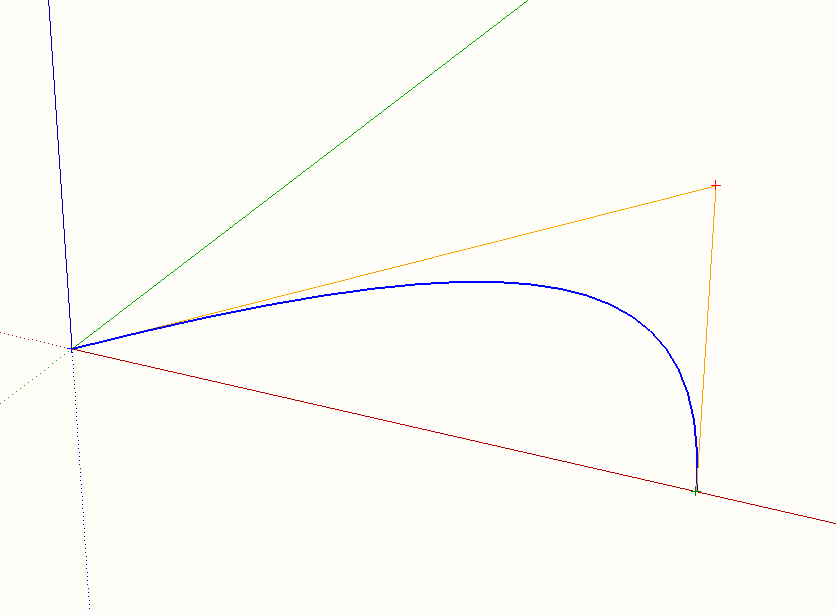
Have a look at Bezier curves. The whole point of the simple, "classical" three-point Bezier curve is that it starts and ends tangent to the two line segments joining the control points. That makes it easy to create curves that join smoothly to each other.
-
RE: Tube coping template wrappers
I don't know what "tube wrappers" means. Could you elaborate on what they are and what you plan to do with them in SketchUp? It is possible there is a technique or plugin that does what you want, but without understanding the question I can't point it out!
-
RE: Separate meshes from the same layer
I have no familiarity with Unity, so I will stick to the SketchUp side of this question.
Your phrasing suggests to me that, like many others who come to SketchUp from another app, you are not clear about what SketchUp's "layers" do. Unlike "layers" in many other apps, SketchUp's Layers are merely shared visibility controls that affect what shows in the SketchUp view. Multiple entities that refer to the same Layer are all either visible or hidden, but Layers do not provide any kind of structuring, grouping, or isolation beyond the fact that you can't use the selection tool to select something that is not visible.
So, "separate meshes from the same layer" is somewhat meaningless in SketchUp, as a Layer has nothing to do with whether the meshes are separate or not. To keep things separate in SketchUp you must use Groups or Components. Ungrouped ("primitive" or "loose") geometry will interact and merge with other primitive geometry regardless of what Layers they are associated with and regardless of whether those Layers are currently visible. For this reason, SketchUp meshes and TINs are usually kept in their own Groups.
-
RE: SketchUp 2016 is here....
I think what is confusing in david_h's request is the meaning of "next C up in the tree". I suppose "tree" means a structure with components nested inside components that are nested inside other components? Then the phrase might mean the instance of C nested in the component that contains the one currently open for edit? Alternatively it could mean sibling C's nested in the same component or all except those nested in the same component. So, the issue isn't with whether it is a good request but with understanding what it means!
-
RE: SketchUp 2016 is here....
@pbacot said:
Mac UI is still a mess.
Yes (although "mess" is subjective, it is certainly different from the Windows UI). Essentially nothing was done in this release to correct the growing divergence between the Mac and Windows GUIs. In fact, the introduction of "trays" added a new item of difference that will make it difficult to train new users.
-
RE: Speed-up Sketchup with RAMDisk ?
I have no real info - it is not documented - but would guess in some temp directory.
-
RE: Copied components automatically tilted to remain flat on sur
@hellnbak said:
I followed your instructions and it seems to be working fine now. Not sure why it stopped working before. Although I suspect your advice about designing the component on a face and not on a group or component may have something to do with it.
When you create a component, pay attention to the various option boxes in the dialog. If you created the component geometry inset on an adjacent face, the "glue to" behavior will get automatically set to "any" unless you set it to "none". Conversely, if you draw on a group or component, the glue to will be set to "none" unless you change it.
-
RE: Speed-up Sketchup with RAMDisk ?
I believe there may be a little i/o for caching the undo stack, but other than autosaves, not a lot.
-
RE: Speed-up Sketchup with RAMDisk ?
Most OS's cache file data in RAM after each read. Some even anticipate by reading ahead when you start loading a file. So, unless you are running short of RAM or reading enough data to overfill the cache, a second read of the same file comes from the cache not the hard disk. Until you reboot or wait long enough for something else to fill the cache, a second load of the same files will go much faster than the first. This effect may be causing confusing results for you, as the RAM cache will be the same speed as your RAM disk. That is, the RAM disk will cause faster load the first time, but not necessarily on subsequent launches.
-
RE: Export a model
You can also upload it to the 3D warehouse, and others can view it there.
-
RE: Help for drawing pulleys
@rcvowell said:
Thanks, I will play with it some tonight. So far the Follow Me tool and I haven't gotten along, but I was trying to do intake runners that shifted around a bit and ended up with non-perpendicular faces to the end points when finished.
This often happens because SketchUp approximates curves with a sequence of chord segments. The first (and last) segments of the path may not be tangent to the theoretical curve you intended. You can adjust the curve to fix up these segments or, better, add an extra at each end that goes in the direction of the theoretical tangent. Also, if the path is a non-planar curve in 3D, followme may twist the profile around the path as it extrudes. There are plugins (see eneroth) that handle this.
-
RE: SketchUp 2016 is here....
@juju said:
Can someone explain to me the need to lock down the plugins / extensions? If you're not sure about the plugins / extensions and where you downloaded them from, surely you have prior knowledge that something could go wrong/break?
By locking down the plugins / extensions, are there any guarantees that there won't be any of these that clash with another? If that is the case, great, if not then I don't quite understand the need for the lock-down.
The new signing facility has a lot more to do with protecting developers' intellectual property than with preventing careless developers from clashes, or with preventing malware. It will still be true that the only safe route is to download extensions and plugins only from known, reliable sites such as the Extension Warehouse, sketchUcation store, smustard, and vendors own sites. Time will tell what ways malicious people can find to tamper with the signatures and new encoding, so the safe practices remain the same.