See, for example,
Oops, your profile's looking a bit empty! To help us tailor your experience, please fill in key details like your SketchUp version, skill level, operating system, and more. Update and save your info on your profile page today!
⚠️ Important | Libfredo 15.8b introduces important bugfixes for Fredo's Extensions Update
S
Offline
Posts
-
RE: Problem export dwg
Are you exporting as a 3D model or as a 2D graphic?
SketchUp always exports all of a model when you select 3D model. To export only a part of a model, you can cut and paste the desired entities to a new model window and then export the new model.
For a 2D graphic export, SketchUp generates essentially a snapshot of the current view. So, anything not visible on the current view will be omitted. But also the graphic will capture the as-displayed view including effects such as zoom, foreshortening and perspective, not true coordinates of points.
-
RE: Sketchucation Plugin vs. Extension manager
It's a technical distinction that maybe could be handled better.
Initially, Ruby-based additions to SketchUp functionality were called "plugins". They usually consisted of a single code file or perhaps a code file and a folder of supporting images. SketchUp itself provided no means for managing them. The user had to do so on his own, either by moving files in and out of the plugins folder or renaming them to something SketchUp wouldn't recognize as a plugin.
Then the SketchUp team decided to provide an official mechanism for managing the plugins. This mechanism requires some specific code statements in the base Ruby file to register this particular plugin with SketchUp's management system. A plugin that contains these statements is called an "extension". SketchUp itself provides internal mechanisms to activate and deactivate extensions.
So, every extension is also a plugin, but not every plugin is an extension. The current sketchUcation managers follow this ordering, even though it causes extensions to appear in both managers.
-
RE: How do I create paralel lines trough two points?
The plugin I posted above was actually developed for that minichallenge (driven pushed me into it!), but never published.
-
RE: How do I create paralel lines trough two points?
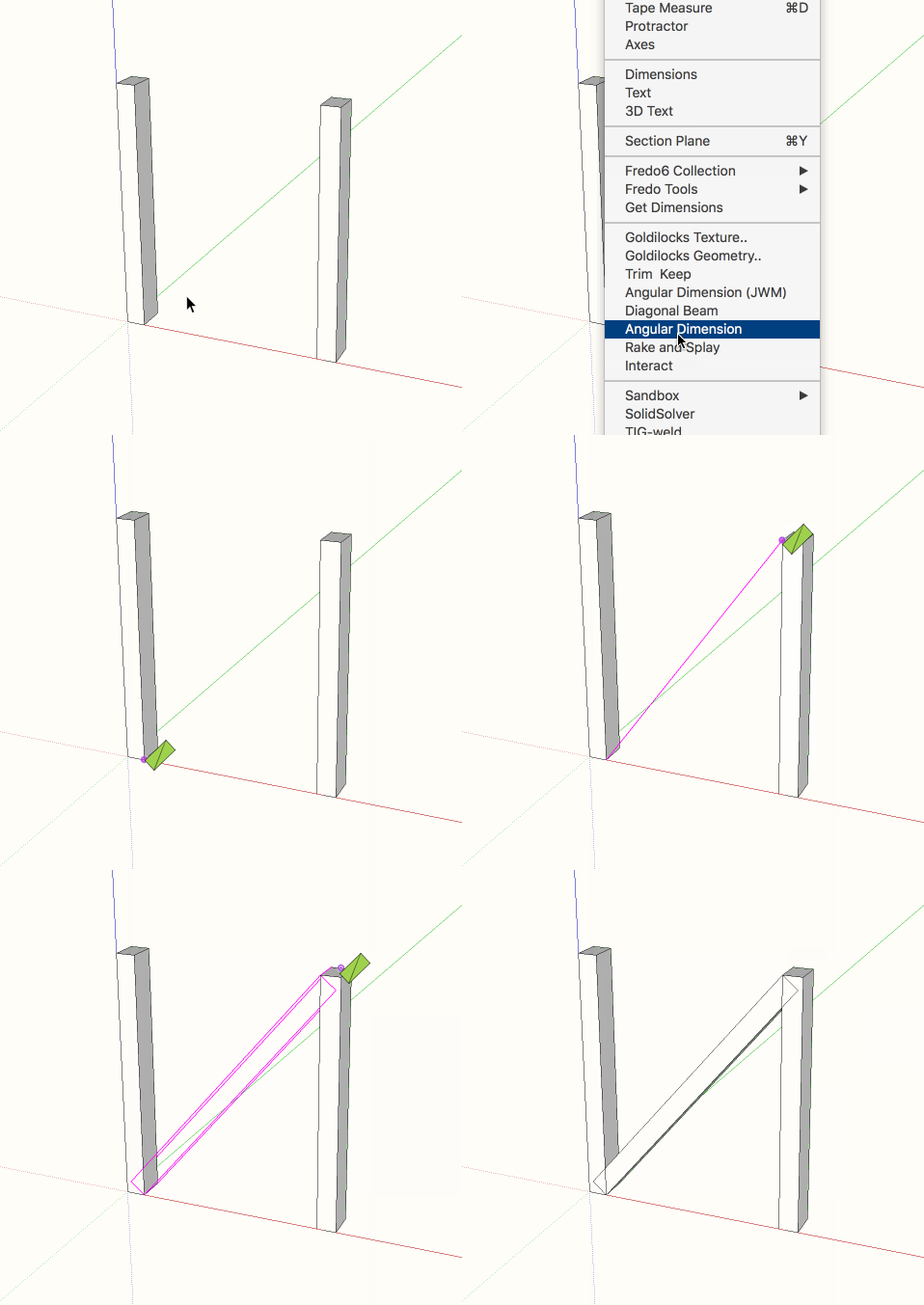
Here's a gif animation of the tool in use.
-
RE: How do I create paralel lines trough two points?
Here is an extension that I did a while ago but never published. It may solve your problem. It is designed for the situation in which you know the two diagonally opposite corners of a face of a rectangular beam, the beam width, and the beam depth. It solves the problem exactly without resorting to any of SketchUp's issues with polygons representing circles. This problem is in general not possible to solve directly via the SketchUp GUI.
To use it, click one corner, move the mouse to the diagonally opposite corner and click there. Then move to a third point in the same plane as the face of the beam and click there. Unless you enter a value the tool will assume you clicked at a distance from the second point equal to the width of the beam. Then click a fourth point to define the thickness of the beam. Again, unless you enter a value the tool will assume that this click shows both the thickness and whether it is in front or in back of the face in the view. You can enter both width and depth separated by either , or ; depending on your locale.
-
RE: Any Stress Calculation method/plugin for SU nowadays?
FEM = Finite Element Model
-
RE: Garden furniture
No kidding about the teak. Last time I checked, my supplier wanted $29/bf!!
-
RE: Object or No: Good Practices
Perhaps you really mean whether to use classes or not, as in Ruby everything is an object! This question is likely to get somewhat religious answers from OO fanatics!
You should use at least modules to isolate namespaces. In Ruby the differences between modules and classes are more subtle than in many other OO languages, but it really comes down to whether the things you are coding need to have individual memory (state) hence be instances of a class, or just shared configuration in which case you could use either.
-
RE: Module depth: Good Practices
The first level keeps your namespace clear of anybody elses.
The second level keeps this extension's namespace clear of your other extensions (it happens! I just had a collision between two of my extensions when I forgot about a name I had used already)
I think a third level would be needed only in a complex suite of extensions such as Fredo6 or TomTom develop - though of course any class you define inside the second level creates a third namespace. -
RE: Point Snapping Error in SU2016 on Windows 10
This is one of the known problems SketchUp has with very high dpi displays: the snap markers for inference (and some other things) are based on pixel size, not as-displayed size on the screen, so they are too small to see easily. Trimble is aware of these issues and made some progress in SU 2016, but they still have a ways to go.
-
RE: Error message : 'reference to deleted Entities'
The message means that you are trying to use a Ruby variable that refers to a SketchUp entity that has been deleted since the variable was assigned, in other words, you are hanging onto a Ruby variable beyond the lifetime of the underlying SketchUp entity. There are several reasons why this could have happened, such as your code explicitly deleting the relevant object or performing an operation that caused SketchUp to need to replace the original object with a new one. As already noted, it is impossible to diagnose what is really wrong based on the snippet you posted, especially since the expressions there aren't even correct (e.g. add_face needs arguments).
I assume based on your last post that you have taken this discussion offline to PMs. It would be helpful to others who might encounter similar issues if you can post the resolution here once you find it.
-
RE: Is there a plugin that tells me my component sizes?
I assume by size you mean length, width, and depth. There are various plugins that do this, for example CutList. Just be advised that many of them work from the component's bounding box, and will give misleading results if the component's axes aren't sensibly aligned with the geometry.
-
RE: Drawing at an angle to XYZ planes??
You can also use the protractor tool to create a construction line at any angle to an existing edge - including 90 degrees!
-
RE: [plugin] Circle Intersect
@pilou said:
PS Tig has made True Tangents who has True intersections inside!

Natural intersection with maximum of segments circles (without plugin)

It seems you are correct - I didn't guess based on the name. That plugin is pretty old and TIG hasn't gotten around to updating it to current coding conventions, though it still works. He operates on entities that you select using the selection tool, whereas mine works with what you click while the tool is active. Difference in workflow. Your call which way you prefer.
-
RE: [plugin] Circle Intersect
@chon said:
Hello,
Many thanks for that plugin !

Seems to have an issue with Fredo6's !AdditionalPluginsFolders...

I took a look and I believe I know how to address that issue. I'm waiting a bit to see whether others come up with bugs or suggestions, and then I'll release a revision that should fix it.
-
RE: [plugin] Circle Intersect
I may not have explained well... Contrary to the GUI, there is a quirk in the API that lets you select arcs or edges in contexts that are not currently open for edit (!). So, you could have Group1 open for edit, select an arc in Group 2, and a second arc from Group 3. Two bad things would result: first, the extension logic would become more complex because coordinates would have to be transformed before the intersections could be calculated, second, there would be three contexts involved leaving it unclear which one should receive the guide points. I took the simplistic view that one should not be seeking intersections between things from different contexts. If that is not workable, please let me know.
-
RE: [plugin] Circle Intersect
@rv1974 said:
Thanks for sharing! Could it work regardless of context?
The reason I added that restriction is that otherwise it is not clear what context should receive the guide points.
-
RE: [plugin] Circle Intersect
@chon said:
Hello,
Many thanks for that plugin !
Seems to have an issue with Fredo6's !AdditionalPluginsFolders...
What sort of issue? Do you mean that you use his extension to place plugins in a non-standard folder? I don't use that extension, so I'll have to research what it does.
-
[plugin] Circle Intersect
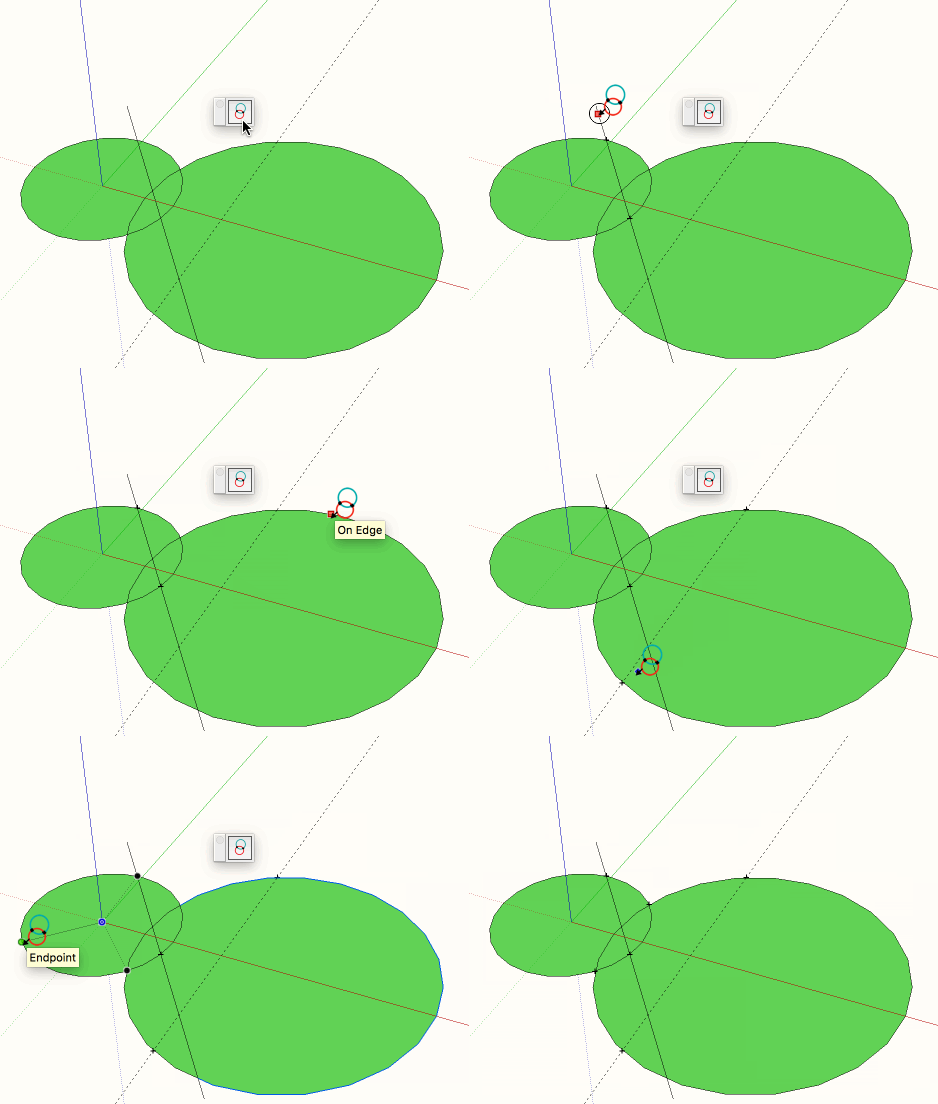
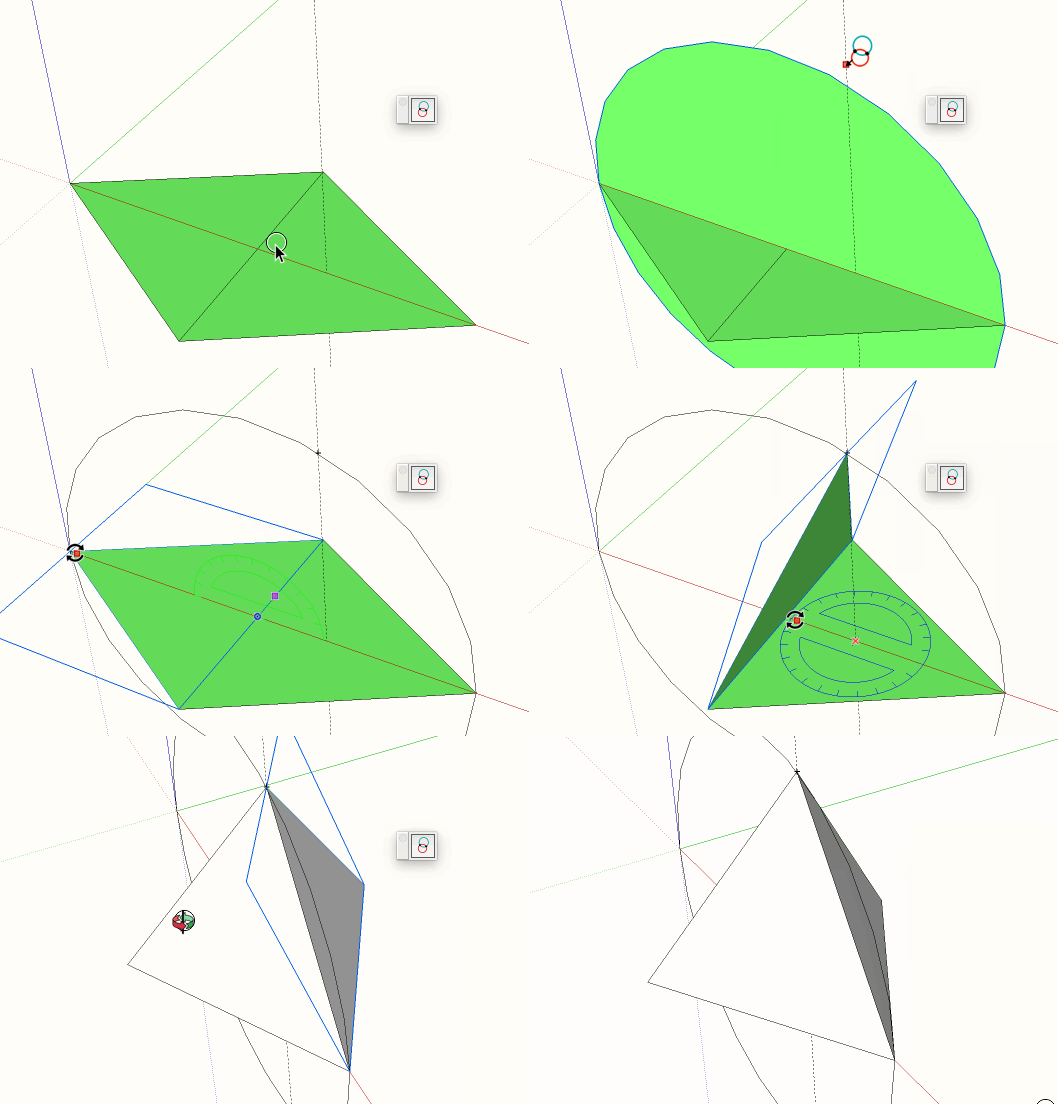
This extension calculates the mathematically correct intersections between a circle or arc and another circle, arc, edge, or construction line.
Available from the sketchUcation plugin store.
Here are a couple of animations of the tool in action: