sketchucation logo sketchucation
    • Login
    1. Home
    2. sdmitch
    3. Posts
    Oops, your profile's looking a bit empty! To help us tailor your experience, please fill in key details like your SketchUp version, skill level, operating system, and more. Update and save your info on your profile page today!
    ⚠️ Important | Libfredo 15.6b introduces important bugfixes for Fredo's Extensions Update
    Offline
    • Profile
    • Following 0
    • Followers 4
    • Topics 54
    • Posts 1,483
    • Groups 2

    Posts

    Recent Best Controversial
    • RE: Subtraction with Intersect Method

      @medeek said:

      I have to intersecting cubes in my model. I then run this ruby code:

      group1 = entities[0]
      > group2 = entities[1]
      > trans1 = group1.transformation
      > trans2 = group2.transformation
      > group1.intersect_with(false, trans2, group1, trans1, false, group2)
      

      Which then gives the following error:

      
      > Error; #<NoMethodError; undefined method `intersect_with' for #<Sketchup;;Group;0x0000000dd92350>>
      > <main>;in `<main>'
      > SketchUp;1;in `eval'
      

      .intersect_with needs the group.entities

      group1.entities.intersect_with(false, trans1, group1.entities, trans1, false, group2)
      
      posted in Developers' Forum
      sdmitchS
      sdmitch
    • RE: [Plugin] FloorGenerator ( Updated 6-Apr-2017)

      @yourpasswordis said:

      a LAP setting would be AMAZING.

      I did try to develop a clapboard option several years ago but never produced a satisfactory one. Perhaps it would be worth another look.

      posted in Plugins
      sdmitchS
      sdmitch
    • RE: Mass convert SU files to different version?

      @ericschimel said:

      Ok, it doesn't work on Mac but it does work on my PC.

      Is there any way to remove the "V8" appended to the end of the filename?

      Yes of course but, if the 'From' and 'To' folders are the same, you will have to accept the overwriting of each individual file.

      Change

      mod.save_copy("#{tdir}/#{m}_v#{versions[ver]}", ver);


      to

      mod.save_copy("#{tdir}/#{m}", ver);
      
      
      posted in SketchUp Discussions
      sdmitchS
      sdmitch
    • RE: Mass convert SU files to different version?

      @ericschimel said:

      I'm trying it and I can't get it to work for some reason (I'm on a Mac if that's helpful)

      When I fire it up it asks me for the version, and then a file dialog pops up. I forces me to browse for and select an individual SketchUp model, I can't multiselect or just pick a folder. Once I do pick a file it pops up another file dialog, assumably for me to tell it where to place the converted files. I select a location and run it and nothing happens...

      Perhaps I'm doing something wrong?

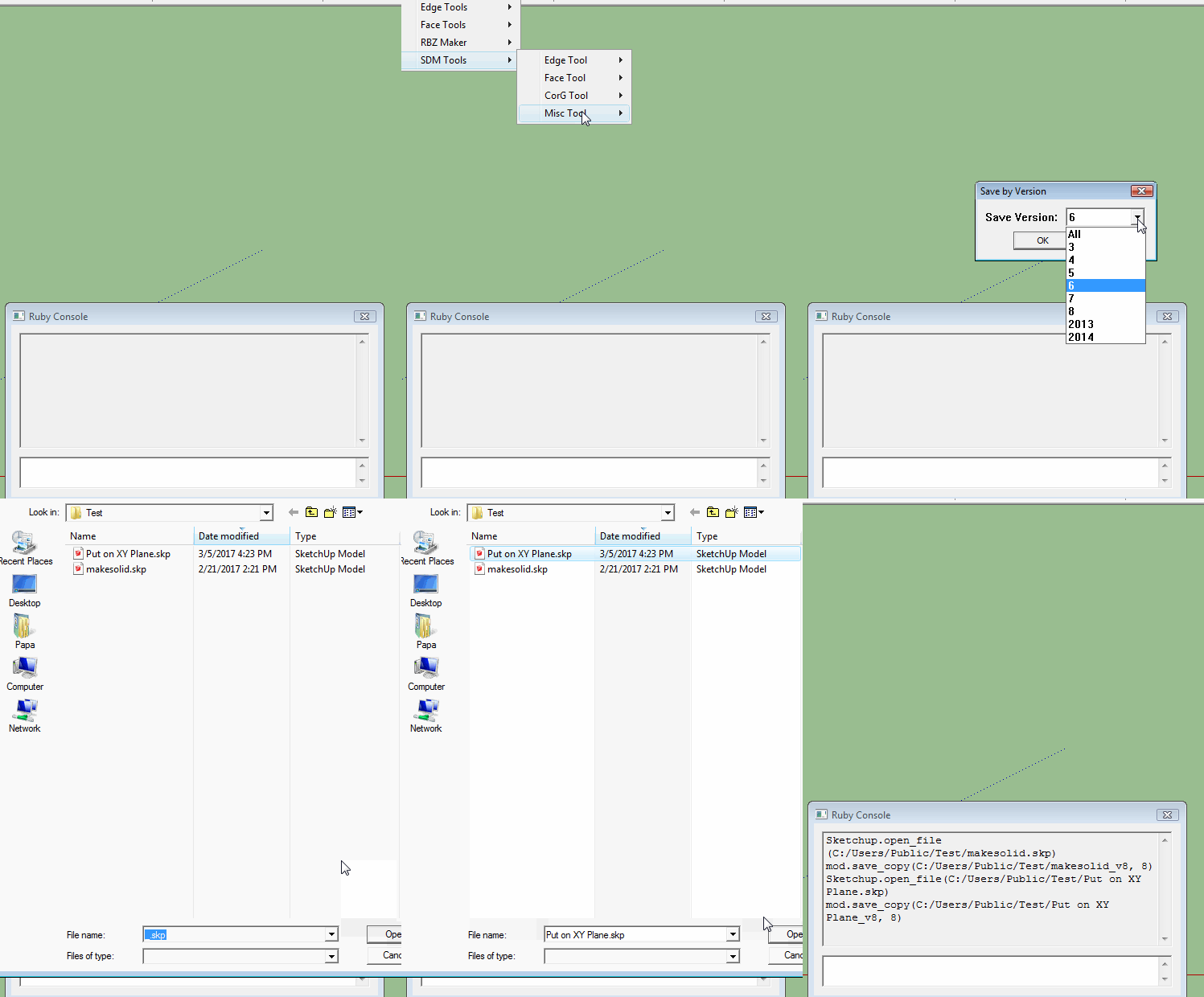
      Since this a 'Bulk' copy, it is assumed that every model in the 'From' folder is to be copied to the specified version so it is not possible to select individual models. You only need to select any one of the models in the folder and click 'Open'. Then select the 'To' folder and click 'Save'.


      Bulk Copy.gif

      posted in SketchUp Discussions
      sdmitchS
      sdmitch
    • RE: Deleting duplicate components

      @bjornburgh said:

      Pasting the Script in the Ruby console doesn't work. Is there another way?

      def remove_instances_duplicates
        defs=Sketchup.active_model.definitions
        to_delete=[]
        defs.each do |compo_def|
          next if compo_def.internal?
          instances=compo_def.instances
          instances2=instances
          instances2.each do |i2|
            keeping_instance=instances.shift
            instances.each do |instance|
              if instance != keeping_instance and instance.transformation.to_a == keeping_instance.transformation.to_a and instance.definition.insertion_point.transform(instance.transformation)==keeping_instance.definition.insertion_point.transform(keeping_instance.transformation)
                to_delete.push(instance)
                puts "Erasing duplicate instance of " + instance.definition.name
              end
            end
          end
        end
        to_delete.each { |inst| inst.erase! }
      end


      There was an extra "end" in the code. Removing that should fix the problem.

      After pasting into the Ruby Console, press Enter then type in "remove_instances_duplicates" to execute.

      posted in Developers' Forum
      sdmitchS
      sdmitch
    • RE: Mass convert SU files to different version?

      @ericschimel said:

      I've been looking around and I'm trying to find a way to mass convert SketchUp 2017 files down to SketchUp 8 files. I've found this great plugin by Jim Foltz:

      http://sketchucation.com/forums/viewtopic.php?f=323%26amp;t=33441

      Unfortunately, it does it one file at a time. Ideally what I'd like to do is point SketchUp 2017 at a directory full of hundreds of SketchUp models and have it open each one and do a "Save as SketchUp 8" and overwrite the file, close, and open the next one.

      I have attached a plugin that I wrote a year ago for someone that made a similar request.

      Usage: Plugins>SDM Tools>Misc Tool>Bulk Copy by Version

      • Select the Copy Version* Select the 'From Folder'* Select the 'To Folder'

      Bulk Copy by Version.rb

      posted in SketchUp Discussions
      sdmitchS
      sdmitch
    • RE: Is there a plugin...

      @pilou said:

      So Cool! πŸ˜„

      What must do with the code above ? Run on the Console, or...

      You can copy and paste it in the Ruby Console to check it out.

      Or you can copy and paste it to an .rb file and save it in the Plugins folder.

      posted in Plugins
      sdmitchS
      sdmitch
    • RE: Is there a plugin...

      @pilou said:

      @Sdmitch
      Does the plugin "plane" on the current x,y plane of each local "Z" object?

      Yes, it doesn't change the transformations point of origin.

      posted in Plugins
      sdmitchS
      sdmitch
    • RE: Is there a plugin...

      @cotty said:

      ...for the rotation of all selected groups/components so that their x-y-plane gets horizontal?

      e.g.:

      [attachment=1:34yh7xbl]<!-- ia1 -->rotateplugin.JPG<!-- ia1 -->[/attachment:34yh7xbl]

      This just requires resetting the axes in the transformation.

      unless file_loaded?((__FILE__))
      	UI.add_context_menu_handler do |menu|
      		sel = Sketchup.active_model.selection
      		if sel.first.is_a?(Sketchup;;ComponentInstance)||sel.first.is_a?(Sketchup;;Group)
      			menu.add_separator
      			menu.add_item('Put on XY Plane') {
      				Sketchup.active_model.start_operation "Put on XY Plane"
      				sel.each{|ci|
      					next unless (ci.is_a?(Sketchup;;ComponentInstance)||ci.is_a?(Sketchup;;Group))
      					t=ci.transformation.to_a
      					t[0]=1;t[1]=0;t[2]=0;#t[3]=nil
      					t[4]=0;t[5]=1;t[6]=0;#t[7]=nil
      					t[8]=0;t[9]=0;t[10]=1;#t[11]=nil
      					#t[12]=0;t[13]=0;t[14]=0;#t[15]=nil
      					ci.transformation=ci.transformation.set! t
      				}
      				Sketchup.active_model.commit_operation
      			}
      		end
      	end
      	file_loaded((__FILE__))
      end


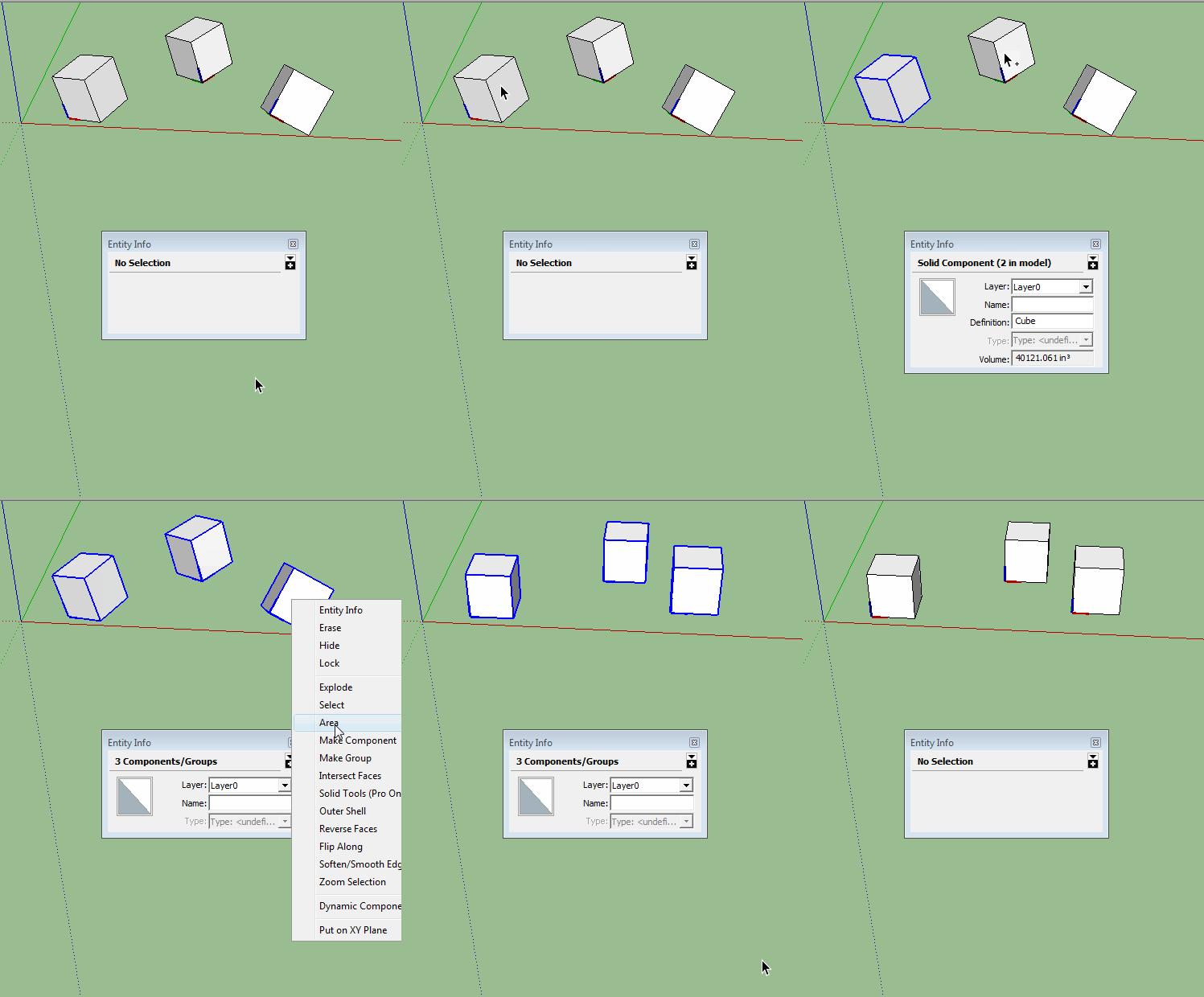
      Put on XY Plane.gif

      posted in Plugins
      sdmitchS
      sdmitch
    • RE: Draft Reply Question

      @ntxdave said:

      @sdmitch said:

      @ntxdave said:

      How do I retrieve and finish a draft reply to a topic?

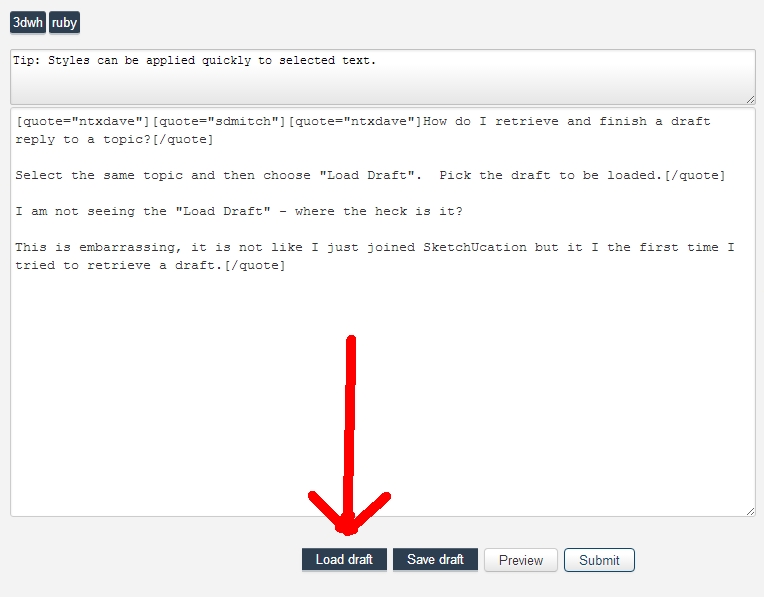
      Select the same topic and then choose "Load Draft". Pick the draft to be loaded.

      I am not seeing the "Load Draft" - where the heck is it?

      This is embarrassing, it is not like I just joined SketchUcation but it I the first time I tried to retrieve a draft.

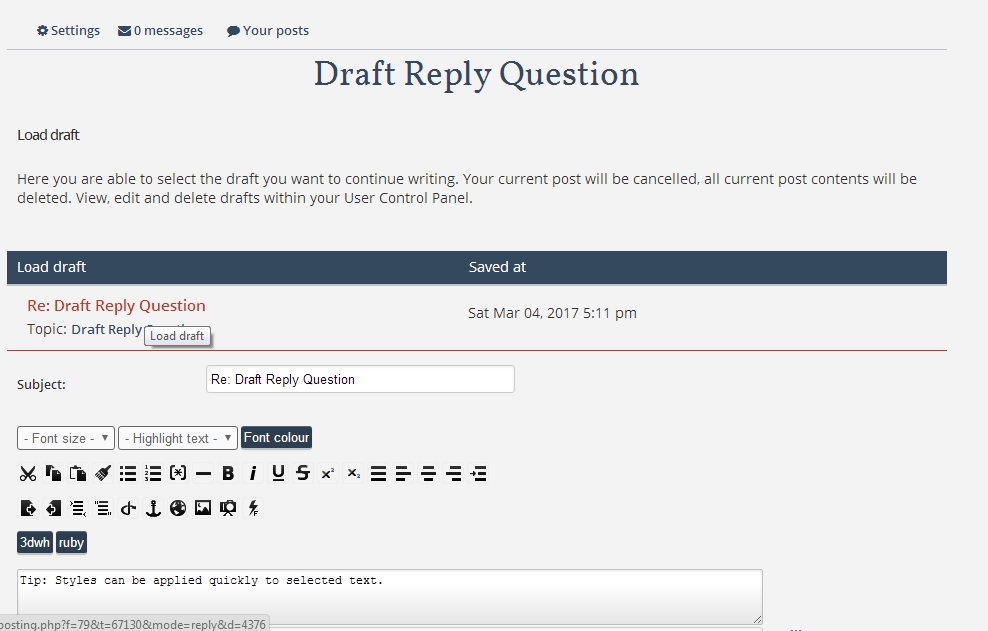
      If not here, there are no saved drafts.


      Load Draft.jpg


      Load Draft2.jpg

      posted in Newbie Forum
      sdmitchS
      sdmitch
    • RE: Draft Reply Question

      @ntxdave said:

      How do I retrieve and finish a draft reply to a topic?

      Select the same topic and then choose "Load Draft". Pick the draft to be loaded.

      posted in Newbie Forum
      sdmitchS
      sdmitch
    • RE: Searching for plugin &quot; surface area of selected components&quot;

      @mics_54 said:

      I was wondering if there was a plugin to help calculate total surface areas of all selected entities or components.

      unless file_loaded?((__FILE__))
      	UI.add_context_menu_handler do |menu|
      		sel = Sketchup.active_model.selection
      		unless sel.empty?
      			menu.add_separator
      			menu.add_item('Surface Area') {
      				sa = 0.0
      				sel.each{|e|
      				 if e.is_a?(Sketchup;;Face)
      					sa += e.area
      				 elsif e.is_a?(Sketchup;;Group)
      					if e.manifold?
      					 e.entities.grep(Sketchup;;Face){|f|
      						sa += f.area
      					 }
      					end
      				 elsif e.is_a?(Sketchup;;ComponentInstance)
      					if e.manifold?
      					 e.definition.entities.grep(Sketchup;;Face){|f|
      						sa += f.area
      					 }
      					end
      				 end
      				}
      				UI.messagebox "Total Surface Area = " + Sketchup.format_area(sa)
      			}
      		end
      	end
      	file_loaded((__FILE__))
      end
      
      
      posted in Plugins
      sdmitchS
      sdmitch
    • RE: Help please. How to get transformation for the face

      @ip.transformation would be the transformation of the parent of the face not the face itself.

      posted in Developers' Forum
      sdmitchS
      sdmitch
    • RE: [Plugin] Simple Building Generator

      @angel said:

      Can anyone help me get this extension to work. It installs Ok on SU 2013 but I don't think i understand the workflow properly as I get 'material cant be found in library' messages
      An idiots guide or run thro would help me a lot

      Thanks

      I have been trying this plugin and the biggest problem with it is the materials and material names. You can't use the Sketchup name or display_name. You have to paint a face in the model with any materials you want to use and then rename them and use those names.

      As for the plugin code, to make it Ruby2.0 compatible, you will need to remove the space in front of the opening parentheses,"(", on all the method call statements.

      posted in Plugins
      sdmitchS
      sdmitch
    • RE: SKUI - Retrieve text from Textbox when clicking button

      Better ask ThomThom, he knows.

      posted in Developers' Forum
      sdmitchS
      sdmitch
    • RE: Quantity Reports

      @nauzer67 said:

      I am trying to use Sketchup to give me a report on componets that I am using to model a insulated styrofoam foundation.I have 3 componets: a corner, a standard block, and an adjustable length block which is used to fill in between the standard blocks and the corner. Some of these blocks are copied and moved and some are grabbed from my componet library. When I run a report some blocks are grouped while others are each on a seperate line. Is there any way to control what gets grouped and what is on its own line? I need my adjustable componets to each be on a seperate line so I can add the total length of all these componets and divide it by the length of a standard block to get my actual quantity. Help please..

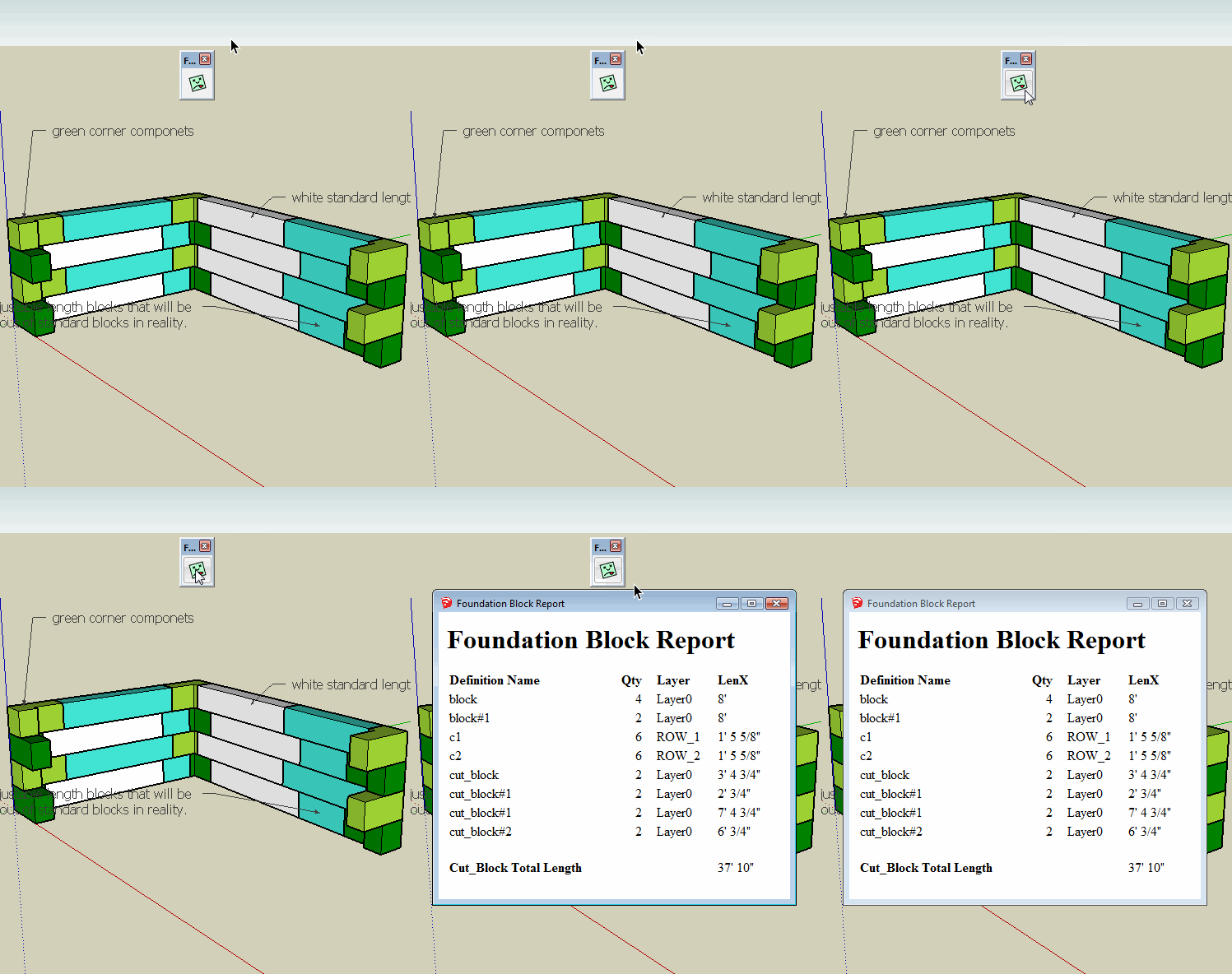
      Perhaps this will help. Rather than putting each cut block on a separate line, I did the addition for you. If this is acceptable I will send you a copy of the plugin by Private Message.


      foundation block report.gif

      posted in SketchUp Discussions
      sdmitchS
      sdmitch
    • RE: [Plugin] ChrisP_ColorEdge

      @oxer said:

      Thanks for the info sdmitch but I changed the lines 233 and 754 but nothing, the TAB key doesn't work 😞

      Remember nothing happens until the Tab key is released. Please check messages. I have sent a copy of the plugin I modified and tested.

      posted in Plugins
      sdmitchS
      sdmitch
    • RE: Quantity Reports

      If possible, post a sample model in version 8.

      posted in SketchUp Discussions
      sdmitchS
      sdmitch
    • RE: Insert Component by &quot;Drawing&quot;

      @juju said:

      I would be interested, but to modify this (depending on how it functions, probably the component that has to be set up in a specific way) to be able to cut openings in cavity (or multi skin walls) and heal the wall between the various skins. Doing the healing manually is a real PITA.

      No this plugin isn't anything that sophisticated. It was initially designed to fit and align a component between two points. Have been working on a three point version with limited success.

      Yes it always depends on how the component definition is oriented relative to its axis and origin.

      posted in Extensions & Applications Discussions
      sdmitchS
      sdmitch
    • RE: Insert Component by &quot;Drawing&quot;

      Anyone else?

      posted in Extensions & Applications Discussions
      sdmitchS
      sdmitch
    • 1 / 1