The option was checked when I asked the question but the signature hasn't been included.
The option doesn't stay selected. I am in edit mode now and have checked the option again.
 Offline
The option was checked when I asked the question but the signature hasn't been included.
The option doesn't stay selected. I am in edit mode now and have checked the option again.
This is a SketchUcation question but I couldn't find an option for that. I have been using and attaching a signature for months but recently I unchecked the include signature option for a post. I later re-checked the option but the signature was not attached to subsequent post. I went to User Control Panel and attempted to Edit Signature but now it tells me that I am not authorized to use a signature. What can I do to fix this problem.
@tspco said:
Using the version from your blog. If I set the riser height to 7" and the overall height to 120" , 4 steps to riser make a new u-shape stair. I get a staircase that has 7 steps over 2 feet apart, or something like that, no riser.
ruby console details are:Error: #<NoMethodError: undefined method
entities' for nil:NilClass> C:/Program Files (x86)/Google/Google SketchUp 8/Plugins/Stair Maker.rb:370:inushape_stair'
C:/Program Files (x86)/Google/Google SketchUp 8/Plugins/Stair Maker.rb:197:in `onLButtonDown'So no worky. It could be I need to download the tut from your blog and review
No there is nothing in the tutorial that will help with this problem. I can't get it to fail and you can't get it to work. I'm at a loss as to why.
I can see where there might be a little confusion regarding riser and height of stairs. The height entry is for each flight of steps not the overall height of the completed stairs which is why when you entered 120" the steps were so far apart. The height can be determined by number of risers and riser, or riser determined by height and number of risers. So, if you can ever get the plugin to work, enter values for any two and 0 for the third and let the plugin calculate it.
tspco, after the first half of the u-shape is created, it makes a copy to use for the second half but for some reason that isn't happening. I did make a change in that code on the suggestion of TIG and that version is on My Plugins blog, http://sdmitch.blogspot.com. Try that version and see if it works for you.
Both versions work on my Vista system.
tspco, open the Ruby Console window then run the plugin. Maybe something is causing an error and thats why it appears to be doing nothing.
Kurt, See if attached plugin does what you want.
@tspco said:
SD, I just tried that latest version, I can make straight stairs, open and in-situ, and that is it, no ushape. If I select u-shape I get straight.
Am I missing something?
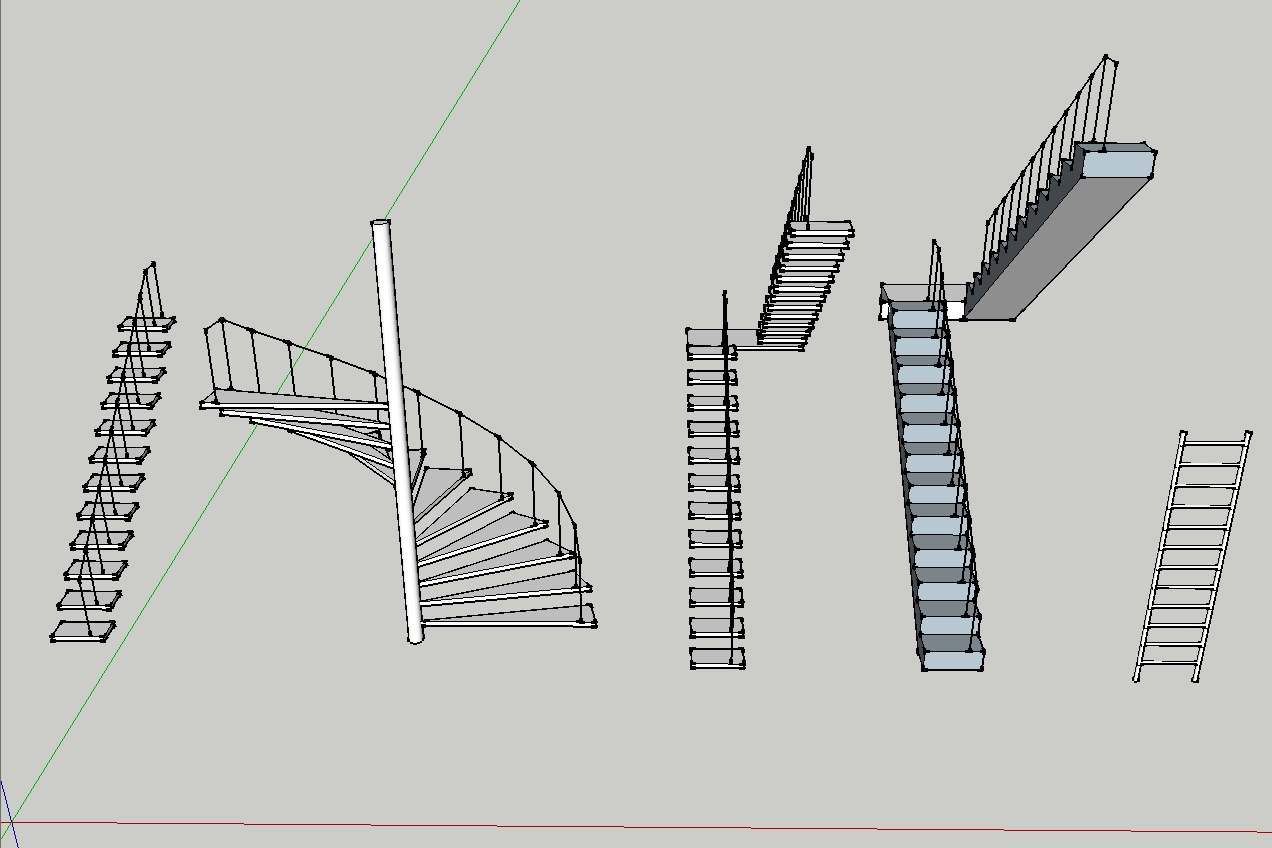
U-Shape refers to two sections of straight stairs connected by a landing. It does not mean the the stairs themselves are curved. I downloaded a copy of the posted plugin and it works just as it was designed to do.
Thanks again Dan. I think the start/stop_timer may be the solution to the problem. However they are apparently not without pitfalls. My first try ended up starting the timer with repeat set to true and not stopped before the plugin exited so my object continued to spin.
@dsarchs said:
I actually used the code offered by sdmitch (after having separated the command as thomthom suggested), and saved it as a plugin rather than having to cut+paste whenever I wanted to check.
You are correct. The count was one less than it should be. Out of habit, because Ruby array index always starts at 0, subtracting 1 from the array length is so common that it is a reflex action. The correct message statement would be
UI.messagebox "This model contains\n\n#{@f_cnt} faces\n#{@e_cnt} edges\nand #{@verts.length} vertices"
Dan, I didn't make myself very clear. The 'on' tools are onKeyDown, onKeyUP, etc. When the code is running, I wanted to stop the spinning when I pressed a key and resume it when I released the key. But the onKeyDown doesn't execute until the spin_it method times out. I have also tried all the ButtonDown and Ups with the same results.
class Spinners
 def activate
  mod = Sketchup.active_model
  ent = mod.entities
  sel = mod.selection

  @corg=[]
  sel.each{|e| @corg<<e if e.class==Sketchup;;Group || e.class==Sketchup;;ComponentInstance}
  sel.clear;@stop_spin=false;@start_time=Time.now;self.spin_it
end
def spin_it
  begin
   @corg.each{|e|
   tr=Geom;;Transformation.rotation(e.bounds.center,Z_AXIS,1.degrees)
   e.transform! tr
   }
   Sketchup.active_model.active_view.refresh
   break if @stop_spin
   sleep(0.1)
  end until Time.now - @start_time > 10
 end
 def onKeyDown(key,repeat,flags,view)
  @stop_spin=true
  puts "stopped"
 end
 def onKeyUp(key,repeat,flags,view)
  puts "started"
  @stop_spin=false
  @start_time=Time.now
  self.spin_it
 end
 def onCancel(flags,view)
   Sketchup.send_action "selectSelectionTool;"
 end
end
UI.menu("Plugins").add_item("Spin_It") {Sketchup.active_model.select_tool Spinners.new}
One possibility
  model = Sketchup.active_model
  entities = model.entities
  ss= model.selection
  entity = ss.first
#=== save the current origin and transform back to created position ===
  origin = entity.transformation.origin
  trans=entity.transformation
  entity.transform! trans.inverse
#======================================================================
  selection_bb = entity.bounds
  max_dir = "blue axis";axis=Y_AXIS; # if blue, rotate around green
  if selection_bb.height > selection_bb.depth
      max_dir = "green axis";axis=Z_AXIS; # if green, rotate around blue
      if selection_bb.width > selection_bb.height
        max_dir = "red axis" ;axis=nil; # if red, no rotation needed
      end
  elsif selection_bb.width > selection_bb.depth
        max_dir = "red axis";axis=nil; # if red, no rotation needed
  end
#=== Rotate as needed and move back to current location ===============
  if axis
    tr=Geom;;Transformation.rotation(entity.transformation.origin,axis,90.degrees)
    entity.transform! tr
  end
  tr=Geom;;Transformation.translation(origin)
  entity.transform! tr
Thanks Dan. I am familiar with break and have it inside my loop. The problem is I want the trigger for the break has to come from outside the loop which is why I have attempted to use all the 'on' tools to set the trigger but they seem to be ignored until the loop terminates on its own.
Is there anyway to duplicate the VB's DoEvents in a Ruby script? I have been trying to figure out a way to interupt a loop. I have tried most if not all of the 'on' tool options but none have succeeded in breaking out of a loop.
@tspco said:
SD, the first version works ok, thanks.
The spin object (2nd version)does not show up in the plugin menu.
I compared the two and I added the last line from the first one to the second like this
UI.menu("Plugins").add_item("Spin View") { spin_vue }
UI.menu("Plugins").add_item("Spin Object") { spin_obj }
That didn't help...help
Oops. Sorry about that. The text in the "curly" brackets should be
{ spin_object }
It is always the name of the method to be called whin the menu item is selected.
Yes, just copy and save. If there is only one object in the model, it doesn't matter if you spin the view or the ojbect. If spinning the object is required then you can use this method.
def spin_object
  inp = inputbox(["Angle;","Delay;"],[1,0.1],"Spin Object")
  if inp
    angle=inp[0].to_f;delay=inp[1].to_f
    mod = Sketchup.active_model
    ent = mod.entities
    sel = mod.selection
    corg=[]
    sel.each{|e| corg<<e if e.class==Sketchup;;Group || \
    (e.class==Sketchup;;ComponentInstance and not e.definition.behavior.always_face_camera? and not e.definition.behavior.shadows_face_sun?)}
    sel.clear
    for i in 1..(360/angle).to_i
      corg.each{|e|
      tr=Geom;;Transformation.rotation(e.bounds.center,Z_AXIS,angle.degrees)
      e.transform! tr
      }
      Sketchup.active_model.active_view.refresh
      sleep(delay)
    end
  end
end
The objects to be spun must be groups or components. You can select more than one.
@dsarchs said:
Does anyone know if a plugin exists that can give you a quick count of how many vertices are in a given selection? If not, would that be an easy script to write?
Here is one that will. It looks at whole model if nothing is selected.
require 'sketchup'

module SDM_PtCnt

  def self.point_counter
    mod=Sketchup.active_model
    ent=mod.active_entities
    sel=mod.selection
    sel=ent if sel.empty?
    @f_cnt=0;@e_cnt=0;@verts=[]
    recurse(sel)
    @verts.flatten!.uniq!
    UI.messagebox "This model contains\n\n#{@f_cnt} faces\n#{@e_cnt} edges\nand #{@verts.length-1} vertices"
  end

  def self.recurse(ents)
    ents.each do |e|
      if e.is_a? Sketchup;;Group
        recurse(e.entities)
      elsif e.is_a? Sketchup;;ComponentInstance
        recurse(e.definition.entities)
      elsif e.is_a? Sketchup;;Face
        @f_cnt += 1;@verts<<e.vertices
      elsif e.is_a? Sketchup;;Edge
        @e_cnt += 1;@verts<<e.vertices
      end
    end
  end

end

if not file_loaded?(File.basename(__FILE__))
  UI.menu("Plugins").add_item("Point Counter") { SDM_PtCnt.point_counter }
  file_loaded(File.basename(__FILE__))
end
Here is a simple plugin that will spin the current view. Input consist of angle and delay between screen updates.
def spin_vue
  inp = inputbox(["Angle;","Delay;"],[1,0.1],"Spin the View")
  if inp
    angle=inp[0].to_f;delay=inp[1].to_f
    mod = Sketchup.active_model
    vue = mod.active_view
    tar = vue.guess_target
    cam = vue.camera
    eye = cam.eye
    tr=Geom;;Transformation.rotation(tar,Z_AXIS,angle.degrees)
    for i in 1..(360/angle).to_i
      eye.transform! tr
      cam.set eye,tar,Z_AXIS
      vue.refresh
      sleep(delay)#control speed of rotation
    end
  end
end
UI.menu("Plugins").add_item("Spin View") { spin_vue }
Thers is no way to "automate" that that I am aware of.
Terrain Tools is just the collection of all my plugins that pertain to GE Terrain's. Clip or Trim being one of them plus two others. There are no other differences. I just put them all into one to help minimize the entries in the Plugins menu.
The Tan-Tan-Radius problem is a simple circle-circle intersection problem as you may know if you have ever done this manually. If not, simply offset the two arcs/circles by the radius of the circle to be placed tangent to the two. Where those offsets intersect is the center of the tangent circle.