Chris, The code works perfectly as far as it was designed to do and that was to place instance1 beside instance2. Only you know how you want and need the components to be related to each other and only you have the components to work with.
Oops, your profile's looking a bit empty! To help us tailor your experience, please fill in key details like your SketchUp version, skill level, operating system, and more. Update and save your info on your profile page today!
⚠️ Important | Libfredo 15.6b introduces important bugfixes for Fredo's Extensions Update
 Offline
Posts
-
RE: Load & Put Components Together
-
RE: Load & Put Components Together
Chris88,
The simplest way to determine the size of a component is to use the bounding box of the component. For example, if you wanted to assemble the components in the X direction, calculate the distance between the center points, calculate the new center point for instance2, define the transformation to move it there, then do the transform.
bb1 = instance1.bounds ctr1 = bb1.center halfx1 = (bb1.max.x-bb1.min.x)/2.0 bb2 = instance2.bounds ctr2 = bb2.center halfx2 = (bb2.max.x-bb2.min.x)/2.0 ctr_to_ctr = halfx1 + halfx2 new_ctr2 = ctr1.offset(X_AXIS,ctr_to_ctr) mov_cuboid = Geom;;Transformation.new(new_ctr2-ctr2) instance2.transform! mov_cuboid -
RE: [Plugin] Bolt Maker (Final Update 7-Feb-2012)
If you are using the Orbit Tool as opposed to orbiting with the mouse wheel, press the Esc key to exit Orbit Tool.
-
[Plugin] Add Points to Curve
In partial response to http://forums.sketchucation.com/viewtopic.php?f=323&t=41006
The plugin computes and adds a series of points along a pre-selected curve or arc.
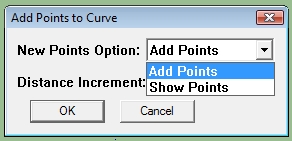
Add Points if you want the computed points to be added and a new curve entity created. Show Points if you only want to see where the points would be. A construction point is placed to indicate where.Distance Increment - The distance between the created points. In the case of a Curve, the plugin follows the individual segments and the calculated point "splits" the segment where it falls. In the case of an Arc, the distance increment represents arc length between the points calculated.
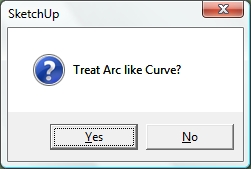
If the pre-selected entity is an Arc, you are given the option of treating it as a Curve or an Arc when computing the point locations.
-
RE: Add vertex on curve at length - or edge on surface at length
I have modified the plugin so that, if the the selected entity is an arc, the point is placed in its true position instead of on the segment as before.
Should this be an option?
-
RE: Add vertex on curve at length - or edge on surface at length
Jeff, You are right regarding the arc, the point added is on the existing segment.
-
RE: Add vertex on curve at length - or edge on surface at length
@jclements said:
Very nice. Thank you.
Could a similar script add points at Equal Intervals? Perhaps leave the points selected or grouped after being created?
It could select and/or group the construction points but not the individual vertices added to the curve.
thomthom, what kind of "extruded surface" are we talking about? Curved or straight?
-
RE: Add vertex on curve at length - or edge on surface at length
ThomThom,
The attached plugin will add a vertex at a given interval along a selected curve.
Add vertices to curve at given interval
-
RE: [Plugin] Bolt Maker (Final Update 7-Feb-2012)
Niffler, The .txt file is automatically created when it doesn't exist and just keeps the last input parameters for future runs.
The only problems I have had with the plugin relate to the .start_operation/commit_operation block but those are not active in the plugin I posted.
If you would please open the Ruby Console before running the plugin and post any errors that appear there.
-
RE: [Plugin] Bolt Maker (Final Update 7-Feb-2012)
You must have me and my Bolt Maker confused with someone else. Mine doesn't have a Toolbar Icon or Button!
No, my Bolt Maker is not "crippleware", there are no limits on its use.
-
RE: [REQ] Intersection Behavior > Groups
JC, I realized I hadn't named the intersection group and it has been added. Re-download plugin from previous post.
-
RE: [REQ] Intersection Behavior > Groups
JClements, Try the attached plugin and see if it does what you are looking for.
-
RE: Start/commit_operation
LarsG, That was exactly my situation. Everything worked perfectly but the simple addition of a start/commit block caused references to deleted entities.
-
RE: [plugin] Clip or Trim Terrain Mesh (Update)
Thanks ThomThom, I'm still learning and need all the help I can get.
-
RE: [plugin] Clip or Trim Terrain Mesh (Update)
I wasn't aware of that difference with Macs since I only have windows at my disposal.
-
RE: [plugin] Clip or Trim Terrain Mesh (Update)
John, You should press and releasethe Shift key to toggle between clip and trim. Holding down the shift key is not required or advised.
-
RE: [REQ] GoogleEarth Meshes boolean subtract
The plugin created in response to this request has been posted.
-
[plugin] Clip or Trim Terrain Mesh (Update)
http://forums.sketchucation.com/viewtopic.php?f=323&t=40555
When you grab several Google Earth Terrain patches, there is often a problem with how the images overlay each other. To help with this problem, the attached plugin, Clip or Trim Terrain Mesh, allows you to select the mesh which you want to keep and the mesh to be trimmed. Everything from the 2nd mesh that falls within the boundary of the 1st mesh is deleted thus eliminating the problem.
In cases where smaller high resolution meshes are placed on top of larger low resolution meshes, you will often be left with vertical gaps especially in areas with significant elevation change due to the differences in the resolution of the grid and the interpolation of the surface.
Another cause of image mis-match are the border rows and columns even when the terrain patches are of the same scale. To help with this problem, use the Trim option of Clip or Trim Terrain Mesh, to remove them from the selected mesh. Press and release the Shift Key to toggle between clipping and trimming. Hopefully now Mac compatible.
Add Terrain Skirt, adds a skirt to the terrain mesh to give depth and definition to the mesh.
clip or trim google earth terrain meshes
-
RE: [REQ] GoogleEarth Meshes boolean subtract
@bob james said:
Any chance you could post that plugin?

Yes, but there are a few things that I want to check first.
-
RE: [REQ] GoogleEarth Meshes boolean subtract
If the two meshes are the same scale,ie grabed with the same zoom, the grids should be the same size and origin. Then you only need to delete the outer row/col in the overlap area as per John's procedure. I have successfully ran several test using John's procedure and the results is seamless.