If you missed yesterdays announcement from Epic with their new Fab platform...
Part of this change means the assets currently available at Quixel for free will become paid after December 2024.
To get all 18k assets just login into your account at Quixel then visit the collections area...

Discover a world of unbounded creativity. Explore a massive asset library, and Quixel’s powerful tools, plus free in-depth tutorials and resources.

Quixel Megascans (quixel.com)
Press F12 to open your browsers console and paste in the following js
(await (async (startPage = 0, autoClearConsole = true) => {

  const getCookie = (name) => {
    const value = `; ${document.cookie}`;
    const parts = value.split(`; ${name}=`);
    if (parts.length === 2) return parts.pop().split(';').shift();
  }

  const callCacheApi = async (params = {}) => {
    const defaultParams = {
      page: 0,
      maxValuesPerFacet: 1000,
      hitsPerPage: 1000,
      attributesToRetrieve: ["id", "name"].join(",")
    }
    const response = await fetch("https://proxy-algolia-prod.quixel.com/algolia/cache", {
      "headers": {
        "x-api-key": "2Zg8!d2WAHIUW?pCO28cVjfOt9seOWPx@2j"
      },
      "body": JSON.stringify({
        url: "https://6UJ1I5A072-2.algolianet.com/1/indexes/assets/query?x-algolia-application-id=6UJ1I5A072&x-algolia-api-key=e93907f4f65fb1d9f813957bdc344892",
        params: new URLSearchParams({ ...defaultParams, ...params }).toString()
      }),
      "method": "POST",
    })
    return await response.json()
  }

  const callAcl = async ({ id, name }) => {
    console.log(`  --> Adding Item ${id} | ${name}...`)

    const response = await fetch("https://quixel.com/v1/acl", {
      "headers": {
        "authorization": "Bearer " + authToken,
        "content-type": "application/json;charset=UTF-8",
      },
      "body": JSON.stringify({ assetID: id }),
      "method": "POST",
    });
    const json = await response.json()
    if (json?.isError) {
      console.error(`  --> **UNABLE TO ADD ITEM** Item ${id} | ${name} (${json?.msg})`)
    } else {
      console.log(`  --> ADDED ITEM Item ${id} | ${name}`)
    }
  }

  // 1. Check token exist, quixel API needs it
  console.log("-> Checking Auth API Token...")
  let authToken = ""
  try {
    const authCookie = getCookie("auth") ?? "{}"
    authToken = JSON.parse(decodeURIComponent(authCookie))?.token
    if (!authToken) {
      return console.error("-> Error: cannot find authentication token. Please login again.")
    }
  } catch (_) {
    return console.error("-> Error: cannot find authentication token. Please login again.")
  }

  // 2. Get total count of items
  console.log("-> Getting Total Number of Pages....")
  const { nbPages: totalPages, hitsPerPage: itemsPerPage, nbHits: totalItems } = await callCacheApi()

  console.log(`-> Total Items to add: ${totalItems} | ${totalPages} total pages with ${itemsPerPage} per page`)
  if (!confirm(`Click OK to start adding ${totalItems} items in your account.`)) return

  // Loop
  for (let pageIdx = startPage || 0; pageIdx < totalPages; pageIdx++) {
    console.log("-> ======================= PAGE " + pageIdx + " START =======================")

    console.log("-> Getting Items from page " + pageIdx + " ...")

    const { hits: items } = await callCacheApi({ page: pageIdx })
    const aclPromises = items.map(callAcl)

    await Promise.all(aclPromises)
    console.log("-> ======================= PAGE " + pageIdx + " COMPLETED =======================")
    if (autoClearConsole) console.clear() // Fix the issue that too much log hangs the console. Set autoClearConsole = false to keep the logs

  }
})())
Hit enter and it will begin adding the assets to your account. It can take a few mins and can run into to snags. But for help on that please visit this Github...
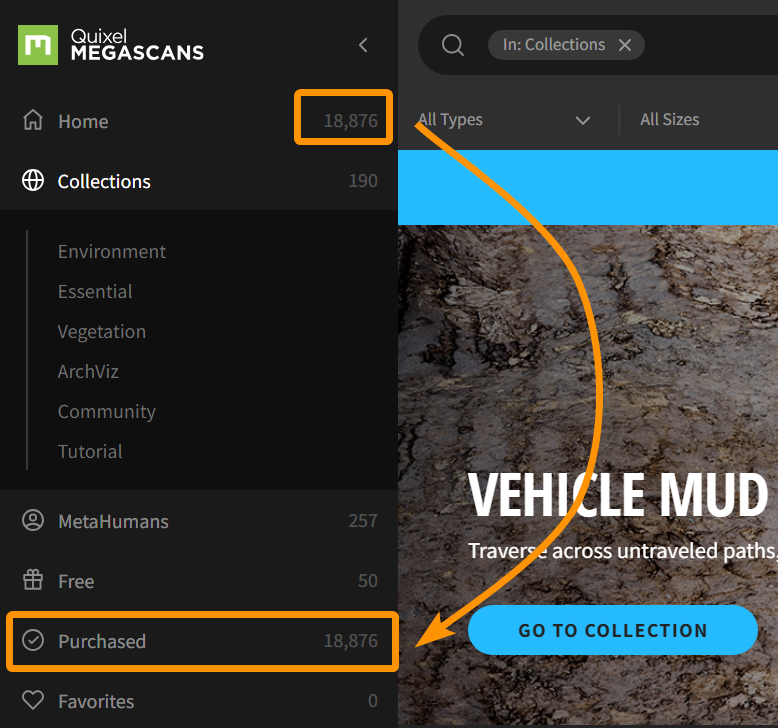
As you can see all assets were assigned to my account which saves you a ton of time!





 Download