
sketchucation logo sketchucation
    • Login
    1. Home
    2. pilger
    3. Posts
    Oops, your profile's looking a bit empty! To help us tailor your experience, please fill in key details like your SketchUp version, skill level, operating system, and more. Update and save your info on your profile page today!
    ⚠️ Important | Libfredo 15.6b introduces important bugfixes for Fredo's Extensions Update
    Offline
    • Profile
    • Following 0
    • Followers 0
    • Topics 2
    • Posts 26
    • Groups 1

    Posts

    Recent Best Controversial
    • RE: Box Stretching - New Dimensions

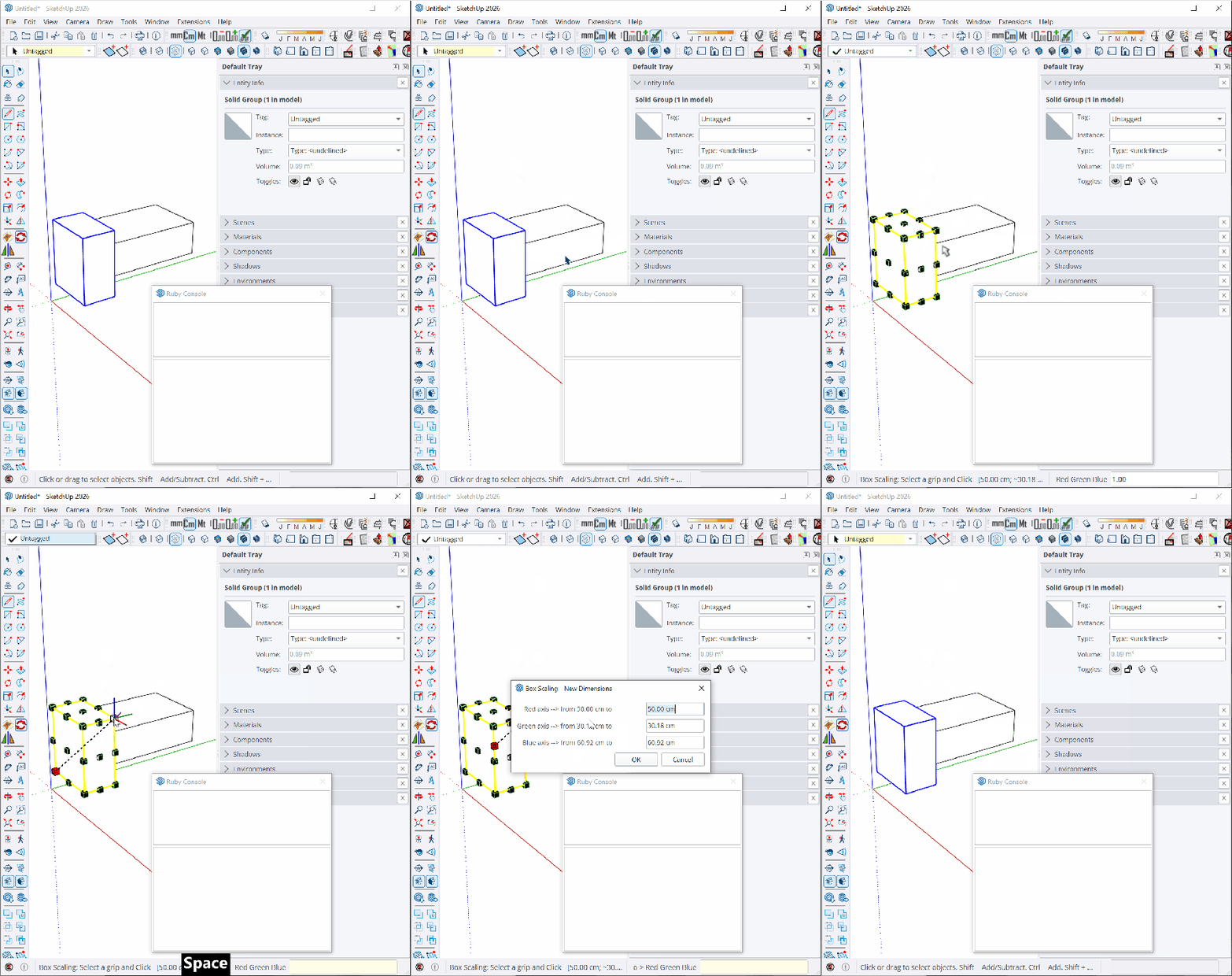
      @fredo6 Yes. Disabling the toolbars fixes the issue.

      At least on my setup, the TAB cycles through the Tags and Shadows toolbars. Disabling them both makes the New Dimensions dialog open on the first TAB.

      But I kinda use those toolbars πŸ˜“

      I guess I'll stick to having to press tab a lot for now. Or right click and go on with the context menu option.

      If is there anything I can do to help fix this, shoot me a msg.
      posted in Plugins
      pilgerP
      pilger
    • RE: Box Stretching - New Dimensions

      Confirmed it happens here on 26.0.429 Win 64-bit (which is the latest version according to the site) Windows 10 with the latest updates installed.

      I've been doing some tests and it seems like the TAB key is making random stuff get focused inside Sketchup itself, like the Tags toolbar for example. Here's a gif showing the issue. I'm pressing TAB and space to make the Tags toolbar pop up.

      EDIT 1: Here's a gif showing the error. I hope it helps.
      FredoScaleTabBug2.gif

      EDIT 2: I think I've nailed it down to the toolbars. When I hide all the toolbars, it works on the first TAB.

      posted in Plugins
      pilgerP
      pilger
    • RE: [Plugin][$] FredoScale - v3.6a - 01 Apr 24

      @Rich-O-Brien @Mattshiggins

      I'm having the same issue here. I've tried uninstalling all other extensions and plugins and running Sketchup without any other apps in the background and I still get the same thing.

      Is there a way to check what is getting focused when I press tab, maybe? To try and find what's stealing the focus?

      EDIT: or maybe change that tab key to something else that doesn't cause the issue?

      EDIT 2: updates here: https://community.sketchucation.com/post/1617927

      posted in Plugins
      pilgerP
      pilger
    • RE: Fredo Scale TAB error

      @fredo6 Thanks for replying and sorry for hijacking the thread 😬

      Sorry I forgot to mention I was hovering over a scale handle when I was pressing TAB already. I still have to press TAB 5 times (or press SHIFT+TAB or CTRL+TAB) for the dialog to appear.

      I've just tried deleting all other plugins, leaving only libfredo, sketchucation and fredoscale and it still behaves the same, unfortunately.

      If you need me to provide a log or something, I'd be happy to. Just tell me how.

      EDIT: Updates here https://community.sketchucation.com/post/1617927

      posted in Extensions & Applications Discussions
      pilgerP
      pilger
    • RE: Fredo Scale TAB error

      @fredo6 Is this TAB bug still a thing?

      I've just installed Fredo Scale 3.6a on Sketchup 26..0.429 and I have to press TAB 5 times to make the dimension dialog to appear.

      Is there any workaround?

      Edit: hovering the cursor over a corner and pressing shift+TAB works for opening the "New Dimensions" dialog window. I guess it's a usable workaround for now.

      Why is this happening again, tho? I don't remember it being an issue with SU 2023

      posted in Extensions & Applications Discussions
      pilgerP
      pilger
    • RE: [Plugin] Layer Manager New Release

      I think there's a bug with the latest version. The toolbar buttons work, but the extension is missing from the toolbar altogether. My keyboard shortcuts for the functions don't work anymore.

      I've manually loaded an older version of the extension and there was a "Tools > Layer Manager" item.

      I've also tried doing a clean install of Sketchup Pro 2023 with only the Layer Manager extension installed and it still wouldn't work.

      Any thoughts?

      posted in Plugins
      pilgerP
      pilger
    • RE: Generate Faces?

      Excellent tip. Worked perfectly! πŸ‘

      Many thanks! πŸ˜„

      posted in Plugins
      pilgerP
      pilger
    • RE: Generate Faces?

      Sorry to bring the thread back alive, but is there a way to make a shortcut for the Generate Faces context menu item!?

      Sadly, it doesn't show on SU's preferences window.

      posted in Plugins
      pilgerP
      pilger
    • RE: [Plugin] V-Ray Tools

      Nothing comes up on the Ruby console. No errors or other messages.

      I'm on Windows 7 x64 Ultimate edition.

      Despite of the not changing field, the aspect of the viewport seems to be changed. I can get the ratio correctly on the "Output" tab of V-Ray. I tried rendering with just the aspect ratio of the Output matching the SU's (left the Zoom field of V-Ray unaltered: 1.00 ) and it kinda worked as expected.

      Maybe we don't need to mess with the zoom anymore? Can you confirm that, Thom?

      posted in Plugins
      pilgerP
      pilger
    • RE: [Plugin] V-Ray Tools

      I believe SU version 8.0.16846 broke this plugin. I type in the aspect ratio on the box and I can see the grey frame on my viewport but the V-Ray zoom indicator doesn't change at all.

      posted in Plugins
      pilgerP
      pilger
    • RE: [Plugin] SectionCutFace

      Ah, sorry for the lack of response back there TIG. I've been sort of away from modeling for a while.

      The plugin seems to be working flawlessly now. Perfect. It's one of the plugins i use the most and i had to turn back to an older version i had stored somewhere here when i stumbled upon that problem, so many many thanks for the fix! πŸ‘

      posted in Plugins
      pilgerP
      pilger
    • RE: [Plugin] SectionCutFace

      Incredibly usefull plugin.

      I've found a very annoying bug on the new version on Sketchup 8 Pro though. It used to work great with the previous versions.

      It fails to create a new layer and move the group backwards a bit so it appears on the section view. I've tried several combinations of the plugin's preferences and all resulted in the same bug.

      Here's what i got on my ruby console window:

      Error; #<TypeError; reference to deleted Edge>
      C;/PROGRA~2/Google/GOOGLE~3/Plugins/SectionCutFace.rb;361;in `faces'
      C;/PROGRA~2/Google/GOOGLE~3/Plugins/SectionCutFace.rb;361;in `initialize'
      C;/PROGRA~2/Google/GOOGLE~3/Plugins/SectionCutFace.rb;359;in `each'
      C;/PROGRA~2/Google/GOOGLE~3/Plugins/SectionCutFace.rb;359;in `initialize'
      C;/PROGRA~2/Google/GOOGLE~3/Plugins/SectionCutFace.rb;358;in `times'
      C;/PROGRA~2/Google/GOOGLE~3/Plugins/SectionCutFace.rb;358;in `initialize'
      C;/PROGRA~2/Google/GOOGLE~3/Plugins/SectionCutFace.rb;476;in `new'
      C;/PROGRA~2/Google/GOOGLE~3/Plugins/SectionCutFace.rb;476
      C;/PROGRA~2/Google/GOOGLE~3/Plugins/SectionCutFace.rb;361;in `call'
      C;/PROGRA~2/Google/GOOGLE~3/Plugins/SectionCutFace.rb;361
      
      posted in Plugins
      pilgerP
      pilger
    • RE: SU Forum keep logging me out

      Hmm... i see.

      But, hey, it seems to be working now. After uninstalling, cleaning thoroughly and reinstalling Firefox, it's all working. πŸ‘

      Thanks!

      posted in Newbie Forum
      pilgerP
      pilger
    • RE: SU Forum keep logging me out

      I've tried deleting all the cookies from my browser with no use.

      Could it be related somehow to the timezone difference between where i am UTC-3 and the one the board uses?

      posted in Newbie Forum
      pilgerP
      pilger
    • RE: Section cut maintaining layers

      Many thanks for your help, Santiago. That video was very helpful.

      It does work in a way. I have all the geometry grouped now, but all in the same layer/with the same colour. So i have to merge the two files (the one with the geometry that has been cut and the one with the geometry in plain view) manually place each block in its respective layer. I need them in separate layers in order to change line widths and to keep it organized.

      This ammount of work would be similar to go crazy on boundaries on CAD, making it all on the correct layer from the simple SectionCutEdge layer.

      I'm starting to think i'll have to modify the SectionCut Face plugin in order to put things in their respective layers.

      posted in Plugins
      pilgerP
      pilger
    • RE: Section cut maintaining layers

      @thom
      I'm just starting to project and design the whole buildings and objects in 3D and at the very end i need to produce some sort of 2D information for the people to make'em real.

      So i'm not getting it back to 3D. I'm just turning the 3D model into 2D drawings. Section cuts, facades, and top plans are my main goal here, since they're the tools used to actually build the project.

      @santiago
      I've tried that, and it's all on the same layer. Either Layer0 or SectionCutEdges, depending on how i export it.

      posted in Plugins
      pilgerP
      pilger
    • RE: Section cut maintaining layers

      Yeap, i'm exporting in 2D. Since i have to apply hatches, dimensions and all that stuff later, it would eventually have to become 2D.

      If i were to export in 3D, it would be too much of a hassle to clean it all on a CAD program later. I've tried using the flatten command previously and let's just say it doesn't like very complex geometry (it actually has a problem with drawings that are both large and have small details).

      posted in Plugins
      pilgerP
      pilger
    • SU Forum keep logging me out

      Hey guys,

      I'm sure this has been posted here quite a few times, but i'm having the problem and i didn't know if reviving an old thread would be the way to go, so i'm posting a new one.

      The "keep me logged in" option doesn't seem to work at all here. I have to log in every 20 minutes or so in order to keep browsing and posting. I'm on Firefox 3.6.6 and i've tried deleting the cookies with no success.

      Any thoughts?

      posted in Newbie Forum sketchup
      pilgerP
      pilger
    • 1 / 1