Awesome find, thanks JQL! That misalignment drives me crazy and I am very pleased that you figured out this little trick of sizing the viewport to 1:1 or 1:2; I would never have figured that out.
Oops, your profile's looking a bit empty! To help us tailor your experience, please fill in key details like your SketchUp version, skill level, operating system, and more. Update and save your info on your profile page today!
Urasik Extensions | Lots of new extensions to check out Learn More
O
Offline
Posts
-
RE: [BUG+WORKAROUND] High Scale Viewports
-
RE: 3D Base Camp 2016
Hey guys, sure was fun putting faces to names!
And Pete, I looked high and low for you all conference so I could throw a couple cocktails down your throat; sorry that our paths never crossed...
An excellent event, for sure, and was quite happy that I went.
-
RE: SketchUp in your browser
+1 Juju. I couldn't agree more.
Until I can group and organize my Layers Palette, they should work on nothing but, imho.
I feel the same way about the new inferencing engine they incorporated into 2016. I hate it. Snapping on small circles (like a ton of bolts) is a giant pain now since you get two inference dots and two dotted lines and you really have no idea what you are snapping unless you zoom in much further than you used to have to. It's very annoying and again, a solution to a nonexistent problem.
And how about clipping? Be nice if they did something about that which we have suffered with since day 1.
And call me crazy, but push/pull just doesn't erase faces like it use to. And, most annoyingly, it is inconsistent in which faces it does erase. Big time waster.
But hey, let's put our resources into a cloud-based app...I can almost guarantee it's going to be subscription-based. Why else would they have even bothered with developing a browser based app in the first place if it was;t in a drive to get the software out of our hands. sigh...
-
RE: SketchUp in your browser
Can anyone say subscription based pricing? First thing I thought when I saw this, "oh no, they are setting up for a cloud-based, subscription-based business model ala Adobe."
Sure hope I'm wrong!
-
RE: Subdivision Marketing Plan with LayOut
As far as giant PDF exports from Layout, this is what I have been doing to minimize file sizes while maintaining print quality.
I export from Layout with high resolution and no jpeg compression. This yields a huge file. I then re-save the PDF in Acrobat as a PDF Optimized. This often times will decrease the file size by a factor of 10 with no appreciable degradation. YMMV but works for me
-
RE: Welcome to Animator Beta Testers
Thanks for the invite guys! I have a nasty deadline due Friday, so hopefully, on Sat, I can jump into the deep end of animating in SU. How nice to even get to type that sentence!
-
RE: [Plugin][$] Profile Builder 2
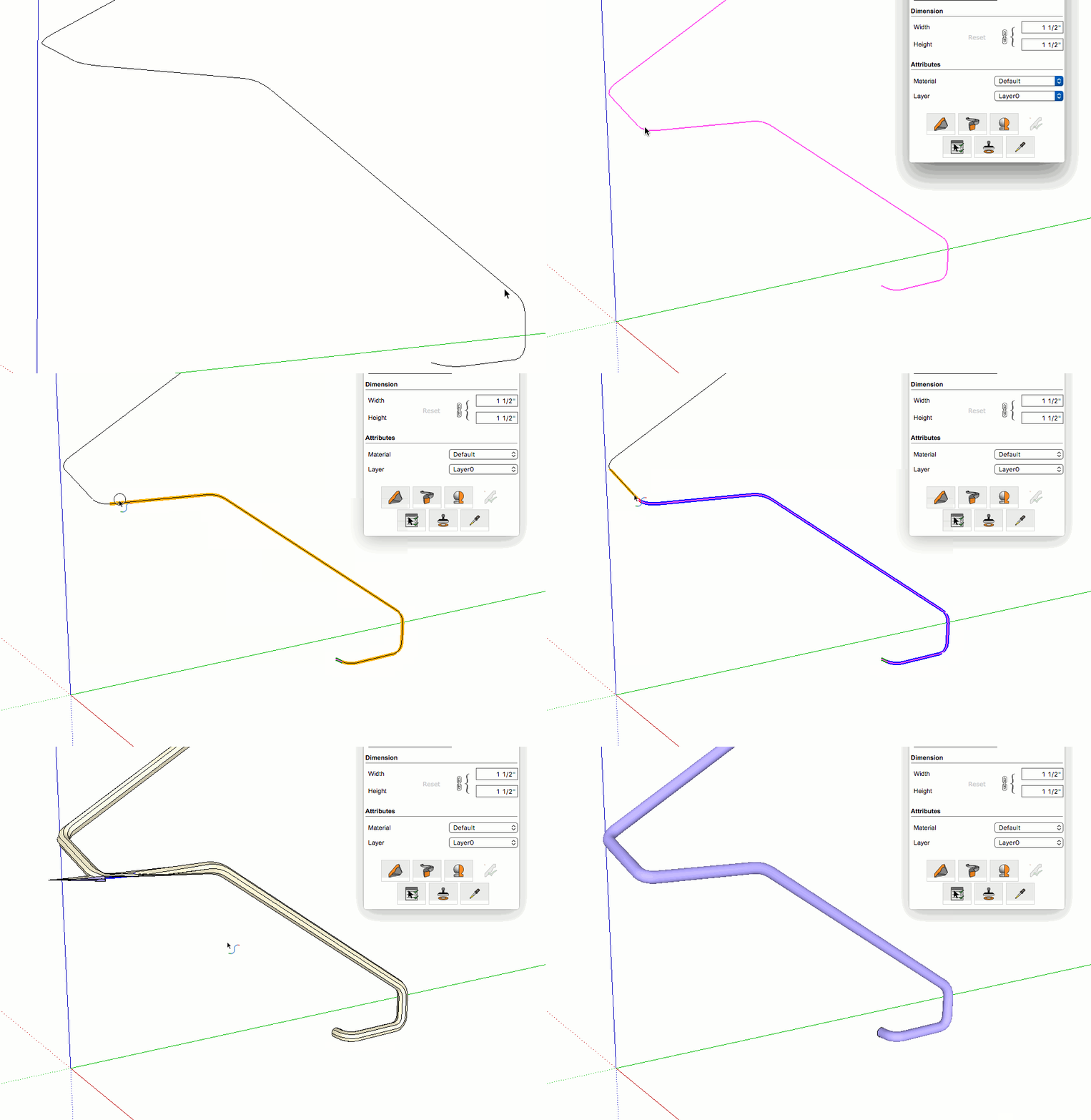
Can someone tell me what I am doing wrong here?
Profile Builder 2.1, SU Pro 2016, Mac 10.11.4
I am attempting to use PB2.1 to generate a simple handrail.
1st attempt without using the PB smart-path: obvious fail
2nd attempt using the PB smart-path: obvious fail
3rd attempt using follow me: success.
I also noticed that PB makes messy geometry vs the native tool at the corners; look at the highest corner where it is all twisted vs. the native follow me.
Thoughts? I must say I was quite surprised and frustrated by these results as this plugin is held in very high regard and it sure looks very powerful, but I sure can't use it if this is the kind of geometry it creates. Perhaps I am missing something very simple... Thanks in advance
-
RE: Importing full architect plan
Heed the warning(s)! Tracing over an image file is is the way to go!
-
RE: Animator: Parametric Animation plugin - Discussion
I agree completely that image sequences is the best and most desirable way to export animations from any software.
-
RE: Animator: Parametric Animation plugin - Discussion
Re beta test team: Pick Me Pick Me!!!
I am more excited for this plugin than anything I have seen come out of the official team since they gave us Layout!
-
RE: Animator: Parametric Animation plugin - Discussion
This thread has made me very happy! Go Fredo Go!!!!
-
RE: [Plugin] SectionCutFace
Thanks TIG!!
Without doubt, my SU experience would suck a whole lot without Section Cut Face and Mirror. Indispensable and greatly appreciated.
-
RE: Setting up text preferences
First off, here's how to change the default attributes of text, text leader, and dimensions:
-
Choose the text tool (for example; the process is the same for leader text and dimensions) and, before actually typing anything or even clicking on the layout page, manually change all of the attributes to your preference.
-
Click and start typing.
-
Choose another tool and then choose text again; the attributes should match what you just changed them to.
Alternate way:
-
Choose text and start typing with whatever the default attribute settings are. Then, with the select tool, select the text and change all the attributes to whatever you want.
-
Choose text tool but don't click anywhere
-
Choose the eyedropper and click on the text that you just modified to what you want.
-
Choose the text tool again and start typing. The attributes should match whatever you eyedroppered.
Best time saver:
I have templates set up for different page sizes. Before I save them as templates, I go through the process(es) outlined above to get all of the tools displaying the attributes I want. I then save the template. Now, when you open a new file with one of the templates, all of your settings have been customized and you should be good to go.
-
-
RE: SketchUp 2016 is here....
Small Dimensions and context menu layer designation in Layout get big thumbs up from me.
-
RE: Poll: Do you use LayOut?
I've used Layout since it's inception and have generated literally 1000's of pages of blueprints, shop drawings. and presentations with it.
For all of it's foibles, it is my goto software for 2D work and is very much indispensable for my work.
-
RE: 3D Printers to buy for Christmass joy
Thanks, Cadmonkey, now I am waiting for that one too!
-
RE: Just a question: Do SketchUp and ZBrush compare ??
Or what about the Mac version of Rhino for only $500? That is an incredible amount of power for that price. Even at the windows Rhino pricing of $1000, it is still a bargain, in my opinion, vs the $700 they want for SU.
And, for the money, Z-Brush is off the charts. I wish I had more need to use it, because that software can do some magical things...
-
RE: SketchUp 2016 is here....
@davejay said:
Its interesting that you say that you would never use Rhino for architectural work. Rhino with its Grashopper plugin has been extremely popular with Architects. In fact that type of visual programming interface has inspired various copy cats in the Architectural Design products such as Dynamo (Revit) and Marionette (Vectorworks).
Grasshopper is not available for Mac and Layouts are not either, so there is no chance of producing effective and efficient plansets at this time.
-
RE: SketchUp 2016 is here....
I'm teaching myself Rhino right now.
I really like it; while it isn't quite SU for ease of modeling, it does have a very nice inference and customizable snapping interface that, once you figure out it's "flow", it is really very powerful. And the modeling tools are awesome; it pretty much even has a push/pull tool.
There are a ton of online video tutorials and training aids and their forum is very helpful as well. What has taken me the most time to come to terms with is that there seems to be 5 different ways to accomplish anything and there are 5 different ways to access each of the 5 different ways and trying to figure out what is fastest and most efficient is a trial and error process.
I am using the MAC version, which is still missing some functions, but I find it to be a very useful software to know how to use, especially if you need to produce STEP or IGES files. Another huge benefit to Rhino is that it can import and export darned near every file type out there, which makes it fantastic as a file converter.
I would never, however, use it for architectural work and blueprinting; to me, SU-LO is a better solution for that.