sketchucation logo sketchucation
    • Login
    1. Home
    2. onzki
    3. Posts
    Oops, your profile's looking a bit empty! To help us tailor your experience, please fill in key details like your SketchUp version, skill level, operating system, and more. Update and save your info on your profile page today!
    ⚠️ Important | Libfredo 15.6b introduces important bugfixes for Fredo's Extensions Update
    Offline
    • Profile
    • Following 0
    • Followers 0
    • Topics 67
    • Posts 174
    • Groups 1

    Posts

    Recent Best Controversial
    • RE: Dimensions Box not working :-(

      SEMI COLON Worked! (or maybe other punctuations.. user need to observe the value control box display)

      Resurrecting a 5 year old thread.. just in case somebody like me Googled for answer. Here's my weird experience with Sketchup 2018 pro- Normally when creating a rectangle or square, I would type in the values separated by a COMMA (,) in value control box to specify my measurement. Example: For a 100x300 rectangle shape, you will type in 100,300.

      However, this comma doesn't work in my other workstation, and took me a year to figure out! (I accidentally observed the value control box while doing a rectangle and the preview values display semi colon instead of the normal comma). So I figured out that the Sketchup in this particular PC only accepts SEMI COLON (;) as separator, no wonder the comma won't work. Example: For a 100x300 rectangle shape, you will type in 100;300. Weird isn't it? I'm using same Sketchup 2018 pro.

      I suggest, play around with the rectangle tool, and the first time you hit mouse button (starting point of rectangle)- values will be displayed automatically corresponding to your mouse movements, and notice the values separator, it may be comma, semi colon or something else. I hope this helps.

      posted in SketchUp Discussions
      onzkiO
      onzki
    • [Inquiry] Plugin for Moving Scenes / mass selection

      Hi Everyone,

      I'm using 2018 Pro, to my surprise, the scene manager haven't improved a lot since version 8 lol πŸ˜„- selection method is one by one. Anyway, I have 100 scenes.
      All I'm planning to do is to select scenes from 1-50 and drag it after 51.
      Is there a plugin to do this? Many thanks!

      posted in Plugins
      onzkiO
      onzki
    • [Feature Request] Startup Diagnostic

      Is there a way to diagnose a startup? My Sketchup 2017 is way too slow starting up. I have no way to know if there's any plugin at all that's causing the delay since there is no startup log with time input being generated (example, like a log of plug in loaded + time elapsed each plugin).

      I appreciate any feedback!

      Thanks

      posted in SketchUp Feature Requests sketchup
      onzkiO
      onzki
    • [Feature Request] Bounding Box Limit Control

      Hi Everyone!
      I'm sure many know this already that if bounding box is ridiculously huge- zooming in an object would be impossible without ghostings, auto cropping your view as you move closer. I hope we can control the bounding box size and limit of our model, to the point that there will be alert if such limit is breached-and most importantly ID the culprit! πŸ˜„ AutoCAD block imports are usually notorious in an unexplainable way for creating these unncecessary bounding box. I hope Sketchup developer can deal with it soon. Thanks!

      I attached a screenshot


      sample from my Residential Estate Project, it's about 1/2 Mile long.

      posted in SketchUp Feature Requests sketchup
      onzkiO
      onzki
    • [Inquiry] Shading/Shadow Settings Import/Export Plugin

      Hi Everyone!

      Is there a plugin to import/export the shade/shadow settings?
      Couple of years ago, I purchased the Page EXlm pro by Smustard, amazing and useful little thing for transferring all scenes from old file to new or vice versa.. however limitation is that the host model's shade/shadows settings are not retained.
      I appreciate any feedback. Thanks a lot!

      posted in Plugins
      onzkiO
      onzki
    • RE: Loading Menu for Styles, Components & Materials from Network

      Okay finally, after testing the setup for a week, I can say Eureka! Making that "symbolic link was the answer. (MKLINK /D link target.. you can Google this command for more info)**. Now, all my components is loaded on network drive and being shared by 2 different Sketchup PC in our office.

      Updating the menu is more efficient now unlike before that I need to copy manually from one PC to another whenever there's changes. The only downside I noticed (this is subjective) is the loading time of thumbnail on your menu- because I have tons of components on the menu (8GB), the thumbnails needs about a second or two to become visible unlike when it is saved locally- you'll see it right away.

      So that's it, hope this helps!

      **reminder when using MKLINK, first make sure that your "link" folder is non existent before using this- took me a long time of trial and error why its not working, it's because I first created an empty folder of same name- so don't do that, let the command create the link folder by itself.

      posted in Extensions & Applications Discussions
      onzkiO
      onzki
    • RE: Loading Menu for Styles, Components & Materials from Network

      Answering my own query is a bit weird.. but the nearest direction I found is using windows command prompt and making a symbolic link.. Now there's a problem-I can't make a symbolic link from my local to the network drive.. This is the missing piece. Once I figured this out- I can shoutout "Eureka" πŸ˜„ Help please. Thanks!

      posted in Extensions & Applications Discussions
      onzkiO
      onzki
    • RE: Crash creating component or open In-model comp. lib.

      Same here and same goes with my other colleagues using Sketchup 2017- Any fix yet? I feel so frustrated, 2017 runs a bit fast/light compared to older versions but this component creation is just super duper PITA, especially on big project- if not crash/hang, it will make me wait for like 2 hours even if just making a simple shape component . Well, It doesn't crash if you have only Sam on the scene LOL.. But put it in a bigger context and you're doomed. And why the heck the dialogue screen needs to open? Trimble guys-please fix this bug.

      Not so with my Pro 2015 version (I still have), I simply right-click a group choose make component on list and done automatically converted to component! I have that in my keyboard shortcut- super quick.

      I don't use dialogue box often, not unless if I want to activate Camera face me feature and other uncommon details..blah blah. But in usual workflow, it is more fluid if they will just revert it to bypass component dialogue screen mode.

      Thanks!

      posted in SketchUp Bug Reporting
      onzkiO
      onzki
    • RE: Loading Menu for Styles, Components & Materials from Network

      @juju said:

      I'm not sure if CloudUp will do this, may be worth taking a look?

      I will check it out, thanks! πŸ‘

      posted in Extensions & Applications Discussions
      onzkiO
      onzki
    • Loading Menu for Styles, Components & Materials from Network

      Hi guys! I'm presently using 3 PC's in our office, loaded with Sketchup 2017. From time to time, It's a habit of mine to update my components and materials menu in main PC and transfer via file sync program to another PC. However it's a bit laborious to transfter manually from main PC to another.. so I am thinking- How can I program Sketchup to automatically load it's menu (Components, Materials, Styles) from my server or Netrwork as source instead of the default local drive? This idea is very similar to how AutoCAD's "support file search path". Looking forward to hear your advice,
      Many Thanks! πŸ‘

      posted in Extensions & Applications Discussions extensions
      onzkiO
      onzki
    • RE: Wishlist for SketchUp 2018

      @kimi kimi said:

      Yeah man, what's up with these material, scenes and layers palletes? We need those better. And we need everything else otb mentioned.

      I second that motion! Just want to add extra notes to the following:

      1. "Export to 2D" features

      -please make scenes tickable /selectable! I have 100++ scenes, there should be a tickable box or better the shift+drag mouse+click scenes that you only wanna export, that would really be handy, just like how you select items in windows/Sketchup environment, you highlight them and drag them, shift click to add/remove, etc.. that kind of gestures. Right now I am just using a paid plugin from Smustard, really helpful but it's one click per scene only, still very manual selection, author hasn't updated it.

      1. Scenes

      -option to batch rename, reorder, reorganize, group, Shift+Click to select and drag to position you want, shift+click to unselect..etc.. these kind of gestures that's normally used in Windows environment. Just like how a Photoshop layers behave. Our hands are used to this pattern already. Sketchup should catch up.

      1. Layers

      -similar to CAD or Photoshop, very easy to manage & organize, an idiot proof approach πŸ˜„.

      I've been using Sketchup since version 7, now there'd been upgrades on features but these panels hasn't received notable updates! Skethup 2018 developers, kindly look at these areas. Thanks!

      posted in SketchUp Discussions
      onzkiO
      onzki
    • RE: Power Toolbar (2.5) - fix for 2019

      LOL, I was too lazy to read! I miss that one. I'll charge this to my Duh moments.

      posted in Plugins
      onzkiO
      onzki
    • RE: Sooo slow when copy-pasting or importing large models

      Hello! Resurrecting an old issue πŸ˜„ I am using the latest 2017 version, and still has this problem, although it is selective, only experienced on certain files. Reason is still unknown. I am copying a partial model, about 5MB only and it takes forever to paste it into the host file (not responding).

      posted in SketchUp Discussions
      onzkiO
      onzki
    • [Inquiry] Sketchup Animation color output control

      Hi guys,
      Anybody here familiar on using Sketchup for animation? I am new to this feature and I noticed a difference in animation rendering output as follows:

      1. Dell Xeon workstation+Quadro 4000 = appeared more accentuated on red/ orange colors, but lacks dynamic overall color range overall (a bit dull pastel-like, my green trees appeared more olive looking, but orange leaf maple tree appeared overly saturated orange). Very smooth animation

      2. Dell Alienware+dual GTX 980 = color output as seen on screen. But unstable and bit jumpy in some parts (as if choking, so unexpected from this $$$dollar machine).

      Does anyone know how to control the color saturation output? Is it controled by graphics card? I appreciate your comments, thanks!

      posted in Post Processing
      onzkiO
      onzki
    • RE: [Request] Plugin to show and copy/move all scenes cameras

      I have 2015 and 2016, both Pro versions.. thanks I will check it out.

      posted in Plugins
      onzkiO
      onzki
    • [Request] Plugin to show and copy/move all scenes cameras

      Hi everyone, is there a plugin to show the scenes camera, just like in 3ds max, camera and target? I have a big model, and lots of scenes have been saved already- however I have to move all my model to a new file with all new location as well. If only I can select the scenes cameras as well, just like an object, that would be great, then I don't have to repeat saving the scenes again. Thanks!

      posted in Plugins
      onzkiO
      onzki
    • Material settings not saved /Textures not being embedded

      Hi everyone, I'm not sure if this is a bug or just my PC πŸ˜„ Here's the scenario:

      1. I adjusted a texure /material's color via the edit tab (slider of RGB/HSL),
      2. Saved the file and then send it to a colleague #1 offshore for further tasks.
      3. After some time, colleague #1 sends the file back, and when I open it- some of my previously adjusted texture /materials, some of it (not all) reverted back to its original colors. By the way, this is the same native .skp file, there were no exporting/importing that happened.

      I wonder why? Any similar experience? I assume that all textures' settings are automatically embedded into the file itself when it is saved, am I right?

      Thanks for looking! I appreciate your suggestions. πŸ‘

      posted in SketchUp Bug Reporting sketchup
      onzkiO
      onzki
    • RE: Power Toolbar (2.5) - fix for 2019

      @onzki said:

      Hi, Thanks for sharing this amazing plugins, I installed it via Sketchucation Store (Autoinstall)but how come mine seems lacking? Do I need to uninstall old plugins first? Please see attached screenshot. Thanks!

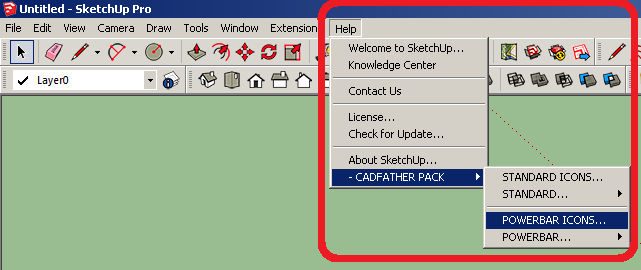
      Funny It's been a year and I have to reply to my own post LOL.. Anyway, for those with similar question like mine here, I finally found where the missing icons are, Euerka! They're under the main menu "HELP->CADFATHER PACK->POWERBARICONS." It took me a year to discover by accident since I don't often scroll down the help menu path.
      These are truly amazing plugins, thanks a lot! πŸ‘


      Screenshot

      posted in Plugins
      onzkiO
      onzki
    • [Request] Plugin: Rename by material?

      Hi, recently I bumped into a wonderful plugin that automatically amends the group/component's name based on it's layer name (Rename by layer- by Renderiza). Now I am thinking a very similar one- is there a plugin that can do the same, but with reference to it's material name?

      My rationale:
      I have lots of 2D trees & shrubs in Sketchup (always face camera type). However, they are named as component #1, #2, #50 and so on. If only I can amend them all quickly to match the material name- then I will be very happy to have both my source images and components having the same name without laboriously copying and pasting it to component's entity info πŸ˜„.
      Thanks!! πŸ˜„

      posted in Plugins
      onzkiO
      onzki
    • RE: [Request] Possibility for a Plugin list manager?

      Thank you guys, I will look into it. Yeah, I guess I got a bit lazy to uninstall those plugins that I don't really use regularly. πŸ‘

      posted in Plugins
      onzkiO
      onzki
    • 1 / 1