sketchucation logo sketchucation
    • Login
    1. Home
    2. Norke
    Oops, your profile's looking a bit empty! To help us tailor your experience, please fill in key details like your SketchUp version, skill level, operating system, and more. Update and save your info on your profile page today!
    โš ๏ธ Important | Libfredo 15.6a introduces important bugfixes for Fredo's Extensions Update
    N
    Offline
    • Profile
    • Following 0
    • Followers 0
    • Topics 4
    • Posts 13
    • Groups 1

    Norke

    @Norke

    10
    Reputation
    1
    Profile views
    13
    Posts
    0
    Followers
    0
    Following
    Joined
    Last Online

    Norke Unfollow Follow
    registered-users

    Latest posts made by Norke

    • RE: Strokes in SketchUp not working

      Thanks a lot, Dave. I glanced over it when I was looking for it myself, and it was checked. Unchecked and restarted, everything works again.

      Funny thing, I rechecked it, and now it still works. I presume checked is better?

      Thanks for helping me out there! ๐Ÿ˜„

      posted in SketchUp Discussions
      N
      Norke
    • Strokes in SketchUp not working

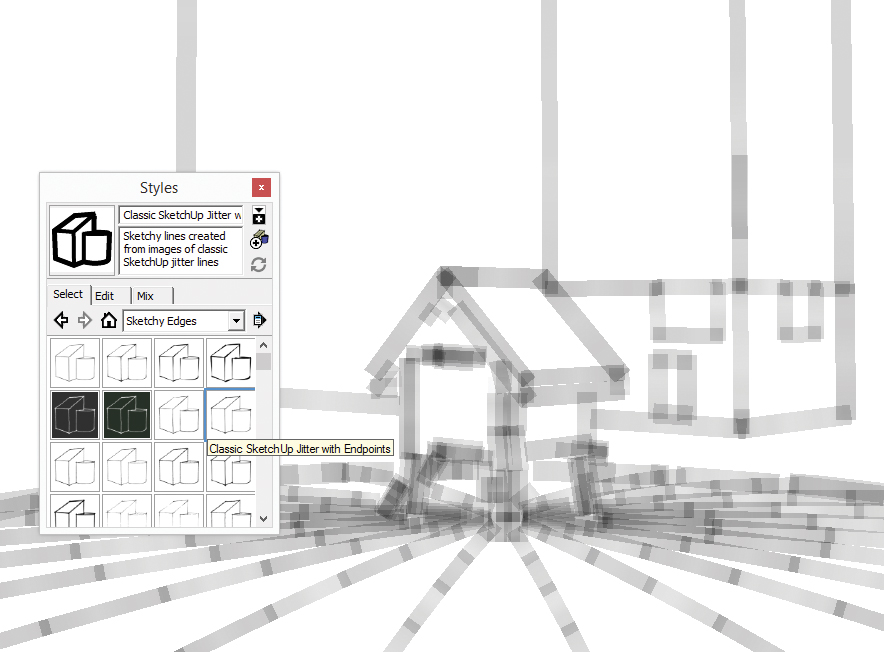
      Whenever I try one of the styles that come with SketchUp, I get large gray lines instead of the strokes. It looks like a blank template.

      I just tried making my own style, and imported this, and also here I get the gray template.

      I hope some of you know how this can be fixed.
      A screen shot of this behavior is included.

      Thanks.

      Strokes not working in Styles

      posted in SketchUp Discussions sketchup
      N
      Norke
    • RE: Different renders to reassamble later

      It crashed the moment I press the renderbutton, it doesn't even show a peek in the memory usage.

      It's weird though, I have the new i7 processor, Rampage II extreme MoBo and 12GB ram. Even thought V-ray is limited by Sketchup's 32bit, I shouldn't get short on memory right? Am I missing things?

      posted in V-Ray
      N
      Norke
    • RE: Different renders to reassamble later

      @thomthom said:

      which tutorial?

      I hope that was what you suggested ๐Ÿ˜„
      http://software.asgvis.com/index.php?option=com_content&task=view&id=16&Itemid=55

      posted in V-Ray
      N
      Norke
    • RE: Different renders to reassamble later

      Wow, thx for the quick respond. I didn't know there was such a thing.

      I followed the tutorial where I had to half my resolution. I tested it on 5000px and then final render to 10000px. That worked perfectly!
      But when I tested it on 10000px for a 20000px render, I got another Bugsplat.

      I just tested it with a single bitmap (a drawing of the roads and water) on the correct size, there weren't any modelled buildings on it yet. I choose 'default.visopt'. It crashed a few seconds after I pressed the render button. Is that a memory issue?

      posted in V-Ray
      N
      Norke
    • Different renders to reassamble later

      Hey fellow sketchuppers,

      I hope this is the correct place to ask.

      I'm working on a model of a complete city (several km's long). I made a scene and would like to render the result with V-Ray as base for a big digital painting.

      The biggest I can go is about 7500px wide. The final result has to be around 20000px+. Is it possible to render large chunks of the model to reassemble again in Photoshop? If I zoom in, the perspective is different and I can't put them together afterwards. Is there a plugin that is able to zoom in without altering the perspective? I could render the chunks with a bit overlapping and then paste them together in Photoshop.

      Sketchup: 7.1
      V-Ray: 1.05

      Thx ahead, it would be such a help!

      posted in V-Ray render plugins extensions
      N
      Norke
    • RE: Seamless pattern repeats wrongly on curved surface :(

      Thx a lot Frederik! I tested it out and it works. It renders it a little bit different, but it's seamless now.

      Thanks again

      posted in SketchUp Discussions
      N
      Norke
    • Seamless pattern repeats wrongly on curved surface :(

      Heya,

      I've push-pulled a pillar out of a half circle. I created a seamless marble pattern, but when I paint that over the pillar, some parts aren't positioned correctly. (see the red arrows on the picture) Does anybody knows how to fix this?


      http://img255.imageshack.us/img255/5389/councilhallpillarsk5.th.jpg

      Thx ahead fella's. ๐Ÿ˜„

      posted in SketchUp Discussions sketchup
      N
      Norke
    • RE: Cropped version of a camera-angle.

      Darned! I had it set to antialiasing anyhow ๐Ÿ˜ณ

      It's not the size I want, but it looks sooo much better ๐Ÿ˜ฎ Thank you very much friendly guy ๐Ÿ˜„

      posted in Newbie Forum
      N
      Norke
    • RE: Cropped version of a camera-angle.

      remus, I have here a final painting I made based on a sketchup render. I made it 3000 px wide (widest I can) and then beefed it up in Photoshop, so everything was very blurry and undetailed.

      http://norke.deviantart.com/art/Middleburg-Anno-1515-87662437 : final painting

      http://norke.deviantart.com/art/Medieval-Castle-86475324 : render of the castle.

      I just hoped I could maybe zoom in on those towers in the back and render that out, and then use that detailed part for the painting, now I had to paint those towers on top of a blurry render.

      I'm very new to SketchUp, I wasn't aware of extern plugins (silly me, I should have known).

      posted in Newbie Forum
      N
      Norke